
AirPods can work better with devices that have Bluetooth 5.0, which is the case for the Galaxy S21. This means you can connect your AirPods to your Samsung device and enjoy your music, podcasts, and phone calls without wires. However, it’s important to remember that while you can use your AirPods with non-Apple devices, you can’t use some features and functionalities exclusive to Apple devices. This article will explore how to use your Apple AirPods with your Samsung Galaxy S21 and what you need to remember.
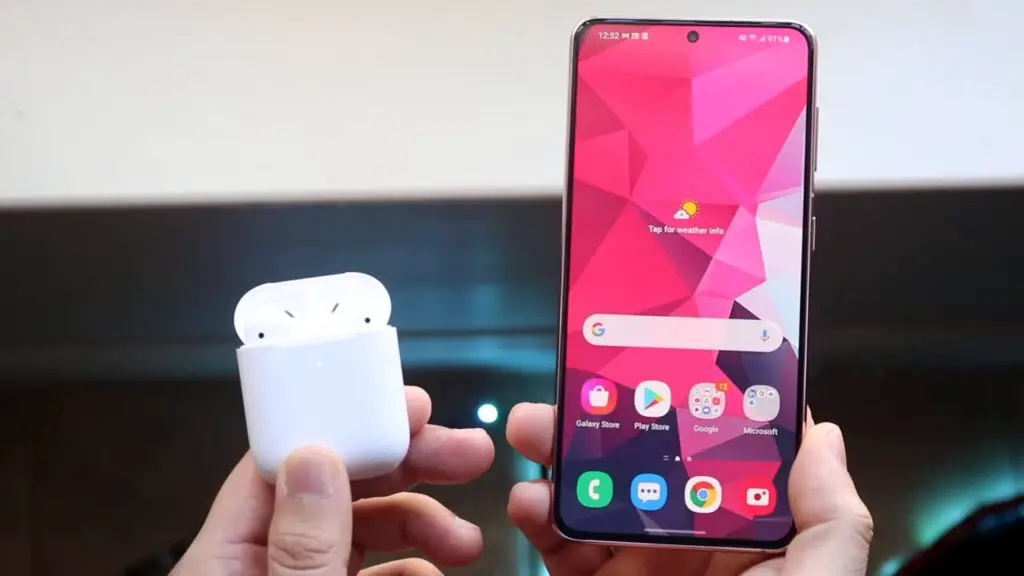
Using Apple AirPod with Samsung Galaxy S21/Plus/Ultra
If you’re a proud owner of an S21 phone, you may have wondered if you can use Apple’s wireless earbuds, AirPods, with your device. The good news is that you can! In this article, we’ll review everything you need to know about using AirPods with your Samsung Galaxy S21 or any other S21 device.
Setting Up Your AirPods with Samsung Galaxy S21/Plus/Ultra
The first step to using AirPods with your S21 device is to pair them via Bluetooth. Here’s how you can do it:

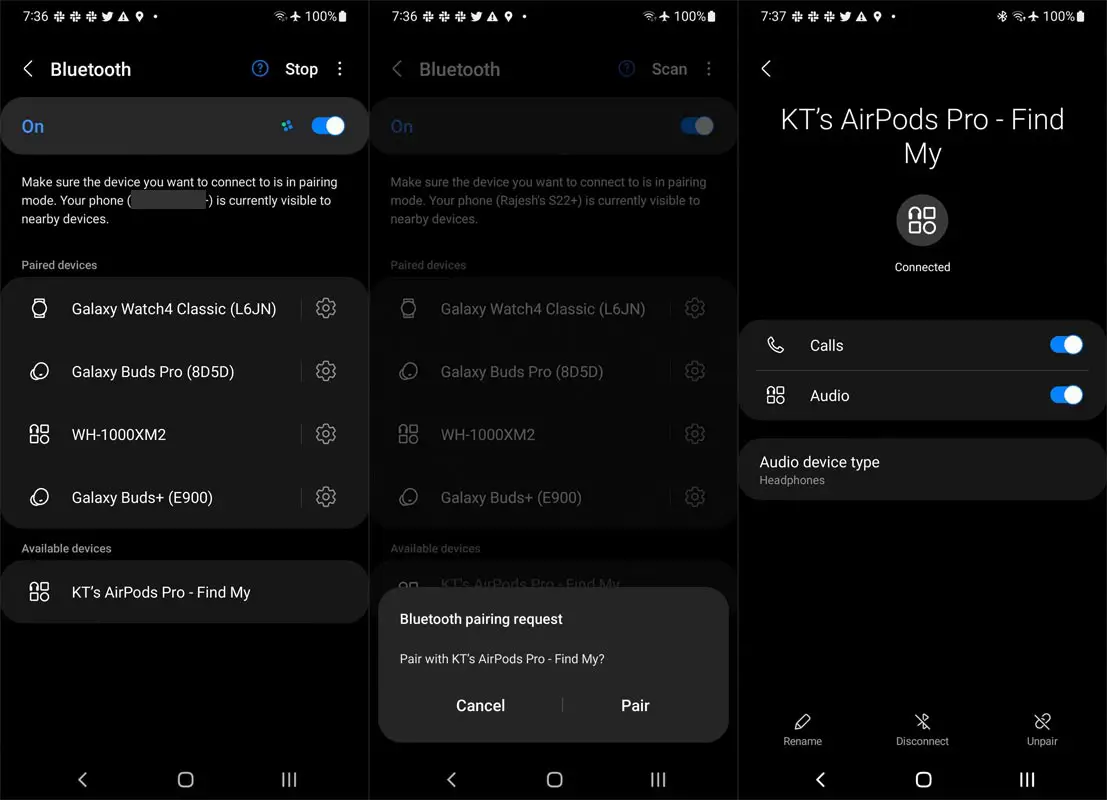
- On your S21 device, ensure that Bluetooth is turned on. You can find this in Settings > Connections > Bluetooth.
- To initiate the setup process for your AirPods, place them inside their charging case and then press and hold the setup button at the back for approximately five seconds. This should cause the status light on the front of the case to begin flashing white.
- Once your S21 phone detects your AirPods in the list of available Bluetooth devices, choose them to establish a connection.
Congratulations, you’ve successfully paired your AirPods with your S21 device!
Using AirPods with Your Samsung Galaxy S21/Plus/Ultra
Now that your AirPods are paired with your Samsung Galaxy S21 device, here are some things to keep in mind when using them:
- You won’t be able to use Siri with your AirPods on S21 devices. However, you can still use Google Assistant by downloading the MaterialPods app and setting it up to launch with a double-tap on one of the earbuds.
- You won’t be able to natively see the battery level of your AirPods on your S21 device. However, you can use third-party apps like CAPod to know the battery levels of each AirPod and the charging case.
- The volume level of your AirPods will need to be controlled through your S21 device.
- You won’t have access to features exclusive to iOS devices, like Spatial Audio and automatic device switching.
You can monitor the battery status of your AirPods in your Samsung Galaxy S21/Plus/Ultra
You can also download third-party apps like MaterialPods and CAPod to display the battery level of your AirPods and launch Google Assistant. While AirPods might not be the perfect fit for S21 users, they’re still an excellent option for those who want a sleek and convenient wireless earbud experience.
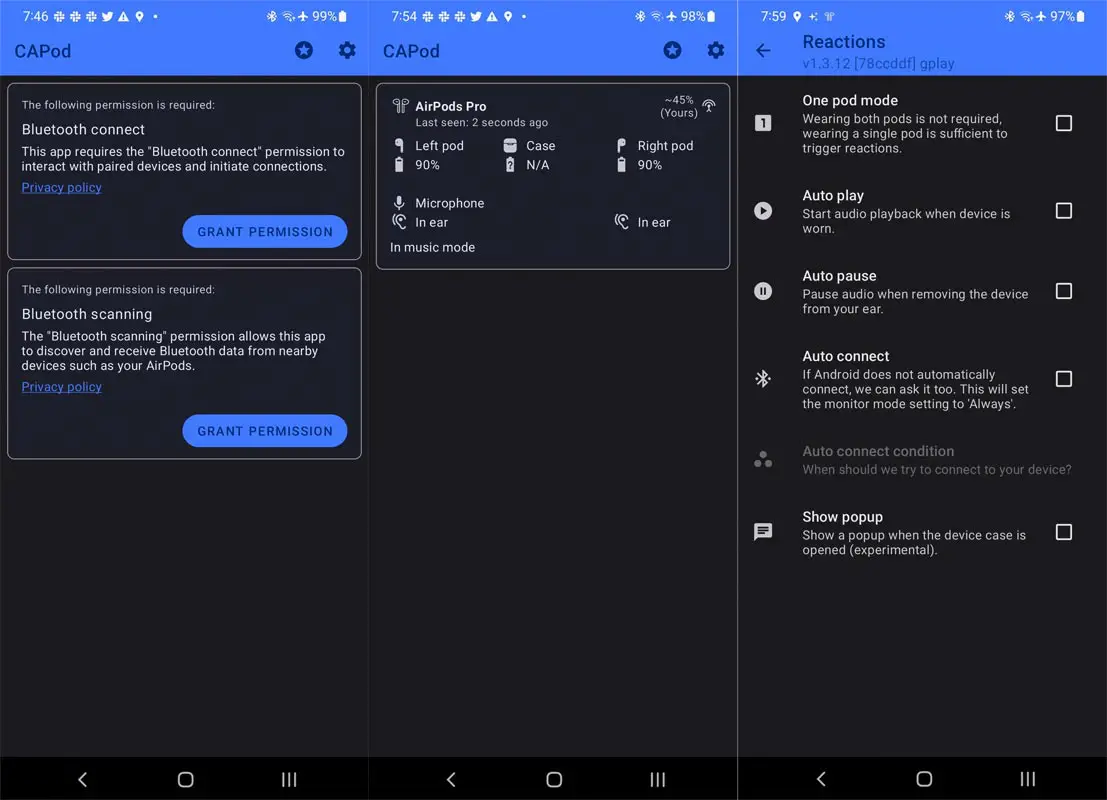
A disadvantage of using AirPods with an S21 device is the absence of a battery indicator. However, a third-party app called CAPod (via XDA) can help you. Once you grant the app the necessary permissions, it will display the battery level of each AirPod, along with the charging case and the connection strength. While it’s not as convenient as having a battery indicator on your phone’s status bar, it’s still better than guessing how much battery life is left in your earbuds.
Can you launch Google Assistant using AirPods on S21?
If you’re an S21 user, you might wonder if you can use AirPods to trigger Google Assistant. Unfortunately, you can’t. While AirPods support always-on “Hey Siri” on iPhones, they don’t have the same feature on S21 devices. However, you can still use the MaterialPods app to launch Google Assistant by double-tapping one of the earbuds. Remember that this is not as seamless as using “Hey Siri” on an iPhone, but it’s still a convenient way to access Google Assistant.
How to Control Your AirPods on Samsung Galaxy S21?
While there are some limitations to using AirPods with an S21 device, you can still control them using the following methods:
- You can pause or play music playback by pressing the force sensor on one of the earbuds.
- To switch between ANC and Transparency mode, long-press the force sensor.
- A double-press on the force sensor skips to the next track, and a triple-press returns to the previous Song/Music.
Remember that these controls cannot be customized and are the same for both earbuds.
FAQs
Can I use AirPods with Samsung Galaxy S21?
You can use AirPods with Samsung Galaxy S21 or any other S21 device.
Can I use AirPods Pro with my other Android devices?
Yes, you can use AirPods Pro with most Android devices.
Can I control the volume with AirPods on S21?
No, you can’t control the importance of your AirPods with the earbuds themselves. You’ll need to adjust the volume on your S21 device.
Conclusion
You can use AirPods with your Samsung Galaxy S21 or other Android device. While you won’t have all the features you would come with an iOS device, you can still listen to music, make calls, and use Google Assistant with your AirPods.
AirPods are not exclusive to iOS devices; you can use them with your S21 phone. While you won’t get all the features that you would on an Apple device, you can still enjoy high-quality wireless audio and other basic functionalities. This article guides configuring your AirPods with an S21 device and managing music playback.

Selva Ganesh is a Computer Science Engineer, Android Developer, and Tech Enthusiast. As the Chief Editor of this blog, he brings over 10 years of experience in Android development and professional blogging. He has completed multiple courses under the Google News Initiative, enhancing his expertise in digital journalism and content accuracy. Selva also manages Android Infotech, a globally recognized platform known for its practical, solution-focused articles that help users resolve Android-related issues.