
In today’s fast-moving world, it can be effortless to overlook important dates, such as birthdays. Nonetheless, with the latest addition of Google Contacts’ feature for birthday notifications, you can ensure that you never forget to reach out to your loved ones on their special day. This article aims to provide a step-by-step guide for setting up birthday notifications on Google Contacts for Android. With this feature, you can select friends and family members whose birthdays you want to be reminded of and get alerts accordingly. In this article, we’ll guide you through setting up birthday notifications for individual contacts or multiple contacts simultaneously. With these instructions, you can set up reminders to keep you on top of your loved ones’ birthdays and maintain healthy relationships with them. So, let’s get started!
Birthday Notifications in Google Contacts Android
The feature is straightforward to use. For any contact with a birthday listed, you can add a notification by selecting the “Add birthday notification” option from the overflow menu in the top-right corner. If someone’s birthday is coming up soon, the reminder on their contact page will also offer an “Add notification” button. Once you’ve added the notification, you can get alerts to remind you of your birthday, ensuring you never miss an important date again.
We’ll cover how to add birthday notifications for individual contacts, as well as how to add them for multiple contacts at once. As you conclude reading this article, you will have the tools to keep track of your loved ones’ birthdays and never again miss an important date.

Step 1: Ensure You Have the Latest Version of Google Contacts
Before adding birthday notifications to your contacts, you must ensure you have the latest version of Google Contacts installed on your Android device. If you are uncertain whether you possess the most recent version, navigate to the Google Play Store, and verify for any available updates.
Step 2: Set Up Birthday Notifications for Individual Contacts
To set up birthday notifications for an individual contact, follow these steps:
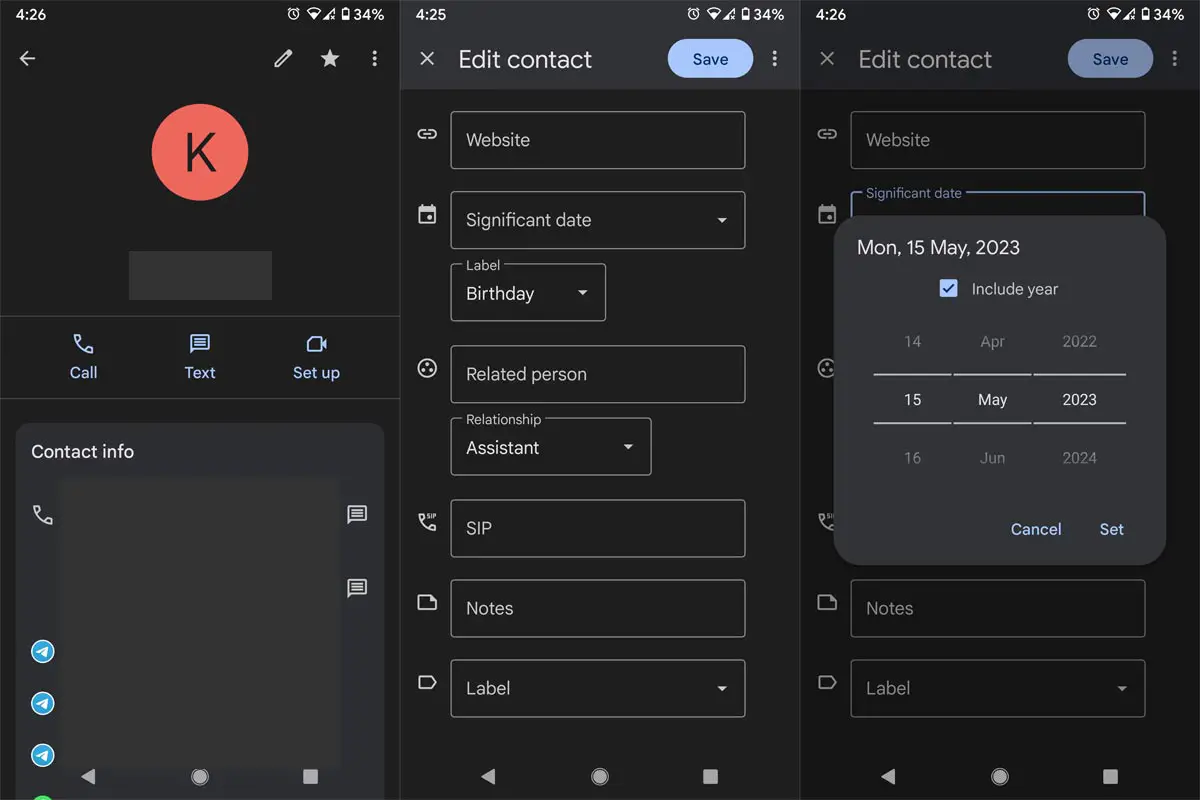
- Open the Google Contacts app on your Android device.
- Find the connection for whom you want to set up a birthday notification.
- Please tap on the contact to access their profile.
- Tap on the icon with three dots in the screen’s top-right corner.
- Select the “Add birthday notification” option from the menu.
- Set the date and time for the notification.
- Tap “Save” to confirm the information.
Once you’ve completed these steps, you’ll receive a notification on the selected date and time.
Step 3: Set Up Birthday Notifications for Multiple Contacts
If you have several contacts for whom you want to set up birthday notifications, you can do so all at once using the following steps:
- Open the Google Contacts app on your Android device.
- Tap the icon with three horizontal lines in the screen’s top-left corner.
- Select “Birthdays” from the menu.
- You’ll see a list of contacts with their birthdays listed.
- Tap on the “Add birthdays” button at the bottom of the screen.
- Please scroll through the contacts list without birthdays and tap the cake icon to add their birthday.
- Set the date and time for the notification.
- Tap “Save” to confirm the message.
Once you’ve completed these steps, you’ll receive notifications for all the contacts for whom you’ve set up birthday notifications.
Step 4: Managing Birthday Notifications
If you need to make changes to your birthday notifications or delete them altogether, you can do so using these steps:
- Open the Google Contacts app on your Android device.
- Find the contact for whom you want to manage the birthday notification.
- Please tap on the contact to access their profile.
- Tap on the icon with three dots in the screen’s top-right corner.
- Select the “Manage birthday notification” option from the menu.
- Make the necessary changes or delete the notification altogether.
FAQs
Will Google Contacts automatically send birthday wishes to my contacts?
No, Google Contacts will only notify you of your contact’s upcoming birthday. It is up to you to send them a birthday message.
How can I turn off birthday notifications in Google Contacts?
To turn off birthday notifications, go to the Google Contacts app settings and toggle off the “Birthday reminders” option.
Can I customize the notification settings for birthday reminders in Google Contacts?
Yes, you can customize the notification settings by going to the Google Contacts app settings and adjusting the notification sound, vibration, and other settings.
What happens if I accidentally remove a birthday notification for a contact?
If you accidentally remove a birthday notification, you can return to the contact’s profile and tap the “Add birthday notification” option to set a new reminder.
Can I add multiple birthday notifications for a single contact in Google Contacts?
Currently, Google Contacts only allows for one birthday notification per contact.
Wrap Up
Setting up birthday notifications in Google Contacts on Android is hassle-free and straightforward. Following the steps outlined in this article, you can easily set up notifications for a single contact or multiple contacts simultaneously, ensuring that you never miss an important date again. With this feature, you can stay on top of your loved ones’ birthdays and maintain your relationships by showing them how much you care. So, don’t hesitate and take advantage of this handy feature now!

Selva Ganesh is a Computer Science Engineer, Android Developer, and Tech Enthusiast. As the Chief Editor of this blog, he brings over 10 years of experience in Android development and professional blogging. He has completed multiple courses under the Google News Initiative, enhancing his expertise in digital journalism and content accuracy. Selva also manages Android Infotech, a globally recognized platform known for its practical, solution-focused articles that help users resolve Android-related issues.