
Google Gemini for Smarter Billing & Bookkeeping– Running a shop today requires more than just keeping track of sales on paper. Small businesses are shifting toward digital billing solutions that are easy to use, low-cost, and accessible from anywhere. With Google Gemini integrated into Google Sheets and Apps Script, shop owners can create a powerful yet simple POS-style workflow for billing, GST calculation, invoice generation, and sales logging. This no-code or low-code approach eliminates expensive software and runs seamlessly on both phone and desktop.
What Google Gemini Can Do for Shop Billing
Google Gemini brings AI-powered automation into daily billing tasks. Here are the most impactful applications:
- Generate invoice templates in Google Docs and Sheets with fields like customer name, GST number, invoice number, and total.
- Auto-calculate GST and totals for each sale, ensuring tax compliance.
- Save invoices as PDFs and email them directly to customers using Apps Script.
- Extract structured data (items, rates, tax) from scanned bills or email attachments and log them into a sales ledger.
- Validate and enrich data in Sheets by auto-filling product details (HSN/SAC codes, discounts, categories).
- Assist with formulas using “Ask Gemini” inside Sheets to build functions for totals, splits, and reporting.
This combination transforms Sheets into a lightweight POS system without requiring advanced coding skills.

Set up Options for Gemini Billing Workflows
Shop owners can choose between two main paths to set up billing workflows with Gemini:
1. Workspace with Gemini (No-Code)
- Available directly inside Gmail, Docs, and Sheets for Workspace users subscribed to Google AI plans.
- Gemini can generate formulas, invoice templates, and summaries without coding.
- Perfect for shopkeepers who want ready-to-use AI inside Google apps.
2. Gemini API (Pay-as-You-Go)
- Requires enabling billing on a Google Cloud project.
- An API key is created in Google AI Studio.
- Apps Script can call Gemini via UrlFetchApp to process billing data.
- Suitable for advanced users who want flexible workflows beyond Workspace limits.
Both methods offer scalable options depending on budget and complexity needs.
Quick Start Guide: Billing with Sheets and Docs
For a shop owner starting fresh, the most straightforward approach is to set up Google Sheets and Docs with Gemini.
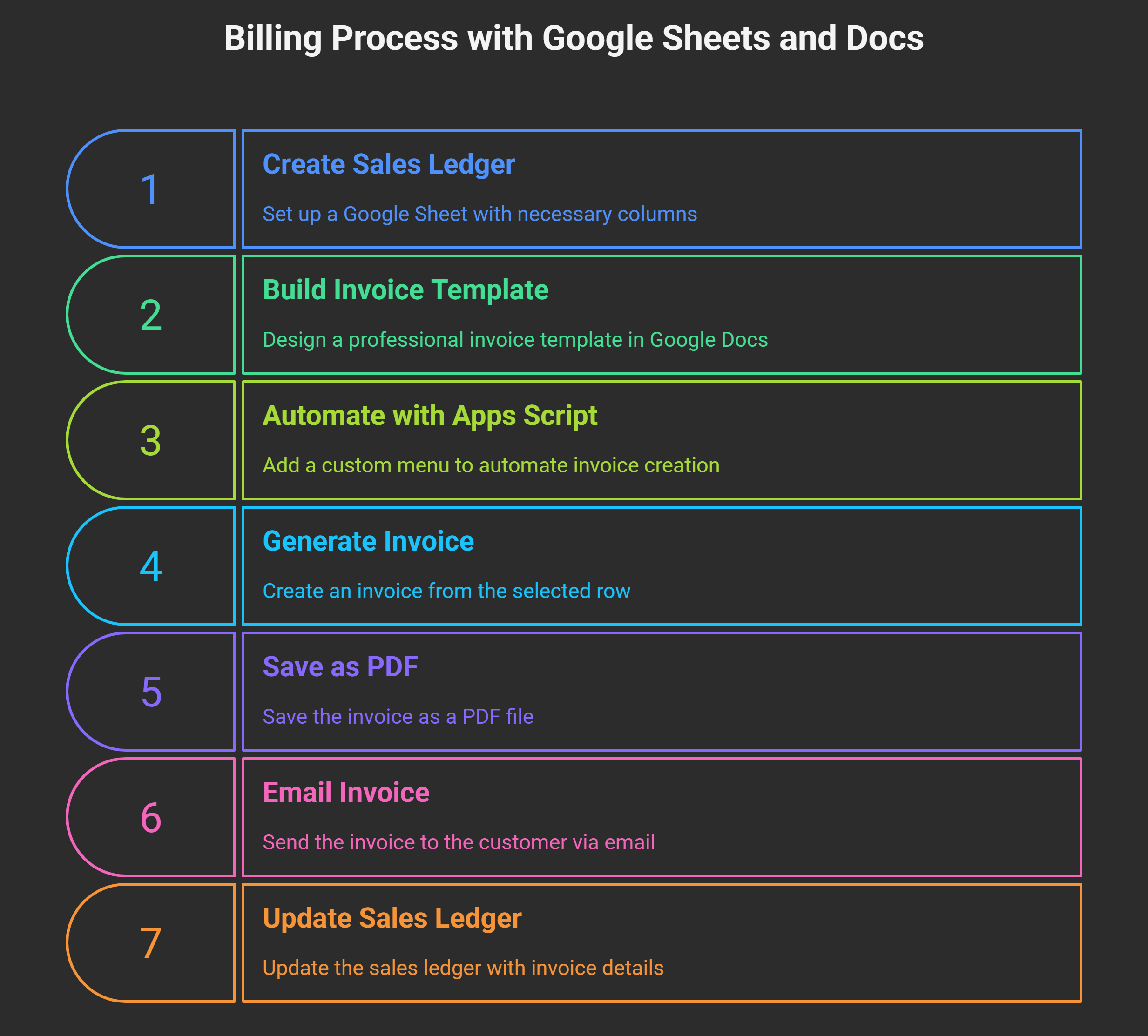
Step 1: Create a Sales Ledger in Sheets
Make a Google Sheet with columns:
- Date
- Invoice No
- Customer Name
- Item
- Quantity
- Rate
- GST %
- Line Total
- Payment Mode
With Gemini, you can automatically generate formulas for line totals and GST split.
Step 2: Build an Invoice Template in Docs
Ask Gemini to create a professional invoice template in Google Docs with GST fields. Connect this template to your sales sheet using mail merge techniques.
Step 3: Automate with Apps Script
Add a custom menu in Sheets called “Create Invoice.”
- Script reads the selected row.
- Populates the invoice template.
- Saves as PDF.
- Email the invoice to the customer.
- Updates the Sheet with invoice number and PDF link.
This creates a full billing cycle that runs with just a few clicks.
API-Powered Automation for Shops
For shopkeepers who want deeper automation, Gemini’s API unlocks more features:
- Parse scanned bills or WhatsApp orders: Convert messy text into structured JSON and log directly into Sheets.
- Auto-suggest GST rates: Gemini interprets product descriptions and applies the correct tax percentage.
- Enrich sales data: Fill missing HSN/SAC descriptions, apply discounts, and categorize items.
- Post data to Sheets: Apps Script uses UrlFetchApp to fetch Gemini responses and append structured data to Sheets.
This method is perfect for handling large transaction volumes or integrating external data sources.
No-Code Automation Tools (Make.com, Pipedream)
Non-technical shop owners can connect Gemini with Sheets through automation platforms like Make.com or Pipedream.
- Trigger workflows when a new row is added to the Sales Sheet.
- Generate a PDF invoice from the row data.
- Send an email via Gmail to the customer.
- Update inventory records automatically.
This approach avoids writing code and gives a drag-and-drop setup that works instantly.
Smart Use Cases for Shop Billing with Gemini
Here are some real-world workflows that small businesses can adopt immediately:
- Smart Invoice Inbox: A time-driven Apps Script checks Gmail for invoice attachments, sends them to Gemini, extracts structured data, and logs them into Sheets.
- POS with Google Forms: Link a Google Form to your sales Sheet. When a customer order is submitted, Gemini computes totals, applies GST, and generates an invoice automatically.
- BigQuery Sales Analytics: Connect the billing Sheet to BigQuery for advanced sales dashboards and trend analysis.
- Inventory Control: Each new invoice updates the stock ledger so you can track inventory without a separate POS system.
Billing Plans and Costs for Gemini
Gemini API Billing
- Free tier available with limited usage.
- Pay-as-you-go model for higher rate limits.
- Cloud Billing can be enabled directly in AI Studio.
Workspace Subscriptions with Gemini
- Some Workspace editions include Gemini features.
- Monthly charges depend on the Workspace plan.
- Best suited for businesses already using Google Workspace.
Data Handling and Privacy
- Paid Gemini API usage does not feed your prompts or responses into Google product training.
- Data can be centrally managed under Google Cloud licenses.
Practical Tips for Shopkeepers
- Start small with Sheets and Docs before moving to APIs.
- Use “Ask Gemini” to generate GST formulas and invoice tables.
- For Indian GST, request Gemini to apply CGST/SGST splits correctly.
- Lock essential formulas and protect Sheet ranges to avoid accidental edits.
- Switch to pay-as-you-go only if the free tier is insufficient.
- Consider Google Forms as a simple POS-style interface for order entry.
Wrap Up
By combining Google Gemini, Sheets, Docs, and Apps Script, small businesses can create a robust billing system that works like a POS without high costs or complex software. From generating GST-compliant invoices to automating data extraction and sales analytics, Gemini brings AI efficiency into shop billing workflows. With flexible setup options—Workspace integration, API calls, or no-code automations—shop owners can pick the right level of complexity for their needs.

Selva Ganesh is a Computer Science Engineer, Android Developer, and Tech Enthusiast. As the Chief Editor of this blog, he brings over 10 years of experience in Android development and professional blogging. He has completed multiple courses under the Google News Initiative, enhancing his expertise in digital journalism and content accuracy. Selva also manages Android Infotech, a globally recognized platform known for its practical, solution-focused articles that help users resolve Android-related issues.