
Autoscroll Officially Coming to Instagram Reels– Instagram is stepping up its game by officially introducing the Autoscroll feature to Instagram Reels. This Update eliminates the need for manual swiping, providing a seamless viewing experience directly within the app. Here’s everything we know about this long-awaited feature and how you can start using it today.
What Is Instagram Reels Autoscroll?
The Instagram Reels Autoscroll feature allows users to watch consecutive reels without having to swipe manually. Unlike third-party apps that offer time-based scrolling with inconsistent performance, Instagram’s native Autoscroll is built into the app, providing smoother transitions and a more natural viewing flow.
How to Activate Autoscroll on Instagram Reels
Getting started with Autoscroll on Instagram Reels is simple. Follow these steps to enable it:

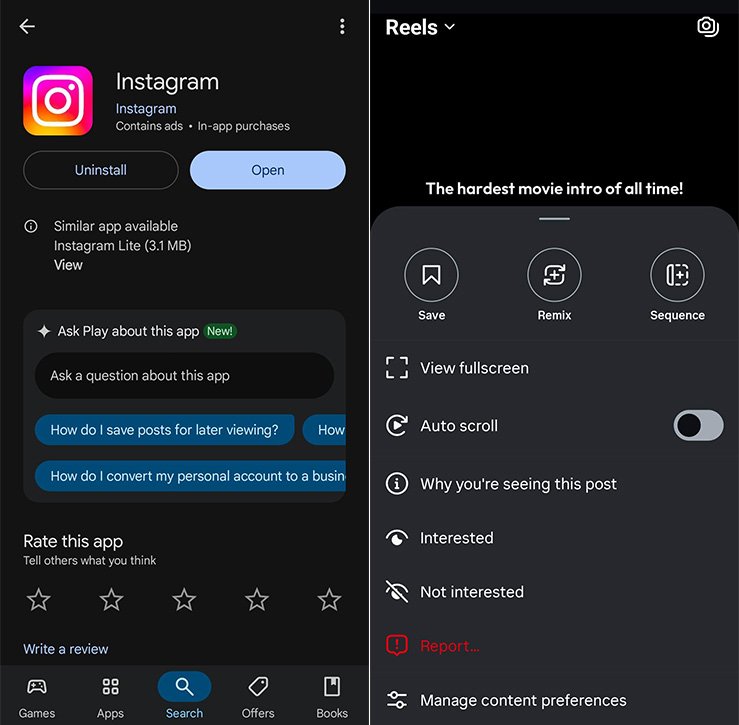
- Update the Instagram App
- Open the Google Play Store or Apple App Store.
- Search for Instagram.
- Tap Update if available.
- Open Instagram and Navigate to Reels
- Launch the Instagram app.
- Tap on the Reels icon in the bottom menu.
- Access the Three-Dot Menu
- Open any Reel.
- Tap the three-dot menu at the bottom right corner.
- Enable Autoscroll
- From the pop-up menu, select Autoscroll.
- Toggle it on.
Once enabled, Autoscroll will automatically play the next reel after the current one ends.
Why Native Autoscroll Is Better Than Third-Party Apps
Many users have relied on third-party apps to scroll reels automatically. However, these apps often have drawbacks:
- Time-Based Scrolling: They scroll after a set timer, not after the reel finishes.
- Lagging and Bugs: Third-party apps are prone to crashes.
- Security Risks: Using unofficial apps can compromise account security.
- Inconsistent User Experience: Lack of integration leads to jerky transitions.
With Instagram’s native Autoscroll, you get a smooth, reliable, and secure experience.
Top Features of Instagram’s Autoscroll
- Smart Playback Timing
- Autoscroll activates right after a reel ends, not based on a fixed timer.
- Seamless Transition
- The transition between reels feels natural and fluid.
- No Additional Apps Required
- Fully integrated within Instagram—no need for downloads or permissions.
- Battery and Performance Optimised
- Designed to work efficiently on both Android and iOS devices.
- Works on Wi-Fi and Mobile Data
- Enjoy uninterrupted scrolling anywhere.
Best Practices for Using Instagram Reels Autoscroll
To get the most out of Instagram’s Autoscroll, follow these tips:
- Keep Your App Updated
- Always use the latest version for optimal performance.
- Use Wi-Fi for Better Speed
- Autoscroll works best with a stable internet connection.
- Engage With Content
- Liking, commenting, or sharing while Autoscroll is active enhances your algorithm experience.
- Customise Your Reel Feed
- The more you interact, the better your Reels suggestions will be.
Can You Disable Autoscroll?
Yes. If you ever wish to turn it off:
- Open any Reel.
- Tap the three-dot menu.
- Select Autoscroll and toggle it off.
Instagram gives you complete control over this feature, allowing you to switch it on or off as per your preference.
Impact of Autoscroll on Content Creators and Viewers
For Content Creators:
- Increased Reach
- Autoscroll may improve content discoverability as users continuously scroll through reels.
- Higher Engagement Rates
- More chances of likes, shares, and follows as reels are played consecutively.
For Viewers:
- Enhanced Viewing Experience
- A seamless binge-watching experience without the fatigue of manual swiping.
- More Content in Less Time
- Ideal for passive viewing or when you’re multitasking.
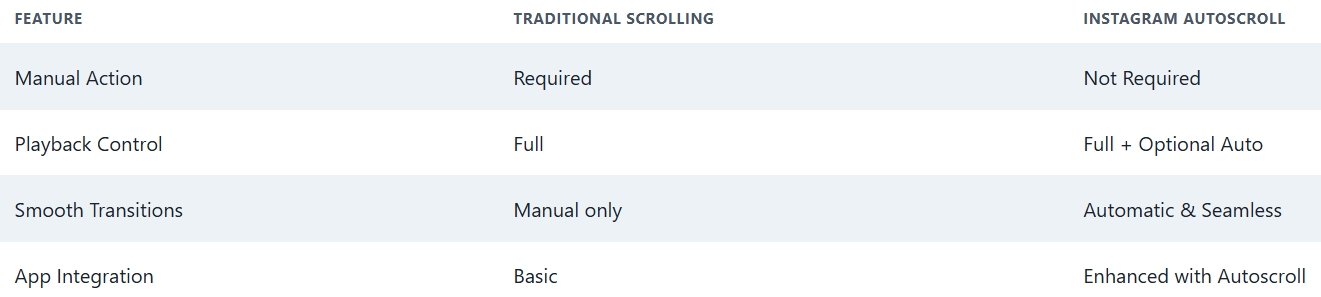
Autoscroll vs. Traditional Reel Viewing
What’s Next for Instagram Reels?
With Autoscroll rolling out globally, Instagram is setting the stage for more AI-powered features and personalised viewing experiences. Expect updates such as:
- AI-curated Reels Feed
- Advanced Interaction Analytics
- Creator Monetisation Tools
Instagram’s continuous innovation ensures that both creators and viewers get the best possible experience.
Wrap Up
Instagram’s Autoscroll feature for Reels brings a much-needed update that enhances user convenience and content discovery. Whether you’re a content creator looking to expand your reach or a viewer wanting a seamless scroll experience, this native feature is a game-changer.
Stay updated, enable Autoscroll, and enjoy a more innovative, smoother way to experience Instagram Reels.

Selva Ganesh is a Computer Science Engineer, Android Developer, and Tech Enthusiast. As the Chief Editor of this blog, he brings over 10 years of experience in Android development and professional blogging. He has completed multiple courses under the Google News Initiative, enhancing his expertise in digital journalism and content accuracy. Selva also manages Android Infotech, a globally recognized platform known for its practical, solution-focused articles that help users resolve Android-related issues.