
As the years go by, so do the knowledge of man and his technology increase drastically. The mobile phone is turning into a supercomputer, thanks to the innovative technologies of different service providers all over the world. Google is one of these service providers and being the world’s largest search engine makes it very popular in different countries of the world. But most people are not aware of the fantastic features which Google provide apart from serving as a search engine. For those of us that have that Google app on your phone, it is not for fancy but for offering you the best experience possible when using your mobile phone.
Who is this Google Assistant
It hasn’t been long since Google introduced the Google Now app which contained a virtual assistant just like the Siri of Apple operating systems. The Google assistant developed by engineers in Google and made available to both mobile and home devices to serve as an artificial intelligence-powered virtual assistant that is capable of engaging in two-way conversations. Yes, two- way conversations in the sense that when you speak to it, it can respond to you like a normal human being. This can be used to perform lots of functions on your phone including making a call to different relationships on your phone.
How this can help you in contacts
Relationships are regular contacts on your phone that can be created by you depending on the type your relationship you want for a touch. For example, you save your brother’s number or girlfriend’s number with their names but go further to create a connection using Google contacts and attaching “brother” or “girlfriend” to the contacts. Now Google can remember such contact as brother and girlfriend. This way all you have to do is to tell the Google assistant to call your brother, and it will automatically call him without you selecting the contact by yourself.

You can add relationships to your contacts either by using Google contacts app and Google Now app. Google contacts app usually is recommended for this process because sometimes the originally installed contacts app may not be supported or compatible with the Google now an app, so it’s best for you to have that Google contacts app on your phone.
How to configure
The following steps will give you an insight on how to go about the configuration of the relationships to your contacts and how to use Google assistant to make calls to them or even text them, whatever the case may be.
They are as follows;
Google Contacts app configuration
- You need to make sure that you have Google contacts app on your mobile phone; if it is not there, then you have to visit the play store, download and install it on the phone.
- All the apps on your mobile will be synchronized into this app once installation is complete.
- Launch the installed Google contacts app and select the contact you wish to create a relationship.
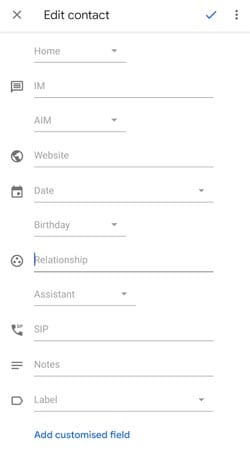
- Once you tap on the contact, you will see EDIT icon (mostly a pencil that is about to write), touch it and scroll down until you see more fields.
- Clicking on this will take you to the relationships field, choose the kind of relationship you want with this contact, either friend, assistant, brother, sister and so on.
- Once you are done with your selection, save the contact.
- In a case whereby there are two different contacts with the same name, it is better to merge them when trying to create a relationship, to avoid confusions. To make this move into the suggestion window and join the contacts you wish according to the Google contacts suggestion.
- Launch Google Now and activate the virtual assistant by saying “ok Google,” this will bring up a microphone telling speak now meaning that you should give your command now.
- Say call relationship name like “call my brother,” and it will quickly start a call to the contact which you saved the relationship as “brother.”
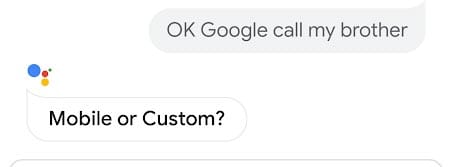
- If the relationship contact merged previously, it would ask you for the particular contact you wish to call/text.
Using Google Now app
- Launch the Google Now app on your mobile phone.
- You can activate the voice command system by saying “Ok Google.” Make a command to your phone now that it is listening to you.
- You can say “Jack is my brother.” It will make Google match and mark the contact named Jack as a brother.
- Another way to do this is to give a command to the virtual assistant by saying “call my brother,” contacts will pop up for you to select one as your brother.
- Once you do this, the contact will be automatically saved as a relationship contact.
- To remove a relationship from a contact, say the command “Stephen is not my boyfriend” and the connection will be deleted immediately. Hurts:)
If you follow the above-listed steps, you will be able to create relationships with your contacts and contact them using the help of the Google assistant available on your mobile phone. Bear in mind that you can either call or text them, it all depends on the commands you give the Google assistant.
You should ensure that these applications on your device are up to date because that is the only way you can enjoy the full benefits of these beautiful Google feature.

Selva Ganesh is a Computer Science Engineer, Android Developer, and Tech Enthusiast. As the Chief Editor of this blog, he brings over 10 years of experience in Android development and professional blogging. He has completed multiple courses under the Google News Initiative, enhancing his expertise in digital journalism and content accuracy. Selva also manages Android Infotech, a globally recognized platform known for its practical, solution-focused articles that help users resolve Android-related issues.