
If you are a Sony Xperia user who enjoys streaming content on Netflix, you may have encountered the frustrating issue of low video quality after installing the latest Android 13 update. This problem has been reported by numerous users on devices such as Xperia 1, Xperia 5 II, and Xperia 1 III. However, fret not! This article will provide a nifty workaround to Fix Netflix Low Video Quality on Sony Xperia Mobiles problem and enhance your streaming experience on Netflix.
Understanding the Xperia Lineup and Its Popularity
Before we delve into the solution, let’s take a moment to appreciate the Xperia lineup by Sony. While Sony’s devices may not always steal the limelight, the company consistently delivers commendable offerings regularly. With its revamped Xperia series, Sony has managed to captivate a significant user base and establish itself as a popular name in the smartphone market.
The Low Video Quality Issue on Xperia Devices
Despite the positive reception of Xperia devices, some users have reported encountering low video quality problems, specifically on Netflix, after updating to Android 13. This issue can be frustrating, as it diminishes the overall viewing experience. However, there is no need to panic. You can follow a simple solution to address this problem effectively.

Fixing Netflix Low Video Quality in Android 13 on Xperia
To fix the low video quality issue on your Sony Xperia device running Android 13, follow the steps outlined below:
Access the App Settings
- Go to the Settings menu on your Xperia device.
- Scroll down and select “Apps” or “Applications.”
- Tap on “See All Apps” to view the complete list of installed applications.
- Locate and select the Netflix app from the list.
Uninstall Netflix
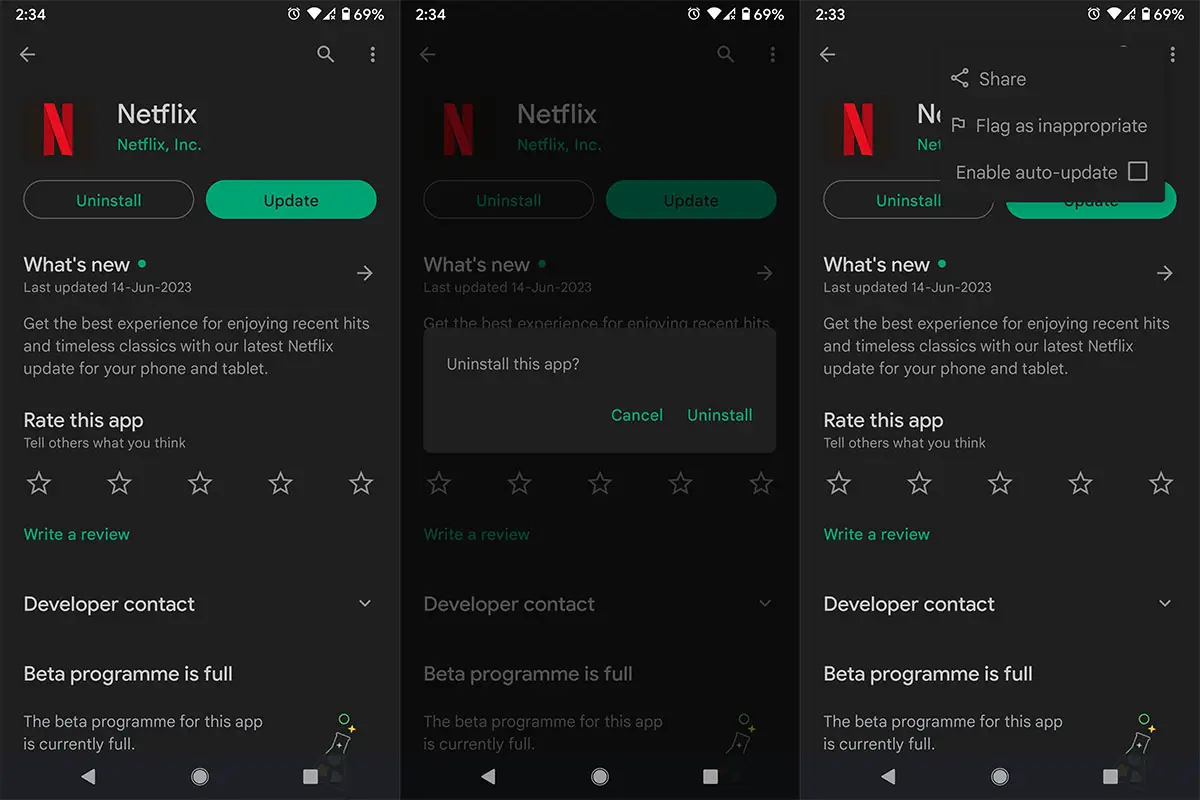
- Within the Netflix app settings, you will find an option to uninstall the app.
- Tap on “Uninstall” and confirm your selection by tapping “OK” in the confirmation prompt.
Install an Older Version of Netflix
- Now, you need to download and install an older version of Netflix on your Xperia device.
- Open the Google Play Store and search for “Netflix.”
- Once you find the Netflix app, tap the overflow icon (usually represented by three vertical dots).
- From the options, uncheck the “Enable Auto Update” option.
- This will prevent the Play Store from automatically updating Netflix in the future.
- After turning off auto-updates, install the selected older version of Netflix.
Restart Your Device
- Once you have successfully installed the older version of Netflix, restart your Sony Xperia device.
- This step ensures that the changes take effect and the app functions optimally.
Congratulations! You have now successfully fixed the low video quality problem on Netflix for your Sony Xperia device running Android 13. Now, you can indulge in streaming your preferred shows and movies, ensuring the utmost quality for viewing pleasure.
FAQs
Is this solution applicable to all Xperia devices?
This solution can be applied to Xperia devices running Android 13, such as Xperia 1, Xperia 5 II, and Xperia 1 III.
Will I lose my Netflix account data during the uninstallation process?
No, uninstalling the Netflix app will not affect your account data. You can log in again after reinstalling the app.
Do I need to root my Xperia device to implement this solution?
No, this solution does not require rooting your Xperia device. It can be performed on a standard, non-rooted device.
Will I lose any features by using an older version of Netflix?
The older version of Netflix may not include the latest features or improvements introduced in newer updates. However, it should still provide a satisfactory streaming experience.
How can I prevent Netflix from updating automatically on my Xperia device?
To turn off auto-updates for Netflix, open the Google Play Store, find the Netflix app, tap the overflow icon, and uncheck the “Enable Auto Update” option.
Wrap Up
In this article, we addressed the frustrating issue of reduced video quality experienced by users of Sony Xperia mobiles when streaming content on Netflix after updating to Android 13. To help resolve this problem, we presented a straightforward solution that involved a few simple steps. Users can restore high-quality video playback on their Xperia devices by uninstalling the Netflix app, installing an older version, and turning off auto-updates. Implementing these steps will ultimately enhance the overall streaming experience, allowing users to enjoy their favorite shows and movies in the best possible quality.

Selva Ganesh is a Computer Science Engineer, Android Developer, and Tech Enthusiast. As the Chief Editor of this blog, he brings over 10 years of experience in Android development and professional blogging. He has completed multiple courses under the Google News Initiative, enhancing his expertise in digital journalism and content accuracy. Selva also manages Android Infotech, a globally recognized platform known for its practical, solution-focused articles that help users resolve Android-related issues.