
Many users have faced the misleading error message “You’re already in a call” when attempting to use Google Meet, even when they are not engaged in ongoing individual or group voice calls. This deceptive bug can significantly impede users from starting or joining video calls, impacting their overall user experience. This article aims to delve into various effective methods to tackle and resolve this issue, providing users with a clear understanding of potential solutions. By addressing this misleading error and ensuring its prompt resolution, users can navigate the Google Meet platform seamlessly, enhancing their ability to initiate and participate in video calls without unnecessary interruptions. Let’s explore these solutions and work towards a smoother Google Meet experience.
Addressing the ‘You’re Already In A Call’ Error
Users frequently face a puzzling situation where Google Meet displays an error message indicating they are already on a call, even though they are not. This glitch can be attributed to various factors related to the app’s background processes and recent updates.
Restarting App Processes: A Potential Solution
When specific app processes get corrupted, it affects its overall functionality. Restarting these processes can often resolve the issue. Here’s how to do it:

- Go to Settings > Apps > All Apps > Meets.
- Tap on Force Stop and confirm by selecting OK.
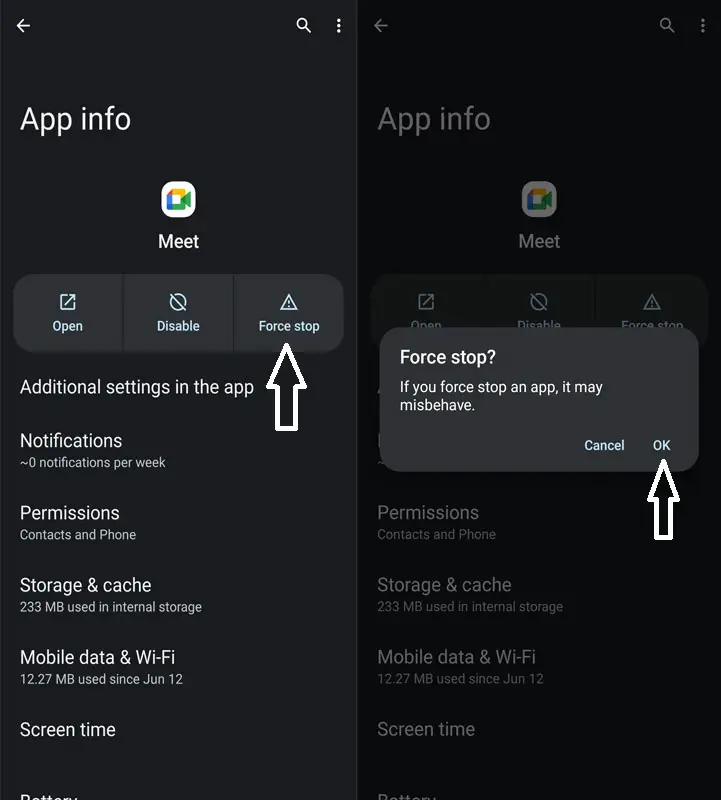
- Check if this action resolves the “You’re already in a call” error in Google Meet.
Clear Google Meets Cache
If a significant amount of temporary data accumulates over time, it can slow down the app and potentially disrupt its standard functionality. Hence, it’s advisable to clear this cached data by following the steps below promptly:
- Navigate to Settings > Apps > All Apps > Meets.
- Proceed to its Storage and Cache section and tap on Clear Cache.
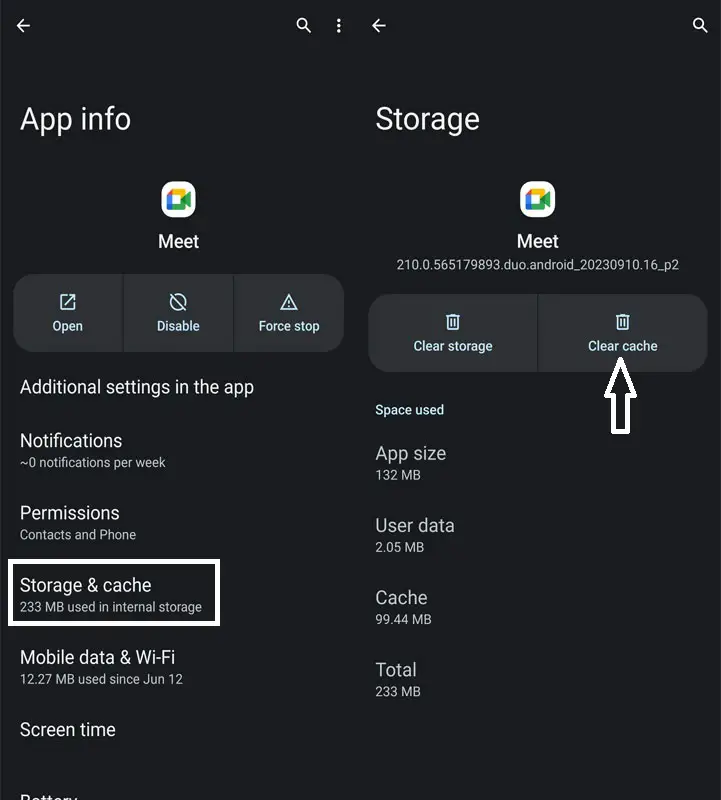
- Verify if this action resolves the “You’re already in a call” error in Google Meets.
Managing App Updates: Checking for Buggy Updates
In some cases, this error might be triggered by a buggy update. Managing app updates can be a helpful solution. Follow these steps:
- Go to Settings on your device.
- Navigate to Apps > See All Apps and select Meet from the list.
- Tap on App Details, then uncheck Enable Auto-updates from the overflow menu.
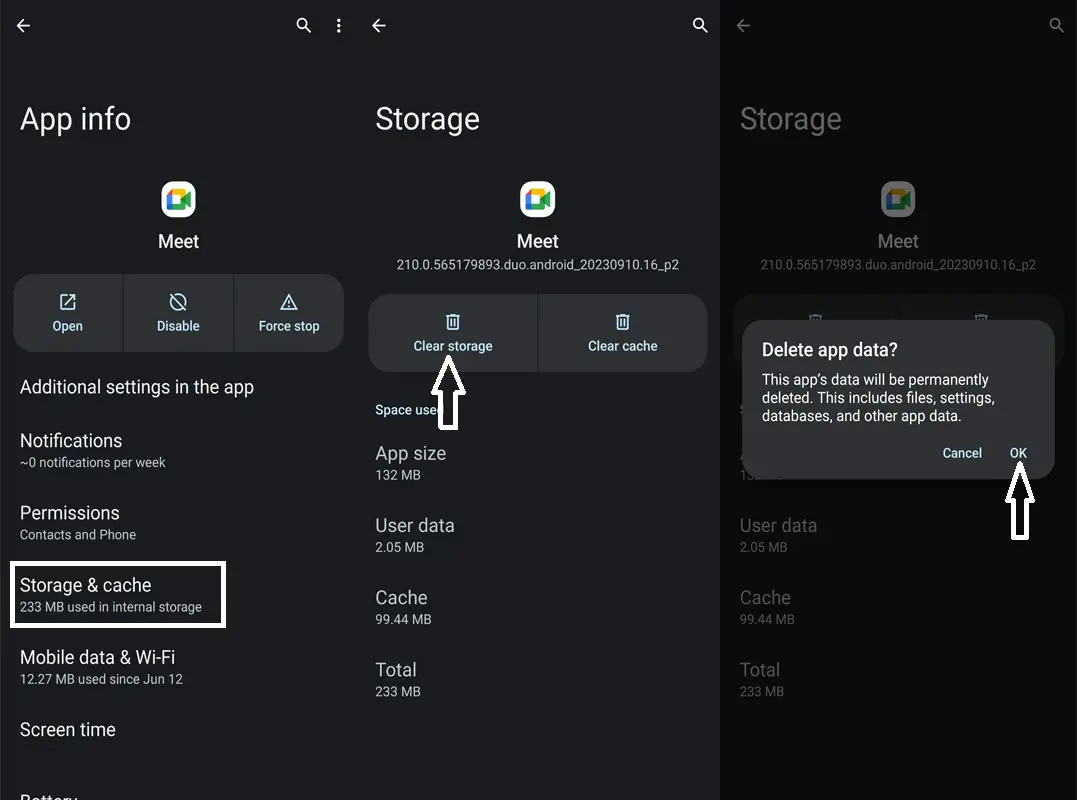
- Check the app’s version number and uninstall the current version.
- Download and install an older, trusted app version from a reliable source.
Downgrading the App: Resolving with an Older Version
If recent updates are causing the error, downgrading to a previous app version can be a practical solution. Here are the steps:
- Start by going to the Settings menu on your device.
- Navigate to Apps > See All Apps and choose Meet from the provided list.
- Scroll down and select App Details. This will take you to the app’s page on the Play Store.
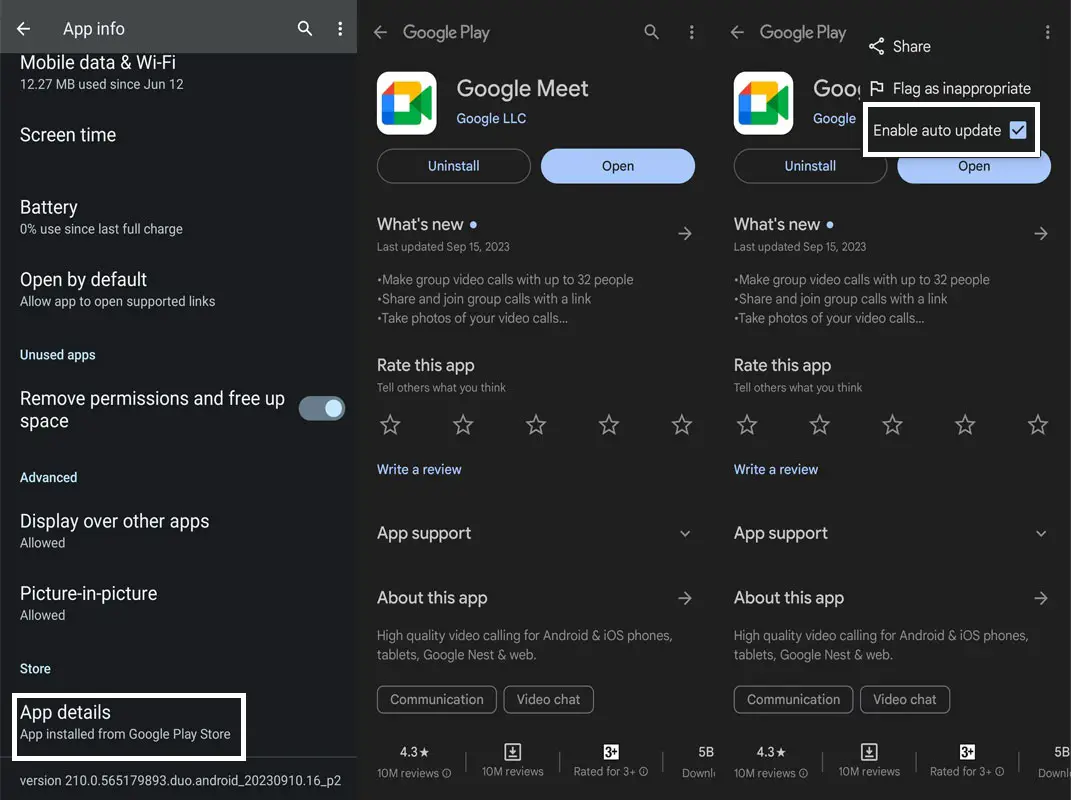
- Click the overflow icon at the top right and uncheck Enable Auto-updates.
- After completing this step, return to Apps > See All Apps and locate the specific app from the list.
- Please scroll down to find and make a note of its version number.
- Uninstall the current app version.
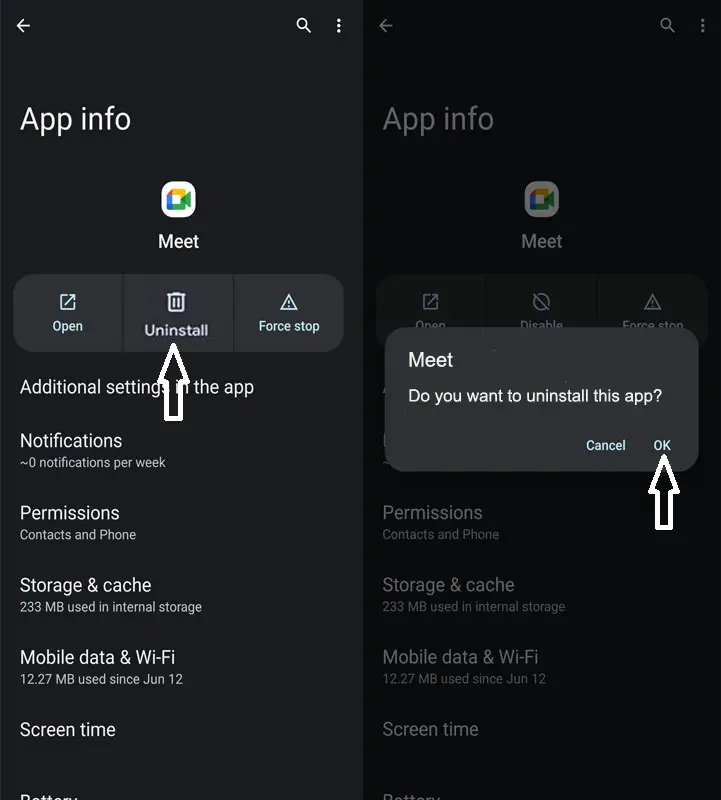
- Download an earlier version of the application from a reliable third-party website.
- Enable Installation from Unknown Sources if needed and install the APK file.
FAQs
Is this error standard in Google Meet?
Several users have reported encountering this error, which can be frustrating when using Google Meet for video calls.
Will downgrading the app cause any loss of data or features?
Downgrading to an older version may result in losing some updated features, but it is a temporary measure to resolve the error.
How often does Google Meet release updates?
Google Meet typically receives updates regularly to enhance performance and fix bugs. However, occasionally, these updates may contain bugs that trigger errors like the one discussed.
Can restarting app processes cause any other issues?
Restarting app processes is a safe troubleshooting step and should not cause any adverse effects on your device or the app.
Is there a permanent fix for this error?
Google is actively working on addressing this issue. Ensure that your app is up to date to benefit from the latest fixes and enhancements, preventing this error from occurring.
Wrap Up
Addressing the ‘You’re Already In A Call’ error on Google Meet is vital to ensure seamless video conferencing. Users encountering this misleading error can employ several strategies for resolution. Restarting the app processes, a potential solution involves force-stopping the app in device settings. Managing updates is another approach, enabling users to prevent buggy updates by turning off auto-updates and potentially downgrading to a stable version. These methods empower users to navigate misleading errors and facilitate uninterrupted video calls, ultimately enhancing their Google Meet experience.
A smooth and error-free video conferencing experience is essential, particularly in today’s digital age, where virtual meetings are pivotal in professional and personal communication. Resolving such issues promptly ensures users can effectively utilize Google Meet for productive and seamless virtual interactions.

Selva Ganesh is a Computer Science Engineer, Android Developer, and Tech Enthusiast. As the Chief Editor of this blog, he brings over 10 years of experience in Android development and professional blogging. He has completed multiple courses under the Google News Initiative, enhancing his expertise in digital journalism and content accuracy. Selva also manages Android Infotech, a globally recognized platform known for its practical, solution-focused articles that help users resolve Android-related issues.