
Set Up and Customize Notification Schedules on Samsung Galaxy S25– The Samsung Galaxy S25 brings advanced notification controls, allowing users to customize how and when they receive alerts. If you often get distracted by unnecessary notifications or want to streamline your app alerts to specific times, Samsung’s Modes & Routines feature is a game-changer. In this guide, we’ll walk you through scheduling app notifications on the Samsung Galaxy S25 to enhance productivity and ensure you only receive essential alerts at the right time.
Why Customize Notification Schedules?
Managing notification schedules can help:
- Improve focus: Reduce distractions while working or studying.
- Enhance sleep quality: Silence non-essential notifications during nighttime.
- Optimize battery life: Minimize background notifications that drain power.
- Customize alerts for different scenarios: Set personalized notification rules for work, travel, or relaxation.
Samsung’s Modes & Routines make it easy to automate these settings with a few taps.

How to Access Modes & Routines on Samsung Galaxy S25
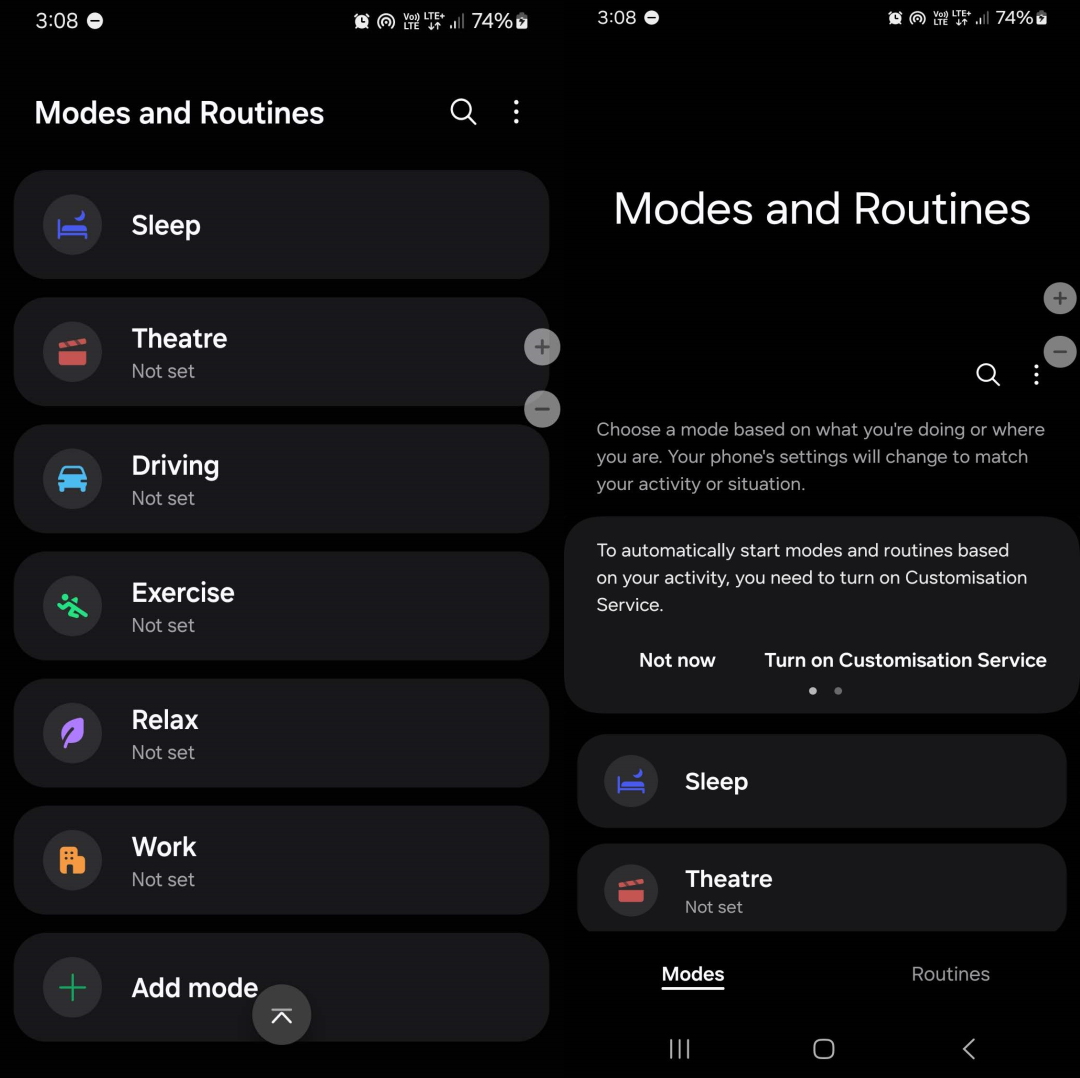
To get started:
- Open the Settings app on your Galaxy S25.
- Scroll down and tap on Modes & Routines.
- You’ll now see an option to add a new custom mode or edit an existing one.
Creating a Custom Mode for Notifications
Follow these steps to set up a personalized notification schedule:
1. Add a New Mode
- Tap “Add mode” at the bottom.
- Select “Custom” and give it a name (e.g., “Work Mode” or “Sleep Mode”).
- Choose a color and icon to help identify the mode quickly.
- Tap “Done” to proceed.
2. Set Triggers for the Mode
- Select when the mode should activate automatically.
- Common triggers include:
- Specific days (e.g., weekdays for work mode, weekends for leisure mode).
- Time-based activation (e.g., 10:00 PM for Do Not Disturb).
- Location-based triggers (e.g., home, office, or gym).
- App usage-based triggers (e.g., activating when opening work-related apps).
- Tap “Add condition” for more options.
Configuring Notification Preferences
Once you’ve set up the triggers, you can manage how notifications behave under each mode.
1. Silence Notifications with Do Not Disturb
- Enable Do Not Disturb (DND) to block unnecessary alerts.
- Optionally, allow exceptions for:
- Priority contacts (family, boss, or close friends).
- Specific apps (messaging, alarms, or work tools).
2. App-Specific Notification Control
- Choose which apps can send notifications during this mode.
- Restrict social media and promotional notifications while keeping essential alerts.
3. Customize Notification Sounds & Vibration
- Set a custom ringtone or vibration pattern for essential notifications.
- Lower notification volume to prevent loud alerts during quiet hours.
Enabling and Managing Custom Modes
Once you’ve configured everything:
- Save your mode and ensure it is enabled.
- It will automatically activate based on the conditions you set.
- To turn it on/off manually, go to Modes & Routines > Select the Mode > Toggle On/Off.
Additional Tips for Managing Notifications on Samsung Galaxy S25
1. Use Bixby Routines for Advanced Automation
- Bixby Routines allow more complex automation.
- Example: Mute notifications while driving or enable specific alerts when connected to Wi-Fi.
2. Optimize Battery Usage with Notification Management
- Disable unnecessary background notifications to improve battery life.
- Turn off auto-sync for non-essential apps.
3. Schedule Focus Mode for Productivity
- Focus Mode under Digital Wellbeing can pause distracting apps.
- Use it alongside custom notification schedules for maximum efficiency.
Troubleshooting Common Issues
1. Mode Not Activating Automatically
- Check if the conditions are correctly set.
- Ensure battery optimization isn’t restricting the mode.
2. Notifications Still Coming Through
- Verify that Do Not Disturb is enabled within the mode.
- Double-check app-specific notification settings.
3. Can’t Find Modes & Routines
- Make sure your device software is up to date.
- Some regions may have different feature names, so search for “Modes & Routines” in settings.
Conclusion
The Samsung Galaxy S25’s Modes & Routines feature provides powerful tools to control app notifications effectively. By setting up custom modes with automatic triggers, you can reduce distractions, improve focus, and optimize battery life. Whether you need a silent work mode, a nighttime DND setting, or a social media-free routine, these features help you take complete control over your notifications. Start customizing your notification schedule today and experience a more organized digital life!

Selva Ganesh is a Computer Science Engineer, Android Developer, and Tech Enthusiast. As the Chief Editor of this blog, he brings over 10 years of experience in Android development and professional blogging. He has completed multiple courses under the Google News Initiative, enhancing his expertise in digital journalism and content accuracy. Selva also manages Android Infotech, a globally recognized platform known for its practical, solution-focused articles that help users resolve Android-related issues.