
If you use Facebook you already know, Facebook always following us and suggests the previously purchased products or we don’t need products. If you view the products on Amazon, Flipkart, Walmart, or whatever Online stores or sites, they provide the data to Facebook, and you can see the suggestions in your feed. Without Ads, Facebook can’t run their service. But, When the Ads become annoying to us, We have to take some steps to optimize them. Yes, Now Facebook allows us to stop Other Websites providing our data to Facebook. After setting this, you won’t get the Shoe ads that you already purchased a month ago.
Every website tracks your activities to provide better Ads experience. But, Facebook is always going way too much. If you are a one who loves this type of Ads experience, you can remain with the default settings.
Stop Other Company Websites and Apps providing your data to Facebook (off-Facebook activity)
We can do this process in both the Web version and the App. I will separate the steps into two parts. Based on your comfort, you can choose one.

1. Clear your other sites data from Facebook- Web version
You can remove the data temporarily every time, or you can set up the permanent settings to delete the off-Facebook activity.
1.1 Delete Data Temporarily
- Login to your Facebook account.
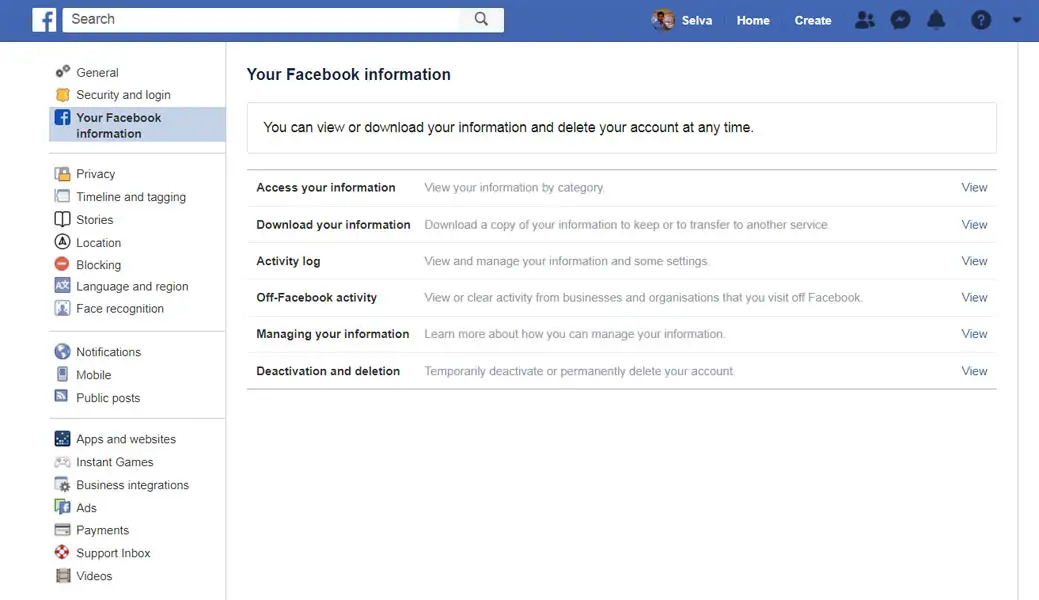
- Go to Settings. You can find a lot of options in the settings. Choose Facebook Information.
- All your stored data categorized into different types. Choose “off-Facebook activity.”
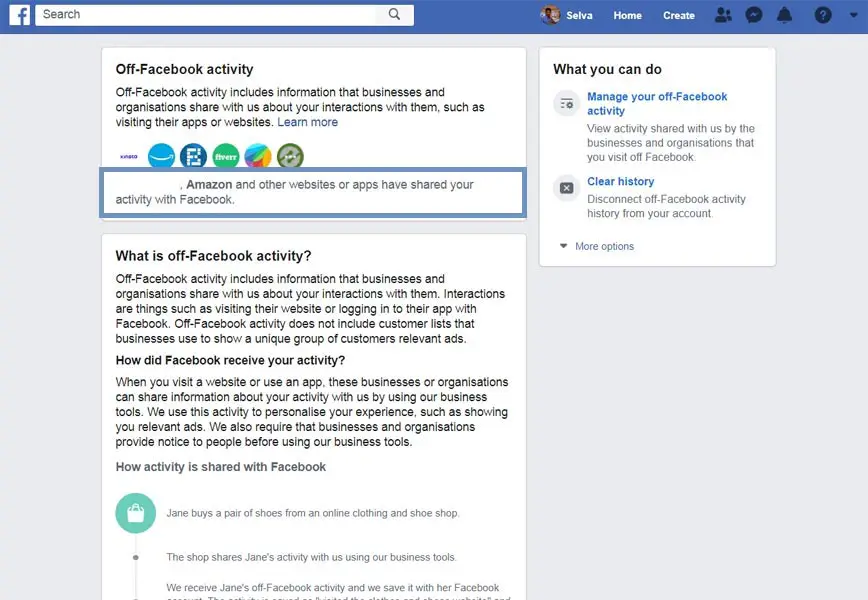
- After the selection, you can find multiple website’s names that shared the data with Facebook.
- Now select the website name. You will get the list of the website names and how much data they shared.
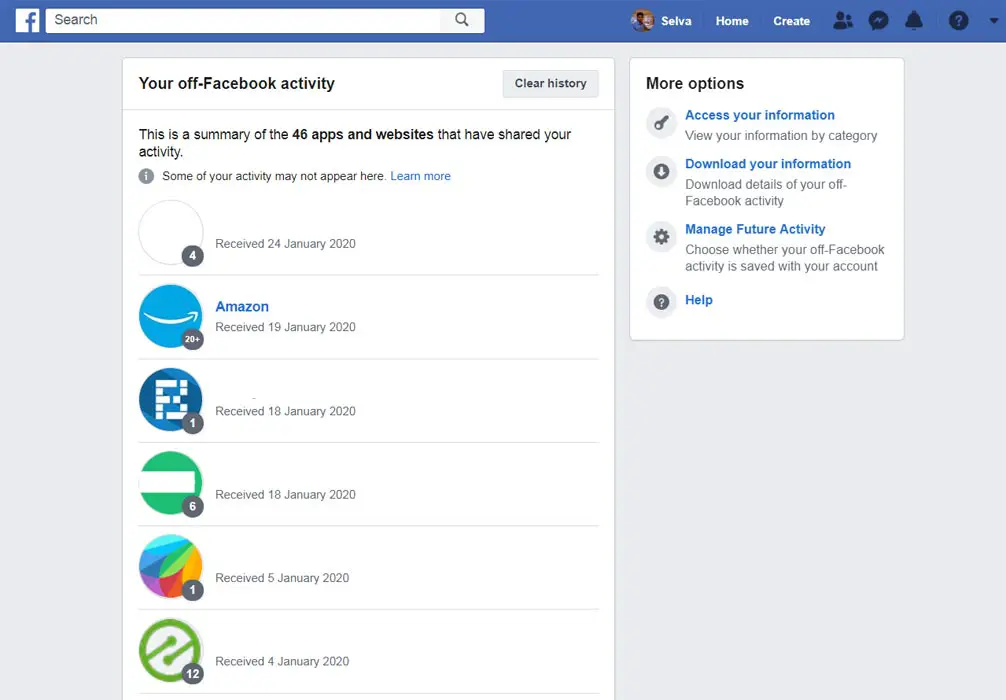
- To clear this data, Select “Clear History. ” It will delete all the other site’s data stored in your Facebook account.
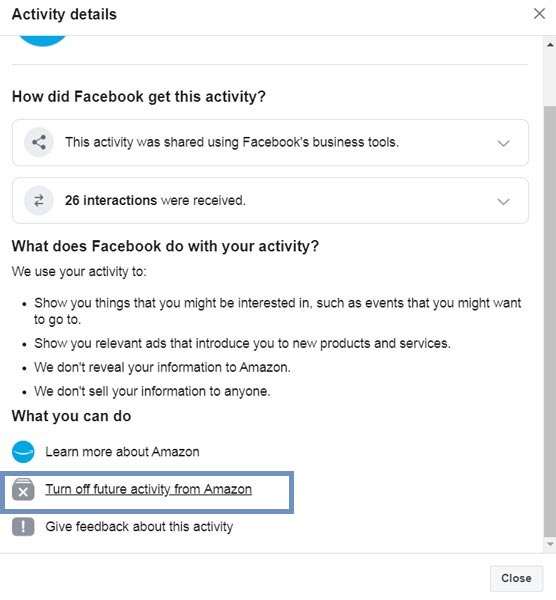
- You can also delete individual websites and apps data. To do this, select the particular site or app and choose “Turn off future activity from.”
1.2 Stop Data Synchronize Permanently
When you want to stop the sync between the sites and Facebook, you can follow the steps below to do this.
- Login to your Facebook account.
- Go to Settings. You can find a lot of options in the settings. Choose Facebook Information.
- All your stored data categorized into different types. Choose “off-Facebook activity.”
- After the selection, you can find multiple website’s names that shared the data with Facebook.
- Now select the website name. You will get the list of the website names and how much data they shared.
- To remove the data synchronize between other sites with Facebook, Select “Manage Future Activity ” and disable “Future off-Facebook activity.”
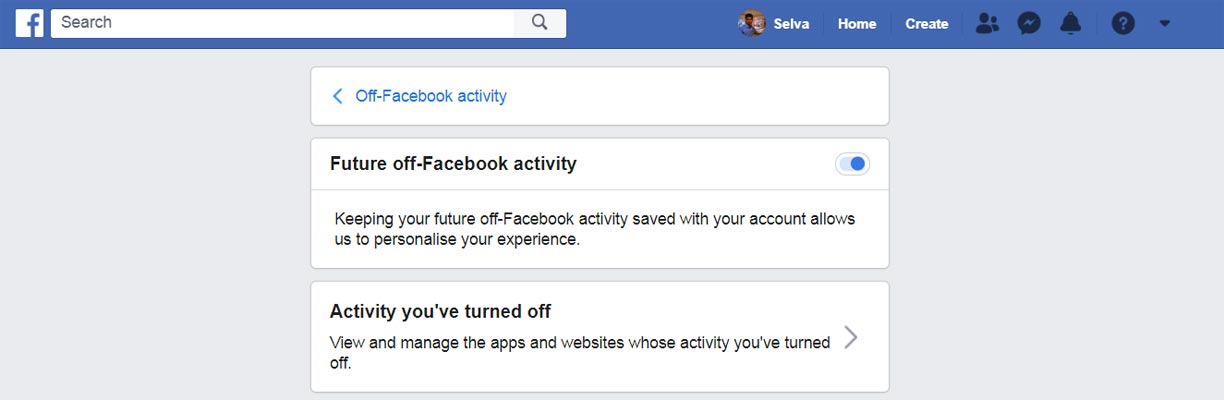
- The above option will disable the data exchange between third-party sites with your Facebook account.
2. Remove your Third-party website’s data from Facebook App (Android and iOS)
The steps are moreover the same as the web version. But some navigation and options name may vary.
2.1 Delete Data Temporarily
- Login to your Facebook account in your mobile app.
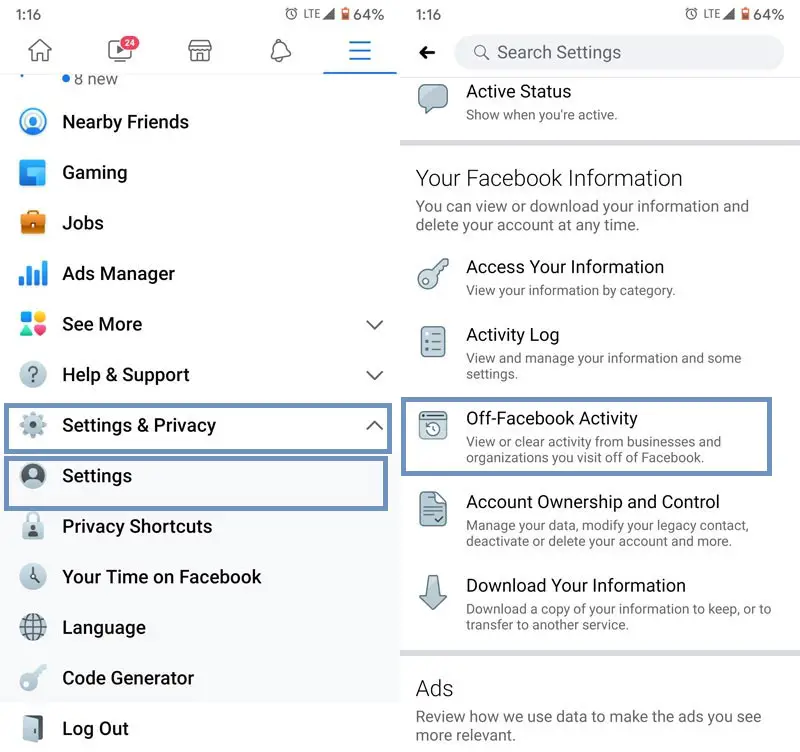
- Select the hamburger menu and Go to “Settings and Privacy.” Then select Settings. You can find a lot of options in the settings. Choose an “off-Facebook activity” from Your Facebook Information.
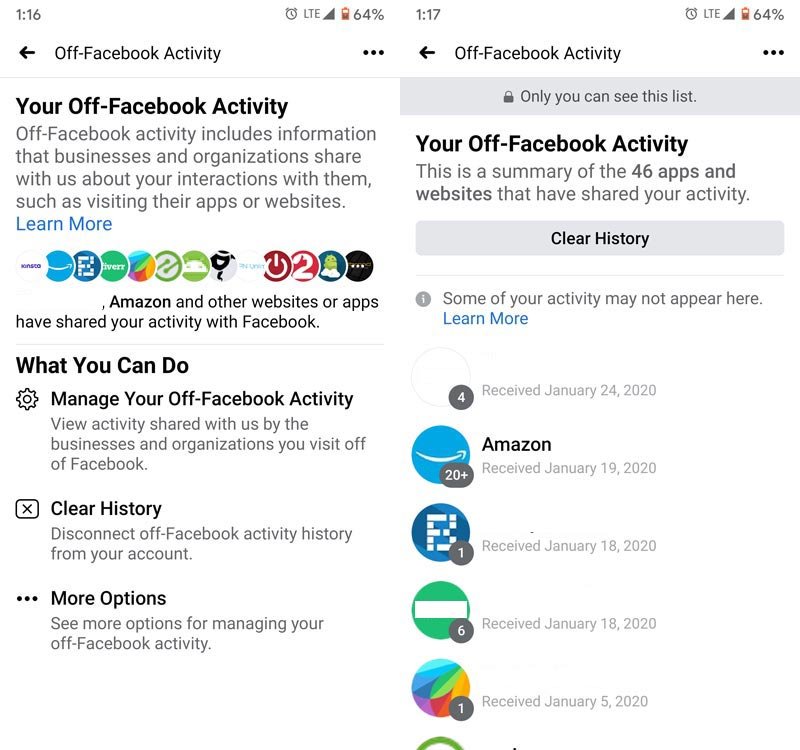
- After the selection, you can find multiple website’s names that shared the data with Facebook.
- Now select the website name. You will get the list of the website names and how much data they shared.
- To clear this data, Select “Clear History. ” It will delete all the other site’s data stored in your Facebook account.
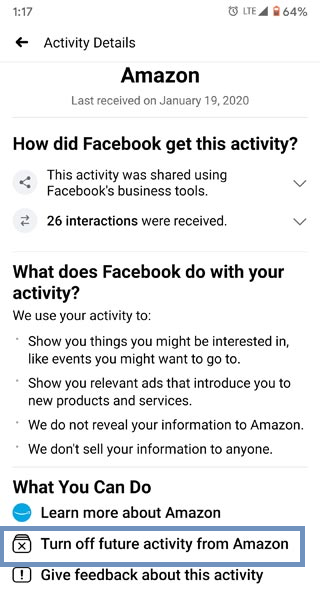
- You can also delete individual websites and apps data. To do this, select the particular site or app and choose “Turn off future activity from.”
2.2 Stop Data Synchronize Permanently
When you want to stop the sync between the sites and Facebook, you can follow the steps below to do this.
- Login to your Facebook account.
- Go to Settings. You can find a lot of options in the settings. Choose Facebook Information.
- All your stored data categorized into different types. Choose “off-Facebook activity.”
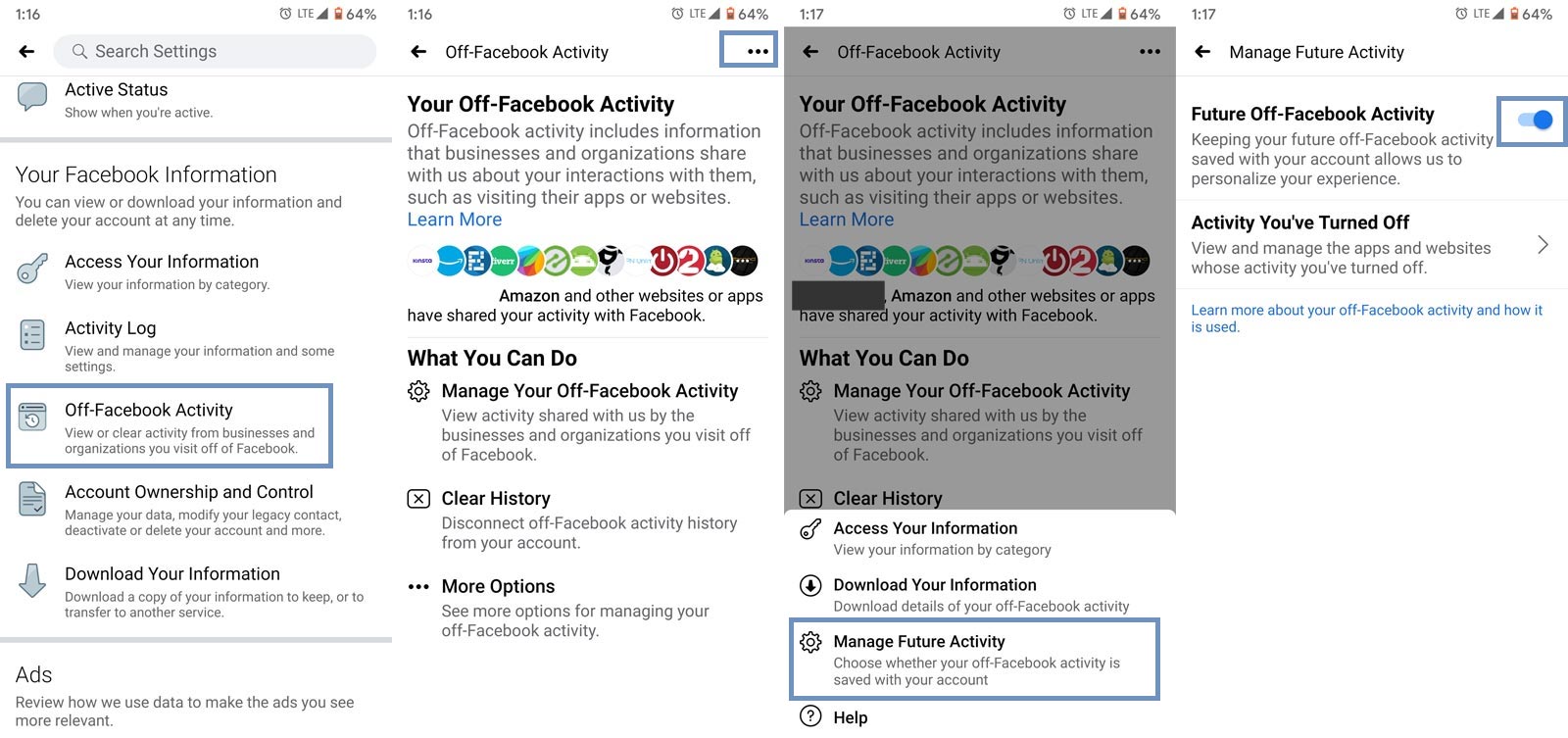
- After the selection, select the three-dot menu button in the corner.
- To remove the data synchronize between other sites with Facebook, Select “Manage Future Activity ” and disable “Future off-Facebook activity.”
- The above option will disable the data exchange between third-party sites with your Facebook account.
Disable Facebook data track completely
Even if you opt put and clear history using the above settings, there is a lot of chance you still receive the unlike Ads in your feed. To disable the sync of data sites with your account follows the steps below. These settings are standard for both Web versions and Apps.
Steps
- Login to your Facebook account.
- Go to Settings. You can find a lot of options in the settings. Choose Ads>Ad Preferences.
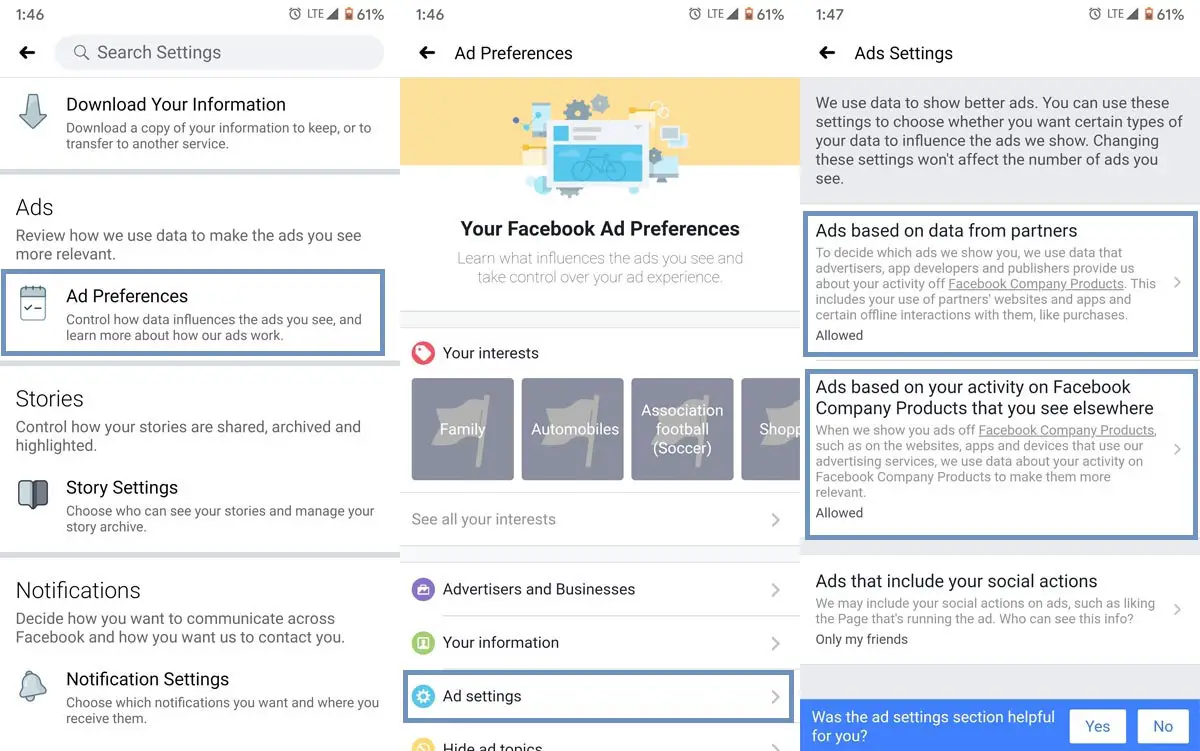
- Select “Ad settings.” After the selection, you will receive three options- Ads based on data from partners, Ads based on your activity, Ads that include your social accounts.
- We don’t have to bother about the third one. We can disable the sync by adjusting the first two settings.
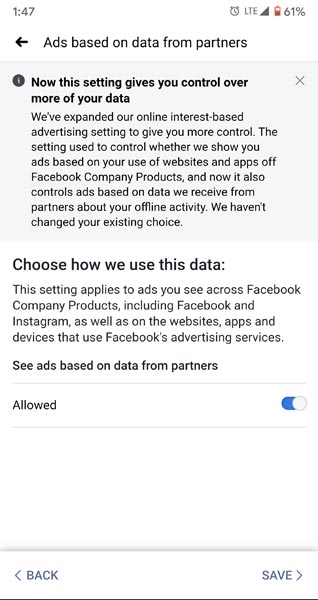
- Select “Ads based on data from partners.” Disable the Allowed option and save your preference. If you didn’t keep the option, It would back to the default setting.
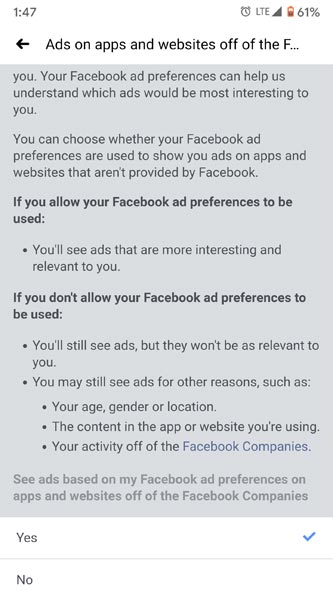
- After the save, select back and select “Ads based on your activity.” Scroll down to the bottom and select No. That’s all now you are done with the following Ads everywhere.
Wrap Up
Without Ads, all of the websites and apps can’t survive. But, when they reach the limit and eavesdrop every site we visit, we have to take control of our data. Also, when you scroll down your feed on Facebook and some unwanted Ads are showing that spoil, your feed should kick out. I hope after you set up the above settings, you will not get the Interest-based Ads. But, You will still receive the general Ads.
We can’t disable those Ads. Other platforms provide subscription-based service for those who hate Ads completely. We can say Youtube Premium, Spotify like that. Also, we know how hard it is to log out entirely from Facebook messenger. But, most of the people already lost hope on Facebook data. I don’t know people will opt-in if they provide some alternatives for Facebook Ads. What are your thoughts after this settings? Did your feed look good? Comment below.

Selva Ganesh is a Computer Science Engineer, Android Developer, and Tech Enthusiast. As the Chief Editor of this blog, he brings over 10 years of experience in Android development and professional blogging. He has completed multiple courses under the Google News Initiative, enhancing his expertise in digital journalism and content accuracy. Selva also manages Android Infotech, a globally recognized platform known for its practical, solution-focused articles that help users resolve Android-related issues.