
Ah. Yea we have ads too…:) But in Mobiles by a Manufacturer, Really? In settings? Your apps? Ads are everywhere in MIUI OS. But it is your fault also. When you buy a new mobile, You give “Yes” for every option. Ya, I know, You don’t want to hurt your mobile feelings. But in return it provides Ads…:) We are going to remove these Ads on your Xiaomi Phones. If your Xiaomi device is running on MIUI, indeed, you have faced quite a bunch of ads in different aspects. Well, there are ways to disable all the ads that appear on your Xiaomi smartphone, and we will discuss all of the processes for this action. Some ads can be very annoying; showing irrelevant information and delaying your activities.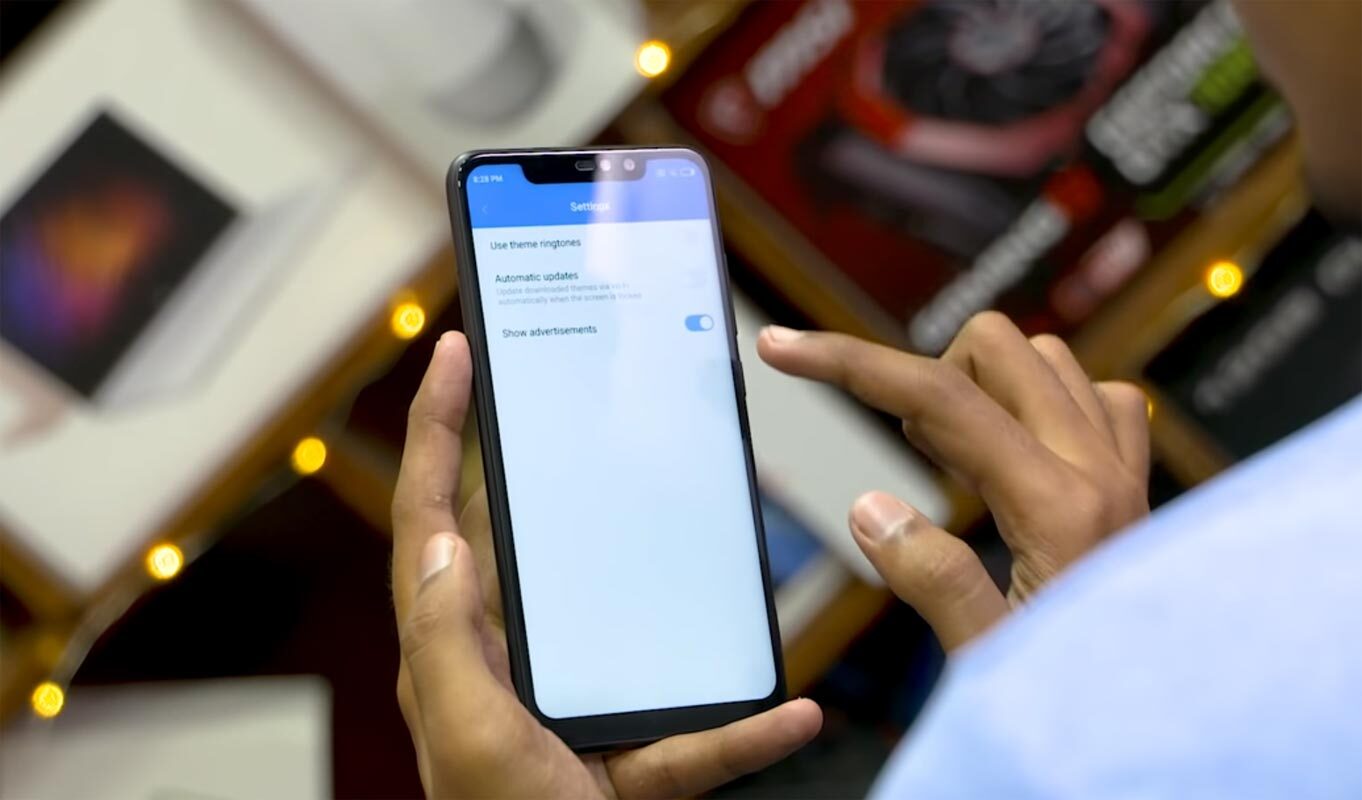
How to remove ads on Xiaomi Phones
I assure you. If you follow all these steps, you can eliminate 90% of the ads in your mobile. Irrespective of the MIUI version your Xiaomi device runs on, following these steps provided below, you’ll stop ads from popping up or displaying when you open specific menus.
Number One: Disable MSA
-
Open the MIUI Settings menu

-
Scroll down to Additional settings and tap on Authorization & revocation
-
Locate and disable MSA
-
Tap Revoke in the pop-up command
-
Because this is your first of trying this, you’ll get an error response that reads “Couldn’t revoke the authorization.” Ignore the message and try again for about four times or maybe more until you get a positive response.
Number Two: Disable system ads
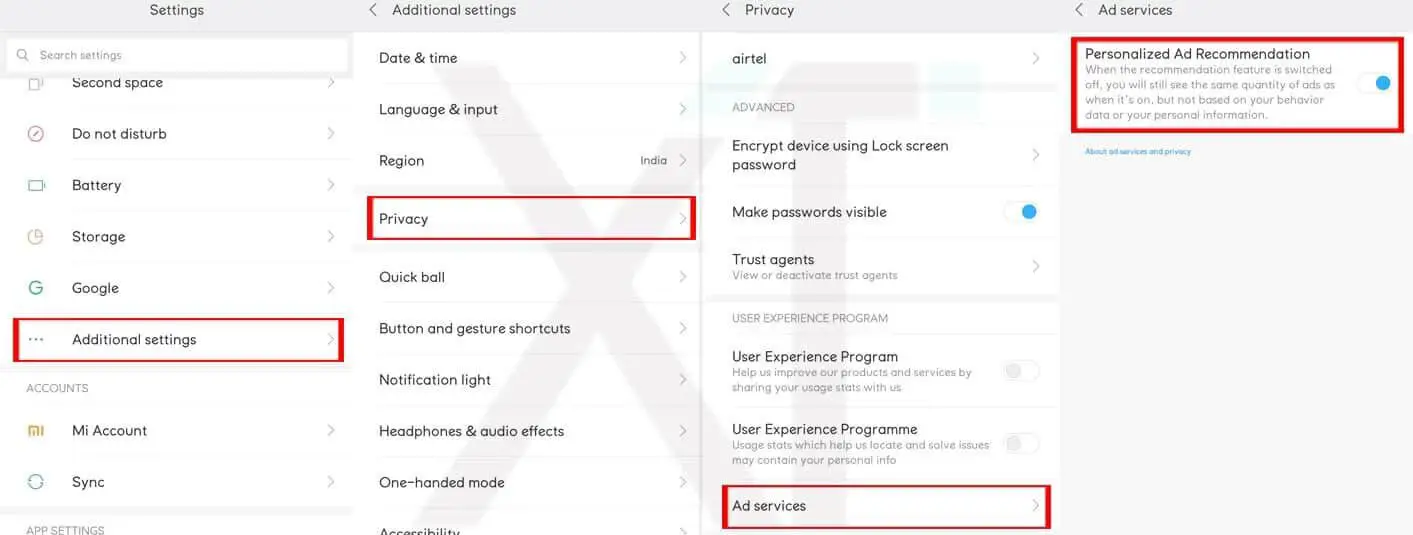
This action will halt systemwide data tracking for ads on Xiaomi MIUI devices
-
Open the device Settings menu
-
Scroll down to Additional settings >>> Privacy
-
Find and click on the Ad services row, further click to Disable Personalized ad recommendation.
Number three: Turn off the ads for Mi file manager
-
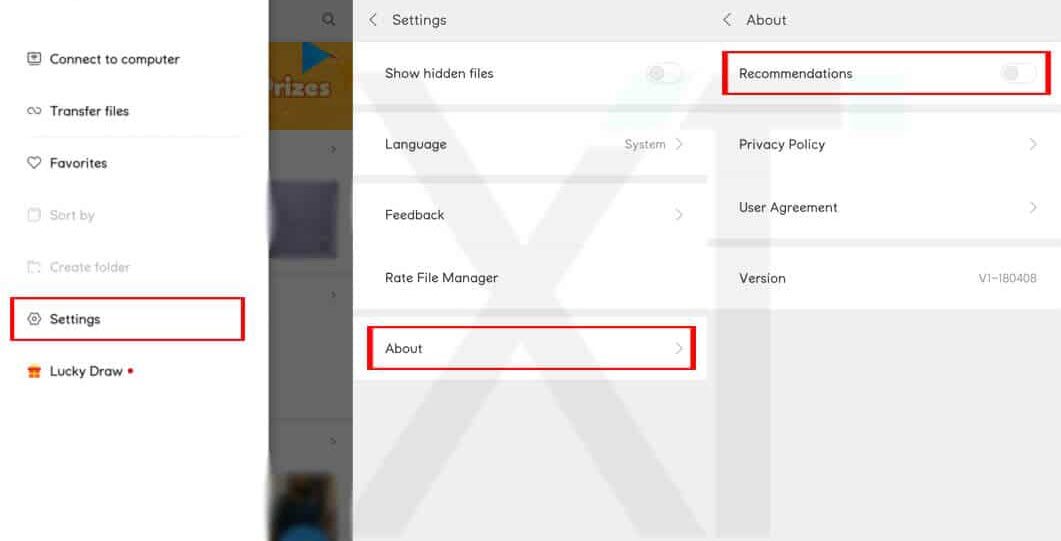
Launch the Mi File Explorer on your device
-
Click on the three dash symbols which are at the top corner of the app’s interface
-
Now, go to Settings >>> Recommendations and turn it off
By this step, you will disable add from showing when next you access the Mi file manager app.
Number four: Stop ads from showing on browser
-
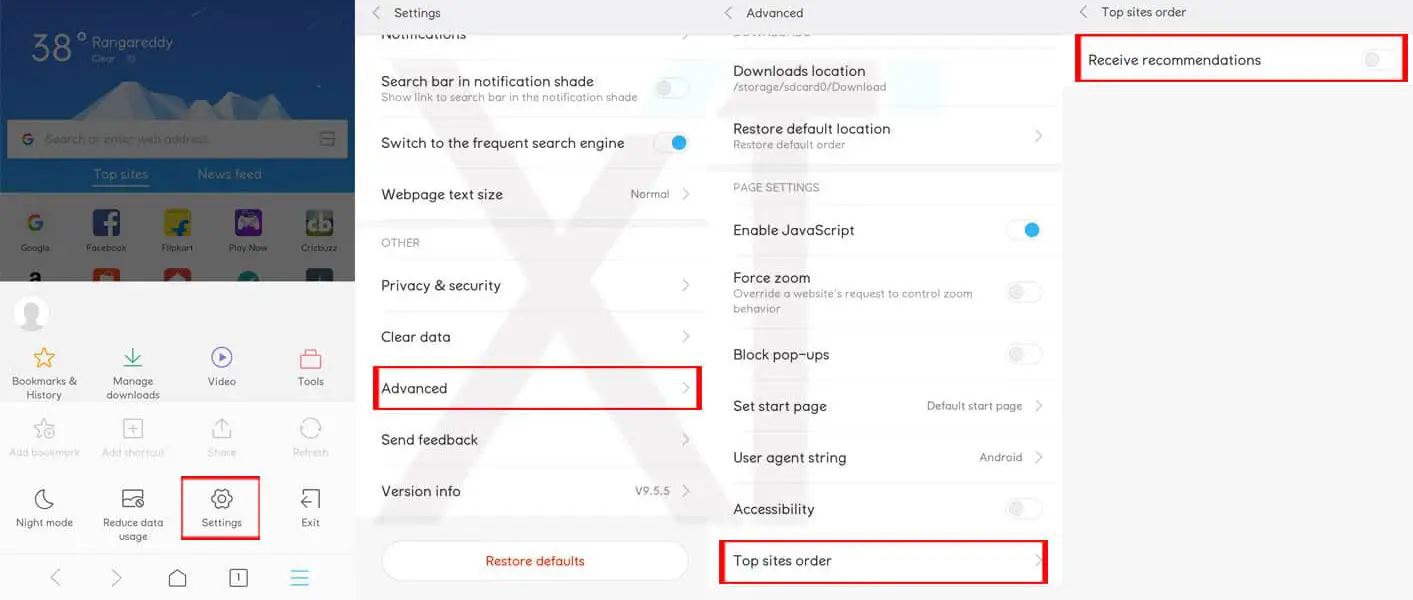
Launch the Mi Browser and click on the three vertical dashes (hamburger icon) which are on the bottom-right side of the app window
-
Tap on Settings.
-
Further, click on Notifications and turn it off
-
Go back to the settings main menu and select Advanced.
-
Click on Top sites order and disable Receive recommendations.
Number Five: how to remove cleaner ads
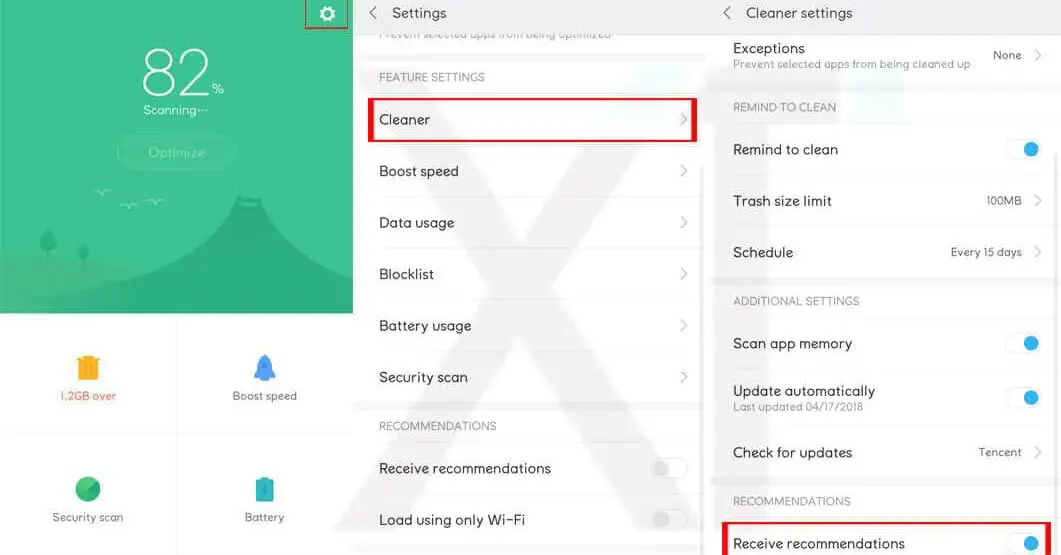
-
Open the MIUI Security app and go to the app’s settings menu
-
Click on Cleaner (available under “features”)
-
Disable “Receive recommendations.”
Number Six: Turn of ads from MIUI security app
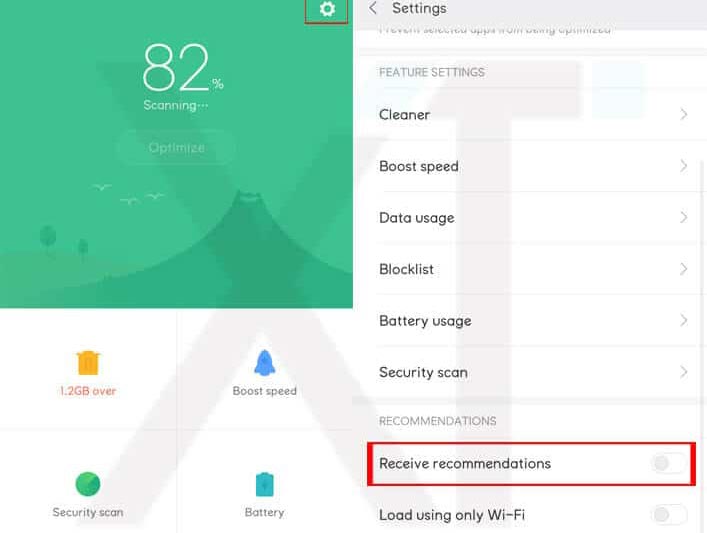
-
Launch the Mi Security App on your Xiaomi device
-
Click on the settings Gear Icon which is at the top corner.
-
Under recommendations, select to turn off Receive recommendations.
Number Seven: Disable ads on downloads app
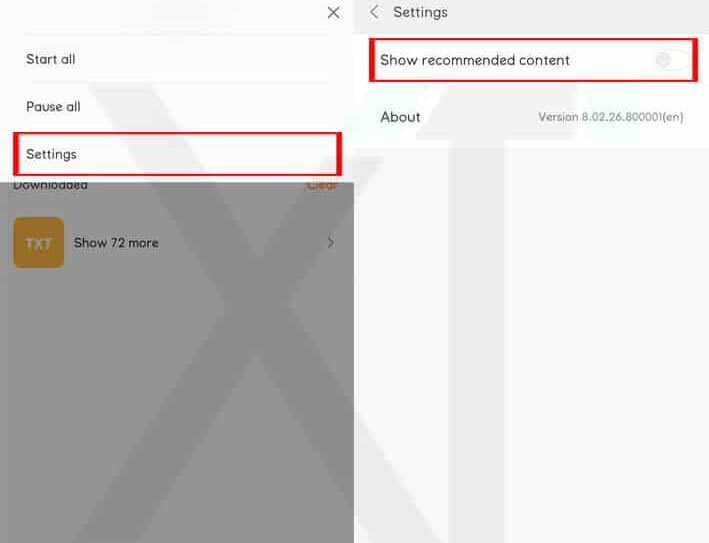
-
Open the MIUI Downloads app.
-
Tap on the three vertical dashes on the top-right edge
-
Select Settings
-
Turn off show recommended content.
-
Also, in the pop-up menu, click OK.
Number Eight: disable ads from Mi Music
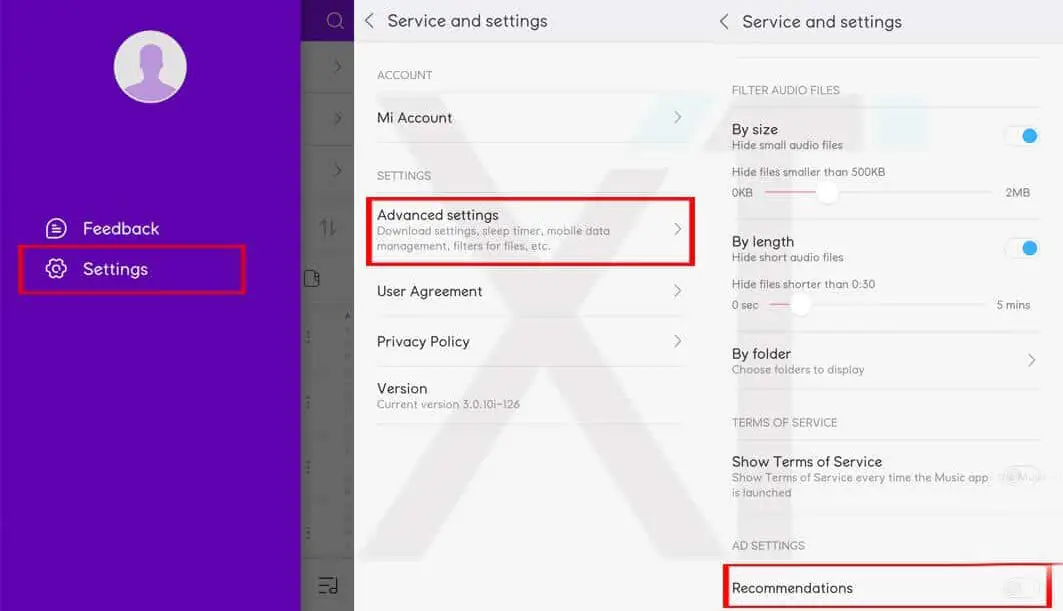
-
Launch the Mi Music app and go to the settings menu
-
Select Advanced settings and turn off recommendations
Number Nine: Turn off ads from MIUI themes
-
Open the MIUI Themes app
-
Visit the Profile menu and select Settings
-
Turn off “show advertisements.”
Number Ten: Disable ads on the Mi video app
-
Open the Mi Video app
-
Click on the three vertical dashes on the top-left
-
Tap Settings
-
Disable online recommendations and push messages.
What More?
The reason for the ads in my opinion- They manufacture cost-effective devices. In some way, they compensate for some loss or benefit from this AD stream. I Want to set this much? Yes. The problem with this OS is It treats every in Built apps as an Individual app. Yes, they are part of your OS. But Xiaomi designed it as like a Separate app. So, If you download an app in Play Store, you disable ads Individually, Like that, you have to Disable the ads in each app.

Selva Ganesh is a Computer Science Engineer, Android Developer, and Tech Enthusiast. As the Chief Editor of this blog, he brings over 10 years of experience in Android development and professional blogging. He has completed multiple courses under the Google News Initiative, enhancing his expertise in digital journalism and content accuracy. Selva also manages Android Infotech, a globally recognized platform known for its practical, solution-focused articles that help users resolve Android-related issues.