
WhatsApp chat app becomes a must-have on your mobile. Everyone using this app as a universal global chat app. Even if there are plenty of other alternatives available, People have WhatsApp as a must-have an app on their mobile. We didn’t know a lot of features that are available in this app. When we want to delete the media files from a particular/individual chat, we scroll over the conversation and delete the media files we see. But, It takes a long time if the conversation is long. WhatsApp has the in-built feature to remove particular type files within the chat. Follow the below-mentioned steps to delete the files. You don’t need to install any third-party apps or go through your file manager. The following method will work on both Android and iPhones WhatsApp.
Remove Media Files (Photos and Videos) from a Particular WhatsApp Chat or Group Conversation on Android Mobiles and iPhone
The following method will remove media files within the one WhatsApp conversation. You can also remove the Group chat files. You can not only delete photos and videos. We can remove the following data within a single contact chat.
Deletable File types in a WhatsApp chat
You can delete the following type of files within Particular chat and Group chat.

- Text Messages
- Contacts
- Locations
- Photos
- Stickers
- Gifs
- Videos
- Audio Messages
- Documents
Steps on Android Mobiles
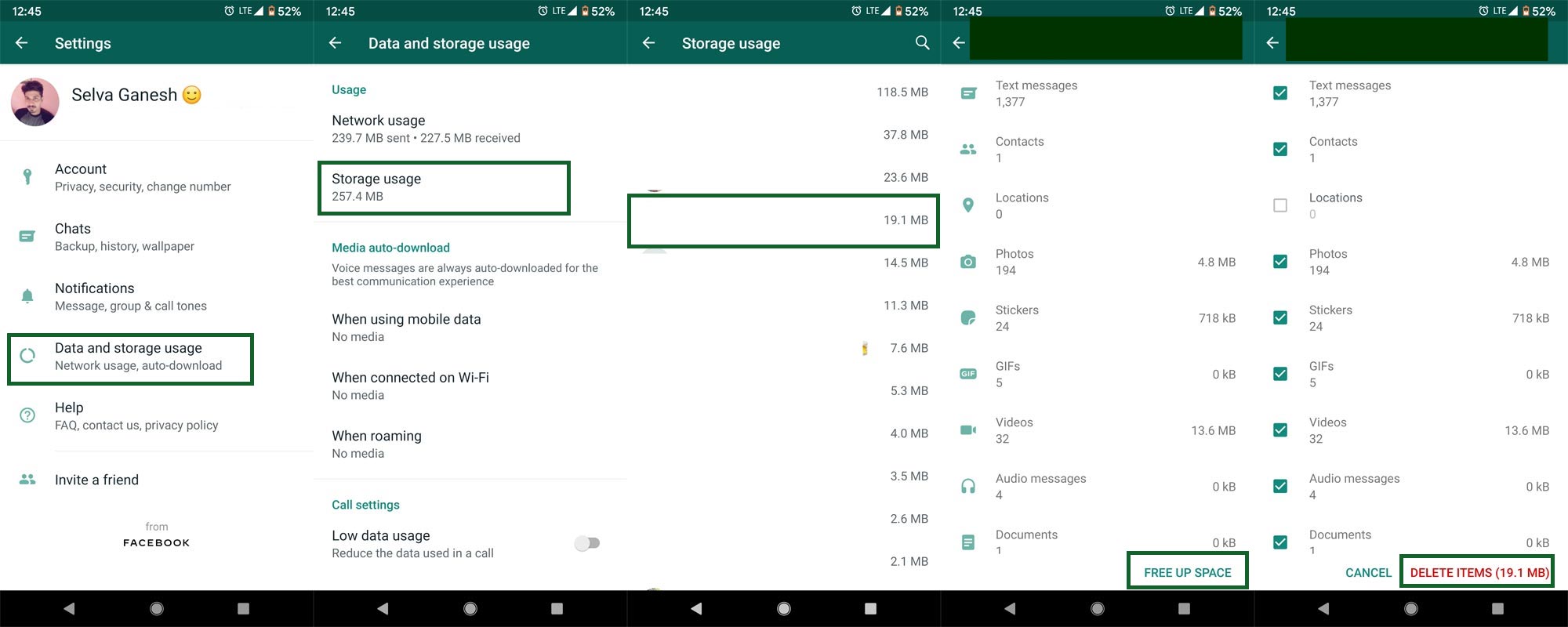
- Open your WhatsApp app. Select the three-dot icon. You will get the menu.
- Select Settings in the menu. In the settings, “Select Data, and storage usage.”
- You will get options like Network usage and Storage usage.
- Select “Storage usage.” It will open the individual chat data usage from high to low in size. You can also manually search the particular chat.
- You should select the chat that you want to delete the media or another type of file.
- After selecting the chat, you will get the type of files you shared with your WhatsApp contact.
- Select “FREE UP SPACE” at the end of the details.
- When you select the free up space option, It will allow you to select multiple files that can file excluding text messages, or you can delete only photos and videos.
- After confirming your types, select “Delete Items.” WhatsApp will ask you to confirm the selection. Select “Clear Items.” That’s all. Now you deleted media files from the particular conversation.
Steps on the iPhone
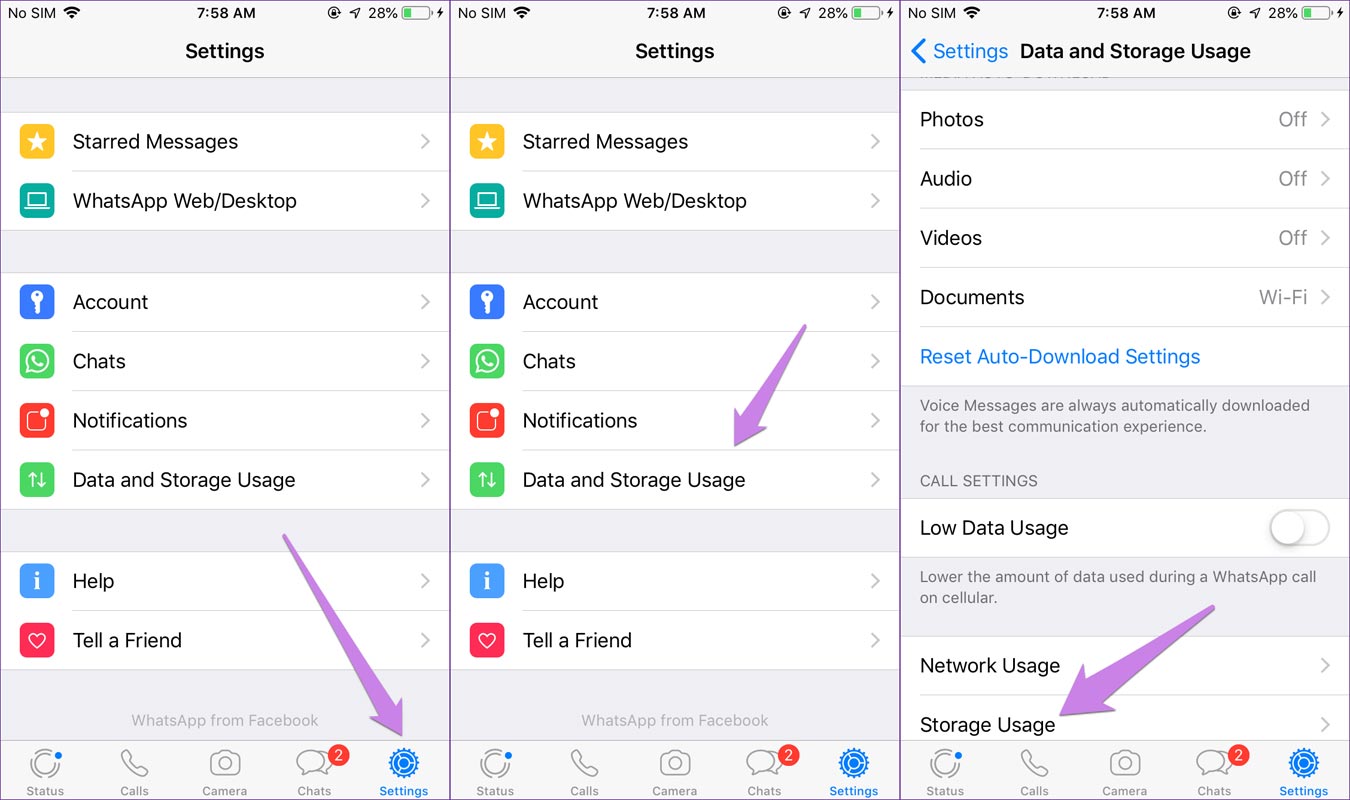
- Open your WhatsApp app. Select the three-dot icon. You will get the menu.
- Select Settings in the menu. In the settings, “Select Data, and storage usage.”
- You will get options like Network usage and Storage usage.
- Select “Storage usage.” It will open the individual chat data usage from high to low in size. You can also manually search the particular chat.
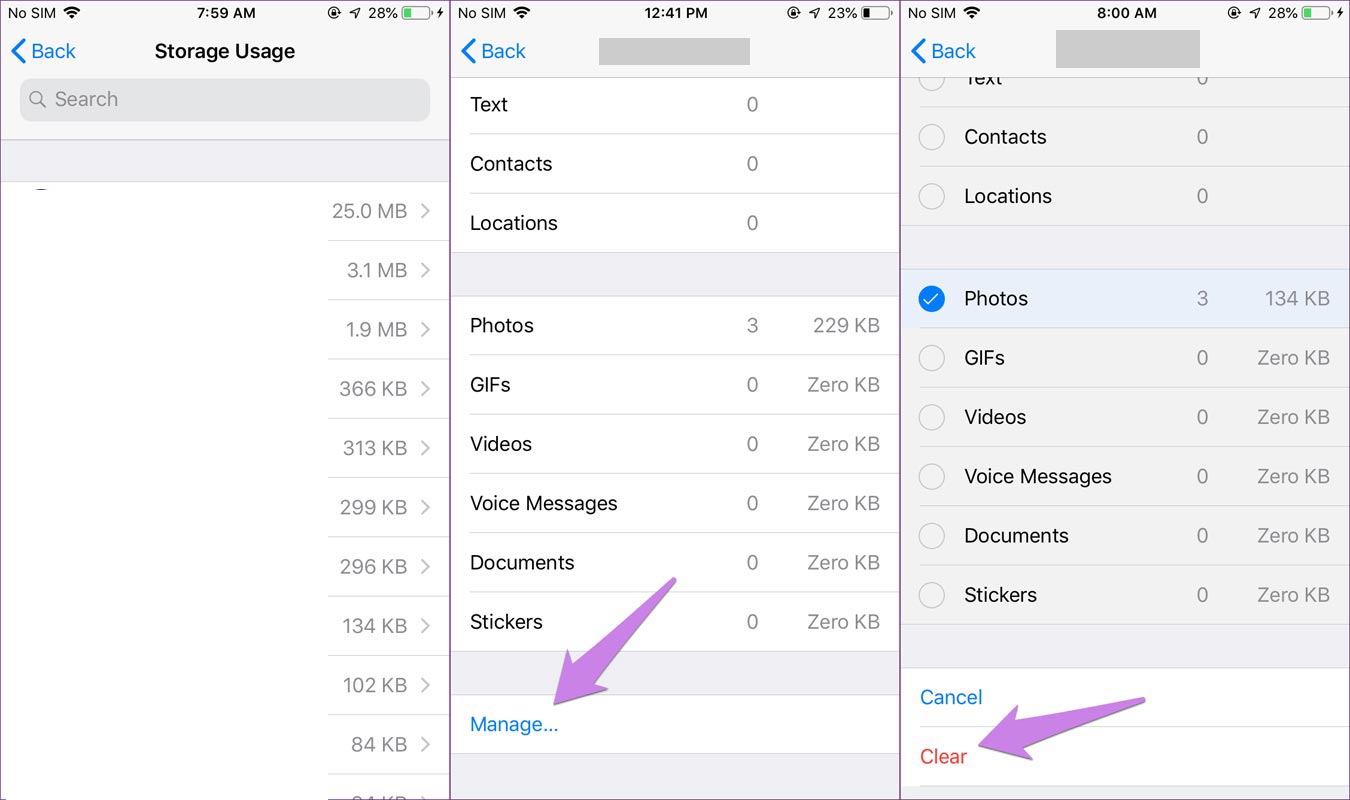
- You should select the chat that you want to delete the media or another type of file.
- After selecting the chat, you will get the type of files you shared with your WhatsApp contact.
- Select “Manage” at the end of the details.
- When you select the free up space option, It will allow you to select multiple files that can file excluding text messages, or you can delete only photos and videos.
- After confirming your types, select “Clear.” WhatsApp will ask you to confirm the selection. Select “Clear Items.” That’s all. Now you deleted media files from the particular conversation.
Wrap Up
Official apps are slowly adopting third party app features. When the official apps don’t give some features, Other app developers utilize those opportunities. It is ok to use hard free apps. But, When you download the apps other than the Play Store to use those features, Your mobile may get harm. As the deletion of particular chat media files, If WhatsApp allows other features like WhatsApp status download, it is undoubtedly useful for us. WhatsApp is improving a lot of features day by day like an end to end encryption, Cloud Backup to move your chats when you purchase a new mobile. So, there are on the right path. What features you need in WhatsApp that are available in other Chat apps? Comment below.

Selva Ganesh is a Computer Science Engineer, Android Developer, and Tech Enthusiast. As the Chief Editor of this blog, he brings over 10 years of experience in Android development and professional blogging. He has completed multiple courses under the Google News Initiative, enhancing his expertise in digital journalism and content accuracy. Selva also manages Android Infotech, a globally recognized platform known for its practical, solution-focused articles that help users resolve Android-related issues.