
YouTube Background Playback is a highly beneficial feature, allowing users to sustain video playback while engaging with other applications or when the screen is turned off. It enhances multitasking and facilitates a seamless viewing experience. For Samsung device users, enabling this feature without incurring additional costs is pivotal. Users can unlock this functionality by implementing specific settings or utilizing third-party apps and making the most of their YouTube usage. Whether listening to music, podcasts, or educational content, the freedom to keep the audio or video running in the background enhances productivity and convenience. This article provides a step-by-step guide, empowering Samsung users to optimize their YouTube usage and enjoy uninterrupted playback while utilizing other device functionalities.
Introduction to YouTube Background Playback on Samsung Devices
YouTube Background Playback is a sought-after feature that allows users to overlay an always-on display while keeping the active app running in the background. This is useful for tasks that might take a while, preserving battery life during prolonged activities.
Benefits of YouTube Background Playback
- This functionality allows users to play YouTube videos while the screen is in sleep mode.
- This can be especially beneficial for multitasking or enjoying audio content without keeping the YouTube app in the foreground.
Installing Good Guardians from the Galaxy Store
- Start by installing “Good Guardians” from the Galaxy Store to initiate this process.
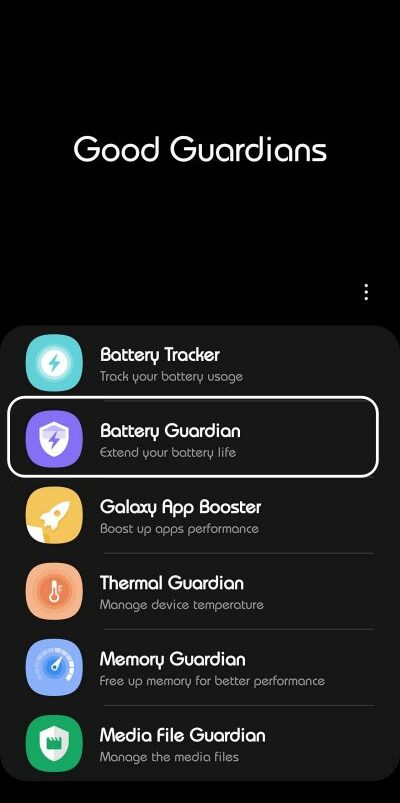

- This app will help facilitate the background playback feature.
Downloading the Battery Guardian Module
Next, download the “Battery Guardian” module, an essential component for enabling YouTube Background Playback.
Activating the Screen Curtain Feature
- Locate and activate the “Screen Curtain” feature within the Battery Guardian module.
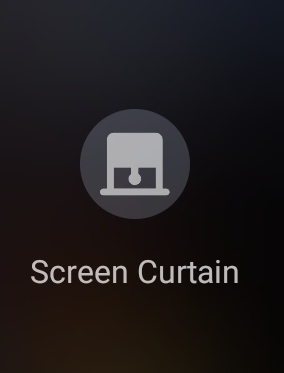
- This will initiate the always-on display with essential information while allowing YouTube videos to play in the background.
Enabling YouTube Background Playback
- You can easily enable YouTube Background Playback via the quick setting tile or the Power + Volume Up key combination.
- Once activated, the YouTube video will continue playing behind the “curtain.”
Exiting the YouTube Background Playback Mode
- Press the Power key or double-tap on your screen to exit the YouTube Background Playback mode and revert to the standard display.
- This will “raise the curtain” and return to the regular viewing mode.
FAQs
Can I access lock screen controls with YouTube Background Playback?
Unfortunately, no. YouTube Background Playback does not provide lock screen controls or picture-in-picture features.
Are there any downsides to YouTube Background Playback?
While it offers continuous playback with the screen off, you won’t have access to all Premium features.
Can I customize the display in Screen Curtain mode?
Currently, there is no customization option for the display in Screen Curtain mode.
Does enabling YouTube Background Playback affect device performance?
Enabling this feature does not significantly impact device performance or battery life.
Is YouTube Background Playback available on all Samsung devices?
Yes, as long as you have the necessary modules installed, you can enable this feature on most Samsung devices.
Wrap Up
YouTube Background Playback is a remarkable feature, allowing users to maintain video or audio playback while concurrently engaging with other applications or when the device’s screen is off. This functionality is particularly advantageous for Samsung device users, as it promotes multitasking efficiency and optimizes battery usage. Users can effortlessly activate this feature and customize their YouTube experience by following the steps outlined in this article.
Whether you want to listen to music, follow podcasts, or keep up with educational content, having the capability to continue playback in the background enhances productivity and convenience. It provides the freedom to navigate other apps or conserve battery power without interrupting your YouTube enjoyment. The step-by-step guide empowers Samsung users to unlock this potential, ensuring a seamless and uninterrupted viewing or listening experience tailored to their preferences and needs.

Selva Ganesh is a Computer Science Engineer, Android Developer, and Tech Enthusiast. As the Chief Editor of this blog, he brings over 10 years of experience in Android development and professional blogging. He has completed multiple courses under the Google News Initiative, enhancing his expertise in digital journalism and content accuracy. Selva also manages Android Infotech, a globally recognized platform known for its practical, solution-focused articles that help users resolve Android-related issues.