
In this guide, we delve into the issue of the 80% Charging Limit not functioning correctly on your iPhone 15/Plus/Pro/Max. Apple’s iPhones have long incorporated the Optimized Charging function, strategically delaying charging beyond 80% in specific scenarios to preserve the battery’s longevity. However, with the iPhone 15 series, a novel feature known as the 80% Limit intervenes, halting the charging process once the battery level hits 80%. Charging only resumes as the battery depletes and again stops at 80%. This article presents effective troubleshooting methodologies to rectify the malfunction associated with the 80% Charging Limit on your iPhone 15/Plus/Pro/Max, ensuring your device operates optimally and upholds its intended functionality.
iPhone 15 Charging Limit Issue
The iPhone 15 series introduces a new feature, 80% Limit, which restricts charging to 80% battery capacity. However, some users encounter issues where this feature does not work as expected, leading to frustration and inconvenience.
Understanding the 80% Charging Limit Feature
Before troubleshooting, let’s comprehend the 80% Charging Limit feature. This feature aims to prolong the battery life by reducing your iPhone’s duration at full charge. It achieves this by stopping the charging process at 80%, resuming only when the battery level drops.

Disabling and Re-enabling 80% Charging
The initial step in troubleshooting involves disabling and then re-enabling the 80% Charging feature to refresh its settings and potentially fix the issue.
- Head to Settings > Battery > Battery Health & Charging.
- Navigate to Charging Optimization and select None.
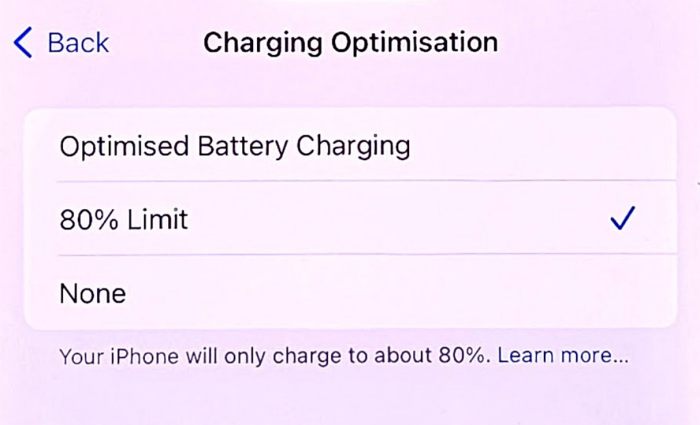
- Wait for a few seconds and then choose 80% Charging.
- Check if 80% Charging now functions correctly on your iPhone 15 Pro.
Enabling Location Services
Ensuring Location Services are enabled is crucial for adequately working the 80% Charging feature. Here’s how you can do it:
- Go to Settings > Privacy & Security > Location Services.
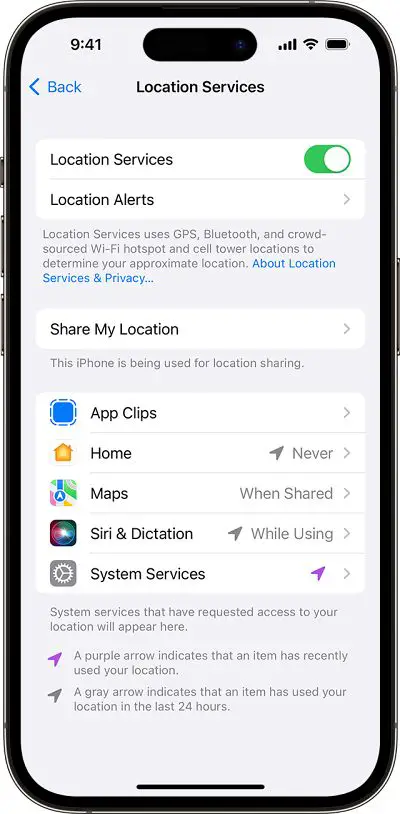
- Enable the toggle next to Location Services.
- Check if this resolves the 80% Charging issue on your iPhone 15 Pro.
Enabling System Customization
Enabling System Customization is another prerequisite for the 80% Charging feature to work correctly. Follow these steps to enable it:
- Head over to Settings > Privacy & Security > Location Services.
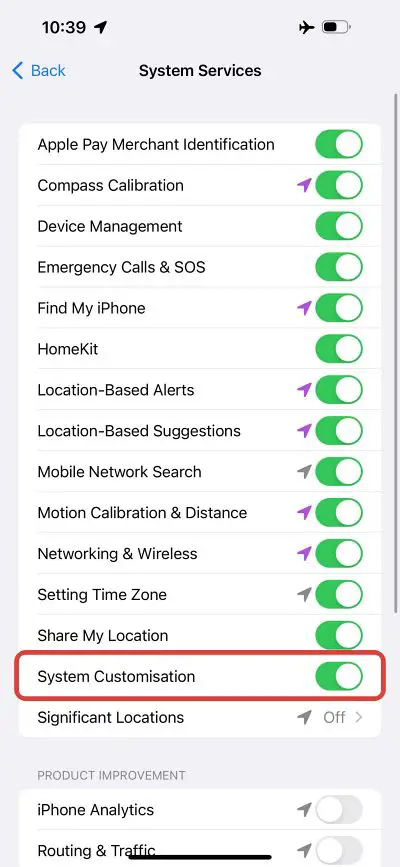
- Go to System Services and turn on System Customization.
- Check if 80% Charging is now working on your iPhone 15 Pro.
Enabling Significant Locations
Enabling Significant Locations is essential for proper 80% Charging functionality. Follow these steps to enable it:
- Go to Settings > Privacy & Security > Location Services.
- Navigate to System Services > Significant Locations.
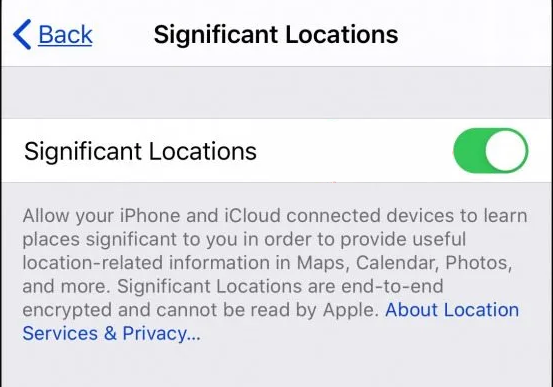
- Enable the toggle next to Significant Locations.
- Check if this resolves the underlying charging issue.
FAQs
Is the 80% Charging Limit feature exclusive to iPhone 15 series?
The 80% Charging Limit feature was introduced with the iPhone 15 series and unavailable in earlier iPhone models.
Does the 80% Charging Limit affect the overall battery lifespan?
The 80% Charging Limit is designed to extend the battery lifespan by reducing the time the iPhone stays at a full charge, thus positively impacting the overall battery health.
Can I turn off the 80% Charging Limit feature if I don’t want it?
You can turn off the 80% Charging Limit feature by following the troubleshooting steps, allowing your iPhone to charge beyond 80% if desired.
Will enabling Significant Locations affect my privacy?
Enabling Significant Locations does not compromise your privacy; it allows your iPhone to optimize charging and enhance user experience.
Are these troubleshooting methods applicable to all iPhone 15 models (15/Plus/Pro/Max)?
Yes, the troubleshooting methods outlined in this guide apply to all iPhone 15 models, including iPhone 15, 15 Plus, 15 Pro, and 15 Max.
Wrap Up
Addressing the malfunctioning 80% Charging Limit on your iPhone 15/Plus/Pro/Max is paramount for ensuring a smooth user experience. When this feature fails to function correctly, it can disrupt your charging routine and impact your device’s usability. The troubleshooting methods in this guide offer practical solutions to rectify this issue, allowing your iPhone to charge up to 80% optimally and maintain a longer battery lifespan.
By following these steps and implementing the recommended fixes, you overcome the charging limitation and optimize your iPhone’s battery performance, ensuring it serves you efficiently throughout the day. Resolving the 80% Charging Limit dysfunction is crucial in maximizing your iPhone’s capabilities and enhancing its overall functionality, providing a seamless and reliable user experience.

Selva Ganesh is a Computer Science Engineer, Android Developer, and Tech Enthusiast. As the Chief Editor of this blog, he brings over 10 years of experience in Android development and professional blogging. He has completed multiple courses under the Google News Initiative, enhancing his expertise in digital journalism and content accuracy. Selva also manages Android Infotech, a globally recognized platform known for its practical, solution-focused articles that help users resolve Android-related issues.