
The Live Captions feature is a recent addition by Google. However, it is currently limited to English and a few other languages and is only available on specific devices. For those who require Live Captions in languages other than the limited available options, this can be a source of frustration. But there’s good news! Google Chrome can generate Live Captions in more than 60 languages by following simple steps. With this method, you can expand your knowledge and understanding by comprehending content in various languages. You can even translate these captions in real time to better understand the content. This feature is especially advantageous for people learning a new language or those who want to access information in a language they are not yet proficient in. Using this feature, you can expand your knowledge and better comprehend the world.
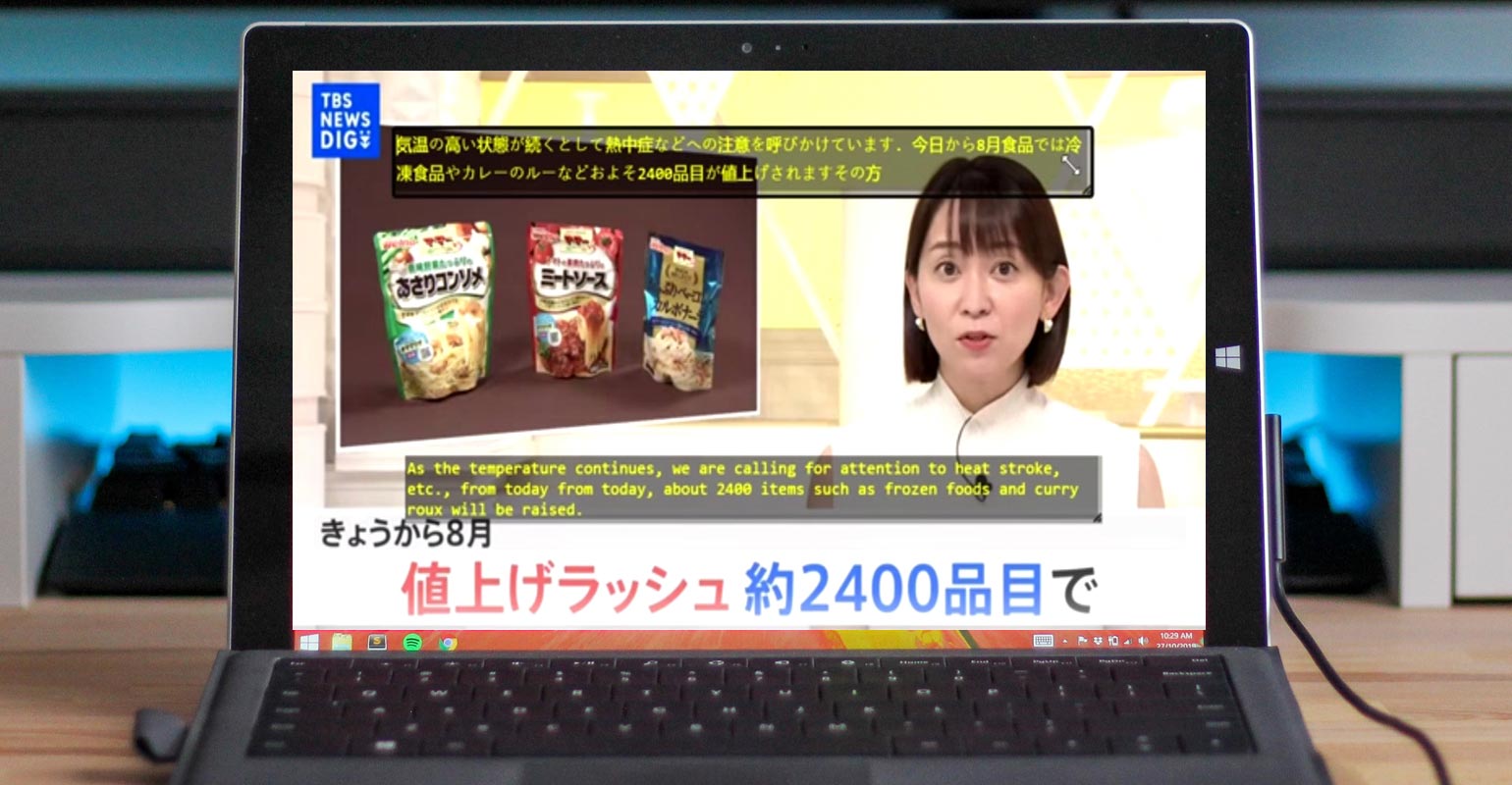
Why do You need Live Captions for other languages in Chrome?
Live Captions in Google Chrome allow users to watch videos in different languages and understand them without language barriers. This is an excellent tool for people who want to learn new languages or explore content in languages other than their own. Additionally, it’s a perfect way to break down language barriers and enable communication and understanding across different cultures and societies. By having Live Captions available in more than 60 languages, Chrome users can now expand their knowledge and experience by being able to comprehend the content in different languages. It’s essential for anyone who wants to learn, communicate and explore the world beyond their language.
Install CRX Translate and CORS Unblock in Google Chrome
To start, you need to install two extensions in Google Chrome. The first extension is CRX Translate, which can recognize any live audio/video streaming and translate it for free. You can download the .zip file from Github or use a mirror to install this extension. The second extension you need to install is CORS Unblock to avoid the default CORS blocking policy of Chrome and Edge. You can easily find and install this extension from the Chrome Store. Once both extensions are installed, pin them in Chrome for easy access.

- Download CRX Translate.zip/ Mirror. Unzip the file and Drop the folder in Google Chrome> Extensions.
- Now Install CORS Unblock in Chrome Webstore.
Install VB Audio Cable Driver
Next, you need to give the audio of your Windows device mic to your system. You can do this using VB Cable Driver, which allows you to input the video audio without loud sound or even when in mute mode.
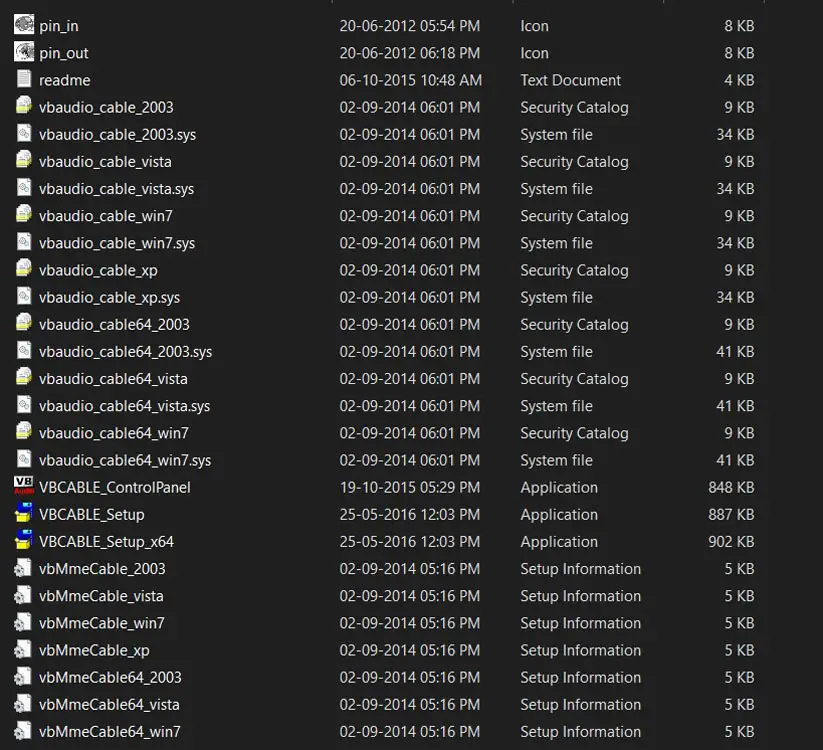
- To install VB Cable Driver, Download it from the official site. Extract and install it on your PC. Choose 64 Bit when you have Windows 64 Bit Device. You can check this in My PC> Properties.
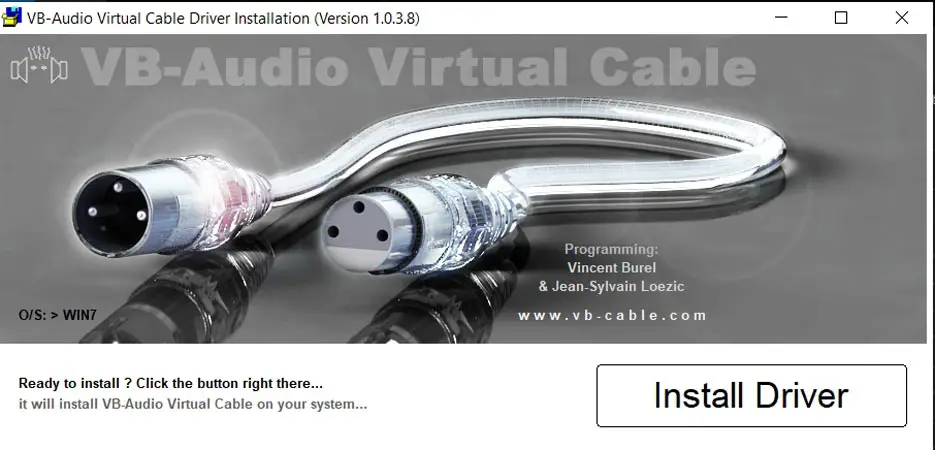
- After installation, change the default devices in playback and mic in the control panel>sounds.
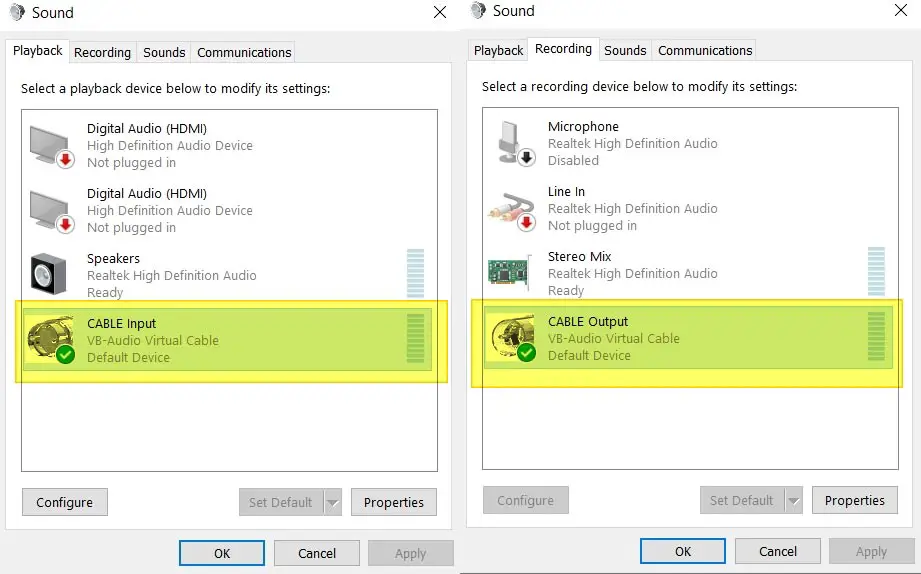
- Choose VB Audio Codec as playback and mic (Output and Input).
- For Bluetooth headphones, you can hear sound along with Live Captions.
- However, follow the instructions below if you want to use analog headphones.
Audio Didn’t Work
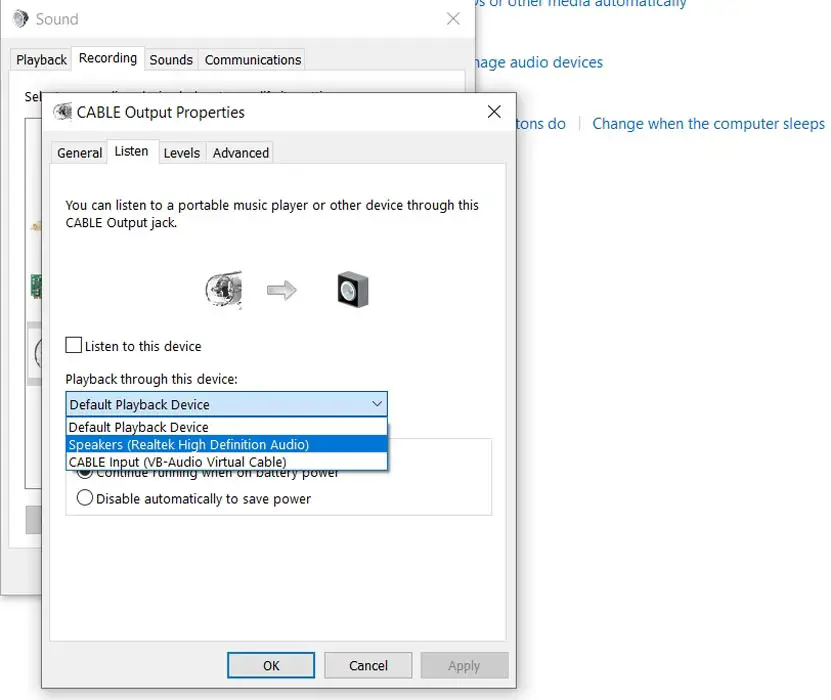
In case you are unable to hear the audio, go to Control Panel>Sounds>Recording>Select Default CB Audio Codec Device> Properties> Listen to this device> Change into Realtek or Windows Audio.
How to Generate 60 Languages Live Captions in Google Chrome Windows?
After setting everything up as instructed above, you can generate Live Captions in over 60 languages by following these simple steps:
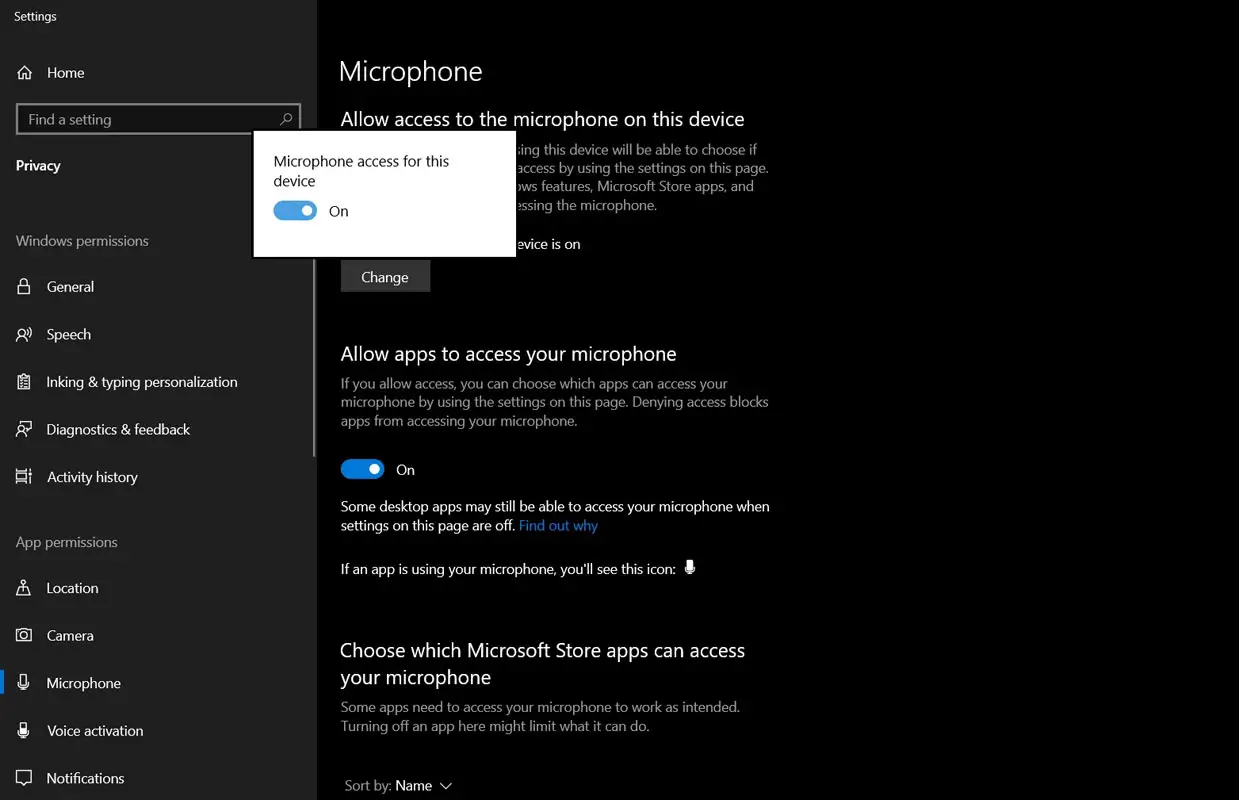
- Enable MIC if you have disabled it in Privacy Settings.
- Go to Google Chrome and play any video in any language. This method will work in All Chrome and Chromium-based browsers (Microsoft Edge, Opera, Brave, and Vivaldi).
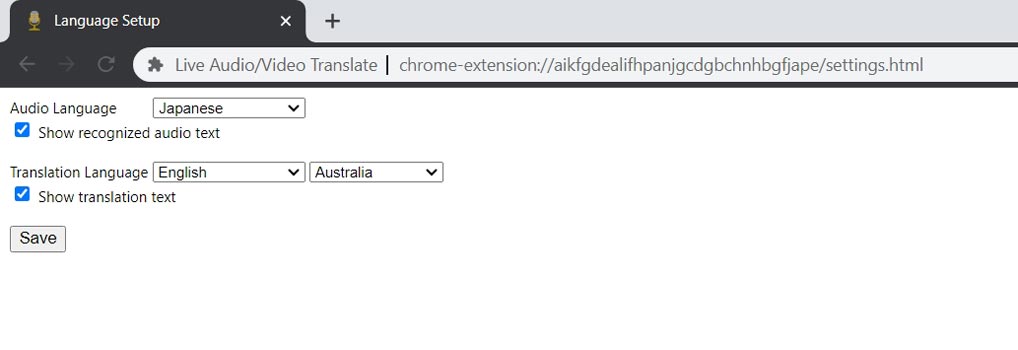
- Right-click on the Mic symbol of the CRX Translate Extension> Options> Choose Audio Language and Enable Show Recognized Audio Text.
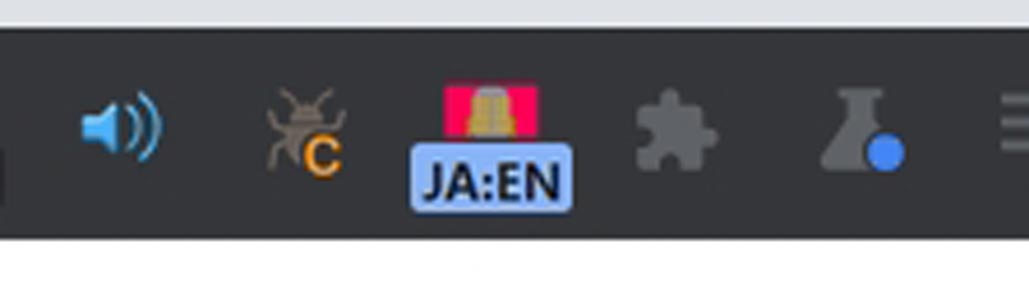
- Now click on the mic symbol and CORS Extension to enable both.
- Live Captions will appear for your video.

- If you want to translate them in real time, click on CRX Translate Extension> Options> Choose Translation Language and Enable Show Translation Text.
With the help of this method, you can understand content in various languages, which will help enhance your knowledge.

FAQs
Is it possible to generate Live Captions in languages not supported by Google?
Using the above method, Google Chrome can develop Live Captions in more than 60 languages.
Is it limited to Chrome Browser?
No. This method will work in All Chrome and Chromium-based browsers (Microsoft Edge, Opera, Brave, and Vivaldi).
Do I need any special equipment to generate Live Captions?
No, you do not need any special equipment. All you need is a Windows device and a few extensions.
Can I translate Live Captions in real time?
You can translate Live Captions in real time using CRX Translate Extension.
Is this method only available in Google Chrome?
Yes, this method is only available in Google Chrome.
Is this method safe to use?
This method is secure if you install the extensions from trusted sources.
Wrap Up
Thanks to the CRX Translate and CORS Unblock extensions and VB Cable Driver, it’s now possible to generate Live Captions in more than 60 languages. With Live Captions, you can watch videos in various languages and understand them without language barriers. This is an excellent tool for learning and expanding your knowledge as it allows you to comprehend content in languages other than your own. Following the steps mentioned earlier, you can easily set up Live Captions and enjoy videos in multiple languages. It’s an efficient and effective way to improve your language skills and broaden your understanding of different cultures and societies.

Selva Ganesh is a Computer Science Engineer, Android Developer, and Tech Enthusiast. As the Chief Editor of this blog, he brings over 10 years of experience in Android development and professional blogging. He has completed multiple courses under the Google News Initiative, enhancing his expertise in digital journalism and content accuracy. Selva also manages Android Infotech, a globally recognized platform known for its practical, solution-focused articles that help users resolve Android-related issues.