
Android Pie 9.0 version comes with Special feature Called “Gesture.” If you already used are using iPhone, you know this. If you have upgraded to use Android Pie 9.0 on your OnePlus, Samsung, or other Android smartphones, you need to activate gestures and start making use of them to operate your device quickly. Android Pie launched with quite a lot of goodies for all Android devices that run on the OS version. However, not all these goodies are activated by default. You have to enable most of them before you can use them manually. For this article, we are focusing on how to activate and use the various gestures available in Android Pie 9.0 with our primary focus limited to Pixel, Samsung, Moto and OnePlus smartphones.
But, what exactly are these gestures?
They eliminate the need to use the default navigation bar (home, recent, and back buttons) situated at the bottom of your device screen; thus, allowing you to launch the app drawer, go back, or toggle active apps by merely running some gestures on your device screen. Well, not everyone will quickly get used to gestures, but, it is exciting and quite more comfortable. The virtual recent, home and back buttons on your screen will disappear, and then, you’ll enjoy a full-screen view. Even, you will love this more, when you split the screen to use two apps at the same time.
Activate Gestures on Google Pixel Devices
Compare with other manufacturers Google utilize these features less. Yep, We hope Android Q will get more features in Gestures.

Activate Steps
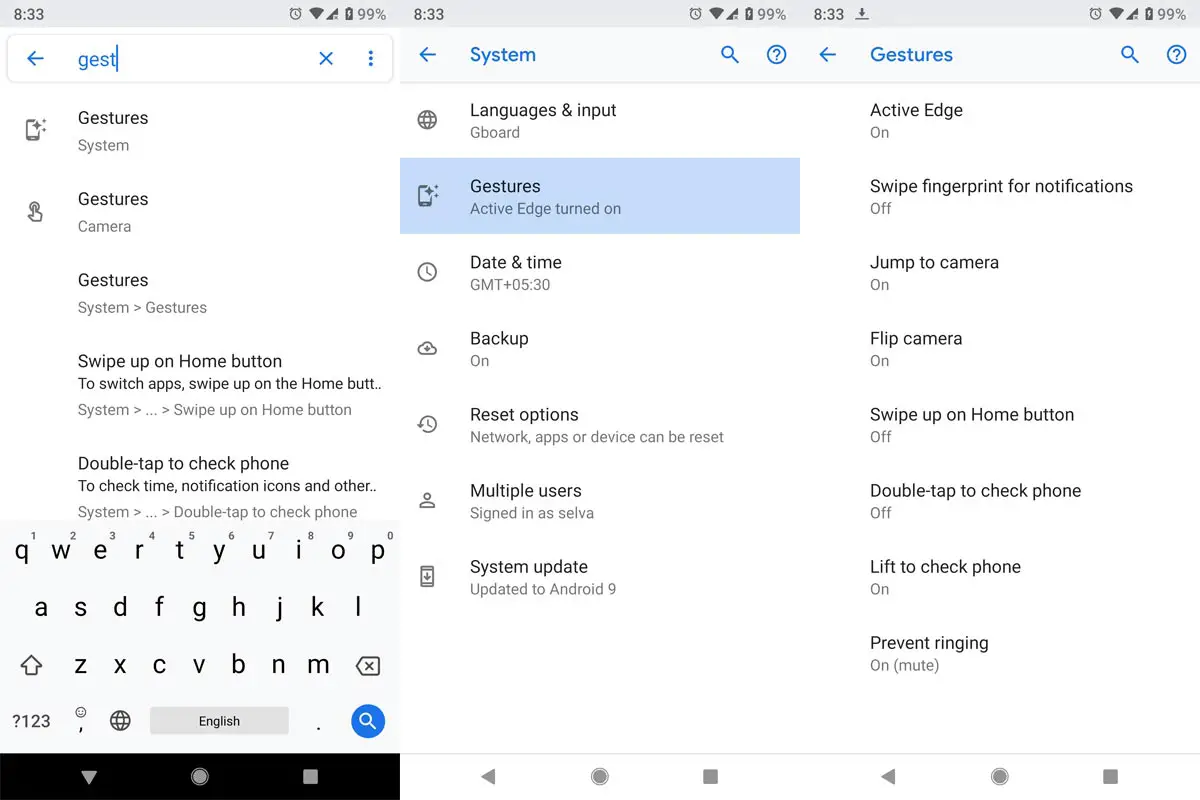
- Go to Settings >> Type “Gestures” in search >> Select Gestures >> Activate Options, based on your need.
Gestures Available in Pixel Devices
Checking Notifications
- Swipe fingerprint for notifications
- If your phone is unlocked, Instead of swiping down on the screen, you can scroll down in the Fingerprint sensor to check notifications.
Double-tap to check the phone
- You already know this, you can double tap in your locked phone, to check notifications.
Lift to check the phone
- If your phone is locked, you can review the notifications in Always on the Display screen, By lifting your phone from the surface.
Apps
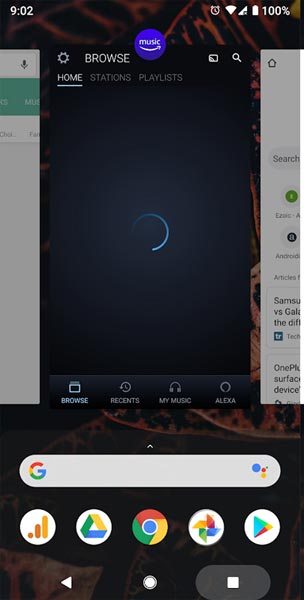
- You can Swipe up to Access last closed the app.
- If you double tap on the task button, you can switch between Last closed app, and before this one.
Camera
- Shake your phone right and left to Switch between Front and rear cameras.
Squeeze Function
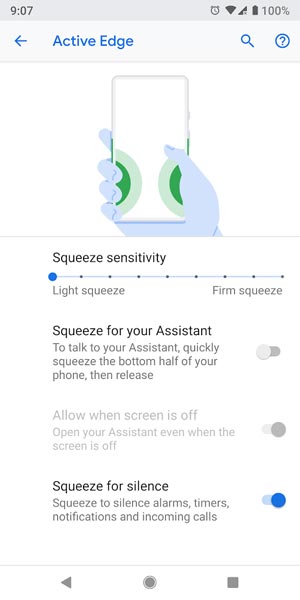
- You can use this feature to Silent your phone. When you get a call, or you can use it to launch Google Assistant or Both. If you are in a normal stage without getting called, It can trigger Google assistant. If you don’t know what GA can do, you can refer to Google Assistant Tips.
Flip to shhh (Google Pixel 3 and above)
- When you get a call, flip your phone Display to the surface to Mute call sound.
More Gestures
- You can refer more gestures in Google Official Page.
Activate and use gestures on Samsung Galaxy devices running on One UI/Android Pie 9.0
There are quite many gestures supported by Samsung smartphones which run in the specified Android OS version. These gestures help you to perform a lot of things quickly and tend to improve your experience. If you’re looking to maximize the features of your flagship Samsung Galaxy on One UI, here is how to activate gestures on the device.
How to activate- Steps
This is quite very simple; toggle a button on your settings menu, and you are good to go.
-
On your device app drawer, locate the settings app icon and launch the settings menu
-
Select the “Display” option and click on it
-
Scroll down to the row where you’ll see “Navigation Bar” and also click on it
-
Now, click on the radio icon and switch on “Gestures.”
-
Activate “Gesture” hints; they will appear at the bottom of your device screen in place of virtual buttons. However, this feature is optional; you can choose not to activate it. Nevertheless, it is quite helpful if you think you’re not familiar with gestures
What gestures are available on Samsung devices?
When you activate gestures on Samsung devices, here are the actions you can run.
Note: a single virtual button will be available on your screen (at the bottom where you had the home button). This button is what you’ll use to perform the following gestures.
Tap on the button
- When you tap your finger on this button, you’ll instantly get back to your home screen.
Long press the button
- This action will activate Google Assistant
Quickly swipe your finger on the button in upward movement
- If you swipe up on this button, you will access your recent; thus, you can toggle between active apps.
Long swipe up or swipe up twice
- This action will open the app drawer. By long swipe up, you have to kind of slowly swipe up the pill button because a quick swipe up will view your recent.
Flick right
- When you perform this gesture, you’ll get back to the app you used last
Swipe right
- You will get to view all the opened apps
Swipe left
- Nothing happens 🙂
Back button
- Still performs the function of taking you back to the previous page
Bixby Key
- You can Also Remap Bixby key to other actions.
More gestures
You can close an app by swiping your finger up on the app’s window. Also, to run two apps at the same time in split mode; click and hold on an app’s icon to activate a menu with several options, choose the Split screen option and the app automatically goes to the top, launch another app, and it will automatically appear at the bottom of the screen. You can deactivate the split screen at any time by dragging down the demarcation line at the middle of the apps.
Activate and use gestures on OnePlus devices running on Oxygen OS/Android Pie 9.0
Even before the feature was available on Android Pie 9.0, OnePlus has provided its users with quite some navigation gestures. If you are using a OnePlus smartphone, you can choose between using the Oxygen OS gestures (OnePlus owned gestures) and Google’s Android Pie 9.0 gestures. Users have claimed that the Oxygen OS gestures are better than what you will get from Google on Android 9.0.
Nevertheless, to activate gestures on OnePlus devices running on the specified OS is similar to how you would do the same in other devices. Just get to the settings menu and enable the respective features.
How to activate gestures on OnePlus devices running on Android Pie 9.0
-
You need to launch the device settings menu from the app drawer
-
Look out for “Buttons & gestures” option, click on it
-
Toggle to activate the function, and that’s all
-
Once “gestures” is activated, the native three virtual buttons on your device screen will disappear, and only one full horizontal button will appear.
For OnePlus 6T users, they are allowed to configure the navigation system style they wish to use. OnePlus’s Oxygen OS gestures are friendlier to use. However, Android Pie 9.0 gestures are not severe, and you can get along with them within a short period.
What gestures are available on OnePlus devices?
The same gestures that are available on other Android devices running on Android 9.0 Pie are what you’ll get too. To this, you can re-read the different gestures available on Android Pie 9.0 and their functions, we have written the above. Additional to this If you swipe with three Fingers, you can take a Screenshot.
Gestures in Motorola Devices (Moto Actions)
In Motorola devices, they use these gestures features from the beginning, there are a lot of features available, and they called these gestures as Moto Actions.
Activate Moto Actions
- Open Official Moto App >> Moto Actions.
What Gestures are available in Motorola Devices
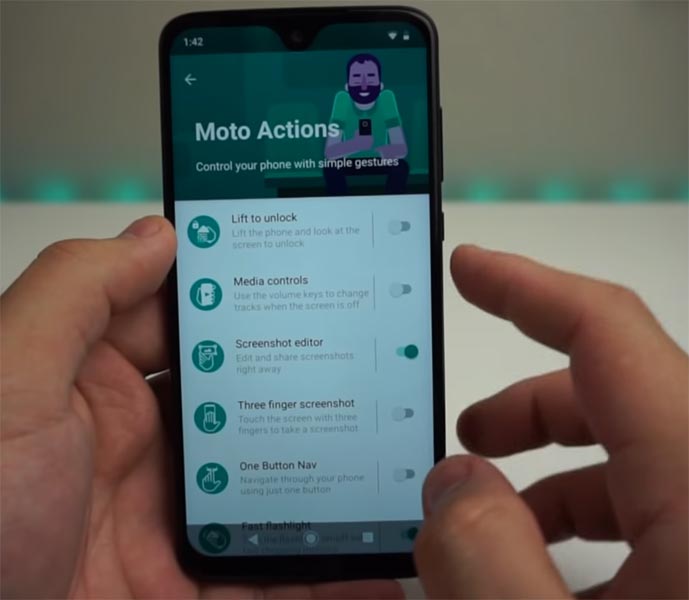
- There are similar Android Pie 9.0 Gestures are available, if you have an updated version. Additional to this Moto have the following features.
Media Controls
- You can use your Volume key to change track.
Three Finger Swipe
- You can take Screenshot by Swiping your display with three fingers.
Pickup to Silent
- If you pick your device from Surface, the mobile will silent the Call sound.
Flip for DND
- Instead of activating Do not Disturb in settings, you can flip your phone to the surface; the phone will Go to DND Until you flip back.
Others
- You can turn on your flashlight by making Chop like Gesture. Just flip Right and Left when your wrist in the Same Position.
What more?
Gestures allow you to get more screen real estate on your device and they are fun to use. Even, with gestures, Android devices now tend to be smarter and more enjoyable. These gestures work on all Android devices running on Android 9.0 irrespective of the brand. If we missed any Important gestures comment below.

Selva Ganesh is a Computer Science Engineer, Android Developer, and Tech Enthusiast. As the Chief Editor of this blog, he brings over 10 years of experience in Android development and professional blogging. He has completed multiple courses under the Google News Initiative, enhancing his expertise in digital journalism and content accuracy. Selva also manages Android Infotech, a globally recognized platform known for its practical, solution-focused articles that help users resolve Android-related issues.