
Samsung Galaxy Watch 4 and 5 have captivated users in the dynamic world of technology. Crafted by Samsung, these sleek wearables with an Android-based OS have found their place in the market, enabling direct engagement with Android apps, including WhatsApp. The era of merely receiving WhatsApp notifications on your watch is over. Thanks to an update, the Galaxy Watch lets you access past and present chats, even group conversations, directly from your wrist. This advancement signifies WhatsApp’s enhanced functionality on the Galaxy Watch. However, this feature remains in the beta phase, requiring users to become beta testers for early access. This heralds a transformative shift in wearable tech possibilities.
Step-by-Step Guide: Official Play Store Installation
Let’s dive into the steps required to install WhatsApp on your Galaxy Watch 4/5. And the best part? No complicated ADB Commands or sideloading is needed.
Download and Install WhatsApp Beta on Your Device
First, ensure you’re a beta tester and have your device’s latest WhatsApp beta version downloaded from the Play Store.

Install WhatsApp on Your Watch via the Play Store
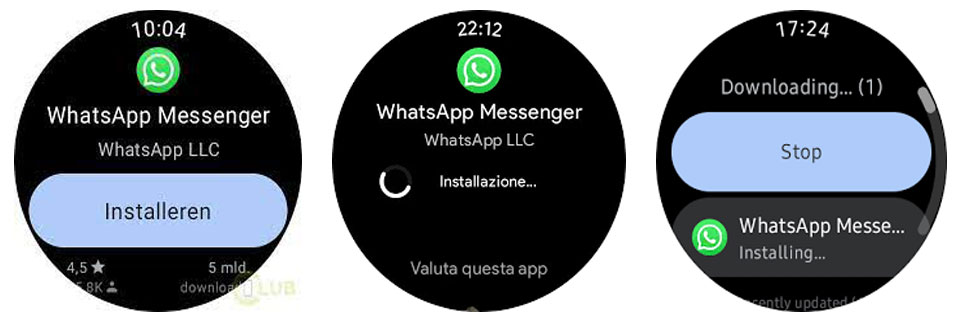
- Open the Play Store on your Galaxy Watch.
- In the search bar, type “WhatsApp” and hit Enter.
- Once you find WhatsApp, tap on “Install.”
Pairing Your Watch with WhatsApp
- Launch WhatsApp on your Galaxy Watch. You’ll be presented with an eight-digit pairing code.
- Simultaneously, you’ll receive a prompt on your paired device asking you to input this pairing code.
Completing the Pairing on Your Device
- Confirm the prompt on your device.
- Enter the pairing code you received on your watch.
- Your Galaxy Watch will now be under WhatsApp’s “Linked Devices” section.
Watch Linked to WhatsApp
With the pairing process completed, all your chats will seamlessly appear on your Galaxy Watch’s WhatsApp. It’s like having a miniature version of your conversations on your wrist.
Troubleshooting and Support
Should you encounter any roadblocks, don’t hesitate to reach out in the comments section. We’re committed to helping you get the most out of your smartwatch experience.
Alternate Method: Sideloading WhatsApp
Of course, not everyone can access the beta testing phase. Fear not if you find yourself in that camp, for there’s an alternate route.
- Download your device’s latest WhatsApp Beta APK and watch from trusted sources.
- Install the APK on your device following the same process as any other APK.
- To install the APK on your watch, refer to our comprehensive guide or follow these simplified steps.
FAQs
Can I install WhatsApp on my Galaxy Watch without being a beta tester?
You can enjoy its features without beta testing by sideloading the WhatsApp Beta APK on your watch.
Is sideloading safe?
When downloading from trusted sources, sideloading is generally safe. Stick to well-known sources to avoid risks.
Can I reply to messages using voice on the Galaxy Watch?
Absolutely! The Galaxy Watch supports voice input, allowing you to reply to messages quickly.
Will WhatsApp notifications still appear on my watch?
You’ll still receive notifications, but now you can delve deeper and access entire conversations.
Can I revert to the standard version of WhatsApp from the beta version?
You can opt out of the beta program and return to the standard version.
Wrap Up
The seamless integration of WhatsApp with the Galaxy Watch 4/5 ushers an expansive realm of communication conveniences right on your wrist. This remarkable synergy empowers users with a gamut of communication avenues, transforming how interactions are facilitated. Whether you’re an enthusiastic beta tester, keen on exploring innovative features or delving into sideloading to customize your experience, the process remains a few straightforward steps away. By embracing this merger, you can elevate your smartwatch encounter.
It’s an invitation to embrace the power of technology and extend its utility beyond expectations. So, seize the opportunity to harness your device’s potential through the conduit of WhatsApp. With this integration, your wrist becomes an intuitive hub of connectivity and intelligence, reflecting the ever-advancing landscape of wearable technology.

Selva Ganesh is a Computer Science Engineer, Android Developer, and Tech Enthusiast. As the Chief Editor of this blog, he brings over 10 years of experience in Android development and professional blogging. He has completed multiple courses under the Google News Initiative, enhancing his expertise in digital journalism and content accuracy. Selva also manages Android Infotech, a globally recognized platform known for its practical, solution-focused articles that help users resolve Android-related issues.