
Smartwatches have seamlessly integrated into our daily routines, becoming indispensable accessories by offering convenience and immediate access to our digital realm, all from a glance at our wrists. Android smartwatches, exemplified by flagship devices such as the Samsung Galaxy Watch 6 and the newly unveiled Google Pixel Watch 2, elevate this experience by allowing users to send and receive text messages, ensuring that connectivity persists even when your smartphone is out of physical reach. This article delves into the intricacies of receiving text messages on your Android smartwatch, considering the distinctions between LTE and Bluetooth/Wi-Fi versions. By understanding these nuances, you can harness the full potential of your smartwatch, seamlessly staying connected in a manner that best suits your needs and preferences, thereby enhancing your digital connectivity experience.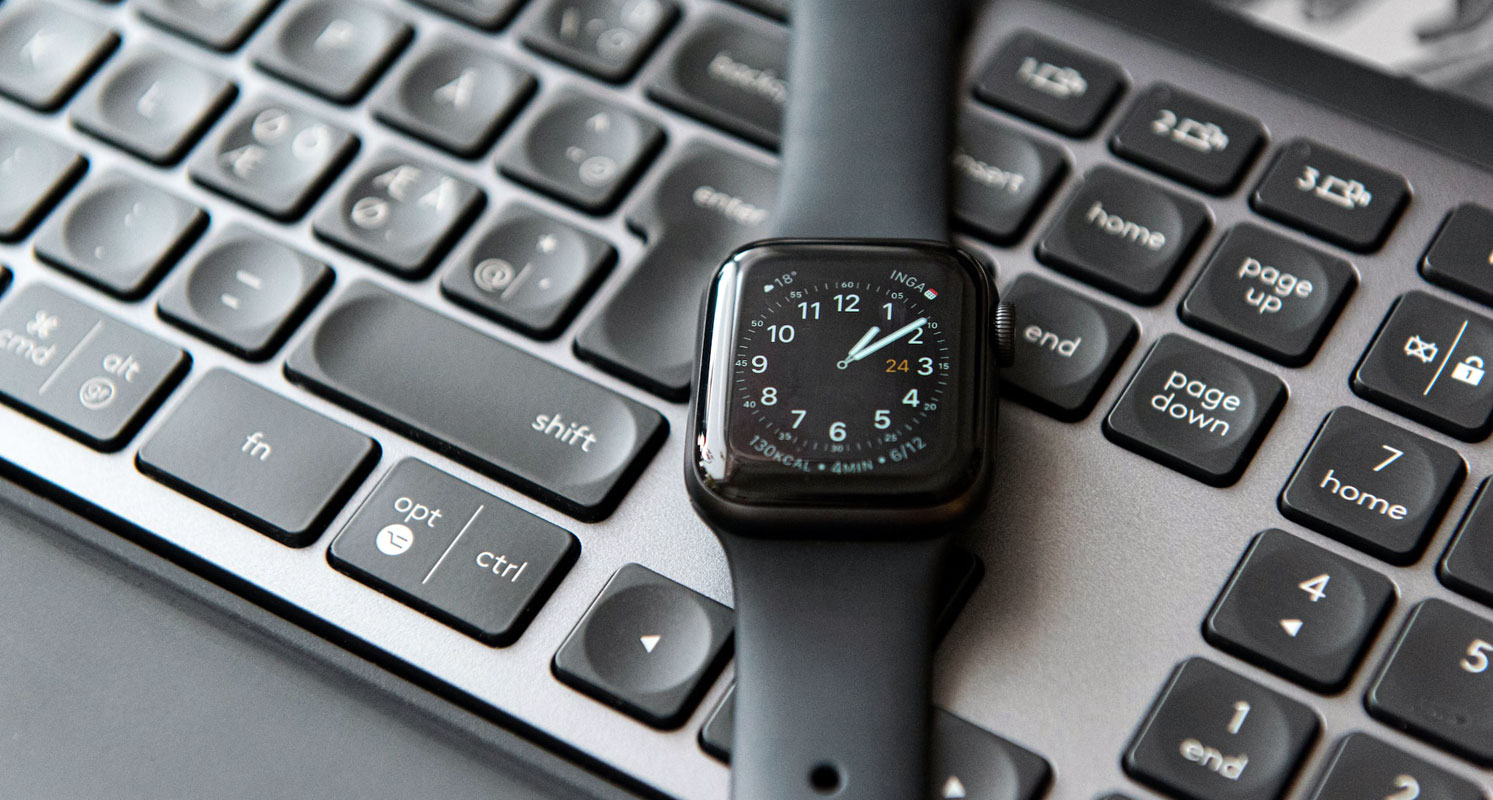
Activating Text Messaging on Your Android Smartwatch
Before you can enjoy the convenience of receiving text messages on your Android smartwatch, you need to activate this feature. The process varies depending on whether you own an LTE-enabled smartwatch or a Bluetooth/Wi-Fi smartwatch.
For LTE-Enabled Android Smartwatches
LTE-enabled Android smartwatches, like the Samsung Galaxy Watch 6, offer the advantage of standalone connectivity. Here’s how you can set up text messaging on them:

Independence from Your Phone:
- Owning an LTE-enabled smartwatch allows you to send and receive text messages and make phone calls independently, without depending on your smartphone.
Activation Process:
To activate text messaging, follow these steps:
- Ensure your smartwatch has an active LTE connection.
- Access the messaging app on your smartwatch and set up your messaging accounts.
For Bluetooth/Wi-Fi Android Smartwatches
Bluetooth/Wi-Fi Android smartwatches, on the other hand, require a connection to your smartphone to send and receive text messages. Here’s how to set up text messaging on these devices:
Dependence on Your Smartphone:
- With a Bluetooth/Wi-Fi smartwatch, you can only send and receive text messages if you are connected and can access your smartphone.
Pairing Your Devices:
To enable text messaging on your Bluetooth/Wi-Fi smartwatch, follow these steps:
- Turn on Bluetooth on your smartphone.
- Pair your Android smartwatch with your smartphone.
- Ensure that your smartwatch is connected to your phone.
Configuring Text Message Notifications
Once you’ve activated text messaging on your Android smartwatch, you may need to configure notifications to ensure you receive messages promptly.
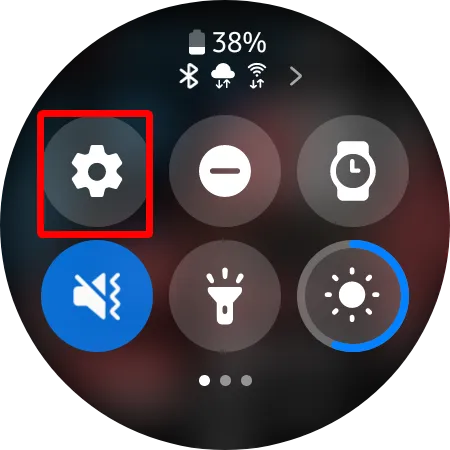
- Swipe down from the home screen on your smartwatch and tap the “Settings” option.
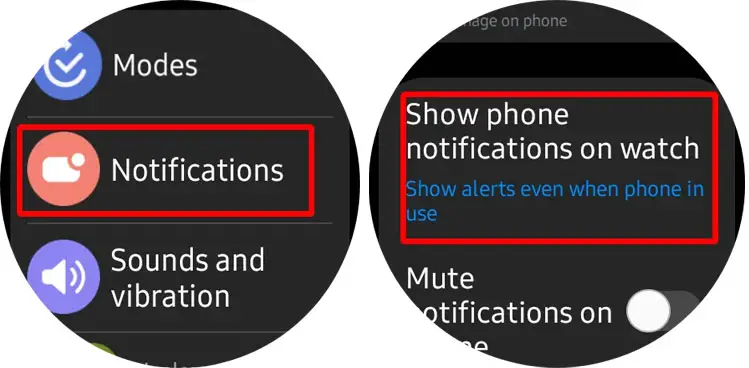
- Scroll down within the Settings menu and tap on “Notifications” to ensure that notifications are activated on your smartwatch.
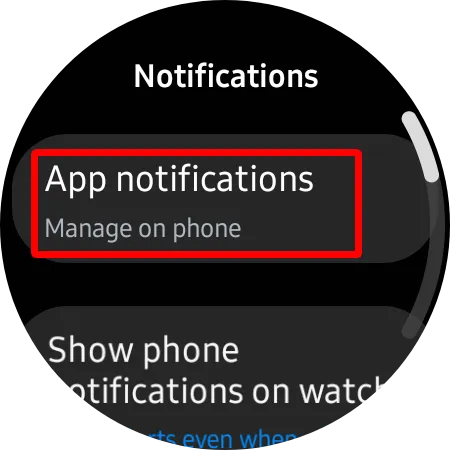
- Go back to the Notifications menu and tap on “App Notifications.” For further settings, you may need your smartphone.
- On your phone, toggle on the notifications for your messaging app, granting permission for message notifications to be sent to your smartwatch.
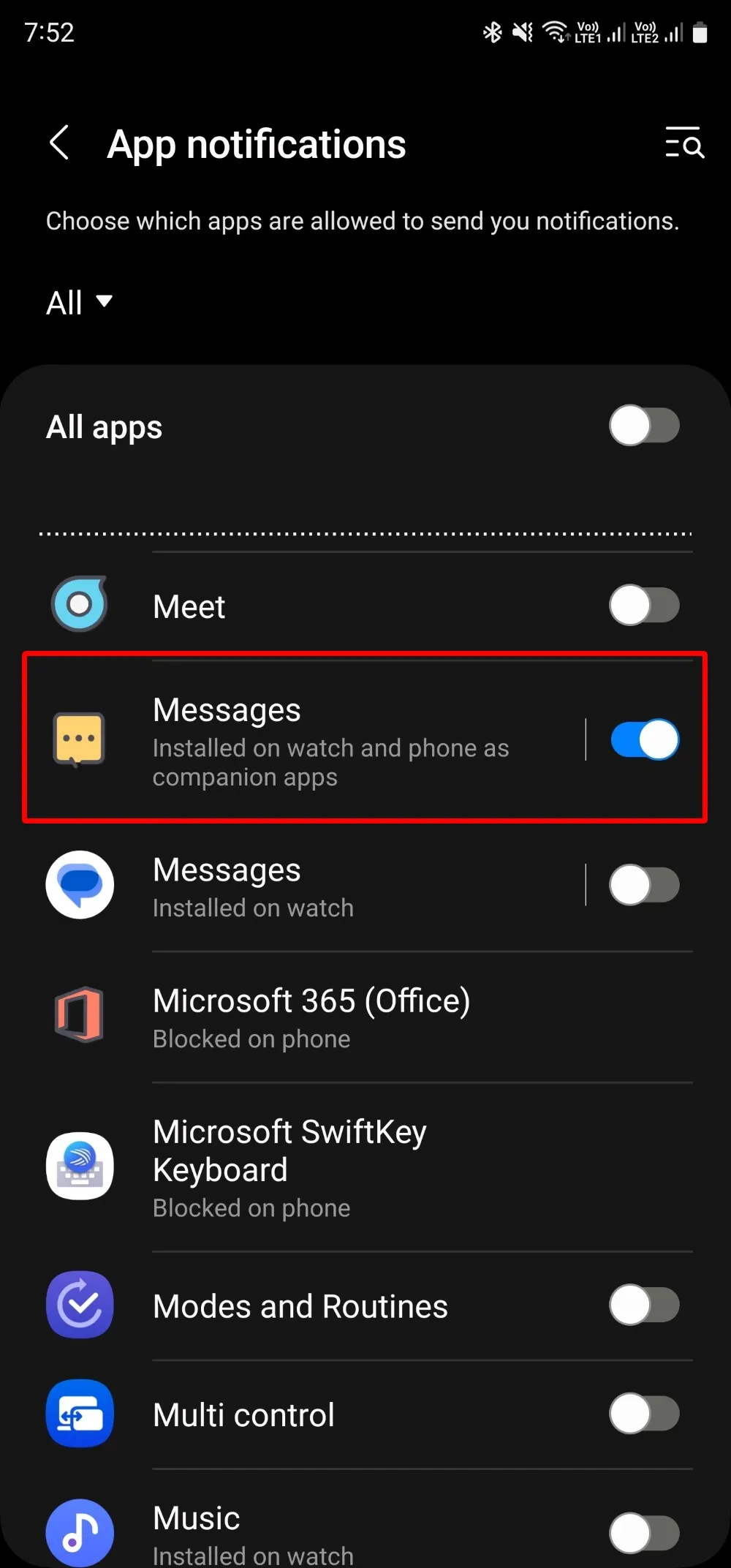
Now, you are all set to start receiving text messages on your Android smartwatch effortlessly. You’ll receive immediate notifications for incoming messages, enabling you to stay connected and well-informed while on the move.
FAQs
Can I send text messages from my LTE-enabled Android smartwatch without my phone?
Yes, LTE-enabled smartwatches can send and receive text messages independently of your phone.
Do I need an LTE connection to receive text messages on my Android smartwatch?
LTE connectivity is required for LTE-enabled smartwatches. Bluetooth/Wi-Fi smartwatches depend on your phone’s connection for text messaging.
How can I pair my Bluetooth/Wi-Fi Android smartwatch with my smartphone?
To pair your devices, turn on Bluetooth on your smartphone and follow the pairing instructions in your smartwatch settings.
Can I receive text message notifications from all messaging apps on my smartwatch?
You can receive notifications from messaging apps once you’ve configured app notifications on your smartwatch and smartphone.
Are there any limitations to sending and receiving text messages on smartwatches?
The limitations depend on your smartwatch’s type. LTE-enabled smartwatches offer more independence, while Bluetooth/Wi-Fi smartwatches require a connection to your smartphone for messaging.
Wrap Up
To conclude, Android smartwatches, regardless of whether they are LTE-enabled or rely on Bluetooth/Wi-Fi connections, present a valuable convenience by bringing text messaging to your wrist. The activation process may vary depending on the specific type of smartwatch you possess, but with the appropriate settings, you can ensure a smooth and uninterrupted messaging experience. This convenience provides you with perpetually connected and updated with meaningful messages and notifications, enhancing your daily life. The beauty of owning a smartwatch lies in the assurance that no matter the model you choose, it is a constant companion that keeps you in the loop around the clock.
So, whether you prefer the standalone capabilities of an LTE-enabled smartwatch or the synergy with your smartphone in the case of a Bluetooth/Wi-Fi variant, you’ll always appreciate the benefits of this wearable technology that seamlessly integrates with your lifestyle.

Selva Ganesh is a Computer Science Engineer, Android Developer, and Tech Enthusiast. As the Chief Editor of this blog, he brings over 10 years of experience in Android development and professional blogging. He has completed multiple courses under the Google News Initiative, enhancing his expertise in digital journalism and content accuracy. Selva also manages Android Infotech, a globally recognized platform known for its practical, solution-focused articles that help users resolve Android-related issues.