
There are plenty of apps in Google to make our life easy. All of the apps may not help us depend on our works. But, We will surely use any one of the apps in our daily life. Google Calendar app is one of the best apps to make reminders, events, and tasks. There are three different things on the calendar. If you view in general, they may look the same. But they are created separately for various works. After reading this article, you will use them for many practices, and it can make your work easy. Using all these three apps may not necessary for all of us. Based on your daily jobs, you can choose the useful one.

The beauty is you can access all of these three in your Gmail Account. You can also add the reminders from your Inbox Mail. So, you will not forget the essential things. In Apps, Reminders and Events can be created within Google Calendar. Tasks can be downloaded as an individual app because It is slightly different from those two.
What is a Reminder in the Calendar App?
The name itself is the meaning. It will remind the things until you did the job. There will be a “Done” option in the reminder. So, If you created a reminder to buy Gift for your loved one’s birthday, It will alert us at the time. If we already purchased the Gift, we can select “Done.” If We Swipe the notification accidentally, It will go into our Reminder Queue. So, Until we choose the “Done,” It will not disappear. You can also use Google Soli Gesture to complete the reminder If you have Google Pixel 4. You can also remove the restriction of the soli if you can’t access the feature in different countries. Simply Reminder means high priority Work.

How to create a Reminder in Google Calendar?
- If you are on PC, You can access the Web version of Google Calendar if you are on mobile, Download Google Calendar App From Playstore.
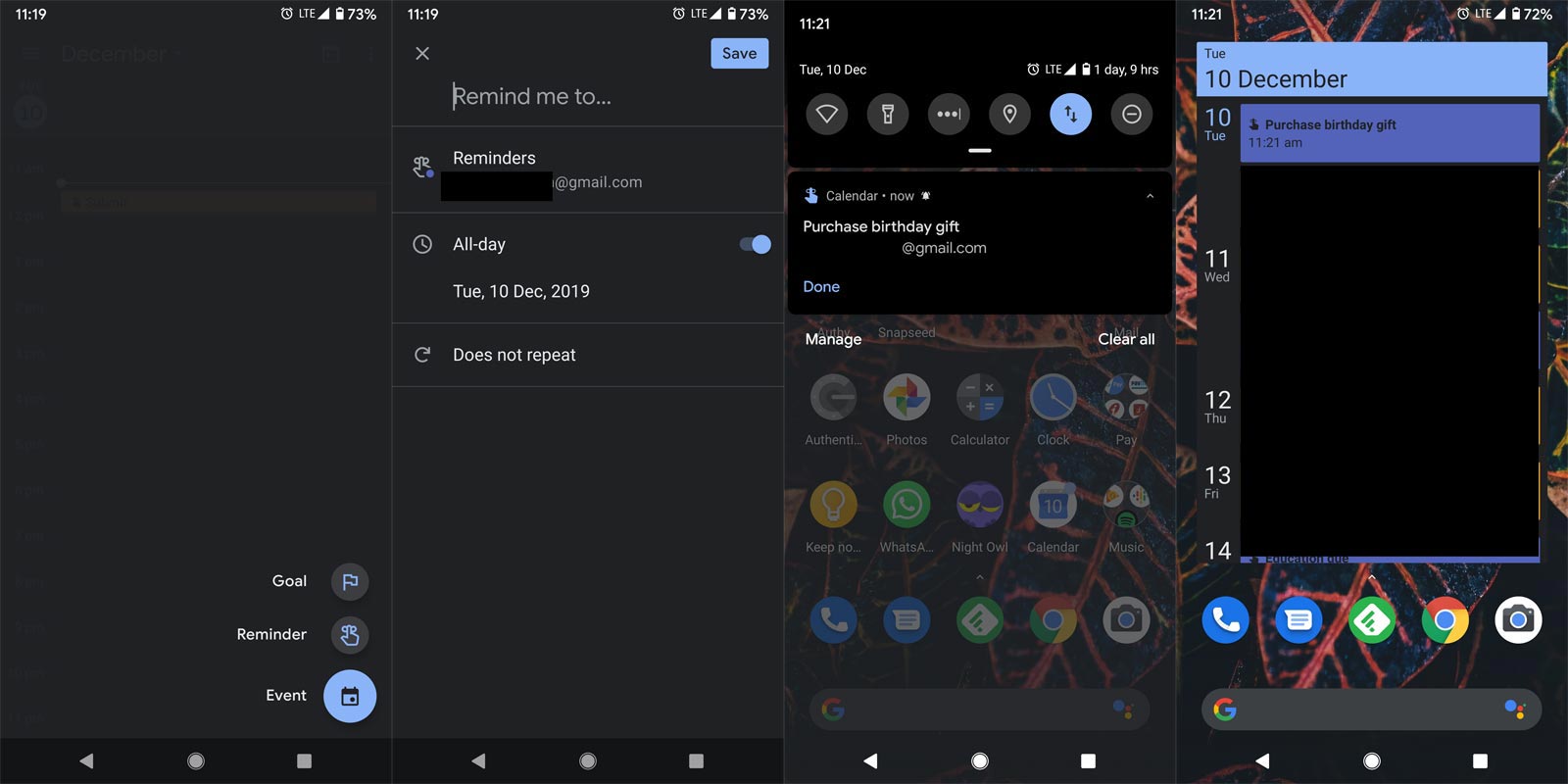
- Open the app. You can see the “+” symbol. If you select the “+ ” symbol, You will get three options. Select a reminder from that option. It will lead you to a new screen where you can set the name and Respective account. The UI will vary in the Web version. But the process is the same for both versions.
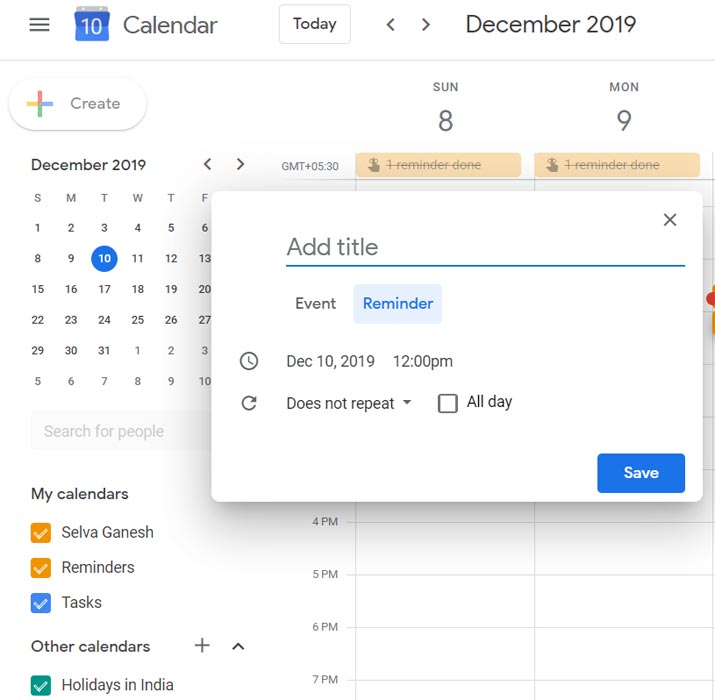
- You can also view the All-Day part in that. If your Reminder is not exact time-dependent, you can set this option. It means you can do the job within a Day. For Example- You have to buy groceries for your home. There is no exact time to do this. But, It should be done within a day. Another example, you have to meet a person within a time. Say you have to meet a person on a Specific day at 9.30 AM. In those situations, you should set a Specific time.
- There is also a Repeat option. You can use this option when the reminder is recursive — for Example, monthly Payments, Rents like that. You can set Every Day, Weekly, Monthly, Years, or Days Interval. If your payment is to be done every three months, you can choose custom>Set 90 Days interval.
What is Event?
The Event can be a meeting. Also, It can consist of a lot of people. You can add location and Guest People in the Event. Also, You can send email to the group of people. You can make Google Hangouts at that particular time. It is like you can attend the meeting within the period. You will be a part of this. The event does not entirely depend on you. You can either participate in the meeting from the beginning or in between. You can also set available, or Busy Status. The Event consists of all the real-time incidents. Simply Events mean Attending Something.
How to create the Event in Google Calendar?
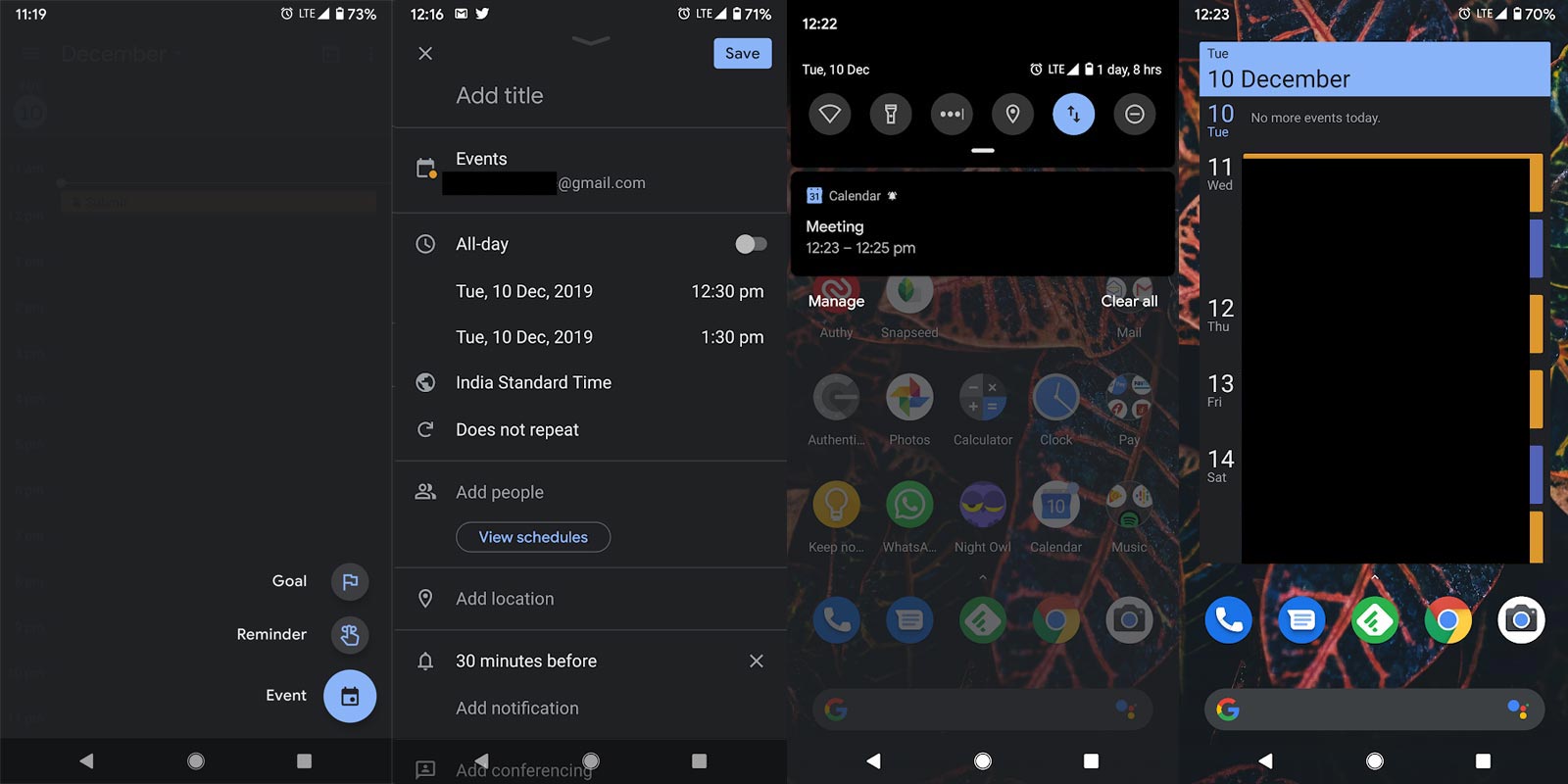
- Open the app. You can see the “+” symbol. If you select the “+ ” symbol, You will get three options. Select the event from that option. It will lead you to a new screen where you can set the name and Respective account. The UI will vary in the Web version. But the process is the same for both versions.
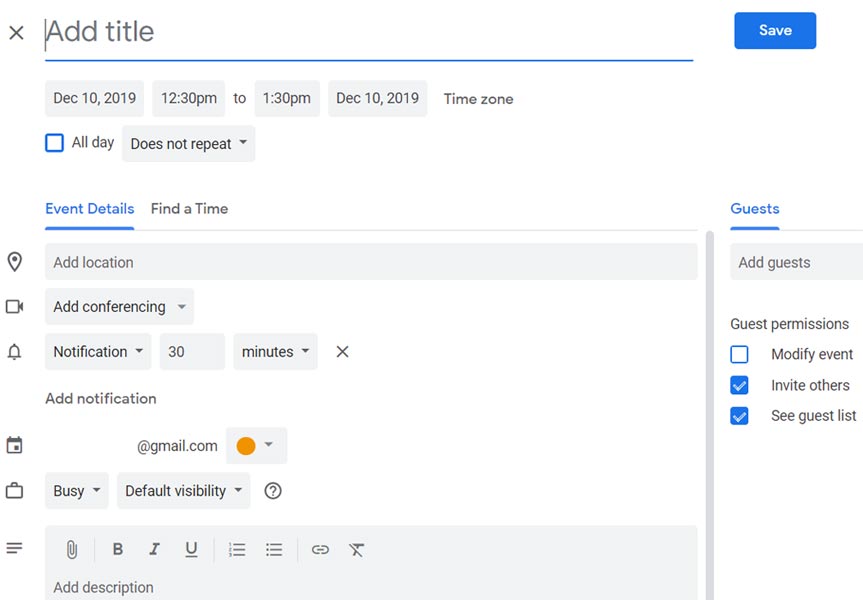
- You can add a group of people in the Event. Also, You can get a reminder with the notification or Email. You can also add the necessary files like Presentation using Google Drive. The meeting can happen between the timeline. If you don’t have the part in a particular time, you can set your status as busy. If it is related to Q&A Session, you can set your status as Available.
- Like Reminder, There is also a Repeat option. You can use this option when the Event is recursive. If you have to attend the weekly or monthly planning meeting, you can use this option. You can set Every Day, Weekly, Monthly, Years, or Days Interval. If your event is happening every two weeks on Monday, you can choose custom>Set 14 Days interval.
What is Google Tasks?
Tasks are parts of things within a Reminder. For Example, you are going to Trip. The trip is a Reminder under this; We have to Pack our Cloths, Take Ticket, Money, and some new things. These things are tasks. You may wonder, I can do this within the Google Calendar app. But, Setting multiple reminders will be annoying. You have to select the done for every reminder. Tasks will not work like that. You have to check the simple functions; When everything is completed, you can choose the done option until the Tasks keep open. Simply Tasks means small parts of Reminder. To Remind Events, You can also use your Google Home.
How to create Tasks in Google Tasks app and Google Calendar?
- If you are on PC, You can access the Web version of Google Calendar if you are on mobile, Download Google Tasks From Playstore.
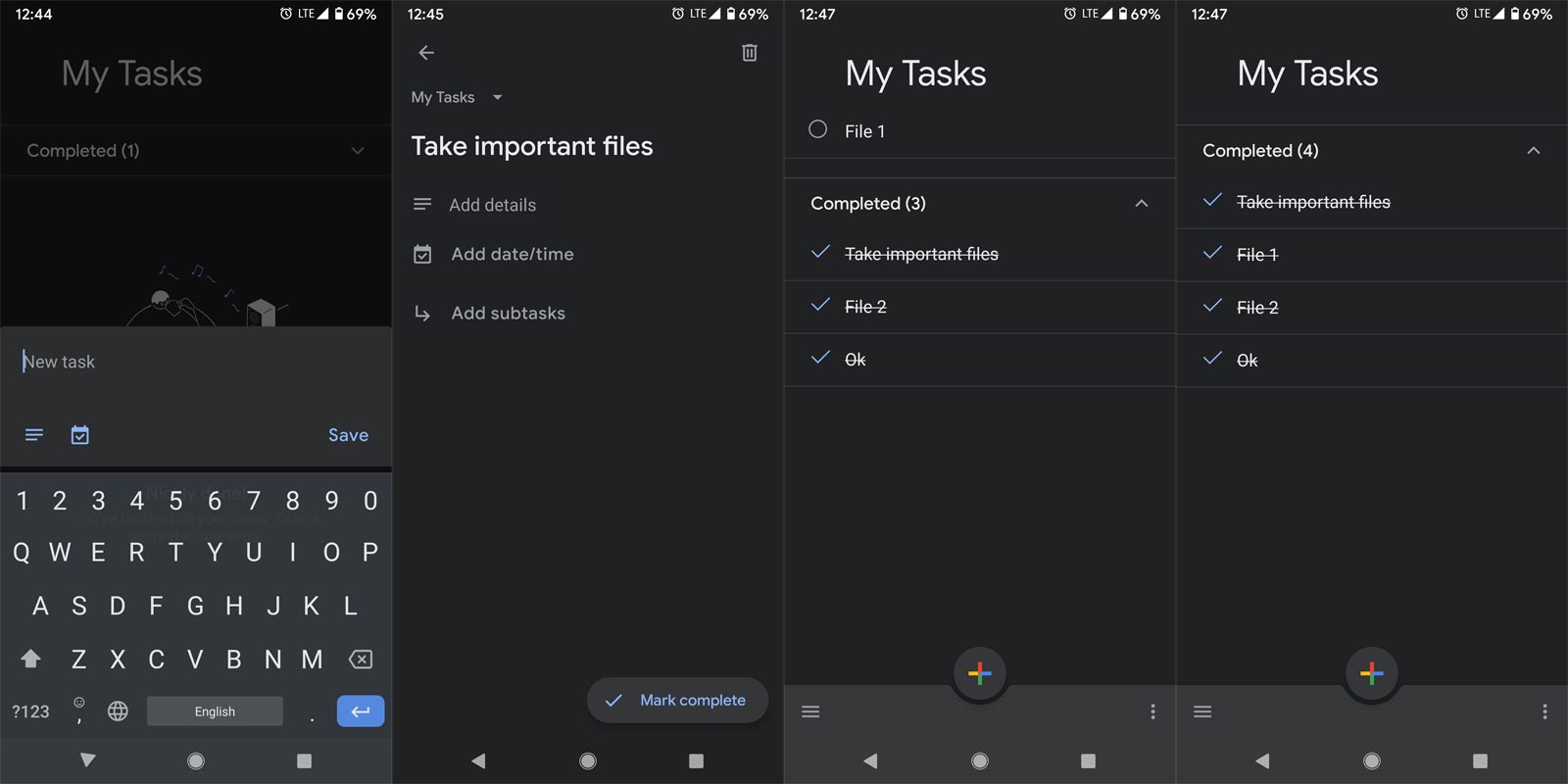
- Open the app. You can see the “+” symbol. If you select the “+ ” logo, You will get the task name option. You can add sub-tasks in the main task. Also, You can add sub-tasks in the sub-tasks..:). It may look confusing. I will explain it in a real-time situation. You created a sub-task to take a ticket. Within that, you have to take Train, Flight tickets. You can add those things as a separate task. The Tasks Web UI will look different. To access the Web version of Task, Go to the right side of the Google Calendar web version.
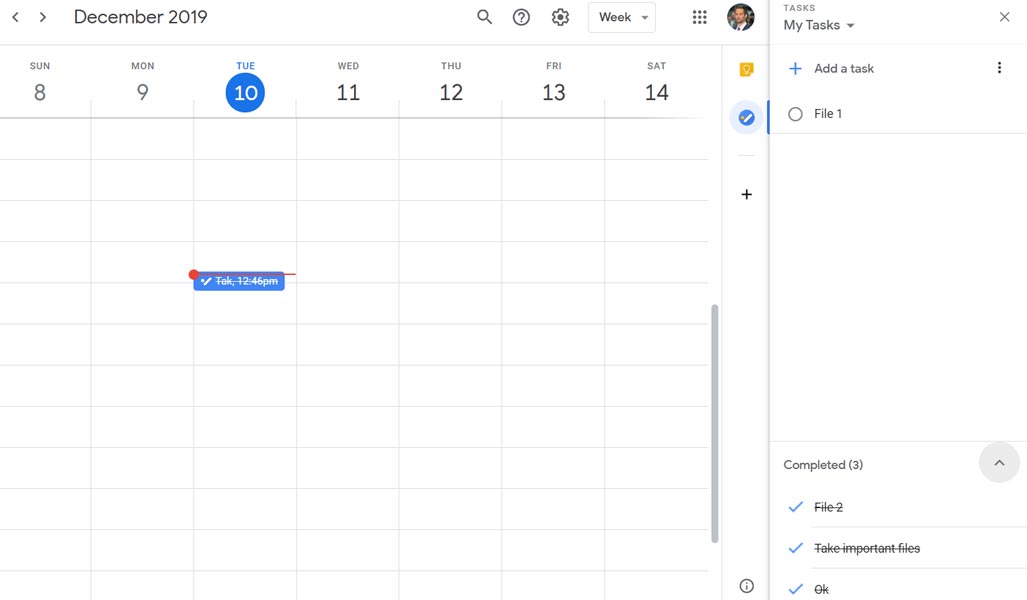
- Until you did all the jobs within the main tasks, The Task will not complete. If you forget any sub-tasks, It will keep reminding us about the non-completed task. When you have to do a lot of jobs under one Title within the period, it will be beneficial for you.
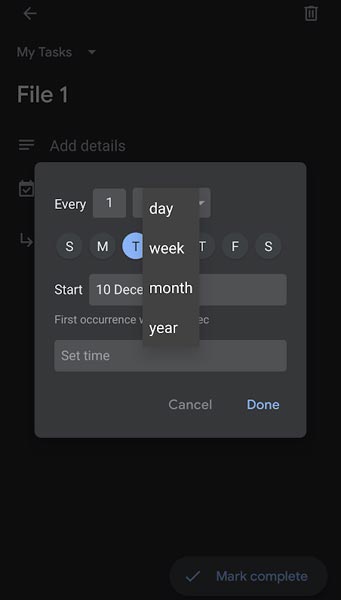
- There is also a Repeat option. You can use this option when the tasks are recursive. For Example, If you are a Regular Business traveler. You can set Weekly, Monthly, Years, or Days Interval.
Reminder vs. Events vs. Tasks. When to choose these options?
I know when there are a lot of options available, we may get confused. If you have only a reminder app, you will set everything in that. Also, You will create different ideas based on this app. I will give some real-time examples of were to use this app.
Reminder
- You can use the reminder option for Buying Birthday Gifts, Monthly Payments, Flight Departure.
Events
- Attending Meetings, Marriage Events.
Tasks
- Before going to Vacation, Business Trips to remind the important things.
Wrap Up
I know some people can remember everything. Consider these apps as supportive. It is best to use those apps instead of making excuses for forgetting important things. For simple stuff like Shopping, you can use Google Notes. Also, You can ask your Google Assistant to add reminders and making Events. You should trust your Brain. It is a level of confidence creation. But, When you forget something, It will destroy your confidence. Use these apps like a Backup, If you hate to use them. If you use them regularly, It will also make you like a planned guy. You will not face any surprises. I hope these apps will surely help you in your day to day life. Did you already use these apps? For what things are you using these apps? Comment below.

Selva Ganesh is a Computer Science Engineer, Android Developer, and Tech Enthusiast. As the Chief Editor of this blog, he brings over 10 years of experience in Android development and professional blogging. He has completed multiple courses under the Google News Initiative, enhancing his expertise in digital journalism and content accuracy. Selva also manages Android Infotech, a globally recognized platform known for its practical, solution-focused articles that help users resolve Android-related issues.