
After the Pie version update in Razer Phone 2, you can choose between Zen UI or Stock UI. Why I am saying this is, In the below method, we are not going to use TWRP based process. It means you can’t Install Custom ROMs. If your purpose is only using Root required apps, you can use this method. When we consider Custom ROMs, Our manufacturers use Heavily customized Skin OS. So, We planned to use near Stock Android OS. But, On your mobile, you can choose Stock Android Also. If you are a regular user, This method is not like a conventional method. It requires some additional steps. So, It can be difficult for you. You should think twice before making your decision and should have a strong reason; you can proceed further. If you are a Developer or regular Root apps user, you can follow the below guide to achieve root on your mobile.
Why should you Root Razer Phone 2?
We thank XDA Developers- topjohnwu, chpimentelpr and Warrior1988 (Who successfully tested this method) Without their hard work, We can’t make this method. Coming to root, you should have a proper reason, and you know what you are doing. Yes, with a minimum of 8 GB RAM, Qualcomm SDM845 Snapdragon 845, You can use this mobile for Heavy tasks without root for 2-3 Years If you use correctly. Asus Optimized your mobile from their side as much as possible for better Gaming Experience. If we modified the OS, we might not expect the optimized performance. Software is better compared with other manufacturers, Custom skin OS. Don’t root because everybody is saying when root your mobile it can become the fastest. No. Rooting is to extract some performance from the device. But, you already have Powerful specs and software. So, If you are addicted to some root apps, you can root. But, if you want to test, I won’t recommend it.
How to Root Razer Phone 2 Pie 9.0 (International Variants)
Razer Phone 2 International variants come with a flexible bootloader. This means that the smartphone can be easily rooted. Also, the device can accept to install TWRP recovery or any other custom recovery file/app alike. Don’t try with Snapdragon US Variants like Verizon devices. They come with a locked Bootloader.

But In the below method, we are going to Root this device by using Magisk. You can install TWRP using the official App when it is released. TWRP recovery is a custom recovery file that must be installed on Android devices so that you can root them successfully. But, In this article, we are not going to use TWRP to root your mobile. However, the tool required for rooting this device is the Magisk App.
With the help of Magisk, you can quickly patch the latest version of your Razer Phone 2 firmware to gain root access. Before sharing the tutorial, you may want to know that, without the TWRP recovery present on your device, you can’t install any custom ROM or firmware. Does it seem complicated? Relax, everything will be explained succinctly in bullets.
Things to check out for;
-
Check your device model number.
- Install Latest Magisk Manager.
-
Make sure your device battery is charged above 50%
-
Backup your current files and data- Full Data Loss Process (save them on external storage).
- You cannot use Google Pay and other secure required Apps.
- You can’t update your firmware, to get new firmware you have to follow the below steps with the latest firmware.
- Read the full tutorial before the process.
Pre-Requirement Steps
Unlock Bootloader using ADB and Fastboot
-
Download and install the Razer Phone USB driver to your computer system.
-
Also, download the ADB drivers. Install it on your PC.
Bootloader unlock is a necessary step for flashing firmware in your Razer Phone devices. Some International versions can be unlocked quickly by enabling OEM to unlock in Developer settings. But, some US Variant Devices need to be unlocked using Device ID and some fastboot steps. Before everything, Please enable OEM to unlock in settings.
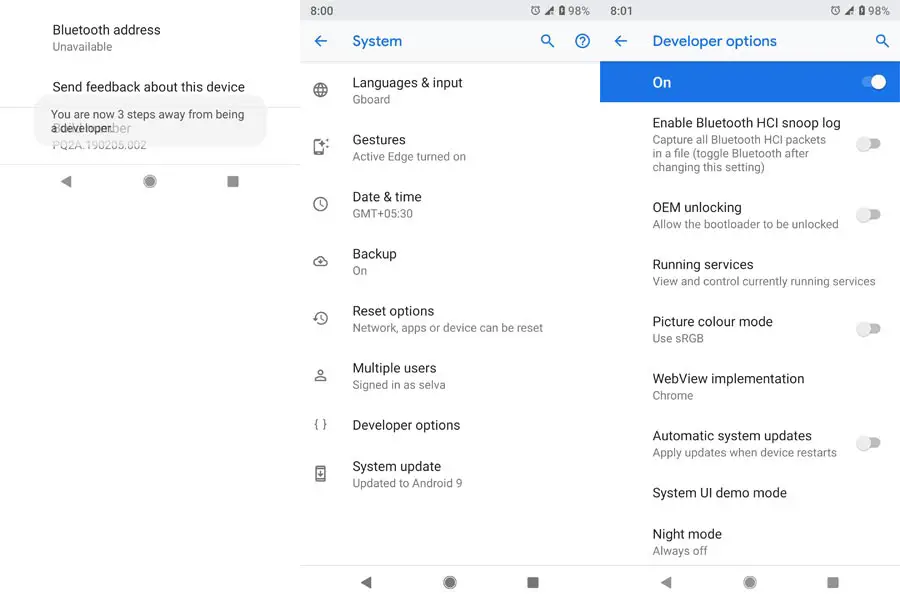
- Go to settings >>> about >>> Tap on the “Build Number” 7-10 times consistently to enable “Developer Options,” then go to the “Developer Options” and enable USB Debugging Mode and OEM Unlock.
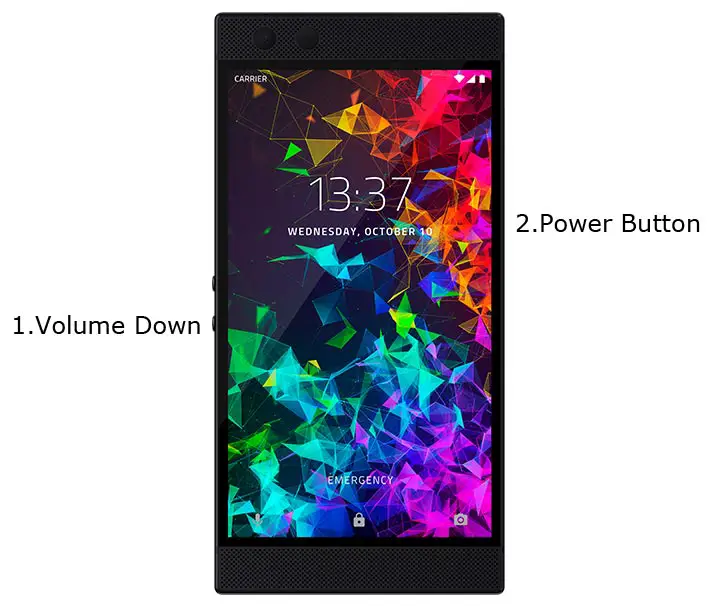
- Switch off your device. Connect your mobile to the PC. Then, enter into Download mode. To do this; Press and hold down the Volume Down + Power buttons at the same time for some time. It will boot your mobile into Fastboot mode.
-
Now, connect the Razer Phone mobile to the computer via USB cable.
-
Launch the fastboot on your computer. Open a Command prompt on your PC and type below command.
- fastboot devices
- It should display the connected devices. If you didn’t get the device, restart the command prompt and Disconnect and Connect your mobile. If you are detected, type below commands.
- fastboot flashing unlock

-
Your phone will ask for the Unlock permission Press volume keys to confirm the action.
- After the process completes, your mobile will reboot. You should recheck the OEM Unlock status; Sometimes It may lock again.
Preparing Patched Boot Image file
- Download Razer Phone 2 Firmware and save it on your PC. Your Current OS version and Downloaded Version should be the Same.
- You can use Phone Info to know your firmware version.
- Download 7Zip-ZS Install on your PC. Extract the files in downloaded firmware using 7Zip-ZS. You will get a boot.img. Copy “boot — img” file to your mobile.
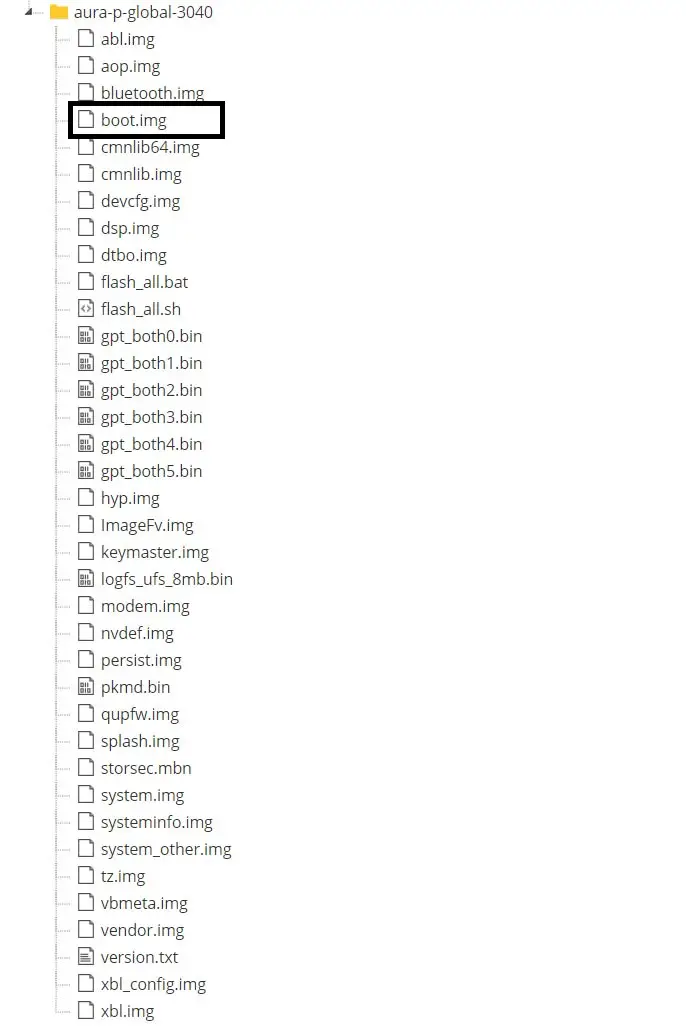
- Download Magisk Manager (Download Latest version) or Magisk canary and Install it on your mobile. Open Installed Magisk and Select Install in Magisk; it will ask For zip file and Patch Boot Image File. Select the Boot Image file.
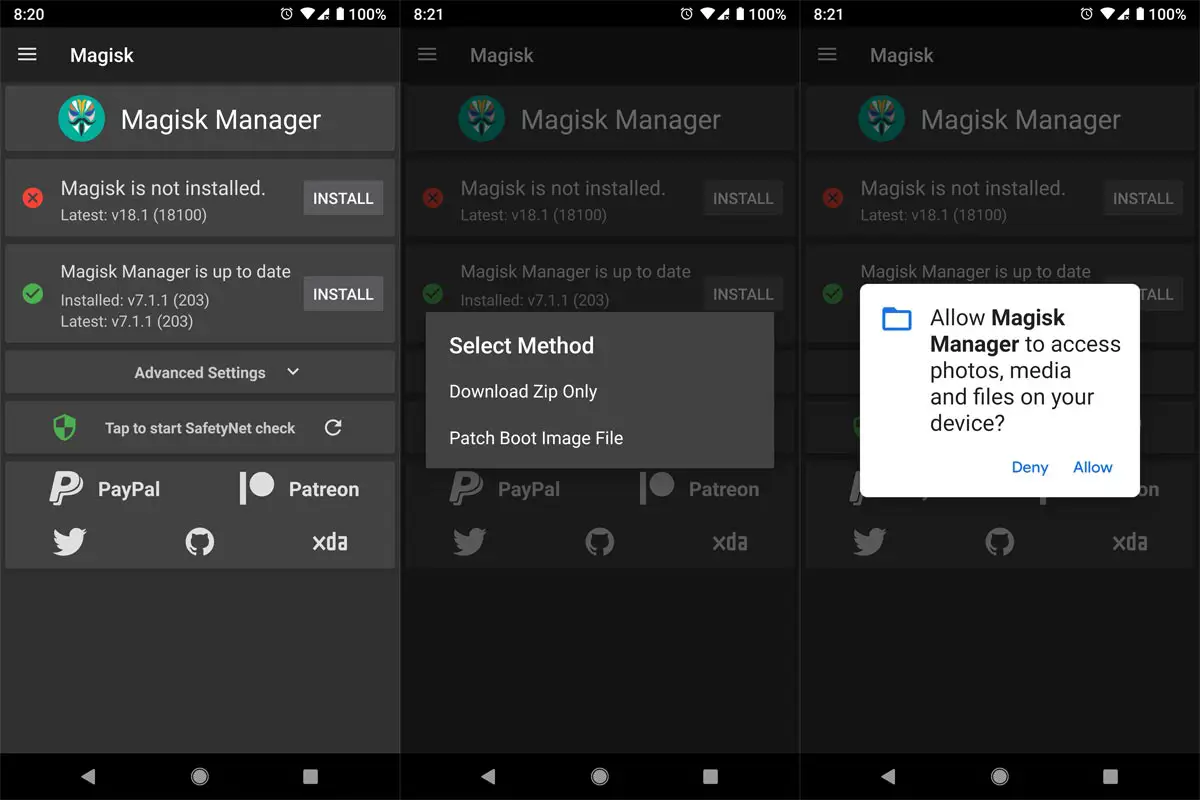
-
Navigate to your copied Boot Image File and patch the file.
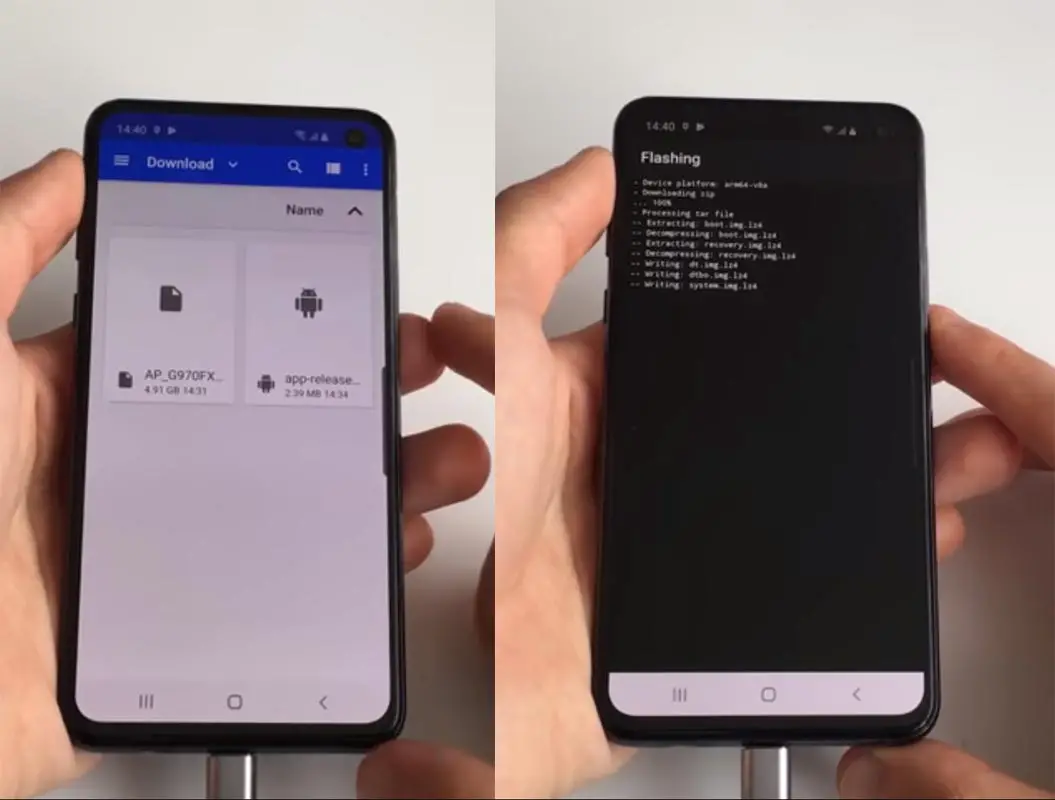
- Wait for the process to complete, In the end, you will get magisk patched .img file. The .img file will be in the same folder where you have the Stock firmware file.
- Copy magisk_patched.img file to your PC. Rename this file to “boot.img.”
Flash Patched Boot Image using ADB and Fastboot
- Switch off your device. Then, enter into Fastboot mode. To do this; press and hold down the Volume Down+ Power buttons after Android Logo Appears Still press the Power button and press Volume Up Button.
-
Now, connect the Razer Phone 2 mobile to the computer via USB cable.
-
Launch the fastboot on your computer. Open a Command prompt on your PC and type below command and hit enter.
- fastboot devices
- It should display the connected devices. If you didn’t get the device, restart the command prompt and Disconnect and Connect your mobile. If you are detected, type below commands one by one.
- fastboot flash boot_a boot.img
fastboot flash boot_b boot.img
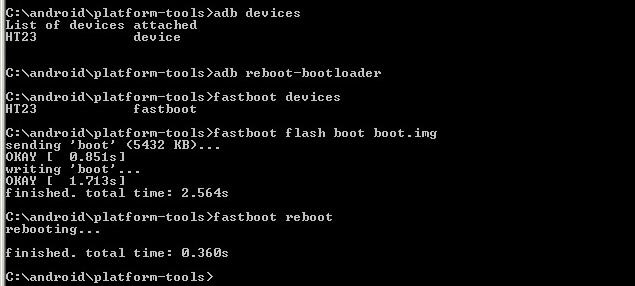
- After successfully executed above command, type below command and hit enter.
- fastboot reboot
- After the process complete, It will boot into the rooted OS.
Boot into Rooted OS
- Press and Hold Volume Down + Power buttons, release all the keys once the Bootloader warning appears. You have to set up your device like a new device. You can check the root status using the Root Checker.
- Stock Recovery Boot – Press and Hold Volume Up + Power buttons, release keys while you hold the Volume Up key.
- You will see Magisk Manager in your App drawer. If you can’t find the app, you can install Magisk Manager on your mobile.
Troubleshoot
- If you get this error, “Your device can’t be trusted and may not work properly.” Boot your mobile into fastboot mode and type below command in your PC.
- Switch off your device. Then, enter into Fastboot mode. To do this; press and hold down the Volume Down+ Power buttons after Android Logo Appears Still press the Power button and press Volume Up Button.
-
Now, connect the Razer Phone 2 mobile to the computer via USB cable.
-
Launch the fastboot on your computer. Open a Command prompt on your PC and type below command one by one and hit enter.
- fastboot devices
- It should display the connected devices. If you didn’t get the device, restart the command prompt and Disconnect and Connect your mobile. If you are detected, type below commands and hit enter.
- su
reboot “dm-verity enforcing”
- After the process complete, It will boot into the rooted OS.
What More?
In my opinion, you don’t need rooting. If you are a regular user, if you thought, you could Improve Performance By root; With the Qualcomm SDM845 Snapdragon 845 Octa-Core processor and 8 GB RAM, your device can perform well. If you don’t know how much RAM you need, You will never use this much RAM. You should not Boot into Normal OS Booting after TWRP Flash. If you boot, you will lose TWRP. You have to repeat the steps from “Flash TWRP.” Don’t Install any apps other than trusted sites on rooted devices. Third-party site apps can contain some background codes. So, Check twice before installing those apps. If you accidentally bricked your mobile flash Razer Phone 2 Stock Pie Firmware to repair your mobile. If you face any problem, comment below.

Selva Ganesh is a Computer Science Engineer, Android Developer, and Tech Enthusiast. As the Chief Editor of this blog, he brings over 10 years of experience in Android development and professional blogging. He has completed multiple courses under the Google News Initiative, enhancing his expertise in digital journalism and content accuracy. Selva also manages Android Infotech, a globally recognized platform known for its practical, solution-focused articles that help users resolve Android-related issues.