
Samsung Galaxy S10 series comes with One UI Pie 9.0 version as a default OS. Samsung Galaxy S10 Plus, USA region devices, are not like other region devices. Most of the devices are carrier locked mobiles. We can’t flash the different carrier firmware. Depending on the Carrier, the Boot for your mobile is locked deeply. Verizon and AT&T carrier devices are hard to flash the firmware and root. They have locked Bootloaders. So, If you accidentally bricked your mobile, It is challenging to repair your mobile. Using the below method, We can flash the firmware. You can also use this method to Un-Root your mobile. By flashing the firmware using ODIN, you can unroot your device. To reduce the confusion and difficulty in the process, We choose only two files per carrier. After flashing that firmware, you can update your mobile regularly using OTA updates from your carrier.
One UI Pie 9.0 Firmware Flash- Samsung Galaxy S10 Plus (S10+ USA)
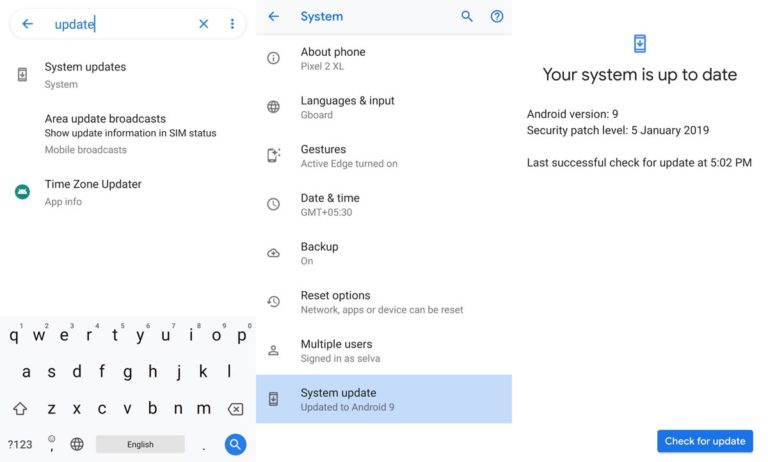
Official OTA Method
If you want to update a security patch to the current month. Don’t go for the manual method. Try this Automatic method.

The process is straightforward and simple;
-
Go to your device setting menu and scroll down to the bottom
-
Tap on “Software Update”
-
You may have to refresh the page to start the OTA upgrade process.
Manual Method (AT&T, Metro by T-Mobile, T-Mobile, Sprint, Verizon Wireless, Xfinity Mobile, Unbranded)
Note
- Check Your Device Mobile No. If you flash Different model number, you will lose some features based on your region.
- Battery Percentage Above 50.
- Backup Your Device.
- Some features may not work in the following firmware. You should update your mobile after the flash. I mentioned below what features may not work as per the carrier.
- T-Mobile – Advanced Messaging and Video Calling
- AT&T – VoLTE, WiFi Calling, Advanced Messaging
Using ODIN Method
-
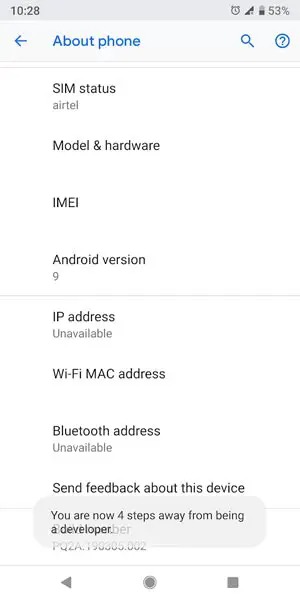
Enable USB Debugging Mode and OEM Unlock; you’ll find these options at Settings >>> Developer options. If you didn’t see the developer options on your settings menu, then go to about >>> build number; click on the “Build Number” row for about ten times regularly to activate “Developer Option” on your device.
- Download Samsung USB driver and install it in your PC.
- We are using third party software flashing. Download Patched ODIN and install this also in your PC. Don’t use other ODINs. It will not work correctly.
- Download Firmware From below links, For Samsung Galaxy S10 Plus USA Official Firmware.
- Select recent firmware. When selecting firmware, refer- How to choose the correct firmware.
- You should download two files from the below links. One is unbranded firmware, and the other one is your respective carrier firmware. Don’t mix the firmware. We picked the correct Unbranded firmware, that will work flawlessly with your carrier.
AT&T
- G975USQU1ASBA (Unbranded)
Metro by T-Mobile
- G975U1UEU1ASD3 (Unbranded)
- G975USQU1ASD3 (Metro by T-Mobile)
T-Mobile
- G975U1UEU1ASD3 (Unbranded)
- G975USQU1ASD3 (T-Mobile)
Sprint
- G975U1UEU1ASD5 (Unbranded)
- G975USQU1ASD5 (Sprint)
Verizon Wireless
- G975U1UEU1ASD3 (Unbranded)
- G975USQU1ASD3 (Verizon)
Xfinity Mobile
- G975U1UEU1ASD3 (Unbranded)
- G975USQU1ASD3 (Xfinity Mobile)
Flashing Firmware
- Now you have two firmware files. One is Unbranded, and another one is your carrier firmware.
Step 1: Flash Unbranded Firmware
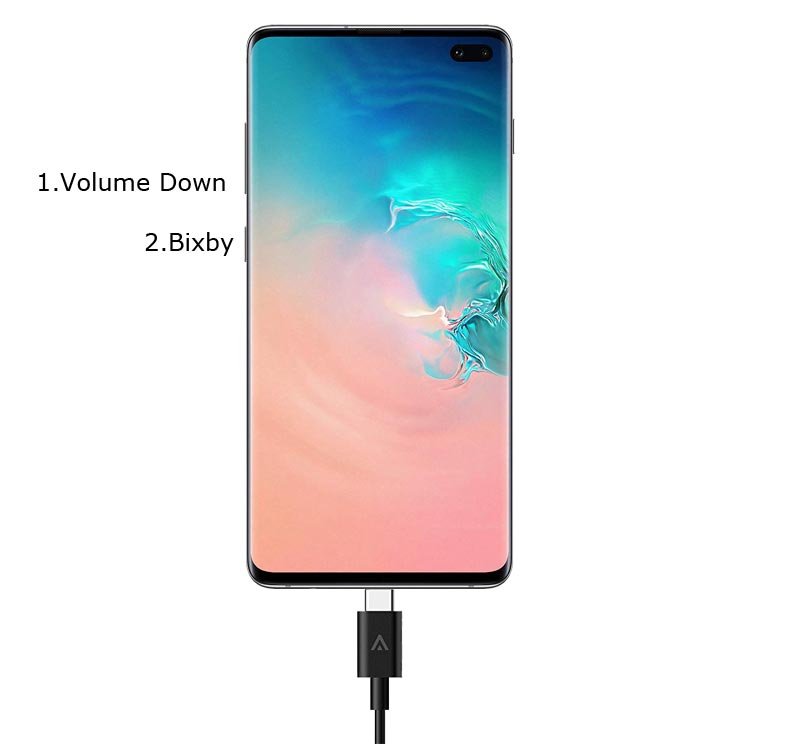
- Switch off your Mobile. Enter into Download mode->Volume Down+ Bixby Button and Connect Your Mobile To PC via USB Cable, After Samsung Logo Appear, Release all keys.
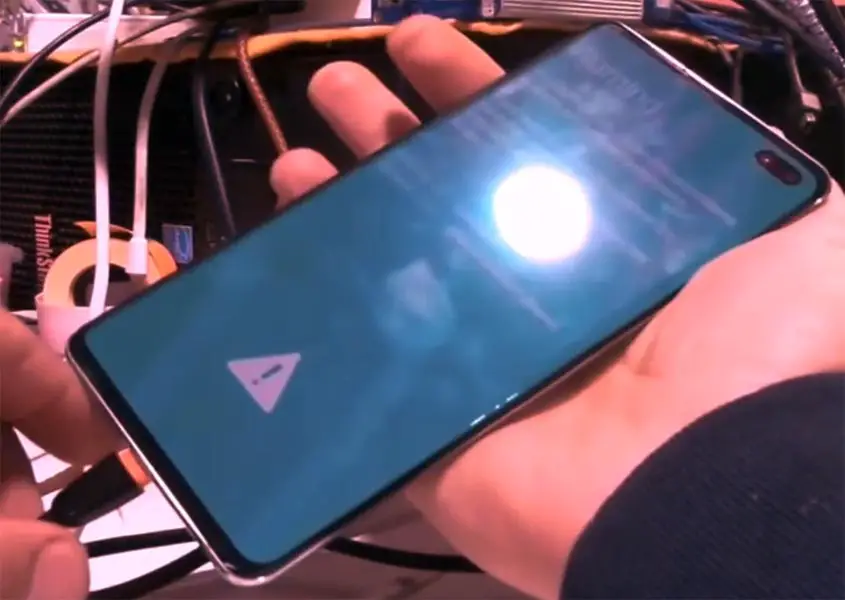
- After entering into Download Mode, it will say Warning, Press Volume Up button to continue.
- Launch Odin Application.
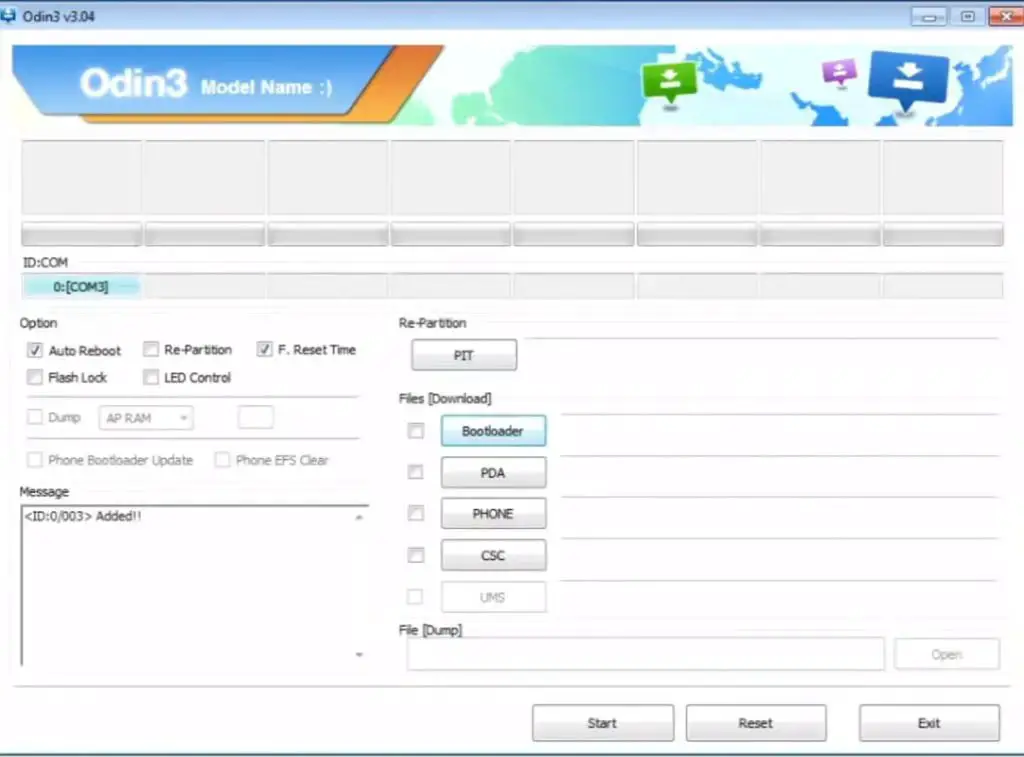
- It Will Show the message added.
- If you did not get this message Repeat the above steps.
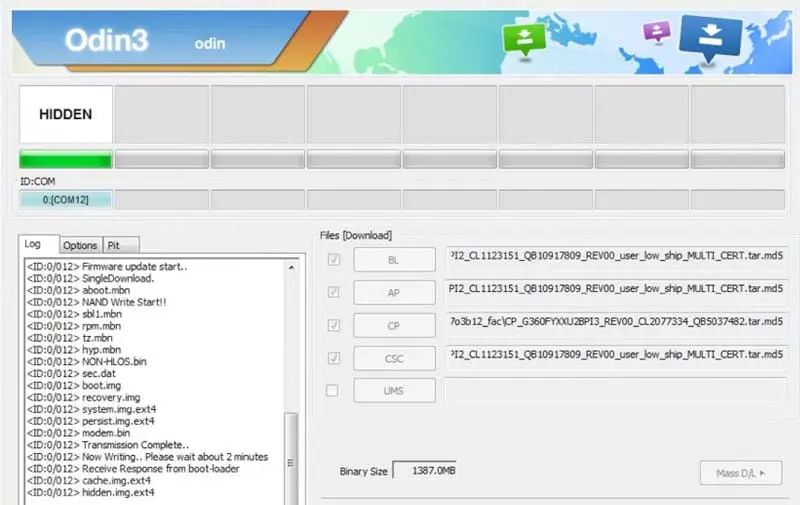
- After Getting Added Message Select, AP/PDA Button then Browse for the Unbranded Firmware file selects it. Un-Tick the Auto-Reboot.
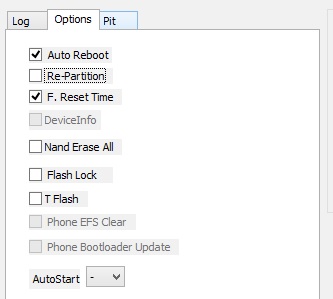
- Press Start wait for the tasks to complete. We Disabled Auto Reboot in ODIN. Do, After the process completion, It will still in Download Mode.
- After the process complete, Press Volume Down+ Power button to exit Download mode. When the screen goes off, Immediately Press Volume Up + Power buttons to boot into Recovery mode.
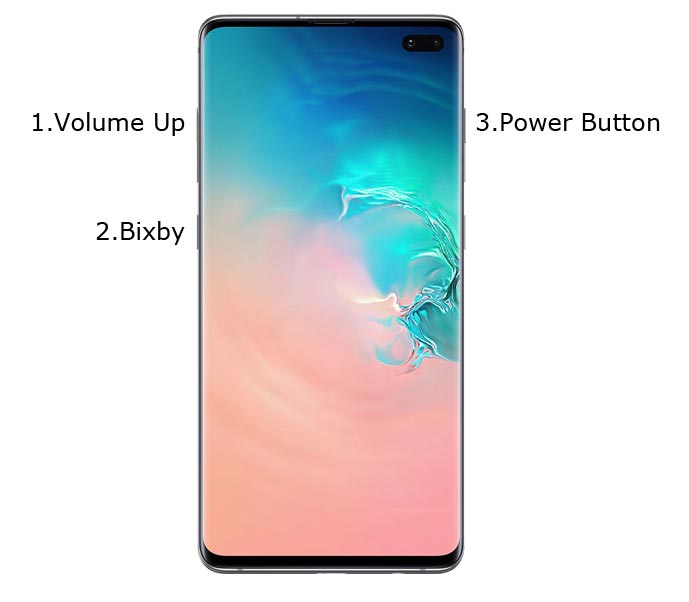
- In the recovery mode, Go to Wipe Data/ Factory Reset and Reset your mobile.
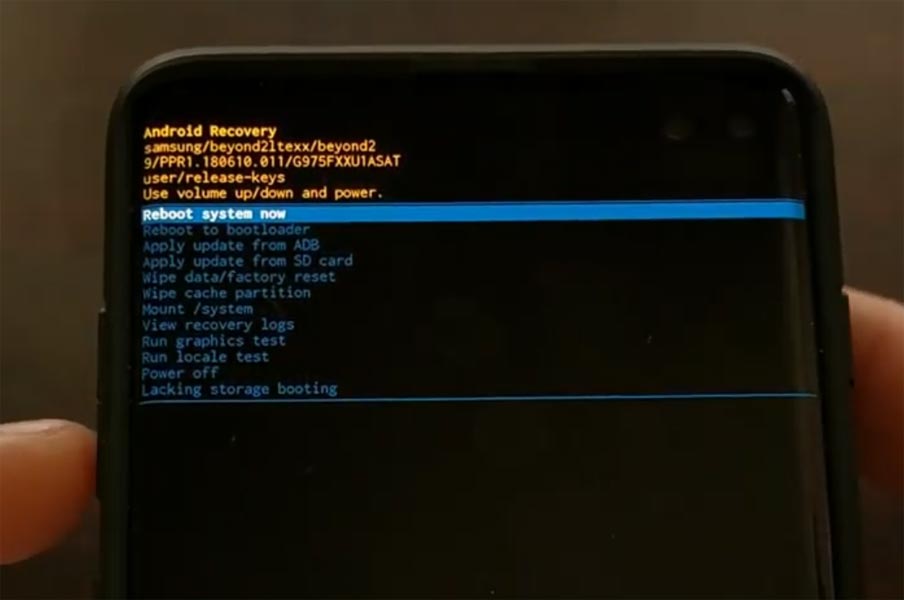
- You should set up your mobile and log in with your account details. After fully set up your device, boot into recovery mode.
Step 2: Flash Carrier Firmware
- Switch off your Mobile. Enter into Download mode->Volume Down+ Bixby Button and Connect Your Mobile To PC via USB Cable, After Samsung Logo Appear, Release all keys.
- After entering into Download Mode, it will say Warning, Press Volume Up button to continue.
- Launch Odin Application.
- It Will Show the message added.
- If you did not get this message Repeat the above steps.
- After Getting Added Message Select, AP/PDA Button then Browse for the Carrier Firmware file selects it. Un-Tick the Auto-Reboot.
- Press Start wait for the tasks to complete. We Disabled Auto Reboot in ODIN. Do, After the process completion, It will still in Download Mode.
- After the process complete, Press Volume Down+ Power button to exit Download mode. When the screen goes off, Immediately Press Volume Up + Power buttons to boot into Recovery mode.
- In the recovery mode, Go to Wipe Data/ Factory Reset and Reset your mobile.
- You can see your carrier Boot Logo, When Startup. You should set up your mobile and log in with your account details. After fully set up your device, boot into recovery mode.
- You can Check the Firmware Details->Settings->About->Version.
One UI Features
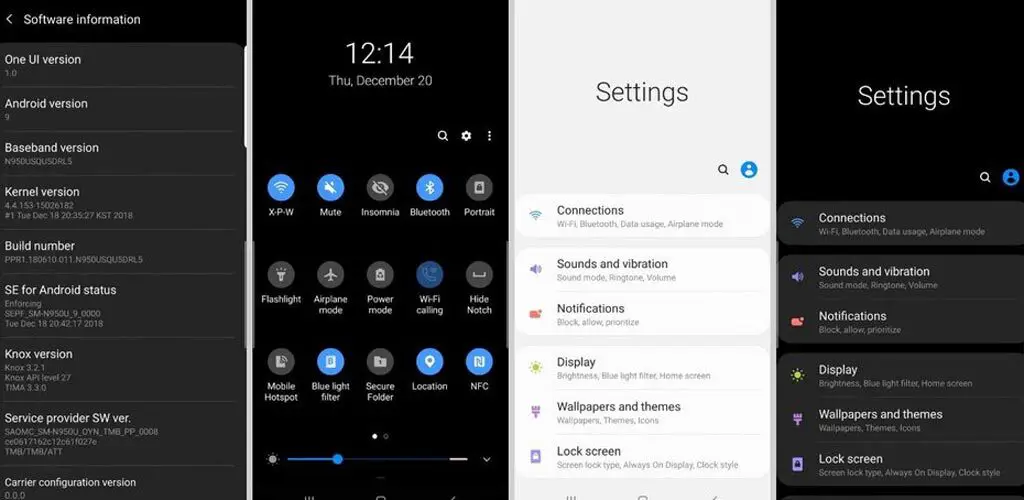
One UI
-
Content, settings, and every option are modified to use mobile in handy.
-
Options moved to the Bottom position so that you can use comfortably in one hand.
-
Night Mode available to reduce eye stress.
Notifications
-
You can quickly reply to messages within the notification bar.
-
Image thumbnails are available.
Samsung Keyboard
-
New Unicode 11.0 emojis are available.
-
The floating keyboard is available in all apps; it will be handy when using your mobile in landscape mode.
-
You can now set a custom touch and hold delay.
Always On Display
-
New clock styles have been added, Charging Information is also available.
Settings
-
Menus have been reorganized to find every essential and frequent usage easily.
Bixby
-
Now you can remap Bixby with the latest OTA.
Phone
-
Call History increased to 2000 entries (increased from 500 entries).
Contacts
-
Now you can manage contacts from various accounts with a new drawer menu.
Camera
-
Enhanced features are available now with AI Features.
Gallery
-
Photo Editor App Available.
My Files
-
New Storage Analysis Tool is available to Monitor Storage and RAM Usage.
Samsung Health
-
Samsung Health Steps counter available in the Notification Bar.
Other improvements and changes
-
Access Kids Home Available in the quick panel.
-
Call stickers have been removed.
-
HEIF images are now supported in Gallery and other apps.
Wrap Up
Selecting correct firmware is the Major step in this process. Based on your country or region choose the firmware. It is a Manual ODIN process; You can flash the latest version. But if you use sideload method, you should flash the next version of your mobile firmware, or else the process may brick your device. After the above process completion, you can update your mobile using regular OTA Updates. You can’t SIM Unlock your mobile using the above method. SIM Unlock and Bootloader Unlock are different. The above process is for repair and Un-Root purpose. So, that I added only Two firmware. If you face any issues, comment below.

Selva Ganesh is a Computer Science Engineer, Android Developer, and Tech Enthusiast. As the Chief Editor of this blog, he brings over 10 years of experience in Android development and professional blogging. He has completed multiple courses under the Google News Initiative, enhancing his expertise in digital journalism and content accuracy. Selva also manages Android Infotech, a globally recognized platform known for its practical, solution-focused articles that help users resolve Android-related issues.