
When companies focus on big features and updates, They always forget what small options and features are needed in their platform. It leads users to use third-party apps to do the task. Most of the time, they have to use different app and setup complicated processes for one or two tasks. Unlike other Video platforms, Netflix has long time contents. It means, When you begin to watch a movie or drama in Nighttime, There is a chance, You may fall asleep during the watch. It is not a big deal from the outside. But if you keep looking in detail, It wastes your data plan and also Netflix server usage. So, Netflix is working on Sleep Timer in Android app with Snooze option.

Either if you fall asleep in routine or someday after a long day of work, you fall asleep while watching Netflix. And when you wake up the next morning, Netflix would have played many episodes, and you have to go back to search where you left the episode. It won’t happen again with Netflix’s new rollout feature.
Netflix has recently started the beta testing of its new feature for Android apps, including a Sleep Timer. It is pretty clear from its name that you can set Netflix to shut down the app after a certain period. Along with time settings, Netflix added another trigger: the end of the current show or movie.

Sleep Timer in Netflix Android App with Snooze Option
Netflix launched this testing feature for its users to set a timer for the current streaming session. The new feature lets you choose the pre-defined time slots as 15 minutes, 30 minutes, 45 minutes, and the end of the current show or movie.
Once you set the timer and it approaches its limits, Netflix will automatically stop the app. This feature looks very helpful in various ways, such as:
- It stops Netflix from autoplay the next episodes, and you can watch the show or episode where you left it before falling asleep.
- It saves the battery life while you fall asleep and the Show is playing in the background, and when you wake up, you find a fully drained battery.
- If you have some data issues, it will surely save your data when you do not consume it, watching your favorite shows or movies.
- When this feature is available for all profiles, you can use it to restrict your kids’ screen timing to sleep properly.
How to Use Sleep Timer Function in Netflix App?
It is pretty easy to set the Sleep Timer in the Netflix app. Once you get the Sleep Timer on your Android device, follow these simple steps.
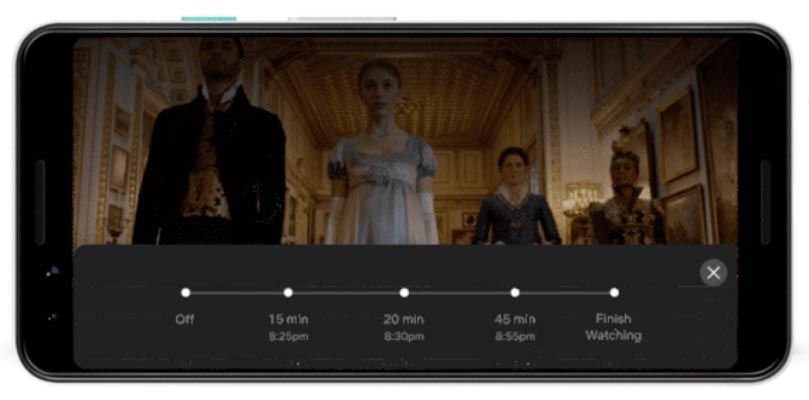
- Open the Netflix app on your Android device.
- Start your favorite TV show or movie.
- Tap the clock icon in the top right corner of your screen, labeled as the Timer.
- Select one of the options 15 minutes, 30 minutes, 45 minutes, or Finish Show.

You set the timer successfully. A floating message screen will open once your set timer limits approach. This floating menu shows the count down timer starting from 5 to 1 with a messaging of snoozing. As the timer reaches 1, Netflix stops the streaming Show and shut down the app automatically.
Limitations of this Beta Testing Sleep Timer Feature
- The sleep timer test feature is limited to selective users globally only with Android devices—no words whether Netflix launch it for iOS. After positive feedback from subscribers, Netflix will launch it for all subscribers.
Future Plans
Netflix currently launched this beta testing sleep timer feature for adult profiles using Android devices. The company announces to expand this feature across mobiles, web, and TVs if the subscribers give appositive feedback.
Wrap Up
Netflix becomes available on most platforms, including Google Nest Hub. Everyone loves to watch his favorite shows or movies before sleeping. And most Netflix viewers fall asleep while watching the shows. It usually happens in routine. Netflix rolled out a testing feature to help you out of this background Netflix playing even after your sleep.
Netflix newly rolled out a testing feature that allows you to set a Sleep Timer to shut down the Netflix app when the set limit reach. It is handy for those who get annoyed when they found that Netflix has played several episodes of their favorite Show after falling asleep. And they have to search and find where they left the episode. It will also help you save battery life and internet data if you don’t have an unlimited data plan.
After successful testing, Netflix will launch it for all subscribers across all devices. Do tell us in the comments if you have used this timer on your device.

Selva Ganesh is a Computer Science Engineer, Android Developer, and Tech Enthusiast. As the Chief Editor of this blog, he brings over 10 years of experience in Android development and professional blogging. He has completed multiple courses under the Google News Initiative, enhancing his expertise in digital journalism and content accuracy. Selva also manages Android Infotech, a globally recognized platform known for its practical, solution-focused articles that help users resolve Android-related issues.