
Every app is currently getting the dark mode feature; it seems to be an essential feature for almost everyone using the internet. Twitter follows suit to add dark mode to its official mobile app. However, the dark way has been available on Twitter’s web version for a long time now. Just as seen on every other app, the Twitter dark mode will change the app’s interface into a dark theme. Also, unlike other apps with dark mode, Twitter is offering two unique dark theme modes; dim and lights out. The former “Dim” feature had been available on Twitter; it is not dark-themed; it’s is bluish.
How to activate the real dark mode- Lights Out on Twitter
First things first, you have to download the latest version of the Twitter mobile app from Google Play store to access this new “Dark Mode” feature. Dark mode has been proved to be friendly to the eye by not leaving a strain when you’re looking into your device screen (especially at night). If you’ve updated the Twitter app on your device, kudos, the Dark Mode is available in the settings menu.
However, the dark mode is labeled “Dark Mode.” Where twitter is called this option “Lights Out.”

Activation on Android
-
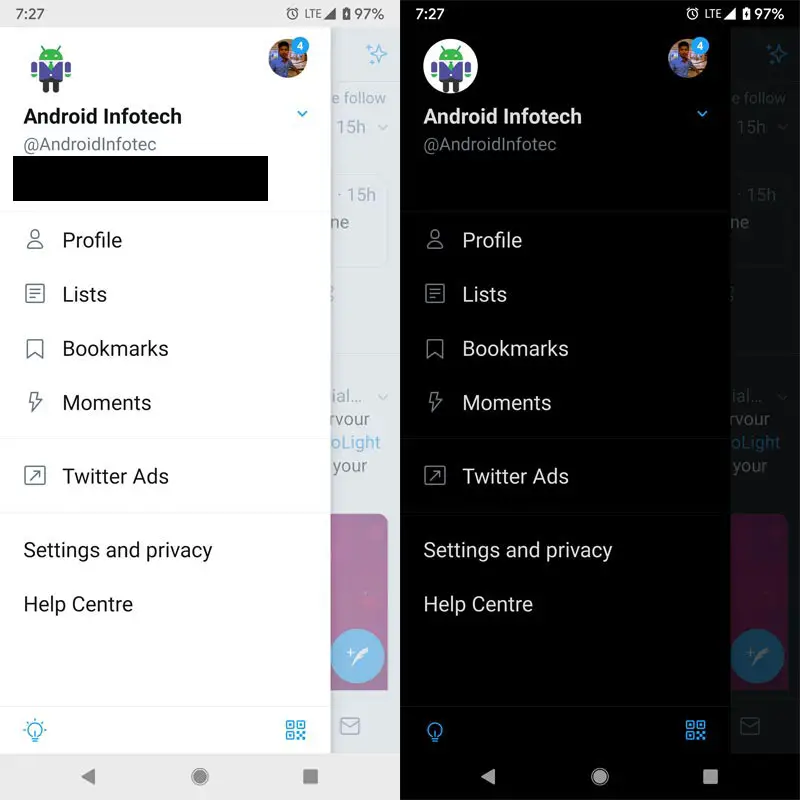
Update the Twitter app, open the app and click on your avatar at the top left corner, to access the navigation menu
-
You’ll see the “Light Bulb” icon on the bottom, click on the icon to activate Twitter’s real dark mode.
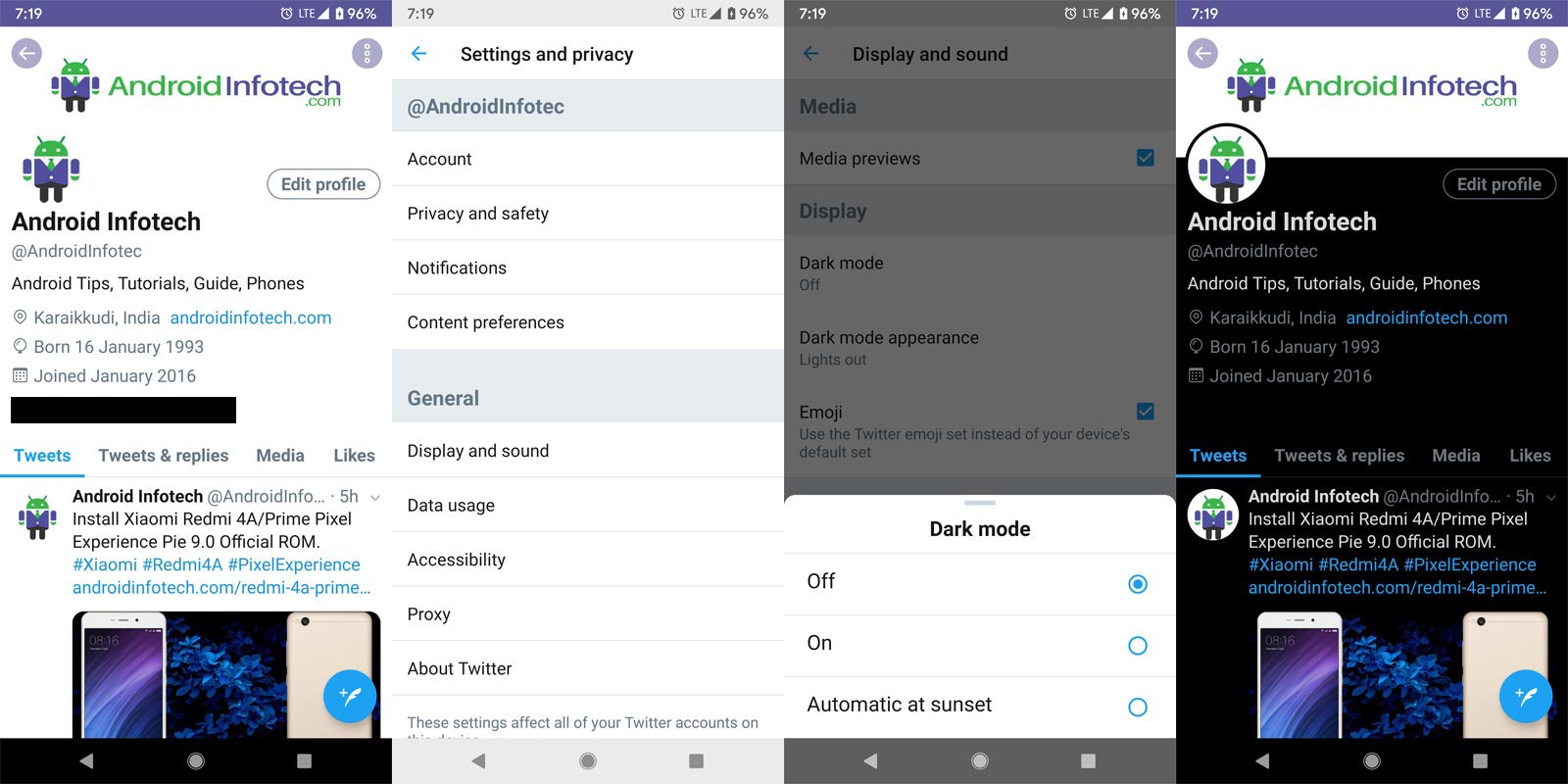
On the other hand, if you want to customize the dark mode, you can continue by heading to the settings & privacy menu from the navigation menu.
-
On the Settings and Privacy settings menu, click on Display and sound
-
Further click on Dark Mode
-
Now, you can define if the Dark Mode should be your permanent theme, or it should automatically activate at sunset.
Activation on PC Web App
-
Select on profile You’ll see the “Dark Mode” on the bottom, click on the icon to activate.
Troubleshoot
Rumors have it that the Twitter dark mode is not working on some devices even after updating to the latest version of the app. If you experience this situation, you can perform the tweak below to get the feature on your favorite social media app.
-
Make sure you’re using the latest version of Twitter’s official mobile app; the version 8.18.0
-
Go to your device settings and look for the “Apps” row, click on the row when you see it
-
When the list of all installed apps appear, search for Twitter and click on it
-
Tap the “Storage” option and further click the “Clear Cache” button
-
Go back to the “App Info” page and click “Force stop.”
-
Click “OK”
Don’t worry; you can open the app even after “Stopping” it. After you have done the steps above, go back and open the app. Hopefully, you can now enjoy the “Lights Out” mode.
Twitter chooses the selected Image process, Where it is not that much like Gmail modes, and there is nothing terrible about that. The feature has been long expected for by users, and seeing that almost all apps are getting dark mode features, it is a feature worth being available for Twitter users.
Wrap Up
Android is slowly moving to Real Dark Mode. Is it worthy? Yes. You can expect 5-30% more battery life. If you use a lot of apps in this mode. There is a difference between Night mode and this dark mode. Night mode saves your eyes from Blue lights. Where this dark mode rests the AMOLED particles to save extra battery life. There are plenty of features added in the Android 10 like this. As I mentioned earlier, most of the white background images are still white. In the future, we can expect more aggressive techniques to do this. What do you think about this feature in the Twitter App? Comment below.

Selva Ganesh is a Computer Science Engineer, Android Developer, and Tech Enthusiast. As the Chief Editor of this blog, he brings over 10 years of experience in Android development and professional blogging. He has completed multiple courses under the Google News Initiative, enhancing his expertise in digital journalism and content accuracy. Selva also manages Android Infotech, a globally recognized platform known for its practical, solution-focused articles that help users resolve Android-related issues.