
Xiaomi Redmi Note 10 Lite is an upper mid-range mobile, and it can handle any apps or updates without problems. When you have full specs on your mobile, You can avoid most general issues. But it doesn’t mean, You can prevent all kinds of mobile problems. Since our mobile has a complicated OS to operate various tasks, stuck and freeze issues can happen. When it occurs in the live condition, Most of the time, I can fix it myself after a few minutes, or a restart can resolve the issue. But when your mobile is stuck after an update or root process, you can fix your Xiaomi Redmi Note 10 Lite that is stuck on the boot logo using one of the below methods.
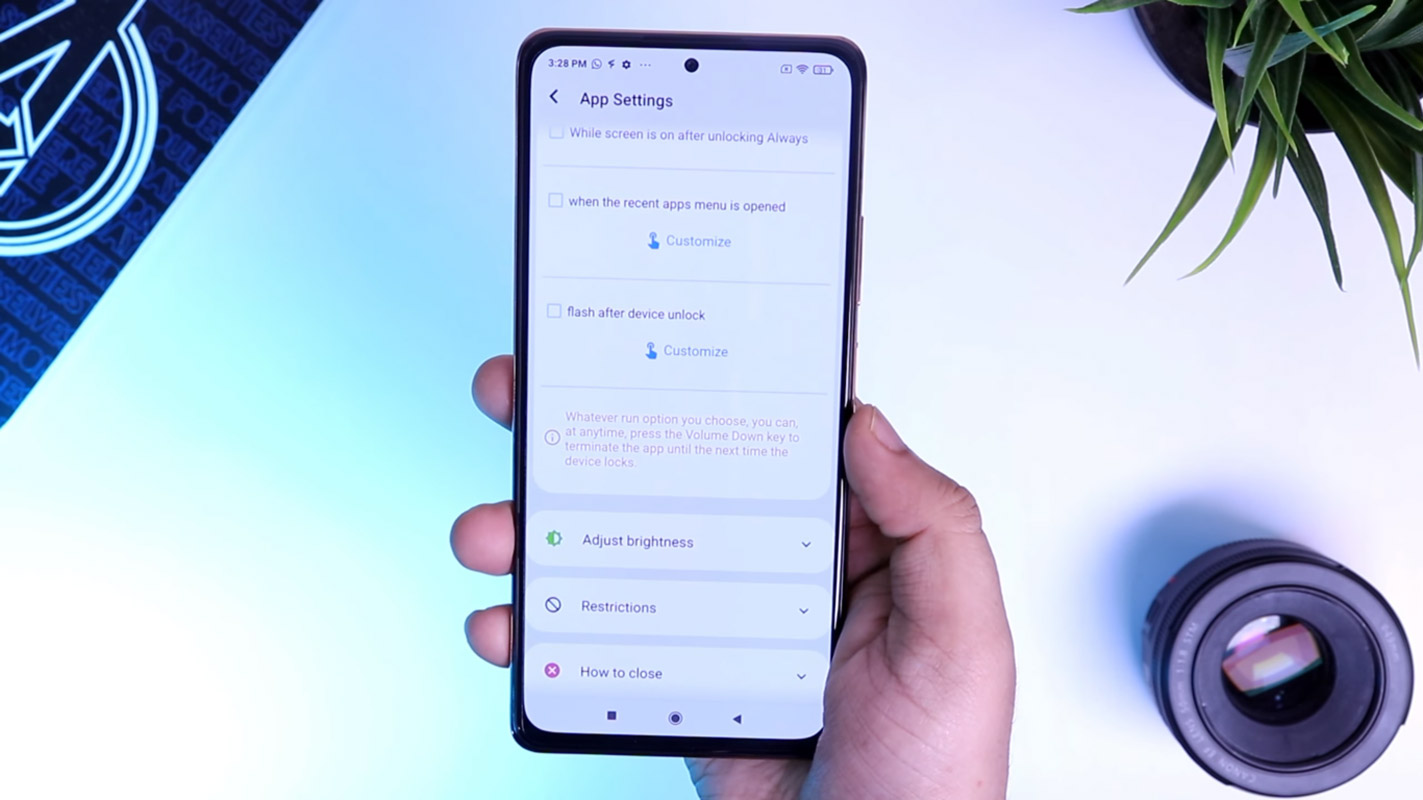
What is the Stuck on the Boot logo in Xiaomi Redmi Note 10 Lite?
OTA updates are, most of the time, flawless processes. But when the mobile begins to finish the first boot after the update, It is a nail-biting situation for most users. Because sometimes the boot can take a long time than usual. If the boot happens after a long time, it is excellent. But it is not a good sign when the boot takes more than 20 minutes and is stuck on the Xiaomi Redmi Note 10 Lite name logo. Even after your mobile is not booted into the regular screen, your mobile is stuck on the Mi Boot logo. You can wait for a few minutes. You don’t need to worry. We can start with simple methods to fix these issues. Always start with a simple process. Most of the time, the boot stuck fixed in simple ways.
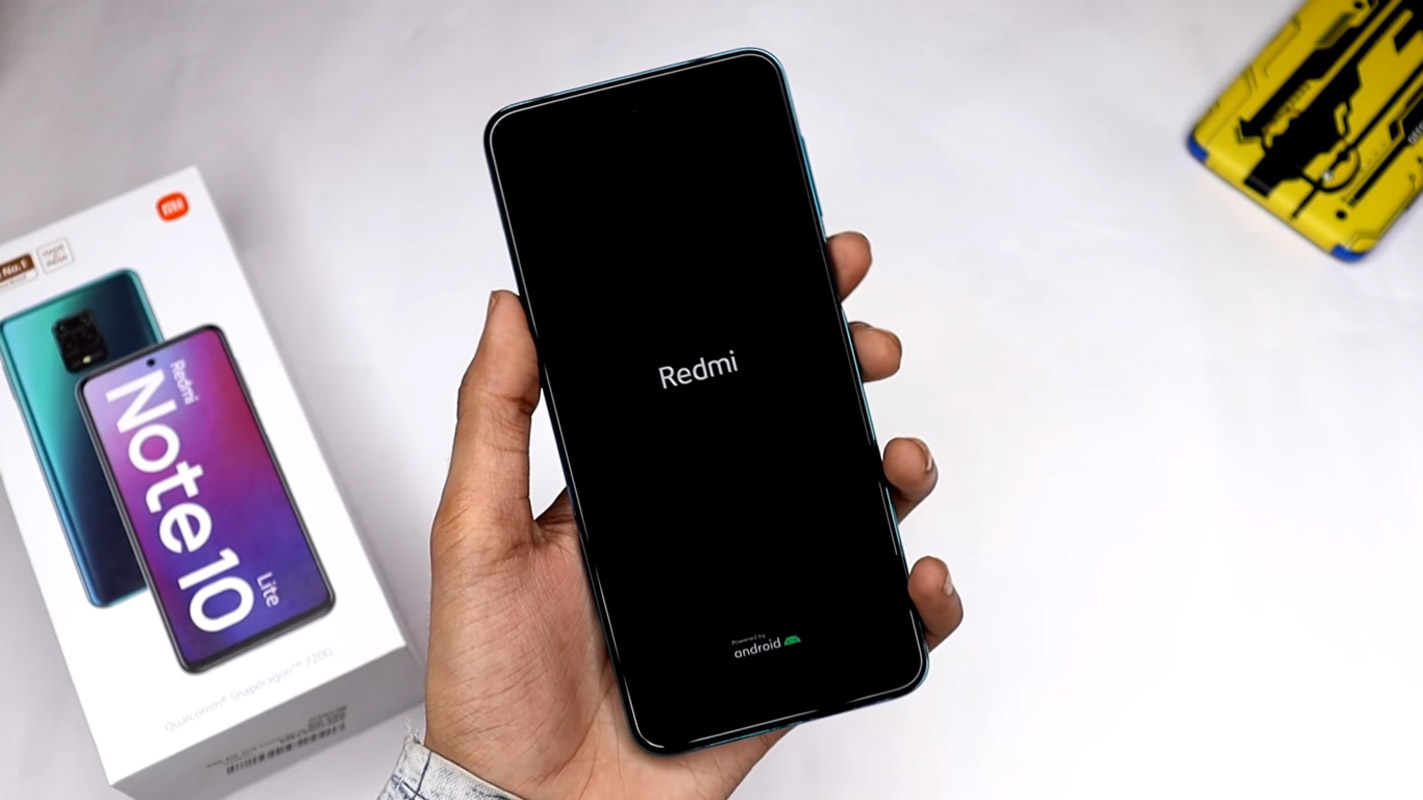

Boot logo stuck can happen for various reasons and different situations. When you restart the mobile after the monthly security patch updates or major upgrades like Pie, and Android 10, It can happen. Due to Overwrite already existing codes in the OS and the process doesn’t go as expected, We have to deal with this kind of problem. When you face this issue, Don’t rush for firmware flash, You will lose user data. The Firmware flash should be your last choice, and We can recover your mobile using different methods. The stuck on the Mi Logo, and The Mobile details screen logo can happen. For both screens, the following techniques will work.
How to Fix Xiaomi Redmi Note 10 Lite Stuck on Boot logo? (curtana)
When you give more time than usual, and your mobile won’t boot into System OS, you can follow the below methods to fix your stuck Xiaomi Redmi Note 10 Lite on the Boot logo. Our motto is as much as we can retrieve your mobile without losing data. But when we can’t, we have to flash the full firmware to get your mobile back.
1. Long Press Power Button
Even if it is a simple method, you may wonder what technology can help here. All electronic devices will work most of the time after the power is off and on. It will work most of the time. Long press your power button for 10 seconds, It will trigger your mobile’s ability, and your mobile will shut down in a few seconds.
2. Boot into Safe Mode
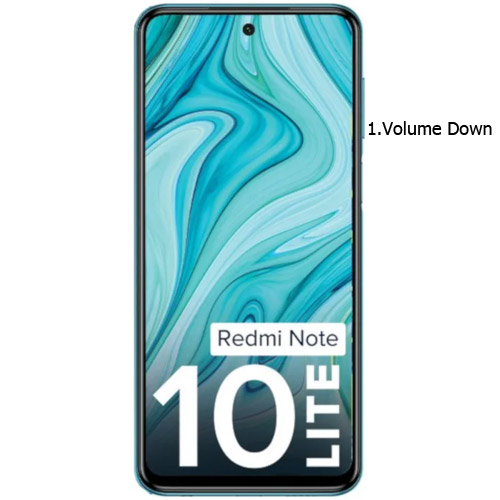
Sometimes third-party apps may trigger the new version, and it may cause the stuck-in boot logo. Try to boot into Safe Mode by pressing Volume Down for 10-15 seconds. Your mobile will boot into Safe mode. Try to Un-Install the recently installed app before the OTA process. Also, check the compatibility in Play Store. When installing apps other than Play Store, Uninstall them and try to boot again.
3. Reboot using recovery
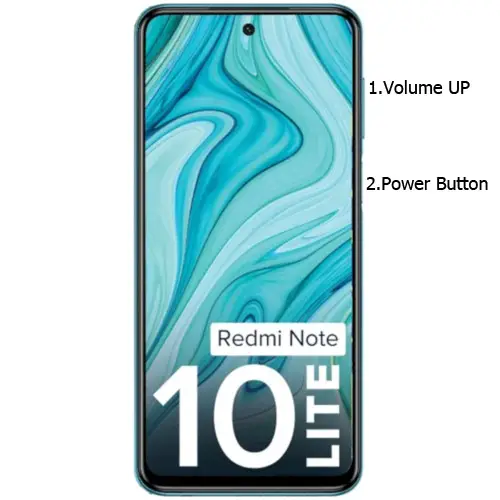
This method will not affect your User data. It will only soft reset your mobile. You have to press Volume Up+ Power Button on your mobile for 7-10 Seconds to boot into recovery mode. After that, it will boot you into the recovery mode or directly boot into System OS. The response may vary depending on the mobile manufacturers. If you received a Recovery mode menu, use the Volume keys to navigate and the Power button to confirm the selection.
3.1 Stock Recovery method
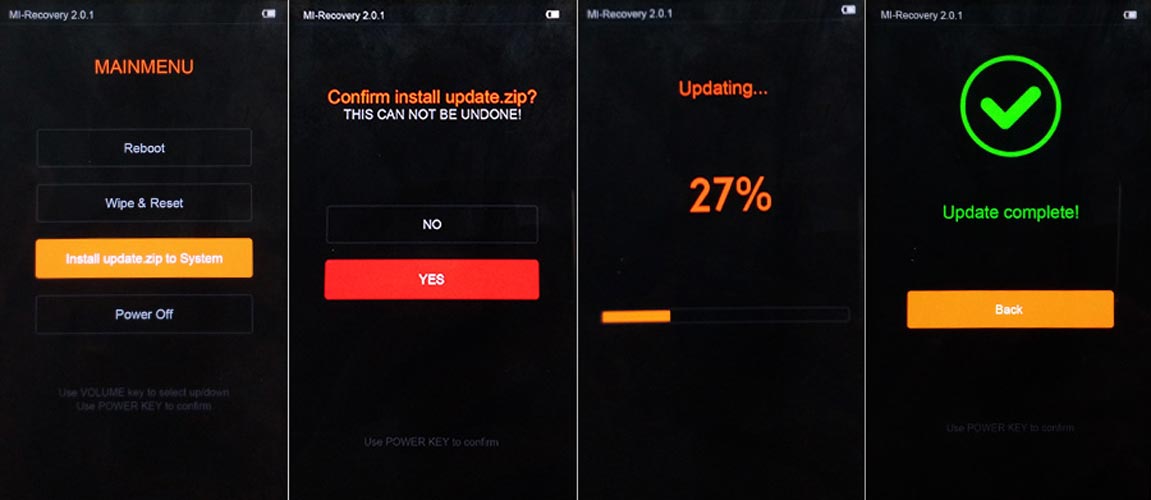
If you didn’t use Rooted mobiles, you have Stock Recovery, provided by your official mobile manufacturer. If you have stock recovery, you have the direct option of “Reboot.” Navigate to this option and confirm it using the power key button.
3.2 TWRP Recovery method
When using Rooted mobiles, you either use Stock Recovery or TWRP custom recovery. If you have Stock Recovery, you can use the above process. When you install TWRP on your mobile, follow the steps below.
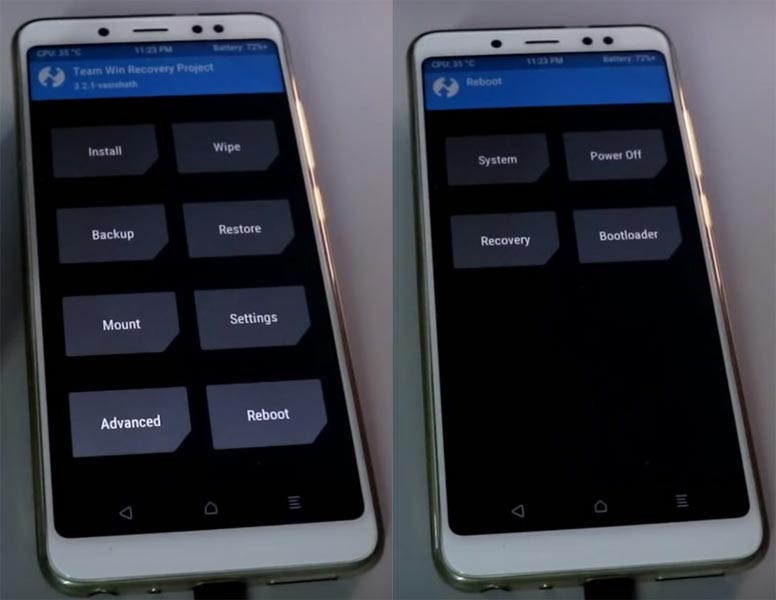
- The Keycombinations will boot your mobile into TWRP Recovery mode.
- On the Home screen, you can find the option “Boot.” Select the item; you will receive further options such as System, Power Off, Recovery, and Bootloader. Select “System.” Your mobile will boot into Normal OS.
4. Using ADB Commands to Reboot, your boot logo stuck Xiaomi Redmi Note 10 Lite Mobile
This process may work 50-60%. If you use Old Mid-range mobiles, the chances are less. But, it will work when you have Flagship mobiles or New mobiles. The OS can still handle background commands. So, the ADB commands may work.
Steps
- Download the ADB drivers. Install it on your PC.
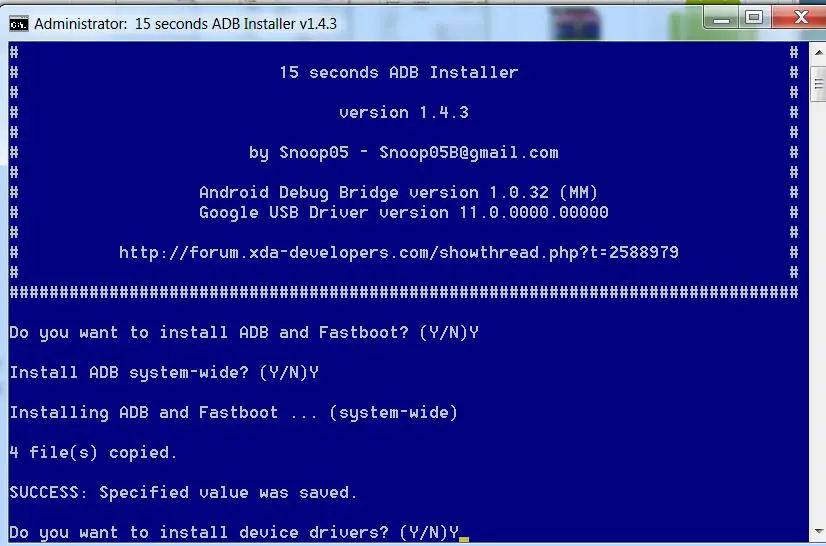
- Connect your mobile with a PC.
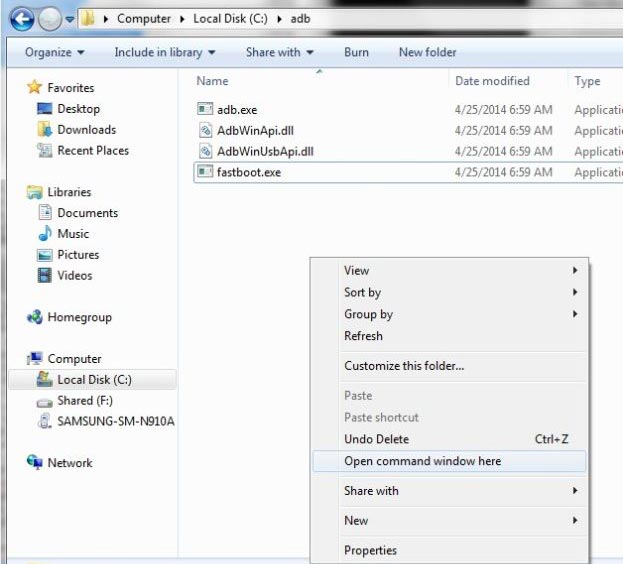
- Open a command prompt as Administrator and type the below command to check the ADB status.
- adb devices
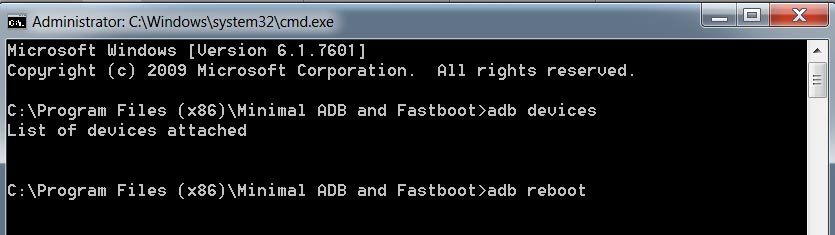
- It should display the connected devices. If you didn’t get the mobile, restart the command prompt and Disconnect and Connect your mobile. If you are detected, type the below commands.
- adb reboot
- The command will reboot your mobile.
5. Drain the Battery Completely
When You can’t Power off or Restart your mobile, Let the battery drain completely. Because of the massive battery, it may take 1-3 days, depending on your mobile battery backup, to remain. When you don’t have this much time and want to urge fix methods, you can proceed with other ways.
6. Wipe Cache Data Partition
When you perform, restart using recovery, and you can’t boot into OS again. In this situation, we have another choice of the fix by Wipe cache partition. It also will not affect user data. It will wipe only cache data. You have to press Volume Up+ Power Button on your mobile for 7-10 Seconds. After that, it will boot you into the recovery mode or directly boot into System OS. The response may vary depending on the mobile manufacturers. If you received a Recovery mode menu, use the Volume keys to navigate and the Power button to confirm the selection. Remember to wipe only the cache partition, Not the Wipe Data/Factory Reset.
6.1 Stock Recovery method
- If you didn’t use Rooted mobiles, you have Stock Recovery, provided by your official mobile manufacturer.
- If you have stock recovery, you have the direct option of “Wipe & Reset.” Navigate to this option and confirm it using the power key button.
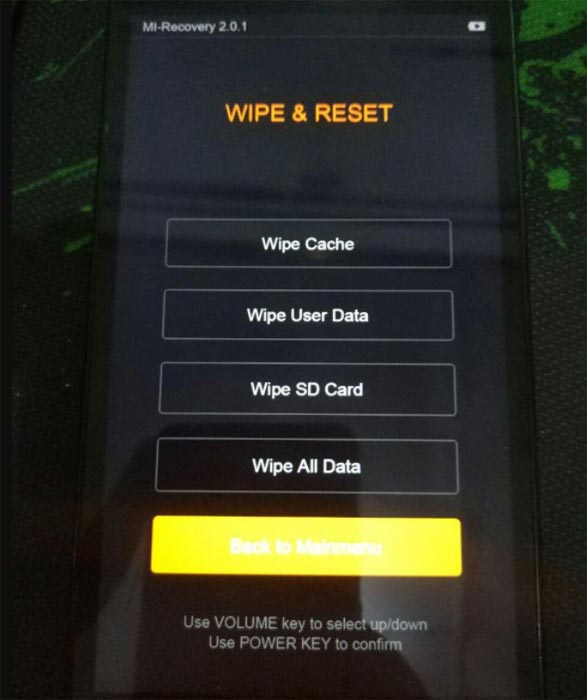
- Initially, try “Wipe Cache.”
- It will ask you to confirm the process. Select “Yes.”
- When a cache doesn’t work, Go for “Wipe User Data.”
- Most of the time, it will boot into OS after the wipe. When it returns to recovery, Select the Reboot system now.
6.2 TWRP Recovery method
When using Rooted mobiles, you either use Stock Recovery or TWRP custom recovery. If you have Stock Recovery, you can use the above process. When you install TWRP on your mobile, follow the steps below.
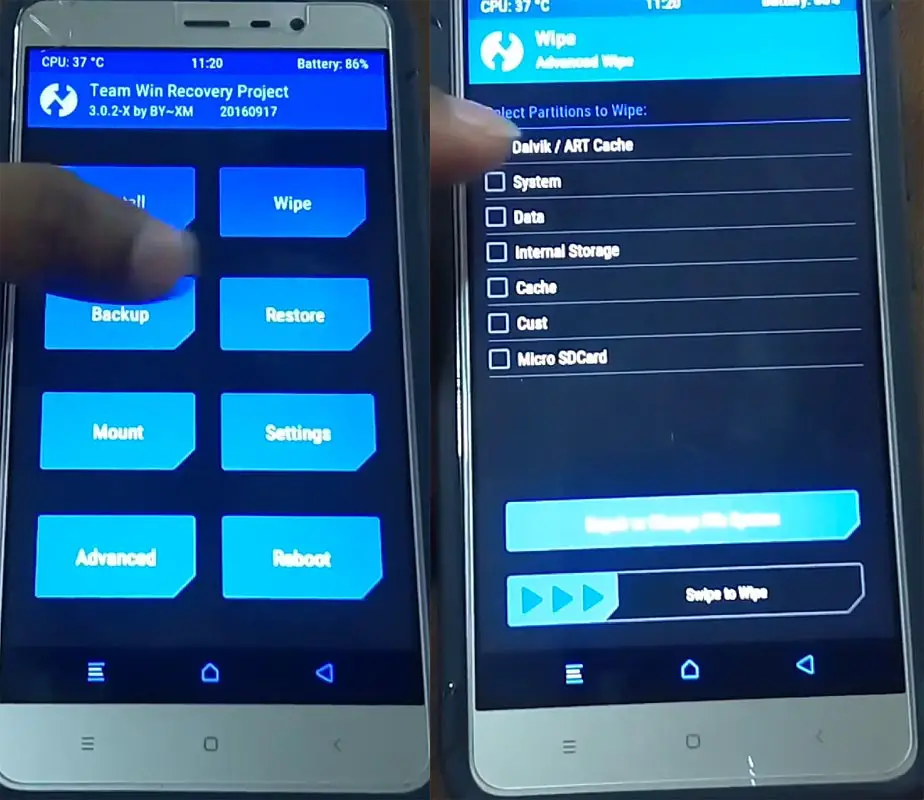
- The Keycombinations will boot your mobile into TWRP Recovery mode.
- On the Home screen, you can find the option “Wipe.” Select the wipe option; you will receive further details. Select “Cache.” Don’t select the System, and it will wipe your OS. After selecting other choices, swipe to erase the data. When the process completes, return to home and boot into OS.
7. Disable Recently installed apps using ADB
If you use Stock Android phones, you can disable/remove the bloatware apps most of the time. If you are in Custom Skin OS, the chances of disabling the Bloatware apps are less. But, We can Disable the Apps using ADB without root. The methods may vary depending on the manufacturer. You have to find the particular Bloatware apps and disable them. I will give the overall idea about ADB steps and commands. But, the list of packages may vary depending on the manufacturers.
- Download the ADB drivers. Install it on your PC.
- Enable USB Debugging Mode and OEM Unlock; you’ll find these options at Settings >>> Developer options. If you didn’t see the developer options on your settings menu, go to about >>> build number. Click on the “Build Number” row about ten times regularly to activate your device’s “Developer Option.”
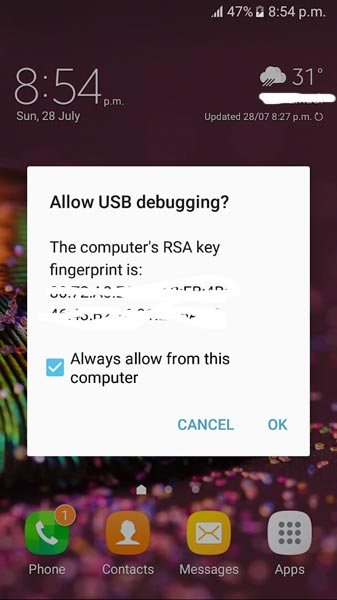
- Connect your mobile with a PC and unlock your mobile (Screen Lock).
- Open a command prompt as Administrator and type the below command to check the ADB status.
- adb devices
- The above command will display some code for device detection. If you didn’t receive any response, Check with the USB Cable. If you get a response, move to the below commands.
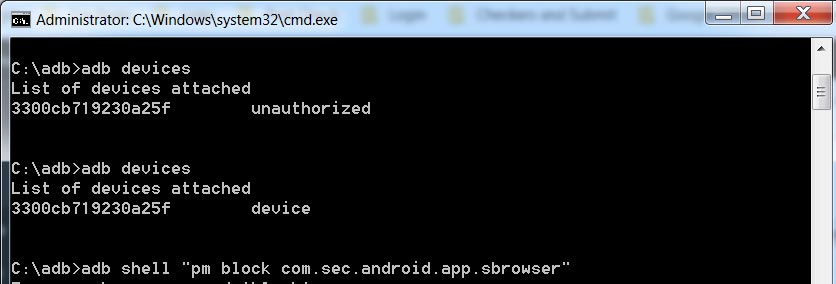
- You can disable the apps based on their adb package name. You can find these package names using the below command.
- adb shell pm list packages
- Based on the title, you can exclude unwanted apps. After that, use the am force-stop and pm disables commands with the Application package name.
- You can enter the commands one by one, Or All commands, and Hit Enter. You can get the application package name in Play Store URL. It will start with com.instagram.android like that.
- am force-stop package name(e.g: com.sprint.w.installer)
pm disable-user package name
- Restart your mobile. Move to different methods when you are again stuck on boot logon on your Xiaomi Redmi Note 10 Lite mobile.
8. Flash Boot. img file using ADB and Fastboot and Repair Boot logo stuck in Xiaomi Redmi Note 10 Lite
The boot image file is the main problem of being stuck in the boot logo. When we flash the particular boot image file, we can restore your mobile without losing data. But you should know what version of the software is already on the mobile. You can always go with the latest boot image file. The following method may not work with EU carrier-locked mobiles.
-
Download the ADB drivers. Install it on your PC.
- Download Xiaomi Redmi Note 10 Lite firmware from the below links and save it on your PC. Your Current OS version and Downloaded Version AP and CSC should be the Same.
8.1 Extracting boot.img file
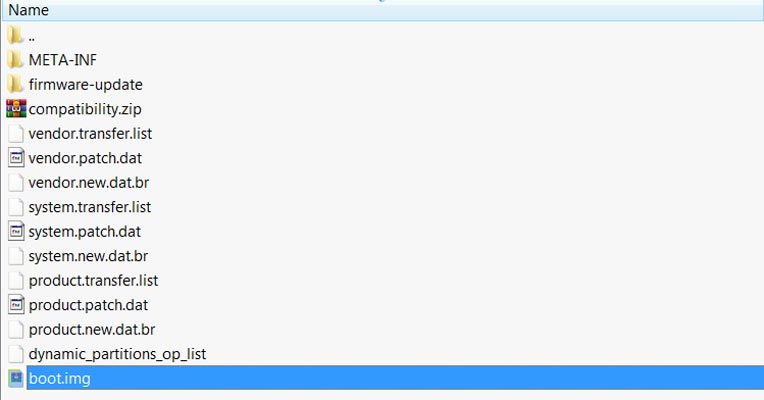
- Download 7Zip-ZS and Install it on your PC. Extract the files in downloaded firmware using 7Zip-ZS. You will get ROM files. In those files, along with some data, you can see boot.img.
- Copy the boot.img to ADB Installed folder.
8.2 Flash boot.tar using ODIN
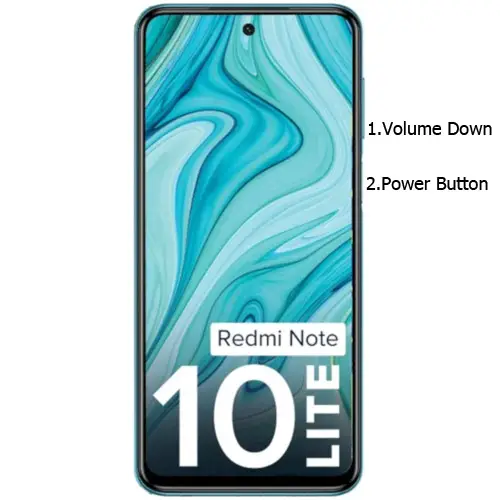
- Connect your USB cable with your PC. To do this, press and hold Volume Down+ Power Buttons and Connect Your Mobile To PC via USB Cable; after Mi Logo Appear, Release all keys. Then, enter into Fastboot mode. Switch off your device.
-
Press the Volume Up button to continue when you see the warning message.
-
Connect the Xiaomi Redmi Note 10 Lite mobile to the computer via USB cable.
-
Launch the fastboot on your computer. Open a Command prompt on your PC and type the below command.
- fastboot devices
- If you are detected, type the below command and hit Enter. It should display the connected devices. If you didn’t get the device, restart the command prompt and Disconnect and Connect your Xiaomi Redmi Note 10 Lite.
- fastboot flash boot boot.img
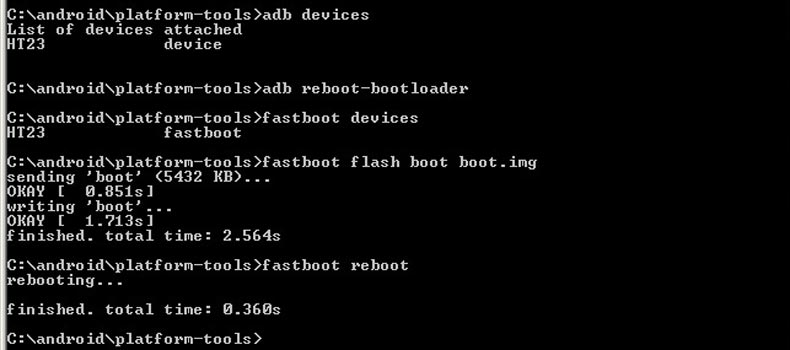
- After the process is complete, Press the Volume Down+ Power button to exit Fastboot mode. When the screen goes off, Immediately Press Volume Up + Power buttons to boot into Recovery mode.
- After entering into Stock recovery mode, Go to Wipe Data/Factory Reset and Select Yes to wipe data. It will erase your saved data on your device. Don’t Boot into OS; read below Boot stages before booting.
9. Flash Complete ROM using Xiaomi Flash Tool
In this method, we are going full flash firmware in your boot logo stuck Xiaomi Redmi Note 10 Lite mobile. It is a Data loss process, and you can use it when you don’t have any choice and none of the above methods work for you. Refer- Flash Xiaomi Redmi Note 10 Lite ROM.
9.1 Flash Xiaomi Redmi Note 10 Lite Android 11 ROM using Xiaomi Flash Tool
- Download the Xiaomi Flash tool.
- Extract the files from the Zip.
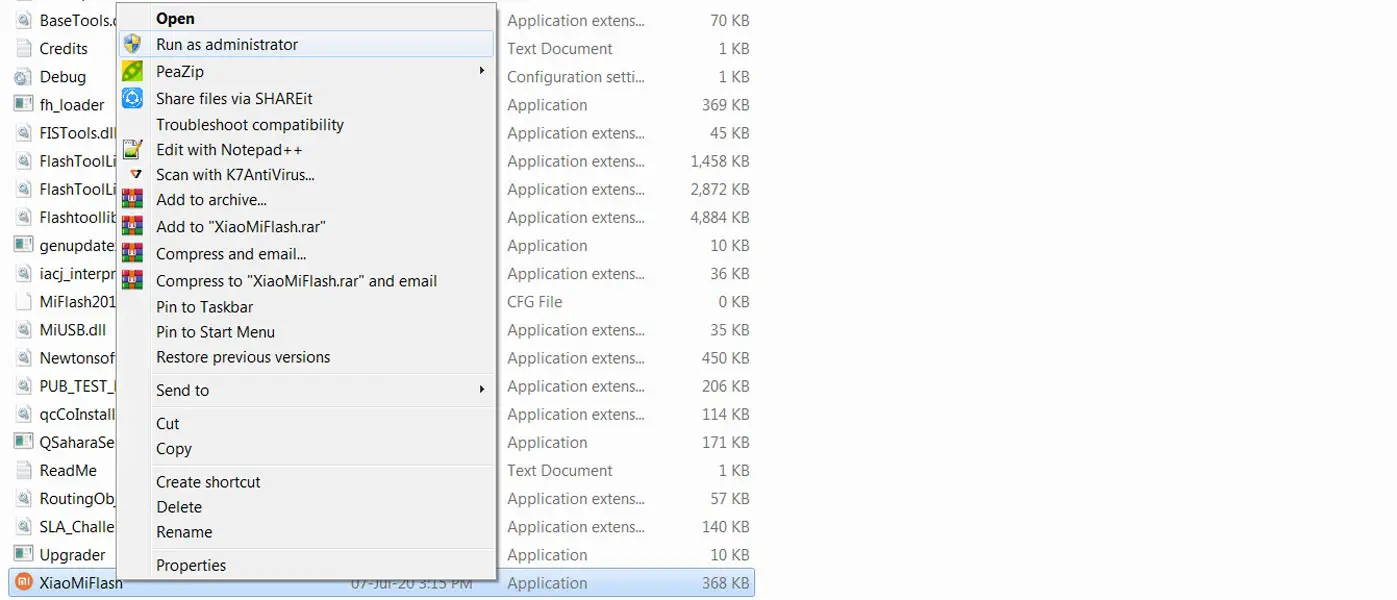
- After the extraction, Right-click on the “XiaoMiFlash” software on your PC and choose “Run as Administrator.”
- We use Administrator Because the USB driver should have General access To get access everywhere without any folder restrictions. If you have already installed the ADB drivers, you may know these issues.
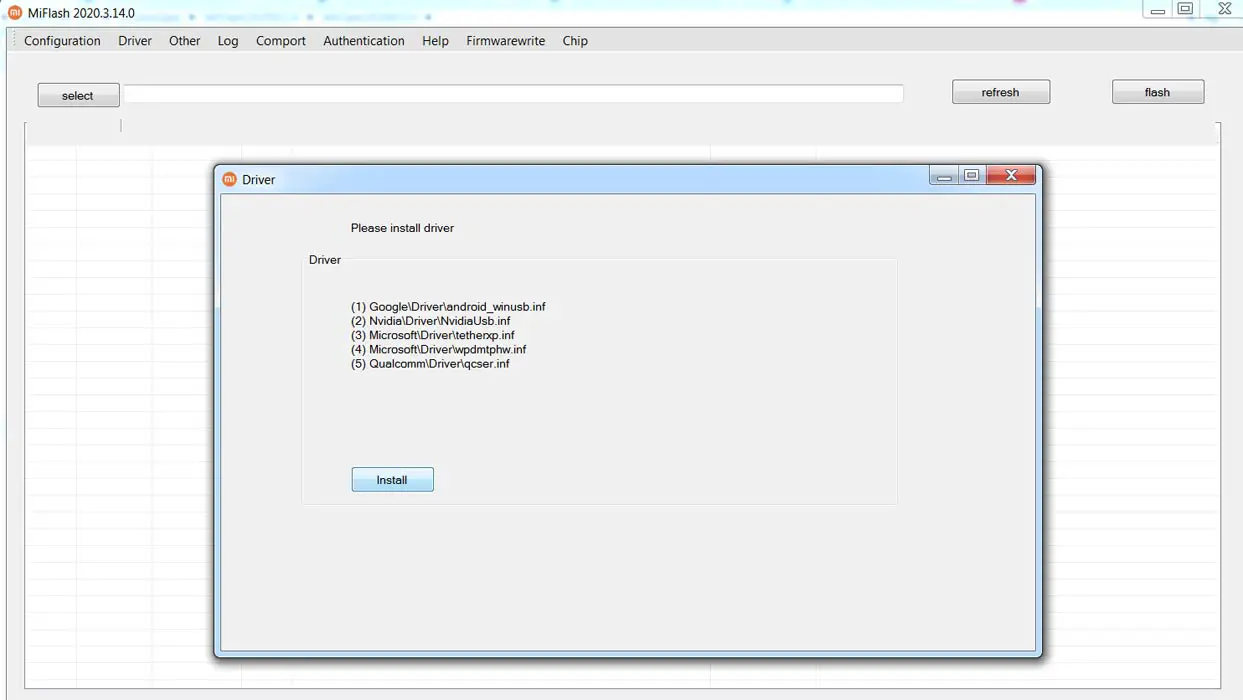
- Navigate to “Driver” and Install all the necessary Driver files.
- Download the necessary firmware for your mobile and copy it to your PC.
- Switch off your device. Then, enter into Fastboot mode. To do this, press and hold down the Volume Down + Power buttons simultaneously for some time.
-
Press the Volume Up button to continue when you see the warning message.
-
Connect the Xiaomi Redmi Note 10 Lite mobile to the computer via USB cable.
- Select “Refresh” in the app; you will get the device ID in the list.
- When you don’t get the device, Repeat the above steps.
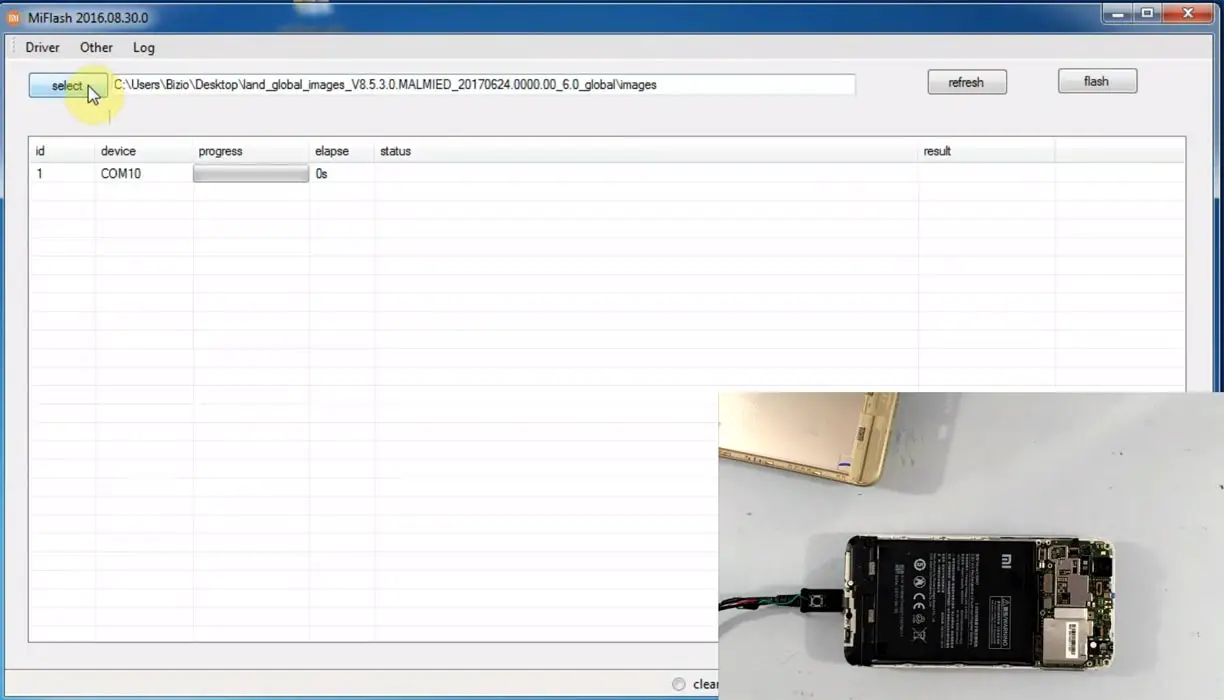
- After getting your mobile ID, Choose firmware using the “select” tab.
- Choose “save user data” in the bottom dot options.
- Now select “Flash.” The software will flash the firmware to your mobile.
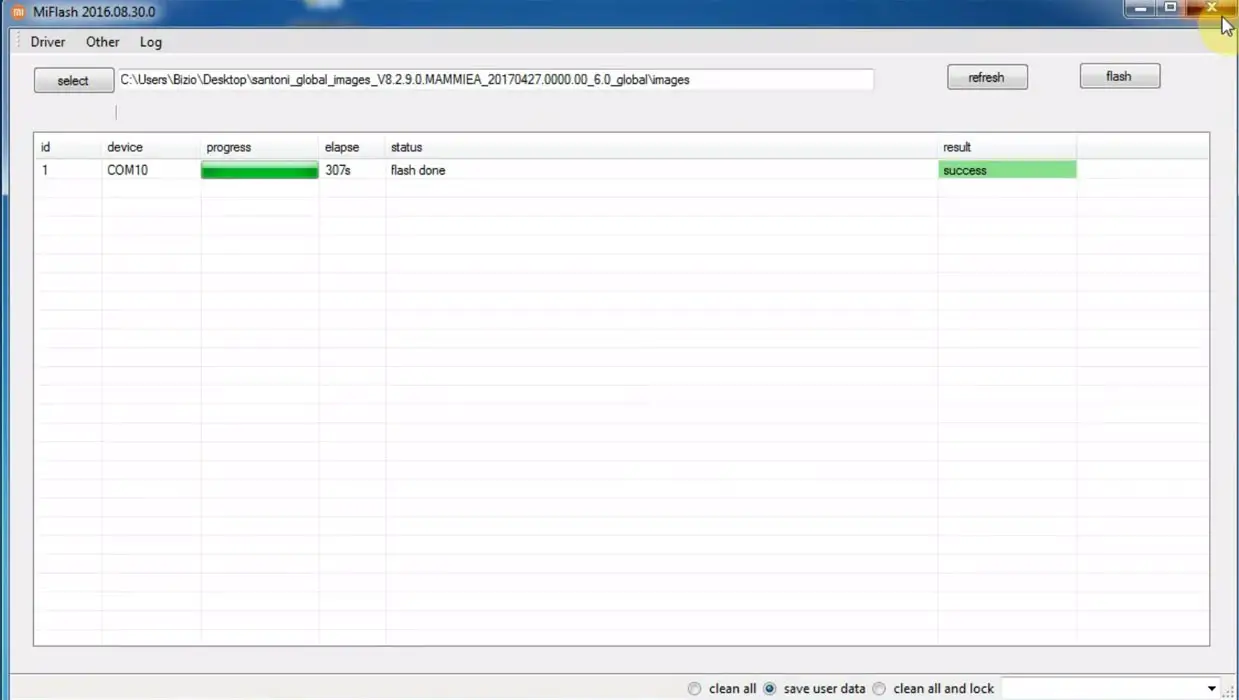
- You will get the “Success” message once the flash firmware is done.
- After the process is complete, you must press the Volume Up+ Power button to exit Fastboot mode.
- You can Check the Firmware Details->Settings->About->Version.
Wrap Up
Even if the software updates process looks simple, 1-5% of people always face making OTA updates. That’s why we suggest you always make a backup before making an update on your mobile. Always use cloud photo backup services like Google Photos. Compared with other mobile manufacturers, with the help of Xiaomi’s available tools, we can fix your Xiaomi Redmi Note 10 Lite stuck on the boot logo.
If you face freeze and unresponsive issues on your mobile, You should try different methods than the above mentioned. It is always wise to give the first boot after the update. The first boot may take longer based on your available storage and app size. When you are confident that the mobile is stuck and already given enough time for initialization, you can follow the above steps to fix your mobile. Comment below when you try different methods than above, and those techniques help you. We try to add if those methods work for everyone.

Selva Ganesh is a Computer Science Engineer, Android Developer, and Tech Enthusiast. As the Chief Editor of this blog, he brings over 10 years of experience in Android development and professional blogging. He has completed multiple courses under the Google News Initiative, enhancing his expertise in digital journalism and content accuracy. Selva also manages Android Infotech, a globally recognized platform known for its practical, solution-focused articles that help users resolve Android-related issues.