
In the ever-evolving world of productivity apps, Google Keep has long stood as a straightforward yet effective tool for note-taking, list-making, and creative sketching. However, Google’s recent focus on integrating AI-powered enhancements into its suite of tools is set to give Google Keep a fresh layer of innovation. With the upcoming “Help me draw” feature, powered by Google’s Gemini AI, the app is taking a bold step toward revolutionizing how we interact with doodles and sketches. This article delves into the exciting prospects of the “Help me draw” tool, its potential impact on productivity, and how it positions Google Keep in the competitive note-taking market.
What Is Google Keep?
Google Keep is a versatile note-taking application that offers features like quick notes, to-do lists, and sketching capabilities. It is part of Google’s Workspace ecosystem and integrates seamlessly with other apps like Google Docs and Google Calendar. While other note-taking apps like Evernote and Notion boast a more comprehensive set of features, Google Keep thrives on simplicity and ease of use.
Introducing Gemini: Google’s AI Superpower
At the heart of Google’s latest innovations is Gemini, its powerful AI model designed to enhance user experiences across various applications. Unlike traditional AI models, Gemini emphasizes context-aware functionalities and creativity-driven tasks, making it an ideal fit for apps like Google Keep that focus on user interaction and visual content creation.
The Evolution of AI in Google Keep
Despite its popularity, Google Keep has seen limited integration of generative AI features. The “Help me create a list” tool, introduced earlier this year, marked the app’s initial step into AI-enhanced functionality. This feature enables users to generate task lists quickly based on simple prompts, streamlining productivity.
The “Help me draw” feature, however, represents a more ambitious leap, offering users tools to turn their hand-drawn sketches into polished, AI-generated visuals.
What Is the “Help Me Draw” Feature?
The upcoming “Help me draw” tool promises to bring AI-generated art to the forefront of Google Keep. This feature unveiled through an APK teardown of Google Keep v5.24.462.04.90, will allow users to:
- Transform hand-drawn doodles into professional-looking visuals.
- Generate new images from scratch by typing a brief description.
- Select from three distinct sketch styles: vector drawing, coloured pencil, and ink marker.
This flexibility makes the feature appealing to casual users and creative professionals alike.
How Does It Work?
The “Help me draw” tool will likely reside in the sketching tools tab, marked by a sparkle icon. Users will have the option to either enhance an existing sketch or create entirely new visuals using text-to-sketch technology.
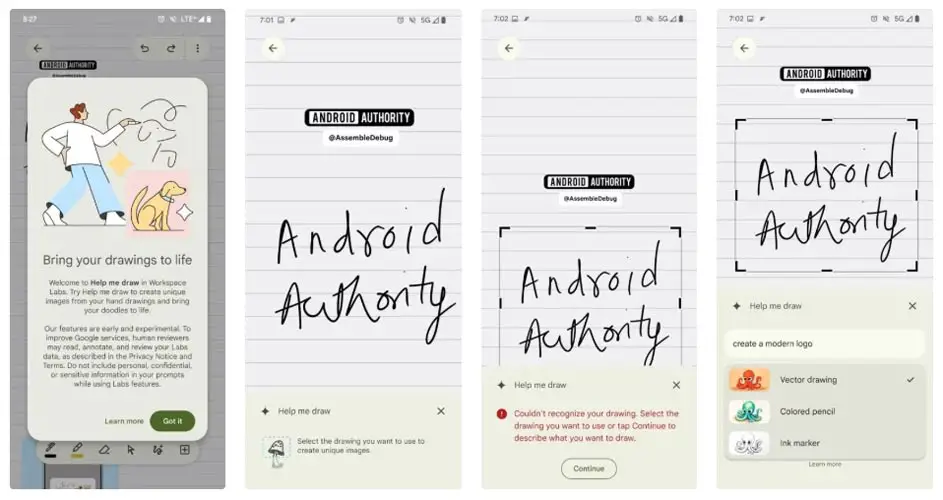
For instance:
- A user can draw a rough outline of a house, and the AI will refine it into a detailed illustration.
- Alternatively, typing “sunset over mountains” could generate a picturesque digital sketch in seconds.
The Role of Workspace Labs
The Workspace Labs program plays a pivotal role in testing and fine-tuning experimental features like “Help me draw.” Through this initiative, Google gathers valuable user feedback to ensure that the tools are user-friendly and reliable before a broader release.
Challenges in Implementation
Although the user interface and welcome screens for “Help Me Draw” are reportedly complete, early testing has revealed that the feature is still in its developmental phase. Testers have encountered limitations, such as the inability to generate sketches consistently. These challenges indicate that Google is still perfecting the feature to ensure seamless functionality upon release.
Implications for Note-Taking and Productivity
The integration of AI-powered drawing tools in Google Keep could redefine how users approach note-taking and brainstorming. By enabling the transformation of abstract ideas into visual representations, “Help Me Draw” can:
- Enhance creative workflows for designers and students.
- Simplify complex concepts through visual aids.
- Encourage interactive note-taking for improved engagement.
Competition in the Note-Taking Space
With apps like Notion, OneNote, and Evernote dominating the market, Google Keep’s success depends on its ability to leverage AI effectively. The “Help me draw” feature, combined with its existing minimalist design, could set it apart by offering unique, creativity-focused tools.
When Will “Help Me Draw” Be Available?
Although there is no confirmed launch date, the presence of a dedicated support page suggests that Google is preparing for a release shortly. However, given past patterns—such as the delayed rollout of the “Help me create a list” feature—it may still take several months before the tool becomes widely accessible.
Wrap Up
The upcoming “Help me draw” feature represents an exciting shift for Google Keep, bridging the gap between note-taking and AI-powered creativity. By allowing users to convert basic sketches into refined visuals or create art from scratch, Google Keep is set to cater to a broader audience, from casual users to creative professionals.
While the exact timing remains uncertain, one thing is clear: the integration of Gemini AI into Google Keep signals Google’s commitment to enhancing productivity tools with cutting-edge technology. As users await this transformative feature, the anticipation highlights how AI is reshaping the way we capture, create, and share ideas.

Selva Ganesh is a Computer Science Engineer, Android Developer, and Tech Enthusiast. As the Chief Editor of this blog, he brings over 10 years of experience in Android development and professional blogging. He has completed multiple courses under the Google News Initiative, enhancing his expertise in digital journalism and content accuracy. Selva also manages Android Infotech, a globally recognized platform known for its practical, solution-focused articles that help users resolve Android-related issues.




Leave a Reply