
In the ever-evolving social media landscape, Instagram remains at the forefront, persistently rolling out fresh features and updates to captivate its vast user base. Among the most recent additions is the ‘Threads for You’ section, an element that unpredictably infiltrates your feed, often at the most inopportune times. Unlike some of Instagram’s other innovations, this addition hasn’t been embraced openly. Its presence has led many users to search for a solution to remove or disable it, seeking a more uninterrupted and personalized browsing experience. This article serves as your guiding light through the process, providing valuable insights into how you can effectively bid farewell to the ‘Threads for You’ section on Instagram, reclaiming control over your social media journey.
Understanding the ‘Threads for You’ Section
Before we delve into how to remove this section, let’s first understand what it is. The ‘Threads for You’ section is an attempt by Meta (formerly Facebook) to incorporate the contents of Threads, a separate app, directly into Instagram. However, unlike Instagram’s Suggested Posts section, Threads often falls short of aligning with users’ preferences. This has left many users frustrated as the section disrupts the seamless scrolling experience on Instagram.
The Native Limitation
Unfortunately, Instagram doesn’t provide a built-in option to disable or remove the ‘Threads for You’ section. This lack of granular control can be pretty frustrating, especially for users who prefer a cleaner and more personalized feed.
The Workaround: Downgrading the Instagram App
To regain control over your Instagram feed and remove the ‘Threads for You’ section, you can use a workaround. This method doesn’t guarantee a 100% success rate but has proven effective for many users. If the ‘Threads for You’ section reappears after you’ve removed it, you can repeat these steps.
- Head over to your device’s Settings.
- Scroll down to find the ‘Apps’ or ‘Applications’ section.
- In the list of installed apps, find ‘Instagram.’
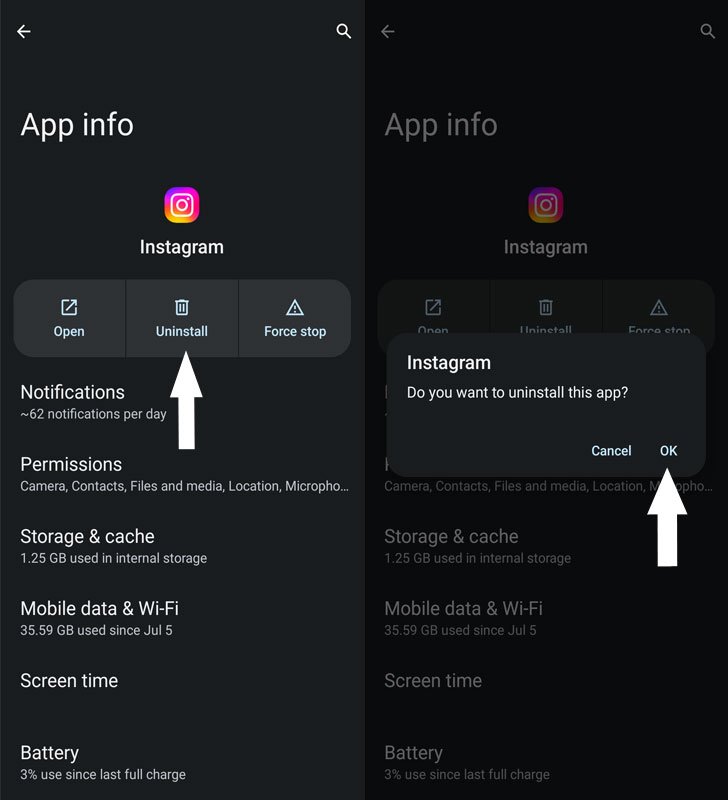
- Tap on ‘Uninstall’ and confirm by clicking ‘OK’ in the prompt that appears.
- After uninstalling the current version of Instagram, download an older version of the app.
- You can find older versions of Instagram on reputable APK websites.
- Once the older version is downloaded, install it on your device.
- However, do not launch the app after installation.
- Open the Google Play Store and search for ‘Instagram.’
- Find the app and tap on the overflow menu (usually represented by three dots).
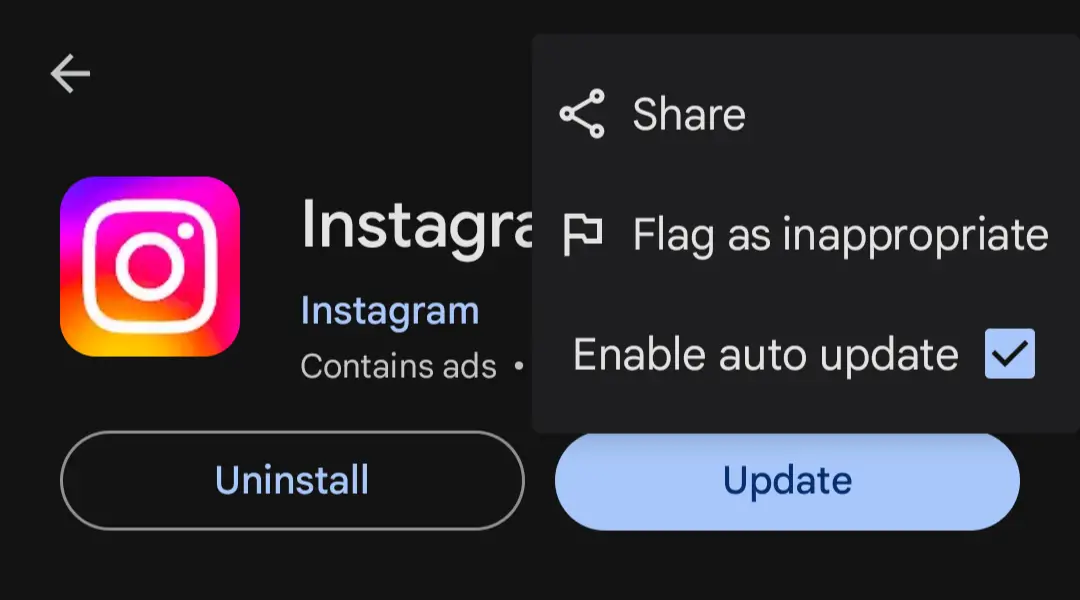
- Uncheck the ‘Enable Auto Updates’ option.
- Now, you can safely launch the Instagram app.
- Check your feed to see if the ‘Threads for You’ section has been removed.
FAQs
Is it safe to download older versions of Instagram from third-party sources?
Using reputable sources for downloading older versions is essential to minimize security risks. Be cautious of unofficial websites.
Will downgrading the Instagram app affect my account or data?
No, downgrading the app should not affect your account or data. Your account information is stored on Instagram’s servers.
Why is Instagram pushing the ‘Threads for You’ section so aggressively?
Instagram aims to increase engagement and user activity by integrating Threads content. However, it has faced resistance from users who prefer a more personalized feed.
Can I use this method on both Android and iOS devices?
The steps mentioned in this article can be applied to Android devices. On iOS, the process may differ, and downgrading apps is generally more challenging.
Are there any alternative methods to remove the ‘Threads for You’ section?
While downgrading is one standard method, some users have reported success by providing feedback to Instagram through the app. Instagram occasionally listens to user feedback and makes adjustments to its features.
Wrap Up
Instagram’s ‘Threads for You’ section, while being an attempt by the platform to integrate more content and keep users engaged, often disrupts the flow of a personalized feed. Unfortunately, Instagram itself doesn’t offer a direct solution to disable this section. However, the workaround we’ve detailed in this guide provides a potential way to regain control over your Instagram experience. It’s worth noting that while this method has proven effective for many users, it may not work for everyone and is not entirely foolproof. The persistence of the ‘Threads for You’ section can be a challenge, but the advantage of this approach is that you can repeat the steps if needed.
By following these instructions, you have the opportunity to improve your time spent on Instagram significantly. Your feed can become more tailored to your preferences, resulting in a smoother and more personalized browsing experience on this widely used social media platform.

Selva Ganesh is a Computer Science Engineer, Android Developer, and Tech Enthusiast. As the Chief Editor of this blog, he brings over 10 years of experience in Android development and professional blogging. He has completed multiple courses under the Google News Initiative, enhancing his expertise in digital journalism and content accuracy. Selva also manages Android Infotech, a globally recognized platform known for its practical, solution-focused articles that help users resolve Android-related issues.




Leave a Reply