
Knowing how to get a prompt for any image using ChatGPT, Gemini, and Grok has become a must-have skill in 2025. Whether you’re a designer, content creator, marketer, or beginner trying to boost creativity, AI image-to-prompt generation helps you understand visuals better and even recreate them with AI models like Midjourney, DALL·E 4, and Stable Diffusion. This guide walks you through every step—how to extract prompts, how to refine them, and how to use ChatGPT, Gemini, and Grok efficiently. You’ll get examples, workflows, expert tips, and FAQs.
Understanding Image-to-Prompt Technology
AI image-to-prompt technology allows machines to “read” an image and convert it into descriptive text. This text becomes a prompt that you can reuse for:
- Re-creating the same image
- Editing parts of an image
- Generating similar styles
- Improving AI art
- Understanding composition
AI vision models detect:
- Objects
- Text
- Location
- Style
- Colors
- Emotions
- Lighting
- Artistic patterns
These systems make it super easy for anyone to describe images like a pro—even if you’re not a designer.
Why You Need AI Image Prompt Extraction Today
People use this for many reasons, like:
- Reproducing a Pinterest photo in AI
- Finding the style name of art
- Creating consistent brand visuals
- Extracting product details
- Identifying objects
- Rewriting prompts for Midjourney or DALL·E
And since it’s fast and accurate, it saves time, improves creativity, and makes work smoother.
How ChatGPT Generates Prompts from Any Image
ChatGPT is one of the easiest platforms to extract super-detailed prompts. The multimodal GPT-4.1 and GPT-5 models understand images extremely well.
Uploading and Processing Images in ChatGPT
To get started:
- Click the upload icon
- Select an image
- ChatGPT scans the image
- It lists all visual elements
- It generates a complete AI-ready prompt
ChatGPT’s processing covers:
- Lighting
- Style
- Angle
- Emotions
- Background details
- Clothing
- Colors
- Depth of field
It also understands memes, charts, documents, landscapes, and even UI screenshots.
Best Prompt Patterns for ChatGPT Image Analysis
Use these prompt templates:
1. Full Description Prompt
“Describe this image in as much detail as possible and generate a Midjourney-ready prompt.”
2. Style Extraction Prompt
“Explain the art style, lighting, camera angle, and mood.”
3. Prompt Reconstruction Prompt
“Create a recreation prompt suitable for Stable Diffusion XL.”
4. Editing Prompt
“Extract the prompt, then rewrite it for a futuristic cyberpunk look.”
ChatGPT’s prompt extraction is highly creative and detailed—perfect for AI art.
How Google Gemini Extracts Image Prompts Accurately
Gemini is known for ultra-accurate image recognition. It performs well with real-world photos, products, handwriting, and business visuals.
Gemini makes it easy to get clean, professional prompts.
Gemini Vision Features You Should Know
Gemini can:
- Read text from blurry images
- Identify brands and logos
- Break down scenes with mathematical clarity
- Detect objects with labels
- Understand technical diagrams
- Recognize people, gestures, and emotions
Its precision helps with product photography, eCommerce listings, and architectural images.
Prompting Gemini for Precise Descriptions
Try these:
1. Product Prompt Extraction
“Generate an SEO-ready product prompt from this image.”
2. Design Prompt
“Break down the colors, materials, camera settings, and mood.”
3. Fact-Based Prompt
“Describe what is happening in this image using real-world facts only.”
Gemini excels at accuracy and being factual.
How xAI Grok Handles Image Prompt Extraction
Grok, by xAI, mixes reasoning + creativity. It can analyze memes, optical illusions, and abstract art better than others.
Grok’s Unique Multimodal Understanding
Grok can:
- Recognize sarcasm in images
- Understand meme templates
- Decode screenshots
- Analyze complex charts
- Interpret unconventional art styles
Its descriptive style is witty and sharp.
Best Use Cases for Grok Image Prompts
Use Grok when you need:
- Meme-based prompts
- Funny descriptions
- Social-media-friendly descriptions
- Abstract art prompt extraction
- Creative long prompts
Grok’s personality makes it a fun tool for AI artists.
ChatGPT vs Gemini vs Grok – Image Prompt Battle
Let’s compare the three across essential features.
Speed Comparison
| AI Model | Speed | Result |
|---|---|---|
| ChatGPT | Fastest | for creative prompts |
| Gemini | Fastest | for factual detail |
| Grok | Medium | but witty and sharp |
Accuracy Comparison
| AI Model | Accuracy Level | Primary Trait |
|---|---|---|
| Gemini | Most Accurate | Factual Detail & Multimodal Reasoning |
| ChatGPT | Very Precise | Creative Flair & Versatile Content |
| Grok | Good | Expressive, Witty, & Real-Time Data |
Creative Depth Comparison
| AI Model | Creative Score | Personality/Trait |
|---|---|---|
| ChatGPT | Best Creativity | General Creative Output & Fluency |
| Grok | Very Creative | Humorous, Unfiltered, & Real-Time Relevance |
| Gemini | Creativity Moderate | High Accuracy, Logic, & Multimodal tasks |
15-Step Workflow to Extract Perfect Prompts from Any Image
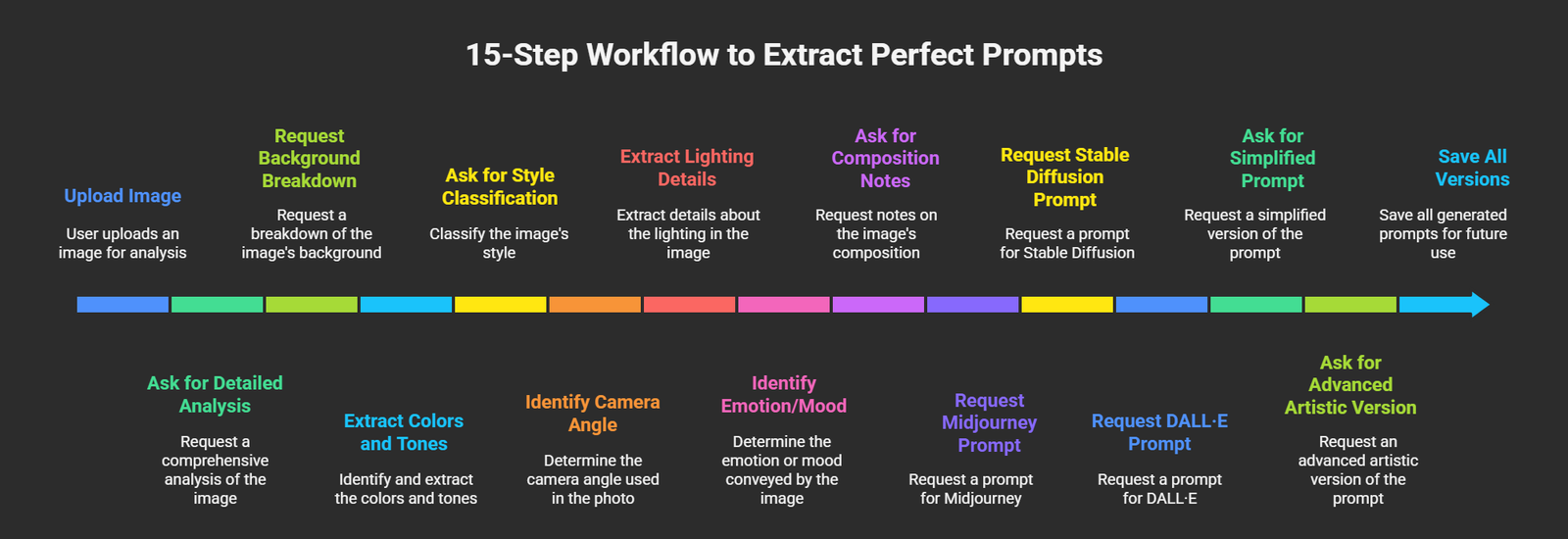
This powerful workflow ensures you always get the best prompt.
- Upload image
- Ask for a detailed analysis
- Request a background breakdown
- Extract colors and tones
- Ask for style classification
- Identify camera angle (for photos)
- Extract lighting details
- Identify emotion/mood
- Ask for composition notes
- Request a Midjourney prompt
- Request a Stable Diffusion prompt
- Request a DALL·E prompt
- Ask for a simplified prompt
- Ask for an advanced artistic version
- Save all versions for future use
This method gives you multiple prompt formats from a single image.
Power Tips to Improve Prompt Extraction Quality
- Use high-quality images
- Avoid screenshots of screenshots
- Use close-ups for detail
- Use specific instructions
- Request multiple styles
- Ask for color palettes
- Request camera metadata interpretation
These drastically improve results.
Real-World Use Cases of Extracting Prompts from Images
People use these AI tools for:
- AI art generation
- Graphic design
- YouTube thumbnails
- Product description writing
- Social media content
- Interior design
- Clothing and fashion design
- Real estate listing optimization
- eCommerce product prompts
- Architecture planning
AI prompt extraction is now a big productivity booster for creators.
Common Mistakes to Avoid While Generating Prompts
Avoid these:
- Uploading blurry images
- Using too many instructions at once
- Asking for contradictory styles
- Not specifying the target AI model
- Forgetting to apply LSI keywords
Clear instructions = better prompts.
FAQs
1. How to get a prompt for any image using ChatGPT easily?
Just upload the image, then ask: “Generate a detailed AI art prompt from this image.”
2. Does Gemini work well for prompt extraction?
Yes, Gemini is excellent for factual and product-based images.
3. Can Grok extract funny prompts?
Yes, Grok is great for humorous or meme-inspired prompts.
4. Can I extract prompts for Midjourney, DALL·E, and SDXL?
Absolutely—specify the format.
5. Are image prompts accurate?
Yes, especially with high-resolution images.
6. Can I use this for professional work?
Yes, many designers and marketers use AI prompt extraction every day.
Conclusion
Learning how to get prompts for any image using ChatGPT, Gemini, and Grok gives you a big edge in creativity, speed, and productivity. With the right workflow and prompt strategy, you can turn any image into a powerful, reusable AI prompt for design, marketing, content creation, and more. Whether you want accuracy (Gemini), creativity (ChatGPT), or humorous flair (Grok), each AI model offers unique strengths.
If you want the best results, try combining the outputs from all three—this produces the richest and most detailed prompts possible.

AITeam is the dedicated editorial team of Android Infotech, consisting of experts and enthusiasts specialized in Android-related topics, including app development, software updates, and the latest tech trends. With a passion for technology and years of experience, our team aims to provide accurate, insightful, and up-to-date information to help developers, tech enthusiasts, and readers stay ahead in the Android ecosystem.
For more about our team, visit our About Us page.




Leave a Reply