
Did you know? 95% of the paid apps, you download for free from Third-Party sites are Malware Injected. If you already know that, What a Pro you are…So, back to the topic, Even if the apps from Play Store is the only safe way. Some situation For using Old versions, We can’t install apps from Play Store. In those situations, We need the Third party Guys. Users of Android devices have the Google Play Store, the safest and easiest way to download applications on their device. However, there are other sources to download apps. You may need to search for other sources if the apps you need are not available in the Play Store or your nation local Play Store. In such situations, you can also download the APK of this application and use it on your very own device.
Today, we will explain in detail the steps necessary to download applications from sources other than the Google Play Store. We’re also going to tell the risks associated with downloading those applications and how to determine if you are downloading malware-free apps.
Avoid Applications Infected With Malware
Before downloading and installing third-party applications, you must know how to keep malware out of applications; you have to take some precautions for the same. First, you must verify the permissions that the application requires of you, you noted that the game applications requested your very own permission to access the contacts, call records or perhaps emails, which does not make sense.

Some applications have a long list of permissions; it is always better to verify the permissions than to regret something later, you need to get the antivirus software installed on your mobile phone. Although the debate about antivirus software still exists, it is better to use one to verify that the application you installed is free of malware.
How do I Know the app is Suspicious
Easy Part is check app’s Data Usage. If the Calculator app using Lots of Data, you know, It is Suspicious. Does the App also need your location? What? Who are you? You are going to tell me that the Value of 1 is Going to change based on the location. So, Check Data usage and Permissions that’s all.
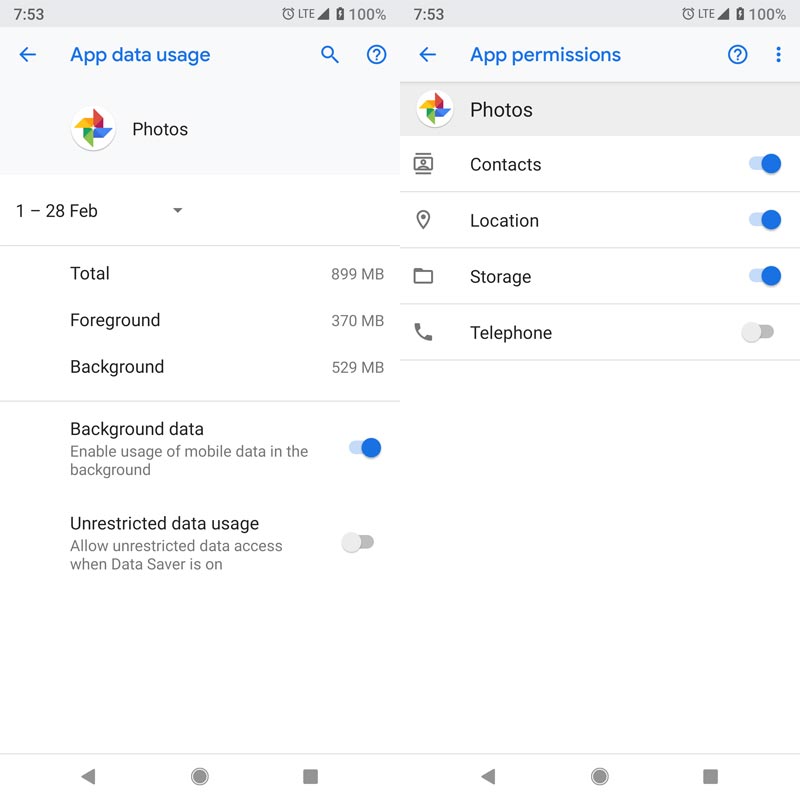
You already Understand this, But Our David can’t understand this. So, Let’s take a Scenario. Here we are taking Google Photos as an example. Google Photos use Backup service. So, It uses Data. No problem. When coming to permissions, It needs Location to organize photos, Storage permission to store pictures. And contacts permission for sharing. So, It is a Good app…:) Good Boy.
Configure Your Device To Download
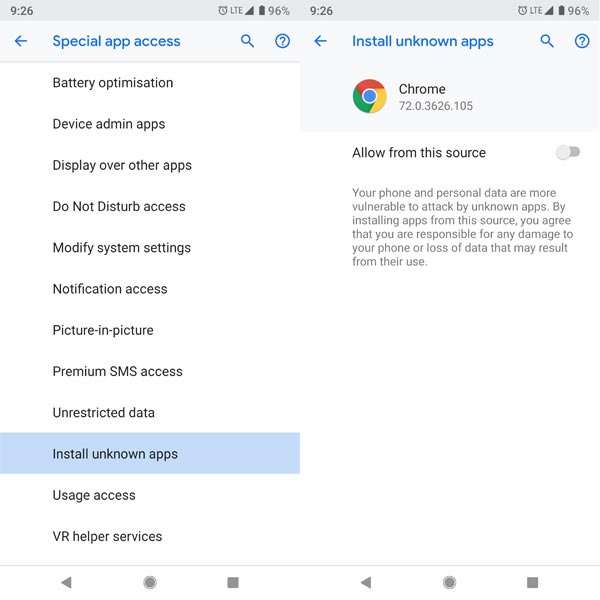
To download applications other than the Play Store, you must make some minor changes to the configuration of your device. To do this, you need to go to Settings and then Security. Here you have an option ‘Allow installation of unknown sources.’ You must enable this option to install APK files on your device. You will be asked in a pop-up window if you are ready to install applications from unknown sources, and you must allow it. Allowing individual applications in the sequence is safe. In Latest versions, you have to enable it in Google Chrome.
How to install Third-Party Apps Other Than Play Store
The next step after activating your device to install applications from unknown sources is described in detail here. You must use the web browser on your Android device to open the third-party application store. Then find the desired application and download it, open the File Explorer, locate the downloaded APK and install it.
Again, You Need To Be Careful
By default, Android does not allow downloading and installing applications from unknown sources, as this is not secure. If you choose to download apps that are not Google Play Store on your Android device, you risk damaging your device. You must be careful when downloading applications from third-party Other than Play Store sources, some applications or APK files may contain malware that is harmful to your device and the data stored on it. Some malicious applications silently download malicious software on your device, if you download an app infected with malware from unknown sources, you must uninstall it as well as perform a factory reset until the phone is working correctly.
Download Android Applications From A Trusted Third-Party Sources (See Below).
We Below recommend some Sites, that we Trust and We use personally. They have users more trust and Reputed sites.
APKMirror
My First and favorite choice. This site, which is run by the people behind the popular Android Police Blog, is one of the most trusted sites, although it has some limitations. All applications loaded in APKMirror will be reviewed before you can download them. If you download an app from the website and install it on the phone with the Play Store, all future updates will be automatically downloaded from Google.
However, APKMirror does not maintain a complete list of all Android applications. Instead, it offers a curated list of popular applications that make it easier for users to download an app that is not otherwise available.
Not only APKMirror facilitates the installation of applications if you don’t have Play Store. This will give you early access to applications that are not yet available through the Play Store due to phase or maybe regional restrictions.
Aptoide
As with most other stores, the Aptoide may mean you will not be able to access all the applications available in the Google Play Store. However, you can find some apps that are not in the Play Store by searching for multiple repositories. It is worth noting that some of these repositories can control applications that have been illegally loaded like Tubemate (According to Youtube), be careful when using the store.
The functions of Aptoide include the option to download updates automatically, choose to download only applications through Wi-Fi or perhaps mobile data, hide Inappropriate content as well as allow the installation of the root. Is it bad why you are Suggesting to me? Here we are choosing Less Bad, other than Play Store; there are no Good Guys.
Amazon Appstore
This is the application and game store that Amazon uses for its Fire TV tablets and boxes. However, you never need an Amazon Fire device to use the Amazon Application Marketplace. You can download and install the APK on almost any Android device that supports the installation of applications from unknown sources.
You can also install the official Amazon Shopping app for Android, sign in to your Amazon account and open AppStore from the navigation menu.
The Amazon store includes hundreds of thousands of apps and games, including some (but not all) of the most popular apps available on the Play Store. But sometimes the Amazon Appstore versions update more slowly than their Play Store counterparts.
Other Sources
The above list is by no means exhaustive, but it provides several reasonably safe places to find Android APK files (provided that the Aptoide developers never have real control over what is loaded into third-party repositories).
There are some other third-party solutions to get Android apps. The last time I put together a list, it was much, much longer. However, some of the solutions on such list are no longer available; others are no longer your best options.
Last words
It is good to have the ability to install applications other than the Google Play Store on your device for a personalized experience. But you have to be careful, the right kind of personalization is essential to keep your very own data safe as well as private. If you know other sites, Comment below, we will include them in future If it is an actually Trusted site.

Selva Ganesh is a Computer Science Engineer, Android Developer, and Tech Enthusiast. As the Chief Editor of this blog, he brings over 10 years of experience in Android development and professional blogging. He has completed multiple courses under the Google News Initiative, enhancing his expertise in digital journalism and content accuracy. Selva also manages Android Infotech, a globally recognized platform known for its practical, solution-focused articles that help users resolve Android-related issues.





Really useful info in this article.
Even tech-savvy users can fall for bad apps.
Never trusting random APK sites again.
I deleted a third-party app yesterday after reading this.
Fake apps are everywhere these days.
This topic needs more awareness.
I’ll definitely think twice before sideloading.
Very well explained. Thanks for the warning.
App safety matters. Thanks for this.
Downloaded a game once, lost all my data.
App security is too often overlooked.
I’ll be more careful from now on.
Never thought app sources mattered so much.
I’ve had apps spy on me before—never again.
Google Play isn’t perfect, but it’s much safer.
Trust is important, and third-party sites don’t have it.
Thanks for this wake-up call.
One bad app can ruin your phone.
I used to download from unknown sites but not anymore.
This article should be pinned for all Android users.