
Copy Links from Instagram Reels Comments– In the ever-evolving landscape of social media interaction, Instagram remains a powerhouse for content discovery. However, one persistent frustration for millions of users is the platform’s restrictive approach to hyperlinks within comments. Unlike captions or bios, links posted in the Instagram Reels comment section are not natively clickable. This creates a significant barrier for users trying to access product pages, resource articles, or external portfolios.
We have developed this comprehensive guide to navigate these technical hurdles. Below, we outline the most efficient, high-success methods to extract and copy links from Instagram Reels comments using both native mobile features and advanced third-party tools.

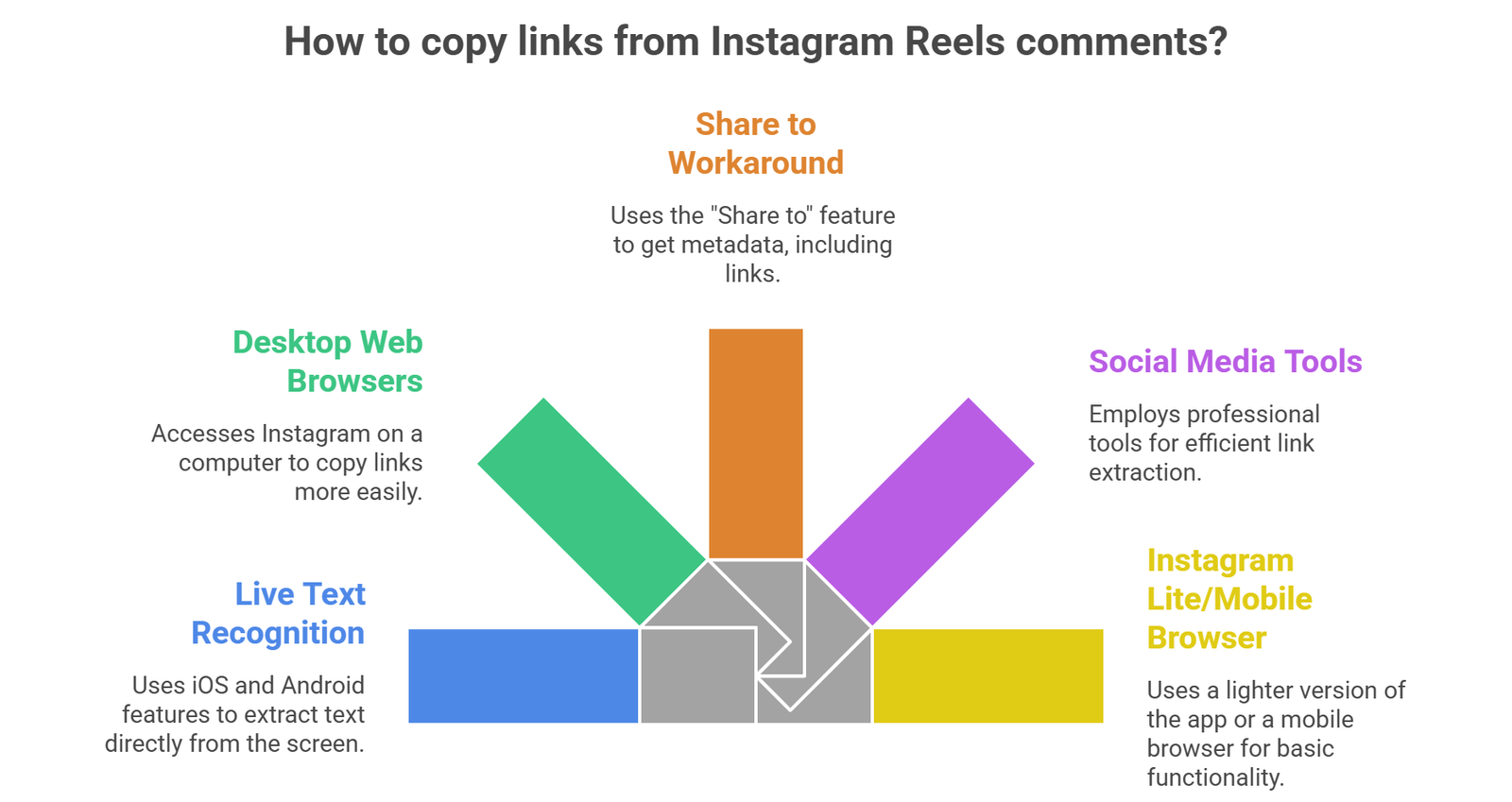
1. Utilizing Live Text Recognition (iOS & Android)
The most sophisticated and streamlined method in 2026 involves leveraging Optical Character Recognition (OCR) technology built directly into your smartphone’s operating system. This eliminates the need for manual typing or external software.
The iOS Visual Look Up Method
If you are an iPhone user, Apple’s Live Text is your most powerful ally.
- Open the Instagram Reel and navigate to the specific comment containing the link.
- Take a high-resolution screenshot of the comment section.
- Open your Photos app and select the screenshot.
- Long-press on the URL text within the image.
- Select Copy from the contextual menu and paste it directly into your mobile browser.
The Android Google Lens Integration
Android users can achieve the same result via Google Lens, which is now deeply integrated into the Google Photos ecosystem.
- Capture a screenshot of the target link in the Reels comments.
- Open the image in Google Photos and tap the Lens icon at the bottom.
- The AI will automatically highlight the textual link.
- Tap Copy Text or Open in Browser to navigate to the destination immediately.
2. Accessing Instagram via Desktop Web Browsers
Many users forget that the Instagram Web Architecture is significantly less restrictive than the mobile application. If you are struggling to capture a link on your phone, switching to a desktop environment is the most reliable “fail-safe” technique.
Why Desktop Browsers Work Better
On a PC or Mac, the Document Object Model (DOM) of the Instagram website allows for direct text selection. To execute this:
- Copy the Reel URL from your mobile device and send it to your computer, or log in to your account at Instagram.com.
- Locate the specific Reel and open the comments pane.
- Use your mouse to highlight the URL just as you would on any standard webpage.
- Right-click and select Copy, or use the keyboard shortcut (Ctrl+C or Cmd+C).
This method is particularly useful for affiliate marketers and researchers who need to collect multiple links quickly without the friction of mobile UI limitations.
3. Leveraging the “Share to” Workaround for Metadata Extraction
A lesser-known but highly effective strategy involves using the “Share” functionality to push the comment data into an environment where it becomes editable.
Step-by-Step Metadata Retrieval
- On the Reel, tap the Paper Plane (Share) icon.
- Instead of sending it to a friend, select “Copy Link” to get the Reel’s primary URL.
- Open a Notes app or a Draft Email.
- While this doesn’t copy the comment specifically, it allows you to use the “Add to Story” feature as a bridge.
- By selecting “Add to Story,” you can sometimes trigger the interactive overlay that allows certain devices to recognize text strings in the background. Note: This is a variable method depending on your specific OS version.
4. Utilizing Professional Social Media Management Tools
For businesses, influencers, and digital marketers, manual copying is often inefficient. If you are monitoring competitor links or managing high-volume engagement, professional software provides a more robust solution.
Third-Party API Integrators
Tools such as Hootsuite, Sprout Social, or Later ingest Instagram data through the official Graph API. When you view comments through these dashboards:
- Links are often rendered as active hyperlinks.
- The text is fully selectable and exportable.
- You can bulk-export comments into a CSV or Excel file, which automatically extracts all URLs and timestamps for further analysis.
We recommend this approach for anyone performing market research or lead generation where capturing every link in a viral Reel’s comment section is a priority.
5. The Instagram Lite and Mobile Browser Strategy
If you do not have access to a desktop but the app is proving stubborn, the mobile browser version of Instagram serves as an excellent middle ground.
- Open your mobile browser (Safari, Chrome, or Firefox).
- Go to Instagram.com and log in.
- Request the “Desktop Site” version through your browser settings.
- This forces the browser to treat the interface as a standard webpage, enabling the native text selection tool of your mobile OS to override the app’s restrictions.
- Simply long-press the link in the comment, and the “Copy” prompt will appear.
Understanding Why Instagram Restricts Comment Links
To master the platform, one must understand the “why” behind the limitation. Instagram’s primary goal is user retention. By making links non-clickable, they prevent users from leaving the app, thereby increasing session duration and ad impressions.
Furthermore, this restriction acts as a primitive anti-spam measure. If every link were clickable, the Reels ecosystem would likely be overwhelmed by automated bots posting malicious or low-quality outbound links. By requiring the manual methods we have outlined above, Instagram ensures a higher level of user intent is required to navigate away from the platform.
Best Practices for Sharing Your Own Links in Reels
If you are a creator wondering how to ensure your audience can actually reach your links, consider these 2026-optimized strategies:
- The “Link in Bio” Standard: Use a landing page tool (like Linktree or a custom WordPress page) and direct users there via a Call to Action (CTA) in your video.
- Keyword Automation: Use tools like ManyChat. Instruct users to comment a specific keyword (e.g., “LINK”), and your account will automatically send the clickable URL to their Direct Messages (DMs).
- Story Stickers: Share your Reel to your Stories and use the Link Sticker. This is currently the only way to provide a one-tap link experience for mobile users.
FAQs
1. Why can’t I click on links in Instagram Reels comments?
Instagram intentionally disables hyperlinks in comments to keep users within the app ecosystem. This “walled garden” strategy increases user retention and prevents automated spam bots from flooding the platform with low-quality outbound traffic. To access these links, you must use OCR (Optical Character Recognition) or desktop workarounds.
2. Is it safe to use third-party apps to copy Instagram links?
We recommend sticking to native OS features (like Apple Live Text or Google Lens) or official Instagram API partners (like Hootsuite). Avoid “shady” third-party apps that require your Instagram login credentials, as these can compromise your account security and lead to permanent bans.
3. Does the “Screenshot and Copy” method work on all phones?
Yes, as of 2026, most modern smartphones have integrated AI text recognition. On iOS, it is built into the Photos app, and on Android, it is accessible via Google Lens. If your phone is an older model, you can still use the Instagram Web method on a mobile browser.
4. Can I copy links from the Instagram app directly?
No, the Instagram mobile app does not currently allow users to highlight or select text within the comment section of Reels or posts. You must either use a desktop browser or a screenshot-to-text conversion method to extract the URL.
5. How do I open a link from a Reel if I’m on a PC?
On a PC, the process is seamless. Simply log into Instagram.com, find the Reel, and navigate to the comments. Because it is a standard web interface, you can highlight, right-click, and copy the URL directly into your browser’s address bar.
6. What is the fastest way to extract multiple links from a viral Reel?
For bulk extraction, using a social media management dashboard or a web scraper is the most efficient route. These tools aggregate all comments into a single, searchable feed where URLs are often automatically hyperlinked or easily exported to CSV.
7. Can I send a link from a comment to my DMs?
You cannot directly “send” a comment link to your DMs within the app. However, you can use the “Copy Link” workaround on a mobile browser and then paste that URL into a message to yourself or a friend for later access.
Conclusion
While Instagram continues to prioritize a “walled garden” approach to its social ecosystem, the methods outlined above provide a clear path for users to bypass these limitations. Whether you are using AI-driven OCR, desktop workarounds, or API-based management tools, you now have the technical knowledge to copy links from Instagram Reels comments with zero friction.
As the platform updates, we will continue to refine these strategies to ensure you stay ahead of the social media curve.

AITeam is the dedicated editorial team of Android Infotech, consisting of experts and enthusiasts specialized in Android-related topics, including app development, software updates, and the latest tech trends. With a passion for technology and years of experience, our team aims to provide accurate, insightful, and up-to-date information to help developers, tech enthusiasts, and readers stay ahead in the Android ecosystem.
For more about our team, visit our About Us page.




Simple and easy steps. Worked on my Android device.
Great tutorial. Instagram really hides this feature well.
This guide helped me copy links from reels comments easily. Thanks!
Method 3 worked perfectly for me on my phone.
Very helpful article. Saved me a lot of time.
Nice tips! Bookmarking this for later.
Finally found a clear guide for copying reel comment links.
I tried the browser method and it worked instantly.
Thanks for sharing these methods, really useful.
I didn’t know these tricks before. Very useful explanation.
Clear explanation and easy to follow steps.