
Ghibli-like AI Prompts for Demon Slayer Inspired Images– Creating highly detailed anime-style artwork using AI prompts inspired by Demon Slayer can elevate your digital art collection, print shop, or anime social pages with dynamic, cinematic visuals that capture a Ghibli-like softness fused with sharp, dramatic action. Here, we break down prompt structures, composition advice, and color treatment to generate stunning, polished anime swordsman artworks that stand out in crowded feeds.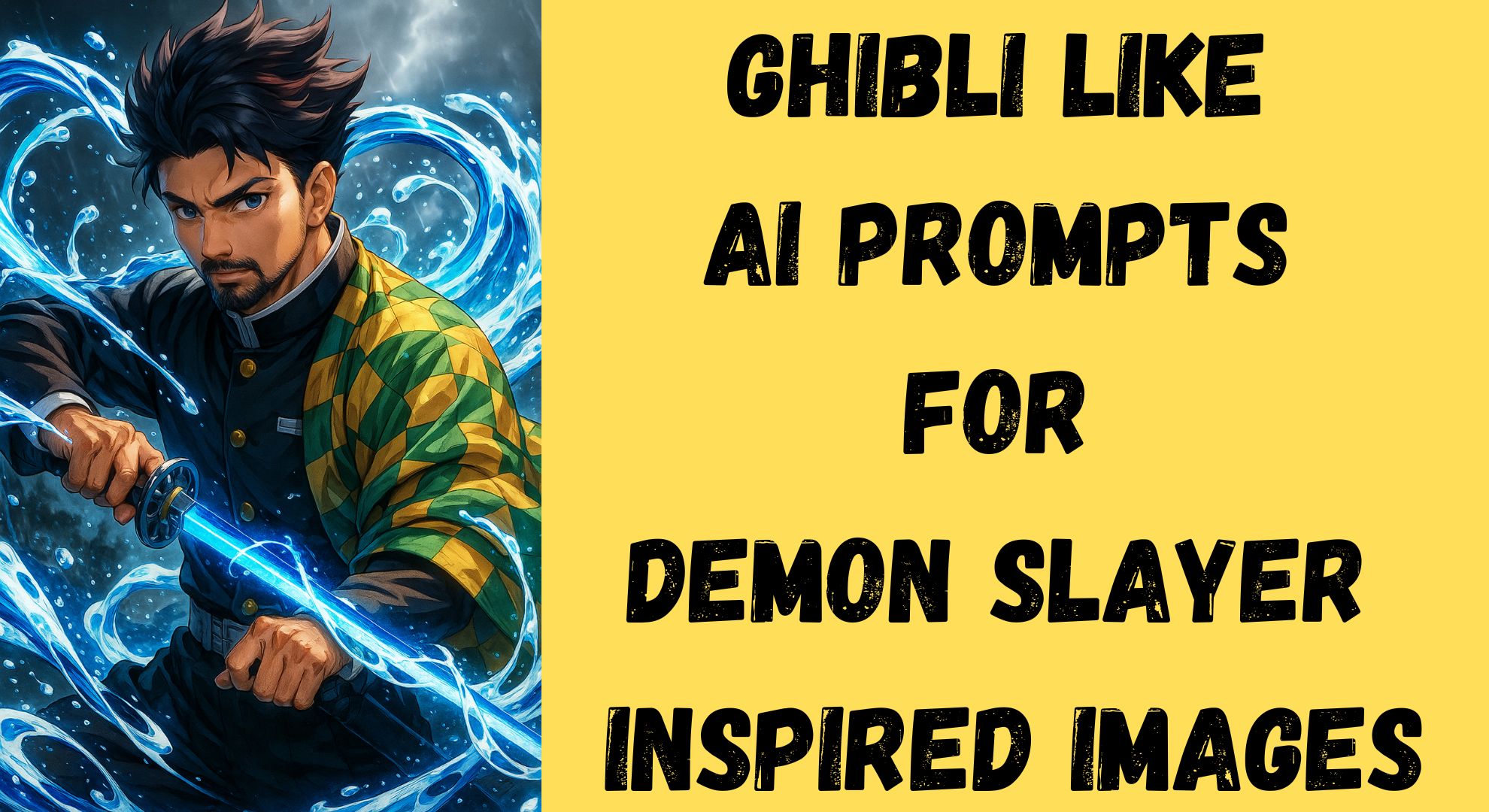
Harnessing the Power of Dynamic Water Effects in Anime Art
Using swirling water effects in your anime swordsman composition can add motion, power, and energy to the scene. Incorporating dynamic water spirals around the katana and character emphasizes fluidity and aggression in battle-ready poses.
- Radiant blue energy around the blade conveys spiritual intensity.
- Mist and stormy elements in the background increase atmosphere and depth.
- Layering water splashes with luminescent highlights enhances focus on the action point.
Use cinematic lighting to emphasize these water effects, ensuring reflections and glow add to the energy rather than overwhelming the character’s silhouette.

Perfecting the Character Pose for Maximum Impact
A serious, focused battle-ready pose will capture your viewer’s attention and provide your AI model with clear, engaging body language cues.
- The katana should extend forward, acting as the central line of action.
- The shoulder is angled, and one shoulder is wearing the green-yellow patterned haori for asymmetry and movement.
- Legs should be placed in a semi-crouched stance, ready to strike, conveying tension and readiness.
- Spiky dark hair should flow subtly with the wind to add directional energy.
- The sharp blue eyes should be angled toward the viewer or the implied opponent, drawing an emotional connection.
Achieving High Contrast and Clean Linework
To generate highly detailed, polished anime-style artwork, emphasize:
- Dark uniform with gold buttons and a silver belt contrasted against the bright energy effects.
- Crisp, precise linework around facial features, hair strands, and folds in clothing.
- The strategic use of rim lighting separates the character from a misty, dark background.
- Use deeper blacks in shadow areas for a cinematic manga feel.
Your AI prompt should explicitly request “high contrast, clean linework, vibrant colors, and dramatic lighting” to ensure outputs do not look flat or muddy.
Selecting Vibrant, Cinematic Colors for Ghibli-Like Softness
The key to a Ghibli-inspired aesthetic in Demon Slayer-style artwork lies in soft gradients paired with high-energy focal points:
- Use turquoise, sapphire, and icy blues for the katana glow and water effects.
- Add pale teal and misty grays in the background for storm clouds and fog.
- Introduce warm golds and deep blacks in the uniform for color contrast.
- Maintain soft edges in the environment while keeping sharp edges on the character to pop against the background.
Crafting the Ideal AI Prompt for Demon Slayer-Inspired Anime Art
Here is an optimized AI prompt for your workflow:
Using the uploaded reference image, generate a highly detailed, polished anime-style artwork of a young swordsman with spiky dark hair and sharp blue eyes, wearing a dark uniform with gold buttons, a silver belt, and a green-yellow patterned haori over one shoulder. He wields a glowing katana with radiant blue energy, surrounded by dynamic, swirling water effects that convey motion and power. The character is in a serious, focused battle-ready pose, with the katana extended forward, water spiraling around the blade and his body. The background is stormy and misty, with water and wind elements enhancing the scene's energy. Emphasize high contrast, clean linework, vibrant colors, and dramatic lighting to highlight the water and energy effects around the character.
Add: reference_image: [upload the image you shared]
Style: Highly detailed anime, cinematic lighting, dynamic action, vibrant water effects.
Add this to your AI generation tool, specifying 4K output and transparent PNG options for stickers, print designs, or animation cells.
Using Mist and Storm Elements for Atmosphere
- Incorporate subtle lightning flashes in the clouds to suggest tension.
- Use fog layers near the feet and water splashes for atmospheric depth.
- Let wind streaks guide the viewer’s eyes towards the glowing katana.
This builds a narrative context, implying the swordsman is fighting in a storm, enhancing your piece’s cinematic storytelling.
Animating Energy with Line Direction and Particle Effects
- Spiral water effects should follow the blade’s motion to guide the composition flow.
- Add glowing particles and mist dots around the blade to simulate movement.
- Create line energy effects emanating from the katana’s glow for added dynamism.
Optimizing for Poster, Print, and Social Media Use
- Aspect Ratio: Use 4:5 or 3:4 for optimal feed filling for Instagram and Pinterest.
- Background: Generate variants with transparent, gradient, and dark stormy backgrounds.
- Color Vibrance: Slightly increase saturation while preserving tonal balance for mobile screens.
AI Tools and Settings for Generating Your Demon Slayer-Inspired Image
Recommended settings for consistent, professional outputs:
- Sampler: DPM++ SDE or DPM++ 2M Karras for clean, detailed outputs.
- CFG Scale: 7–10 to balance prompt adherence and creativity.
- Steps: 30–50 for detailed linework.
- Resolution: 2048×3072 for poster-grade detail.
- Upscale: Use 4x UltraSharp models if needed for crisp print readiness.
Expanding Your Portfolio with Variations
Once your main swordsman artwork is generated:
- Create daylight, sunset, and moonlit variants to add range.
- Adjust the haori pattern color for multiple character skins.
- Animate water effects with subtle glows for reels and TikToks.
Why This Approach Will Elevate Your Anime Art Brand
Using Ghibli-like softness combined with Demon Slayer’s high-energy combat aesthetics, your anime swordsman artworks will attract collectors, digital art buyers, and social media audiences seeking clean, cinematic, and dynamic illustrations.
This methodology helps you produce unique, scroll-stopping visuals that can drive your:
- Etsy anime sticker sales
- Print-on-demand poster business
- YouTube/Instagram anime art growth
- Portfolio attraction for anime studios

Selva Ganesh is a Computer Science Engineer, Android Developer, and Tech Enthusiast. As the Chief Editor of this blog, he brings over 10 years of experience in Android development and professional blogging. He has completed multiple courses under the Google News Initiative, enhancing his expertise in digital journalism and content accuracy. Selva also manages Android Infotech, a globally recognized platform known for its practical, solution-focused articles that help users resolve Android-related issues.




Using these in my next AI animation project. Thanks again!
Highly detailed and emotionally rich artwork. This is gold for AI artists.
I love how expressive the characters turn out. These prompts work like a charm!
Ghibli meets Demon Slayer in the best way possible. So cool!
The lighting and mood are spot-on. AI is really evolving fast.
I was skeptical at first, but these prompts actually deliver.
Art meets tech in the most beautiful way here.
The level of detail is insane. These are not just images—they’re stories.
This is what I needed for my fan art projects. Appreciate the work.
I tried a few prompts and the results are stunning. Feels straight out of a Studio Ghibli scene.
Can we get more swordfight-specific prompts? These are a great start.