
Why Google Pixel Tag Is Better Than Apple AirTag – Every day, millions of people waste precious minutes searching for lost keys, misplaced wallets, and buried luggage. When Apple introduced the AirTag, it revolutionized how we keep track of our personal belongings. However, smart tracking technology has reached an entirely new milestone with the arrival of the Google Pixel Tag. While Apple paved the early path for Bluetooth location tags, Google has refined, upgraded, and expanded the concept to build a vastly superior tracker for real-world everyday use.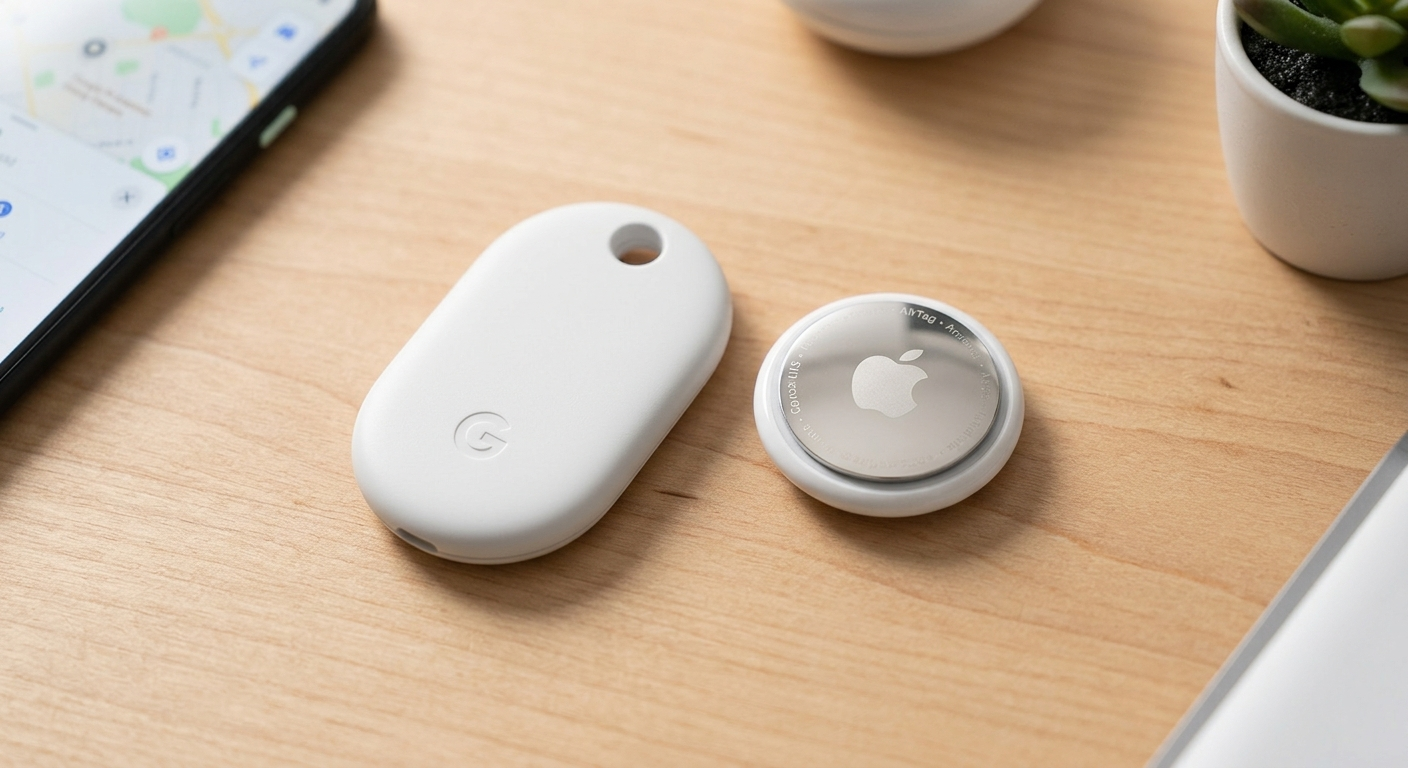
We have conducted an in-depth comparison to examine why the Google Pixel Tag outshines the Apple AirTag. From a thinner design and two-way phone finding capabilities to seamless family sharing and an expansive tracking network, here is everything you need to know about why Google’s latest innovation reigns supreme.
Design and Ergonomics: Sleeker, Thinner, and Built for Real Wallets
At first glance, both devices look like small, elegant metallic discs. However, everyday usability comes down to exact dimensions and practical engineering.
The Apple AirTag features a distinct circular shape that measures roughly 0.31 inches thick. While this compact size works reasonably well on a keychain, its bulbous, hockey-puck shape creates an awkward bulge when placed inside a slim wallet, credit card holder, or passport pouch.
In contrast, the Google Pixel Tag features an elongated, oval pill shape engineered specifically for versatile placement. Key design advantages include:
-
Ultra-Slim Profile: At only 0.2 inches thick, the Pixel Tag is roughly 35% thinner than the Apple AirTag. It slides seamlessly into wallet card slots, coat pockets, and luggage linings without creating unappealing bulges.
-
Durable Construction: Built with a durable stainless steel shell and high-grade polycarbonate, it is engineered to resist cracking, bending, and everyday impacts.
-
IP67 Water and Dust Resistance: Like top-tier smartphones, the Pixel Tag can survive accidental spills, sudden rainstorms, or even being submerged under three feet of water for up to 30 minutes.
By creating a sleeker, thinner form factor, Google has ensured that its tracker fits where you actually need it most.
Two-Way Finding: The Reverse Phone-Finder Feature Apple Left Out
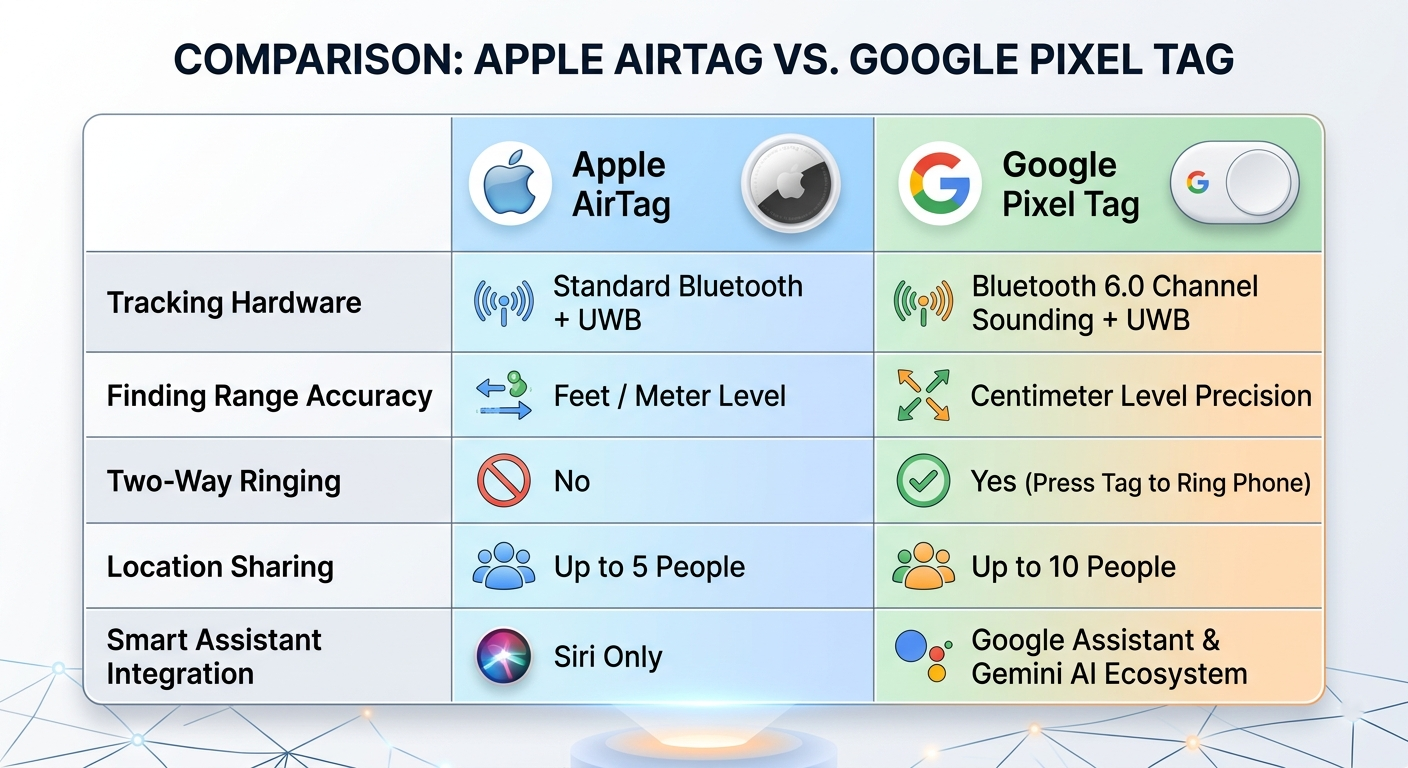
One of the most significant advantages of the Google Pixel Tag over the Apple AirTag is its integrated two-way physical button.
With an Apple AirTag, tracking works in only one direction: your iPhone can locate the AirTag, but the AirTag is completely passive. If you have your keys in your hand but cannot find your misplaced phone, your AirTag is useless. You must log into a separate computer or rely on a smart speaker to ping your iPhone.
Google resolved this common frustration by embedding a physical control button directly onto the front stainless steel surface of the Pixel Tag.
How Two-Way Finding Works:
-
Mislaid Phone: If your Android phone is hiding under a couch cushion or beneath a stack of papers, simply double-press the button on your Pixel Tag.
-
Instant Ring: Your paired smartphone will instantly play an audible tone at high volume—even if your phone is set to silent or Do Not Disturb mode.
-
Save Time: You can locate both your belongings and your phone using a single connected accessory.
This simple hardware feature turns the Pixel Tag into a multi-functional daily tool rather than just a passive location beacon.
Precision Finding Powered by Next-Generation Signal Technology
When you misplace an item nearby—such as your house keys hiding in a laundry basket—you need exact guidance to pinpoint its location. Both Apple and Google utilize Ultra-Wideband (UWB) technology to display directional arrows and exact distance readings on your smartphone screen. However, Google takes precision finding a step further by combining UWB with Bluetooth Channel Sounding.
Why Bluetooth Channel Sounding Matters to Non-Tech Users
Standard Bluetooth calculates distance by estimating signal strength. If a wall, pillow, or metal object blocks the signal, standard Bluetooth often falsely assumes the tag is far away.
Bluetooth Channel Sounding, featured in the Pixel Tag, measures the actual time it takes for radio waves to travel between your phone and the tag. This yields centimeter-level accuracy. Whether your item is hidden under a thick couch cushion or inside a deep backpack, the Find Hub app provides clear visual directional prompts without signal drop-offs or false distance readings.
Global Crowd-Sourced Reach: The Power of Google’s Find Hub Network
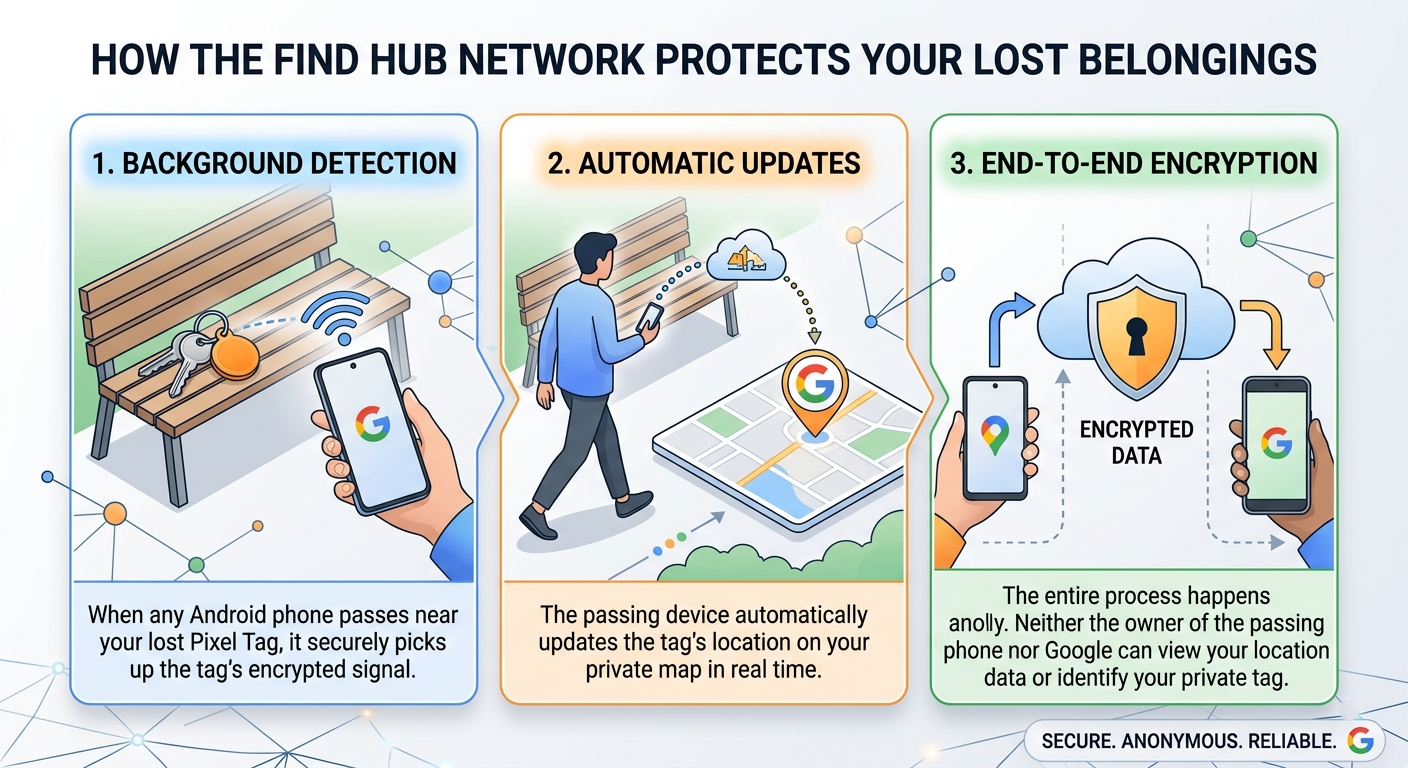
When you leave a bag behind at an airport, park, or restaurant, local Bluetooth signals can no longer reach your phone directly. In these scenarios, item trackers rely on a crowd-sourced network of surrounding devices to report their location securely.
Apple’s tracking network relies on active iPhones, iPads, and Macs. While vast, it is fundamentally limited to Apple device owners.
Google’s Find Hub network leverages over one billion active Android devices worldwide. Because Android is the most widely used mobile operating system globally, the Google Pixel Tag offers unmatched coverage density.
Multi-User Location Sharing Built for Households and Families
Item tracking is rarely an individual task. Shared belongings like car keys, pet collars, TV remotes, shared luggage, and stroller bags need to be accessible to multiple family members simultaneously.
Apple originally locked AirTags to single Apple IDs, later expanding sharing to a maximum of 5 users. Recognizing how families and teams manage shared items, Google designed the Pixel Tag to support location sharing with up to 10 people out of the box.
Through the Find Hub app, you can invite family members, housemates, or travel companions to view the real-time location of shared items. Everyone granted access can see the item on their map, play an audible chime, and receive proactive Left Behind alerts if an item is accidentally left at a venue.
Deeper Ecosystem Integration: From Smartwatches to Gemini AI
While Apple limits AirTag interactions primarily to iPhones and the basic Find My application, Google integrates the Pixel Tag deeply across its entire device and software ecosystem:
-
Hands-Free AI Assistance with Gemini: Paired with Pixel Buds, you can simply ask Gemini to locate your items (e.g., “Hey Google, ring my car keys”), causing the Pixel Tag’s loud built-in speaker to sound without you ever touching your phone.
-
Wrist Guidance via Smartwatch: You can open the Find Hub app directly on a Pixel Watch or compatible Wear OS device to view distance indicators and trigger ringing directly from your wrist.
-
Smart Battery Maintenance: While both trackers use standard, user-replaceable CR2032 coin batteries that last roughly a year, Google eliminates unexpected battery failures. Instead of sending a single low-battery popup that is easily dismissed, Google sends recurring battery notifications every two weeks once power drops, ensuring your tracker is never dead when you need it most.
Proactive Privacy and Industry-Leading Safety Standards
In recent years, unwanted tracking has become a primary consumer concern with small Bluetooth location devices. Google built the Pixel Tag from the ground up with strict safety protocols designed to protect users from unauthorized monitoring.
-
Cross-Platform Unknown Tracker Alerts: Thanks to unified tracking safety standards developed jointly by Google and Apple, your phone—whether Android or iPhone—will immediately notify you if an unknown Pixel Tag is moving with you.
-
Audible Alert Triggers: If an unknown tag stays near you for an extended period, your phone will guide you step-by-step on how to force the tag to play an audible sound so you can locate and disable it.
-
Anti-Stalking Protections: Location history stored on the Find Hub network is continuously rotated and encrypted, making it impossible for unauthorized parties to track your historical movements.
Superior Value and Complete Peace of Mind
When evaluating any tech accessory, overall value is paramount. The Google Pixel Tag enters the market priced competitively at $29 for a single tag or $99 for a convenient 4-pack—matching Apple’s pricing structure while delivering superior features, a thinner footprint, and broader global network coverage.
Summary of Why Google Pixel Tag Wins:
-
Thinner, Sleeker Profile: 0.2 inches thick vs. AirTag’s 0.31 inches—perfect for slim wallets.
-
Two-Way Finding: Use your tag to ring your misplaced phone with a simple button press.
-
Next-Gen Accuracy: Combines UWB with Bluetooth 6.0 Channel Sounding for centimeter-level precise tracking.
-
Bigger Crowd-Sourced Network: Taps into over one billion Android devices across the globe.
-
Better Family Sharing: Share tracking access with up to 10 people compared to Apple’s lower limits.
-
Smarter AI Integration: Ring your tags hands-free using Gemini and voice commands.
By refining the hardware design, introducing practical two-way finding, and leveraging the massive power of the Find Hub network, Google has delivered a tracking device that truly sets a new standard. The Google Pixel Tag is not just an alternative to the Apple AirTag—it is a fundamentally better item tracker designed for everyday life.

Selva Ganesh is a Computer Science Engineer, Android Developer, and Tech Enthusiast. As the Chief Editor of this blog, he brings over 10 years of experience in Android development and professional blogging. He has completed multiple courses under the Google News Initiative, enhancing his expertise in digital journalism and content accuracy. Selva also manages Android Infotech, a globally recognized platform known for its practical, solution-focused articles that help users resolve Android-related issues.





Leave a Reply