
How to Sign Up for Apple Upgrade Program – The process of upgrading to the latest tech can often feel overwhelming, confusing, and financially daunting. To make accessing cutting-edge technology simpler and more flexible, Apple officially introduced Apple Upgrade, a comprehensive hardware leasing program created in partnership with Klarna. Replacing older financing structures such as the classic iPhone Upgrade Program, Apple Upgrade allows customers across the United States to lease not only the latest iPhone, but also Apple Watch, Mac, and iPad with manageable monthly payments.
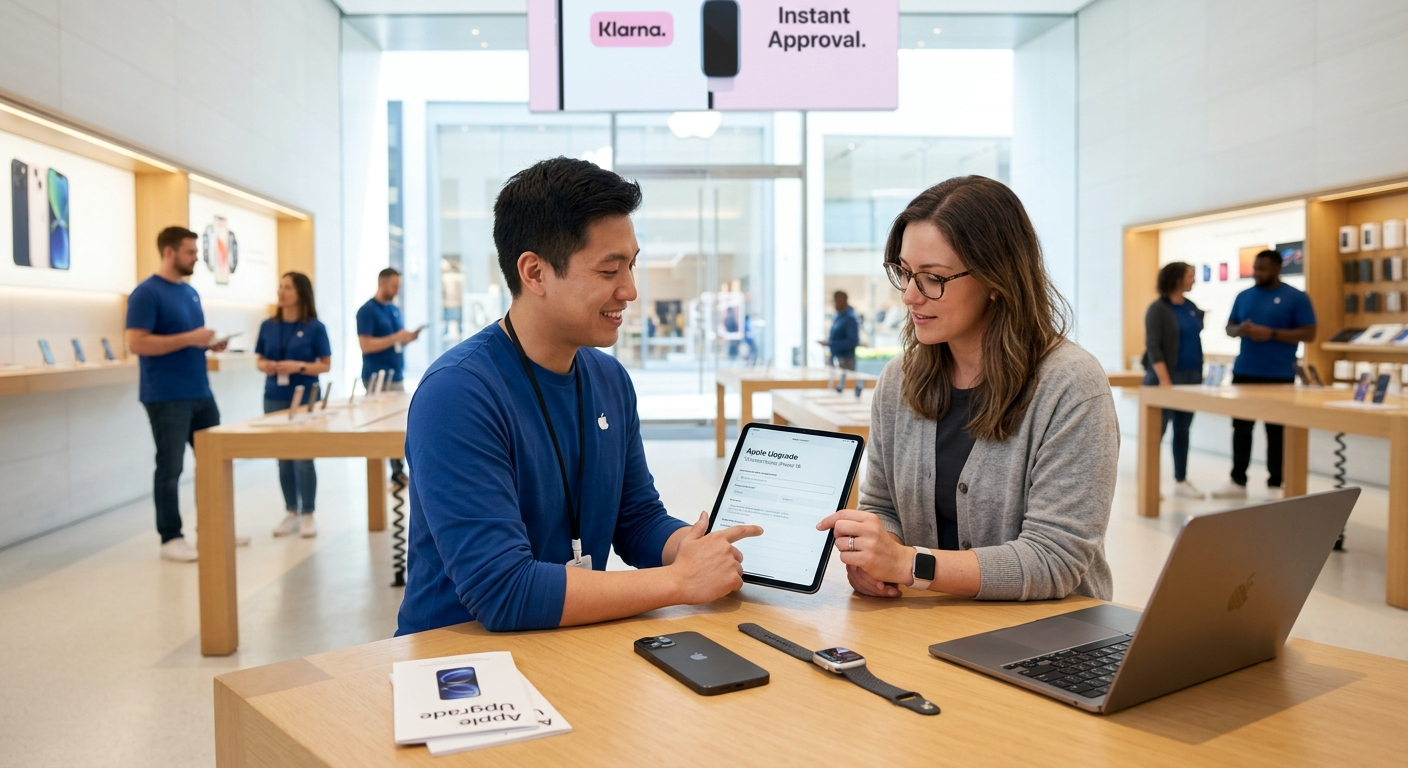

In this comprehensive guide, we break down everything you need to know about how the program works, what requirements you must meet, and exact step-by-step instructions on how to sign up for Apple Upgrade both online and in-store. We have designed this guide specifically for everyday consumers, removing overly dense technical jargon so you can navigate your application with complete confidence.
What Is the Apple Upgrade Program?
Apple Upgrade is a hardware leasing program offered directly by Apple through its retail channels in partnership with Klarna. Instead of purchasing a device outright or locking yourself into a rigid long-term retail installment contract, we can choose a lease term that fits our budget and usage habits. At the end of that term, you simply swap your current device for the newest model, buy the device permanently with a final payment, or hand the device back and exit the program.
Unlike traditional phone carrier contracts that often tie you down to lengthy commitments with hidden service fees, Apple Upgrade focuses on predictable monthly billing, zero soft-credit risk during application, and full integration with official AppleCare protective coverage.
Key Hardware Categories Included in Apple Upgrade
Under this unified leasing structure, we can select from four major product lines:
-
iPhone: Flexible 12-month or 24-month leasing options.
-
Apple Watch: Flexible 12-month or 24-month leasing options.
-
Mac: Extended 24-month or 36-month leasing options.
-
iPad: Extended 24-month or 36-month leasing options.
Eligibility Checklist: What You Need Before Signing Up
Before beginning the enrollment process online or inside an Apple Store location, we recommend gathering a few essential items to ensure your application goes smoothly.
1. Basic Personal Requirements
-
Age Requirement: You must be at least 18 years old (or the legal age of majority in your state).
-
Residency: You must be a resident of the United States.
-
Tax Identification: You need a valid Social Security Number (SSN) or Individual Taxpayer Identification Number (ITIN) for identity verification.
2. Apple and Klarna Account Setup
-
An Apple Account (formerly Apple ID) in good standing.
-
A Klarna account registered in your name (if you do not have one yet, you can create it during checkout).
-
An accepted personal credit card or debit card on file.
3. Cellular Carrier Requirements (For iPhone Leasing Only)
If you are enrolling an iPhone into the Apple Upgrade program, you must connect the phone to a postpaid plan from one of the major wireless carriers: AT&T, T-Mobile, or Verizon. Although leased iPhones are unlocked, prepaid carrier plans do not qualify for initial carrier activation during checkout.
Understanding Credit Checks: Does Signing Up Affect Your Credit Score?
One of the most appealing features of Apple Upgrade is how credit evaluations are handled. When you submit your application through Klarna, Klarna performs a soft credit inquiry.
A soft credit check allows Klarna to verify your identity and assess creditworthiness without leaving a mark on your credit report or dropping your credit score. This makes applying stress-free, as you can check your eligibility without worrying about hard inquiries appearing on your personal financial record.
How to Sign Up for Apple Upgrade Online or via the Apple Store App
Enrolling in Apple Upgrade from the comfort of your home is quick, straightforward, and completed entirely within Apple’s online ecosystem. We have broken down the online sign-up procedure into five simple steps:
Step 1: Browse to the Apple Store Online or Open the App
Launch your web browser and visit apple.com or open the official Apple Store app on your existing mobile device. Ensure you are signed in with your personal Apple Account.
Step 2: Select Your Product and Customize Specifications
Navigate to the product page for the device you wish to lease—whether it is a new iPhone, Apple Watch, Macbook, or iPad. Choose your preferred color, storage capacity, and screen size.
Step 3: Select “Apple Upgrade” as Your Payment Method
When you reach the payment section during the configuration process, look for the payment options menu. Select Apple Upgrade. Here, you will see the full breakdown of your monthly payment choices:
-
For iPhone or Apple Watch, choose between a 12-month or 24-month plan.
-
For Mac or iPad, choose between a 24-month or 36-month plan.
Step 4: Complete the Instant Klarna Application
Once you select your desired lease term, you will be redirected to the brief Klarna enrollment form embedded within checkout. Enter your basic identity details, including your full legal name, home address, date of birth, and the last four digits of your SSN or ITIN.
Klarna will instantly process your soft credit check. Within seconds, you will receive an approval decision on your screen.
Step 5: Review Terms and Confirm Checkout
Review your lease agreement, monthly payment schedule, and initial down payment (if applicable). Complete the checkout process. You can choose to have your new device shipped directly to your doorstep or scheduled for in-store pickup at a nearby Apple Store location.
How to Sign Up for Apple Upgrade In-Person at an Apple Store
If you prefer hands-on assistance or want to leave the store with your new device immediately, signing up in person is an excellent choice.
-
Visit Your Local Apple Store: Walk in or schedule a shopping appointment with an Apple Specialist.
-
Select Your Device: Tell the Specialist which product line and model you are interested in leasing under Apple Upgrade.
-
Apply On-Site: The Specialist will guide you through the digital application on an in-store iPad. You will enter your details to trigger Klarna’s instant soft credit inquiry.
-
Instant Approval and Setup: Once approved, you can complete the purchase immediately. Apple Specialists will offer Personal Setup service on the spot, helping you transfer data from your old device and configure all settings before you leave.
Monthly Payment Breakdown Across Products
To give you a clear picture of expected costs, we have summarized the starting monthly lease tiers introduced with Apple Upgrade:
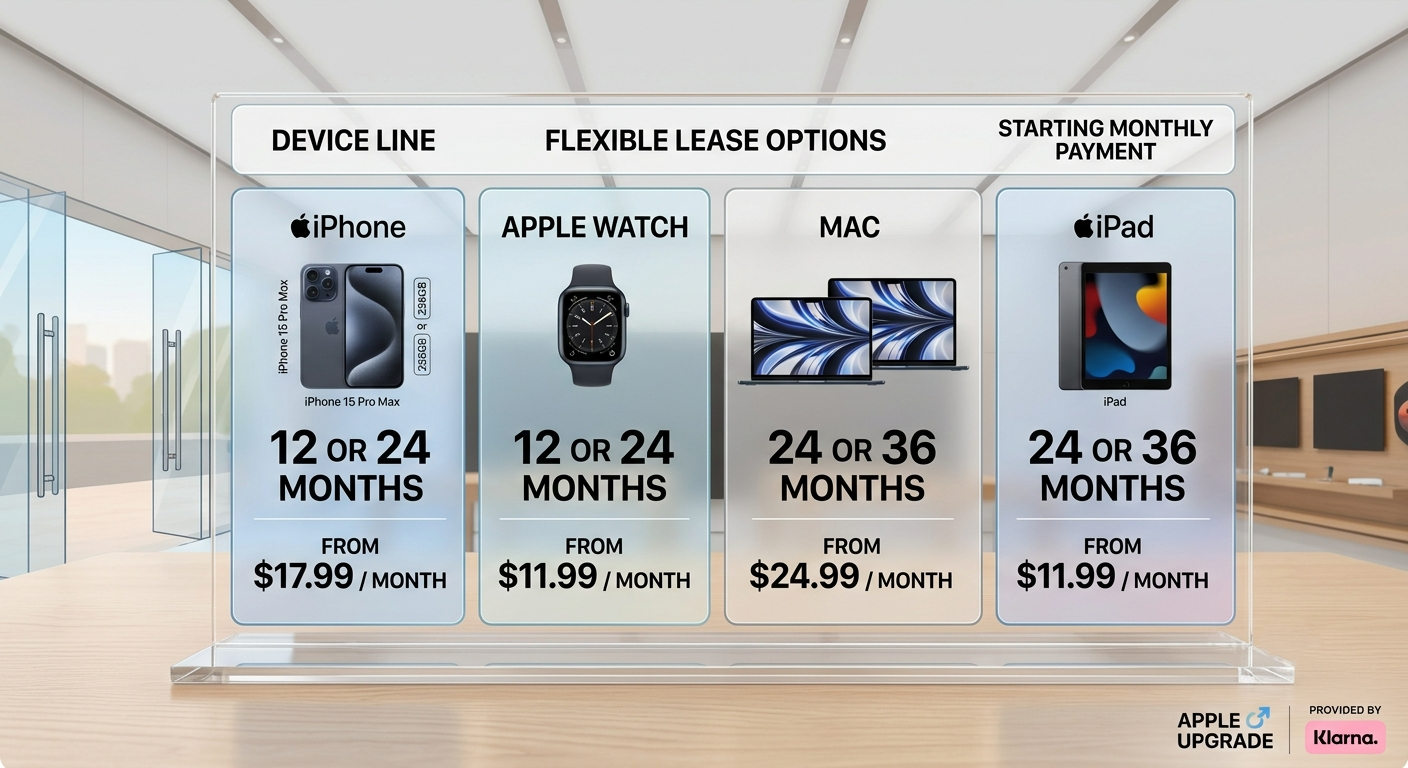
Note: Starting prices depend on the specific baseline configuration chosen and vary based on optional trade-ins or upgraded device specifications.
How to Lower Your Monthly Payments: Apple Trade In and Apple Card
We always encourage shoppers to take advantage of available savings mechanisms during enrollment:
1. Apple Trade In Integration
When you first sign up for Apple Upgrade, you can trade in an older device you currently own. Apple applies the verified trade-in value directly to your lease, significantly reducing your recurring monthly payments over the duration of your term.
2. Apple Card 3% Daily Cash Back
If you make your monthly Apple Upgrade lease payments using an Apple Card, you earn 3% Daily Cash back on every single payment made throughout your lease period.
What Happens When Your Lease Ends? (3 Flexible Options)
At the conclusion of your 12, 24, or 36-month lease term, Apple Upgrade provides total freedom over what to do next. You are never locked into keeping a device you no longer want. We outline your three end-of-term choices below:
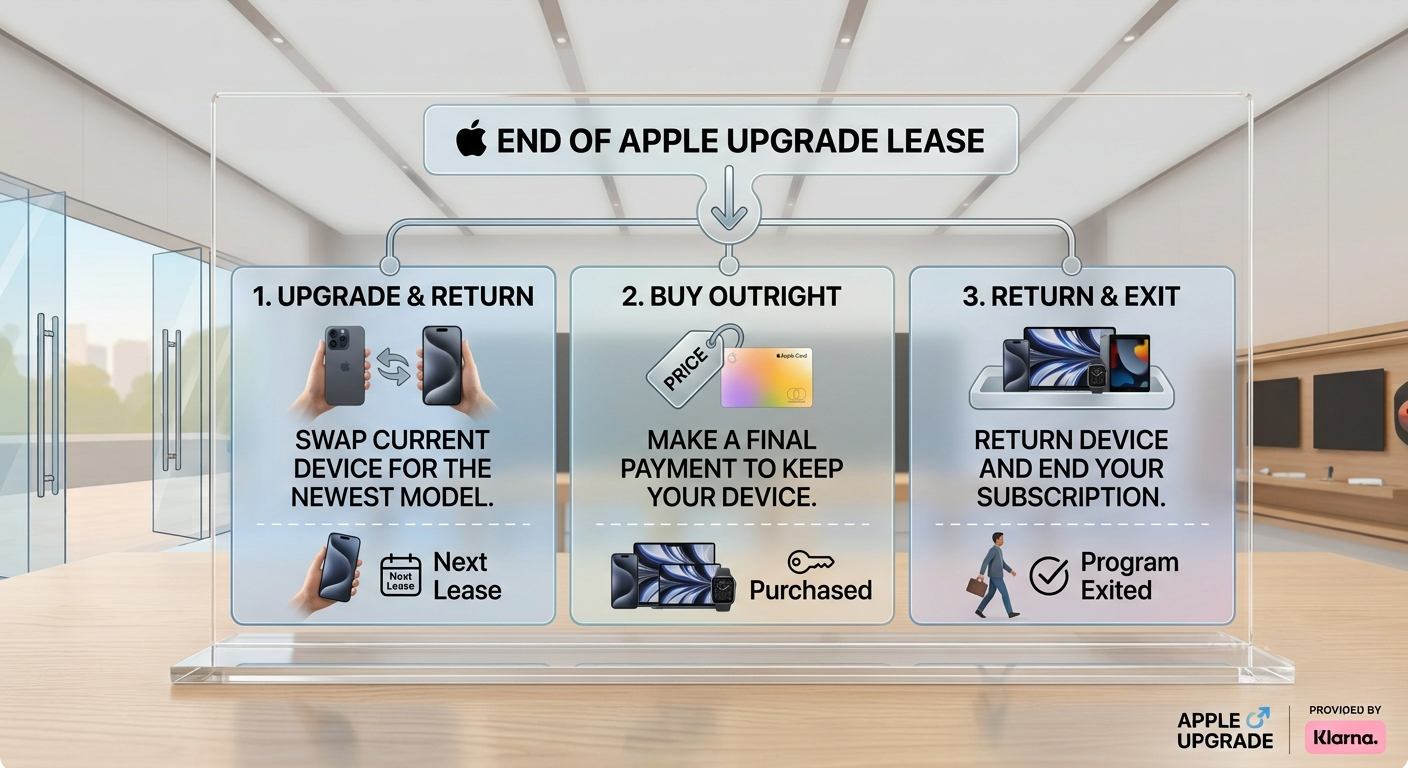
Option 1: Upgrade to the Latest Model and Return Your Current Device
Simply select your new preferred model, start a new lease, and return your existing hardware using a prepaid shipping kit provided by Apple or by dropping it off in an Apple Store. Once received in good working condition, your old lease closes automatically.
Option 2: Buy the Device Outright
If you love your device and want to keep it permanently, you can buy it through your Klarna account. You pay a single purchase option fee (equal to the device list price minus your accumulated lease payments), officially making the product yours.
Option 3: Return the Device and Exit the Program
If you no longer need the hardware or wish to pause leasing, return the device in good physical and operational condition to close your lease and exit the program without any ongoing obligations.
Protecting Your Leased Tech with AppleCare
Because leased devices must be returned in good physical condition at the end of your term (or upon upgrading), protecting your investment is crucial.
During enrollment in Apple Upgrade, you can bundle an AppleCare subscription directly into your order. Adding AppleCare+ gives you peace of mind against accidental damage, liquid spills, or screen cracks, ensuring that returning or upgrading your device at the end of your lease remains smooth and hassle-free.
What If You Are Already in the Old iPhone Upgrade Program?
For long-time users who enrolled in Apple’s legacy iPhone Upgrade Program (previously managed via Citizens One), we have clear news: Apple has formally retired the old program in favor of this new, expanded Apple Upgrade structure.
-
Current Payments: Existing members do not need to take immediate action. You can continue making monthly payments under your existing agreement until your term ends.
-
When You Are Ready to Upgrade: Once you complete your current term, you will have the seamless choice to switch into Apple Upgrade, finance with Apple Card Monthly Installments, or purchase outright.
Frequently Asked Questions (FAQ)
Can I manage my lease payments through my smartphone?
Yes. All billing schedules, remaining lease payments, and payment methods are conveniently managed within the official Klarna app.
Are devices leased through Apple Upgrade carrier-unlocked?
Yes. All iPhones and cellular Apple Watches obtained through Apple Upgrade are factory unlocked. However, initial activation for iPhones requires choosing an eligible postpaid account with AT&T, T-Mobile, or Verizon during checkout.
Can I enroll multiple Apple devices under one account?
Yes. You can submit separate leasing applications via Klarna for different product lines (such as a MacBook and an iPad) and manage all active devices under your central account dashboard.
Conclusion
The launch of Apple Upgrade represents a major step forward in making premium technology accessible, flexible, and affordable. By expanding flexible 12, 24, and 36-month leasing options across iPhone, Apple Watch, Mac, and iPad, Apple and Klarna have created a friction-free ecosystem for tech enthusiasts and casual users alike.
By following the simple steps we outlined above, you can check your eligibility with zero risk to your credit score, complete your enrollment within minutes, and enjoy the latest Apple hardware today.

Selva Ganesh is a Computer Science Engineer, Android Developer, and Tech Enthusiast. As the Chief Editor of this blog, he brings over 10 years of experience in Android development and professional blogging. He has completed multiple courses under the Google News Initiative, enhancing his expertise in digital journalism and content accuracy. Selva also manages Android Infotech, a globally recognized platform known for its practical, solution-focused articles that help users resolve Android-related issues.




Leave a Reply