
BOOX Palma 3 Gets Android 16 & AI Transcripts – Mobile reading devices have evolved far beyond simple digital bookholders. With the official release of the BOOX Palma 3, Onyx BOOX has redefined what a pocket-sized ePaper reader can achieve. By combining the familiar form factor of a modern smartphone with an eye-friendly E Ink screen, Android 16, active stylus support, and powerful AI-driven transcription tools, the Palma 3 bridges the gap between everyday reading, active note-taking, and hands-free productivity.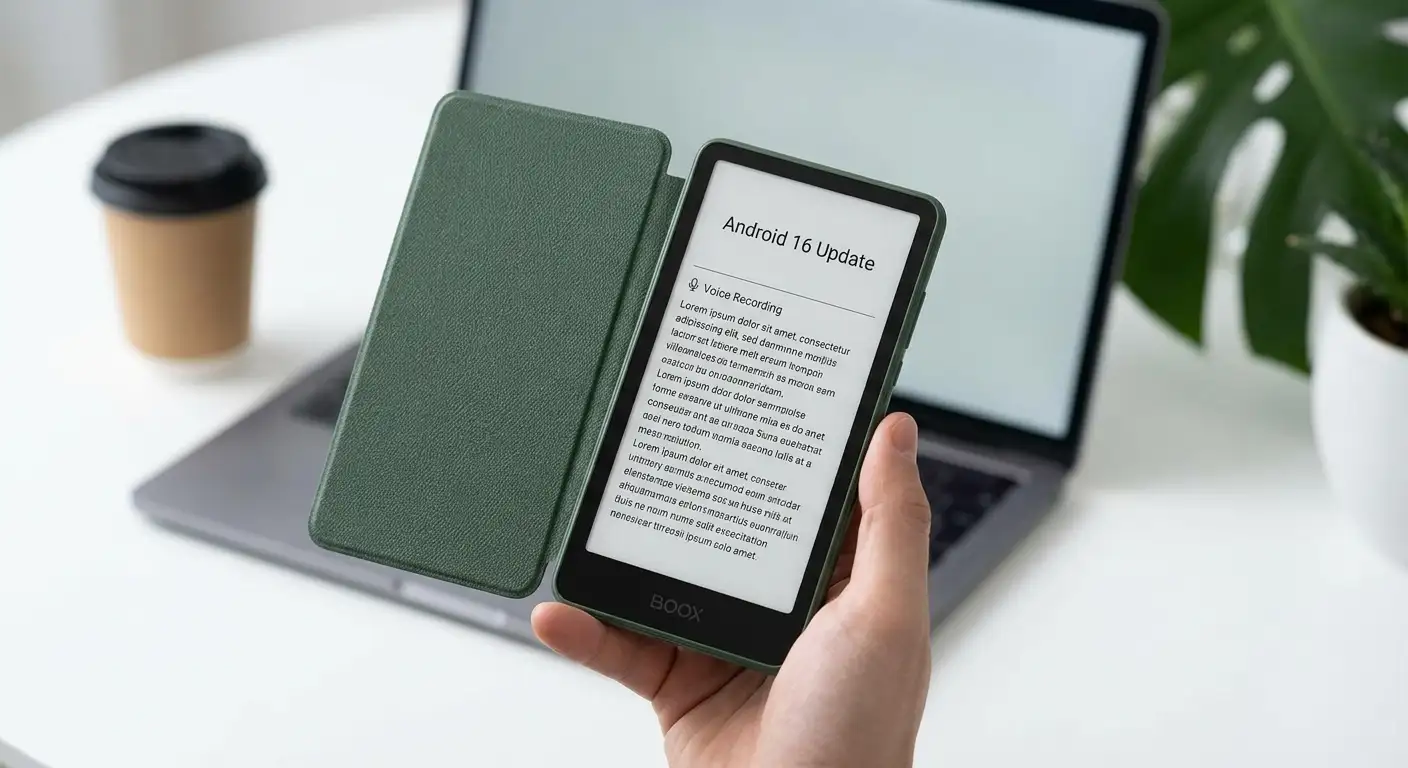
Whether you are looking for a distraction-free digital reader or a portable voice-to-text assistant for work and study, here is a detailed breakdown of what makes the BOOX Palma 3 a game-changer—along with an overview of the full line of BOOX supported models receiving these cutting-edge software upgrades.

What Is the BOOX Palma 3?
The BOOX Palma 3 is a pocket eReader designed in the shape and size of a compact smartphone. Unlike standard phones that rely on bright, eye-straining LCD or OLED screens, the Palma 3 utilizes an E Ink Carta 1200 touchscreen display. This technology mimics real physical paper, making reading comfortable under direct sunlight while reducing eye fatigue during extended use.
While it looks and feels like a mobile phone, the Palma 3 is intentionally focused on mindful reading, listening, and digital productivity. It connects to Wi-Fi and Bluetooth for app downloads and web browsing, giving you full access to digital content without the overwhelming notifications and blue light of a conventional smartphone.
Major Upgrades in the BOOX Palma 3
1. Powered by Android 16
The headline feature of the Palma 3 is its factory installation of Android 16. Upgrading directly from previous generations running older Android versions, Android 16 offers enhanced security, optimized battery performance, and complete compatibility with modern apps from the Google Play Store.
What this means for everyday users:
-
Universal App Compatibility: Easily download popular reading apps like Kindle, Kobo, Audible, Libby, Scribd, and news readers directly to your device.
-
Cloud Syncing: Seamlessly access files stored on Google Drive, Dropbox, OneDrive, and other cloud platforms.
-
Long-Term Support: Android 16 ensures software stability and app support for years to come.
2. Built-In AI Audio Transcripts & Voice Notes
One of the most impressive additions to BOOX software is native AI Transcripts. Powered by dual built-in microphones and advanced processing, the Palma 3 can record real-time audio from meetings, lectures, phone calls, or voice memos and instantly convert spoken words into clean, organized written text.
Key Benefits of AI Transcripts:
-
Hands-Free Note Taking: Perfect for students, journalists, executives, and researchers who want to focus on conversations rather than typing.
-
Instant Summaries: Converts lengthy audio recordings into readable, searchable text directly on your eReader screen.
-
Document Scanning Integration: Pair voice notes with the 16MP rear camera to scan physical documents, capture text (OCR), and combine visual notes with audio summaries in one place.
3. Active Stylus Support (InkSense Plus)
For the first time in the compact monochrome Palma line, the Palma 3 features active digital pen support. By pairing with the optional BOOX InkSense Plus stylus, you can convert this pocket reader into a fully functional digital notebook. You can underline e-books, mark up PDFs, doodle, or write handwritten journal entries right on the paper-like screen.
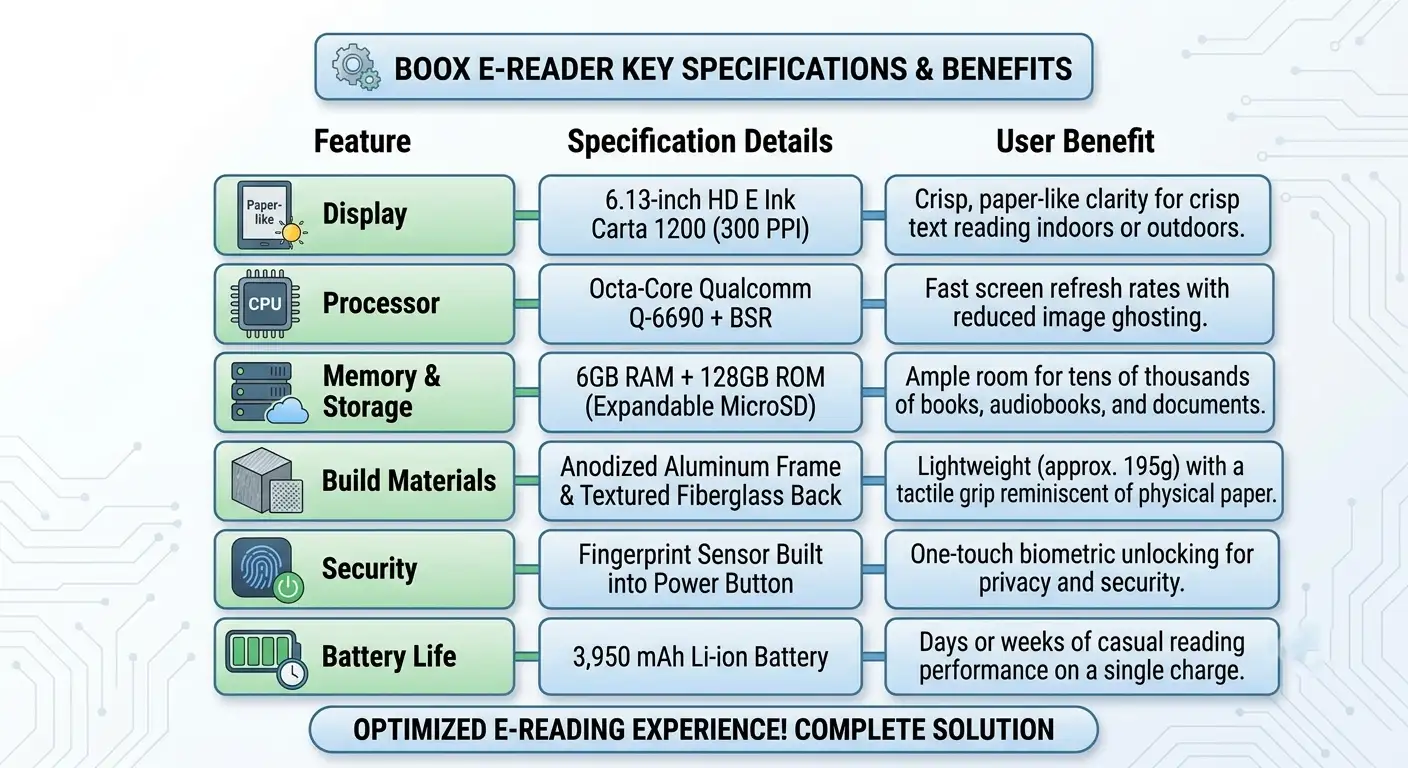
4. Upgraded Hardware & Premium Build Quality
The BOOX Palma 3 features key hardware improvements across the board:
Software Features and AI Transcripts across BOOX Models
While the Palma 3 highlights these software advancements out of the box, Onyx BOOX continues to rollout hardware updates, Android 16, and new AI features across its wider lineup of ePaper devices.
Here is an overview of the supported BOOX models and how different device families benefit from these software capabilities:
Compact Pocket Readers (Palma Family)
-
BOOX Palma 3: Ships natively with Android 16, AI Transcripts, active stylus support, and upgraded performance.
-
BOOX Palma 2 & Original Palma: Compact 6.13-inch readers designed for pure portable reading and lightweight web browsing.
Color ePaper & Stylus Tablets (Note & Tab Series)
-
BOOX Note Air Series (Note Air 3, Note Air 3 C, Note Air 5 C, Note Air 6 C): Mid-to-large-size digital notebooks designed for students and creative professionals. These devices feature full color/monochrome displays, pressure-sensitive pens, and extensive note-taking toolkits.
-
BOOX Tab Series (Tab Ultra C Pro, Tab Mini C): High-performance ePaper tablets equipped with dedicated GPUs and BOOX Super Refresh (BSR) technology. Built for tablet-style multitasking, productivity workflows, document editing, and speech recognition.
-
BOOX Max & Go Series: Large-format e-readers (10.3-inch to 13.3-inch) optimized for reading full-page PDF documents, technical schematics, and legal files.
Why Choose the BOOX Palma 3?
If you are evaluating whether to buy the BOOX Palma 3, consider these everyday use cases:
-
Reduce Eye Strain: Read books, news articles, and documents on an eye-friendly display that causes far less eye fatigue than traditional smartphones.
-
On-the-Go Productivity: Record meetings or quick voice notes while traveling, and let AI Transcripts handle the transcribing automatically.
-
All-in-One Digital Library: Carry thousands of eBooks, EPUBs, MOBI files, and PDFs in a device that fits right inside your pocket.
-
Distraction-Free Focus: Enjoy your favorite media, audiobooks, and reading applications without constant app pop-ups or notifications interrupting your focus.
FAQs
-
What is the BOOX Palma 3?
The BOOX Palma 3 is a compact, pocket-sized ePaper device shaped like a smartphone. It features an eye-friendly E Ink Carta 1200 touchscreen display, Android 16, and active stylus support for reading and distraction-free productivity.
-
Does the BOOX Palma 3 have cellular connectivity or support SIM cards?
No, the Palma 3 does not function as a standard cellular phone. It relies on Wi-Fi and Bluetooth connectivity for internet access, app downloads, and cloud syncing.
-
What version of Android does the BOOX Palma 3 run?
It comes with Android 16 installed out of the box, offering broad security updates, performance optimizations, and compatibility with modern apps from the Google Play Store.
-
Can I download regular Android apps like Kindle or Audible on it?
Yes. Because it runs full Android with Google Play support, you can download apps such as Kindle, Kobo, Libby, Audible, Scribd, and various cloud storage or news tools.
-
How does the AI Transcripts feature work on the Palma 3?
Using dual built-in microphones, the device captures real-time audio from voice memos, meetings, or lectures and uses on-device AI tools to transcribe speech into editable, searchable text notes and summaries.
-
Does the BOOX Palma 3 support a stylus for handwriting and note-taking?
Yes. The Palma 3 introduces active stylus support (compatible with the BOOX InkSense Plus stylus), allowing you to annotate PDFs, underline eBooks, and write handwritten notes directly on the screen.
-
What display technology is used on the Palma 3?
It features an E Ink Carta 1200 monochrome display designed to mimic physical paper. It remains glare-free under direct sunlight and minimizes blue light exposure to reduce eye strain.
-
Does the BOOX Palma 3 have a camera?
Yes, it includes a 16MP rear camera primarily intended for scanning documents, OCR (optical character recognition) text capture, and pairing visual references with notes.
-
Which other BOOX devices are getting the new software features?
Onyx BOOX is rolling out these software and AI enhancements across its broader lineup, including the BOOX Note Air series (such as the Note Air 3 and color models), the high-performance Tab series, and the larger Go and Max series.
-
How does the Palma 3 differ from a standard smartphone?
While built in a smartphone form factor, the Palma 3 focuses entirely on mindful reading and lightweight productivity. It swaps a high-glare OLED/LCD panel for an eye-friendly E Ink display and lacks disruptive cellular notifications.
Final Thoughts
The BOOX Palma 3 represents a major step forward for mobile ePaper readers. Combining Android 16, high-speed performance, AI Audio Transcripts, and digital stylus support into a compact pocket design, it provides a powerful yet gentle way to stay productive and entertained on the move.

Selva Ganesh is a Computer Science Engineer, Android Developer, and Tech Enthusiast. As the Chief Editor of this blog, he brings over 10 years of experience in Android development and professional blogging. He has completed multiple courses under the Google News Initiative, enhancing his expertise in digital journalism and content accuracy. Selva also manages Android Infotech, a globally recognized platform known for its practical, solution-focused articles that help users resolve Android-related issues.




Leave a Reply