
Custom Carousels Using Instagram Edits – Social media content creation has officially entered a brand-new era of creativity and seamless design. If you have ever felt limited by standard, rigid photo layouts or struggled to keep your branding consistent across multiple swipeable frames, we have some fantastic news for you. Instagram’s dedicated companion creation app, Edits, has rolled out a major feature update that changes the game: custom carousel support.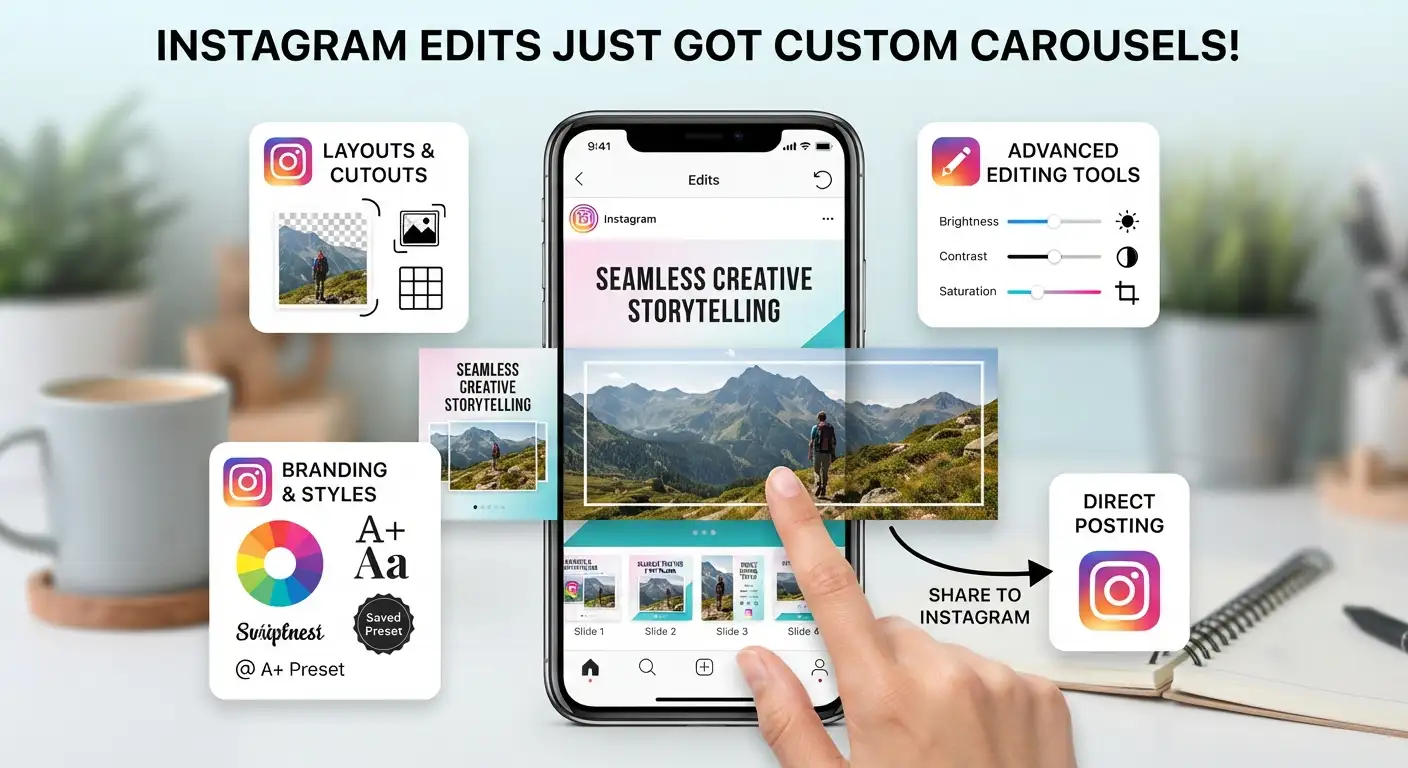
This long-awaited upgrade empowers everyday creators, influencers, small business owners, and casual users to craft stunning, multi-slide photo and video posts with incredible ease. No longer do you need complicated desktop software or clunky third-party apps to stitch together panoramic images or sequential stories. Everything you need is now integrated directly into the Edits app ecosystem, designed to help your content stand out in crowded feeds.

What Are Custom Carousels in Instagram Edits?
At its core, a carousel is a single post on Instagram that contains multiple pieces of media—such as a mix of photos and videos—that users can swipe through. Until now, building these multi-slide posts often meant picking separate images, cropping them individually, and hoping they aligned well when posted together.
With the new custom carousel feature in the Edits app, the creative process becomes completely unified. We can now combine photos and videos seamlessly across multiple slides within a single project workspace. Whether you want to showcase a photo dump from a recent weekend trip, display a step-by-step tutorial, or present a professional product catalog for your brand, the carousel editor gives you total creative control over every single frame.
One of the most exciting design capabilities is the ability to create panoramic visual effects. Instead of treating each slide as an isolated box, photos can stretch from one slide into the next, creating a continuous visual landscape that encourages viewers to swipe. Additionally, headlines and text elements can continue across multiple slides, turning the physical act of swiping into an interactive part of the storytelling experience.
Key Creative Features Built for Everyone
You do not need to be a professional graphic designer or a tech wizard to master the new carousel editor. The interface is built to be intuitive, welcoming, and packed with powerful tools that simplify advanced editing.
1. Versatile Layouts and Custom Cutouts
The updated app introduces a wide variety of creative layouts that let you arrange multiple images or video clips on a single slide. Furthermore, the built-in cutout tool allows you to instantly turn any photo subject into a custom sticker. You can place these cutouts anywhere across your carousel slides to add depth, dimension, and personality to your posts.
2. Consistent Branding and Saved Styles
Consistency is key to building a recognizable profile. The Edits app automatically carries over your saved fonts, styles, colors, and presets across different projects and formats. If you have spent time developing a signature aesthetic—including custom color grading, text formatting, and scaling preferences—those choices remain right at your fingertips when building your next multi-slide carousel.
3. Comprehensive Editing Tools
Every slide in your carousel can be fine-tuned using the app’s robust suite of editing features. Color grading, scaling, rotation, and custom filters are fully supported for every element. This ensures that every image and video clip is precisely positioned, perfectly aligned, and visually balanced before it goes live.
How to Create Your First Custom Carousel
Getting started with the new carousel feature is quick and straightforward. We have broken down the process into a few simple steps so you can dive right in:
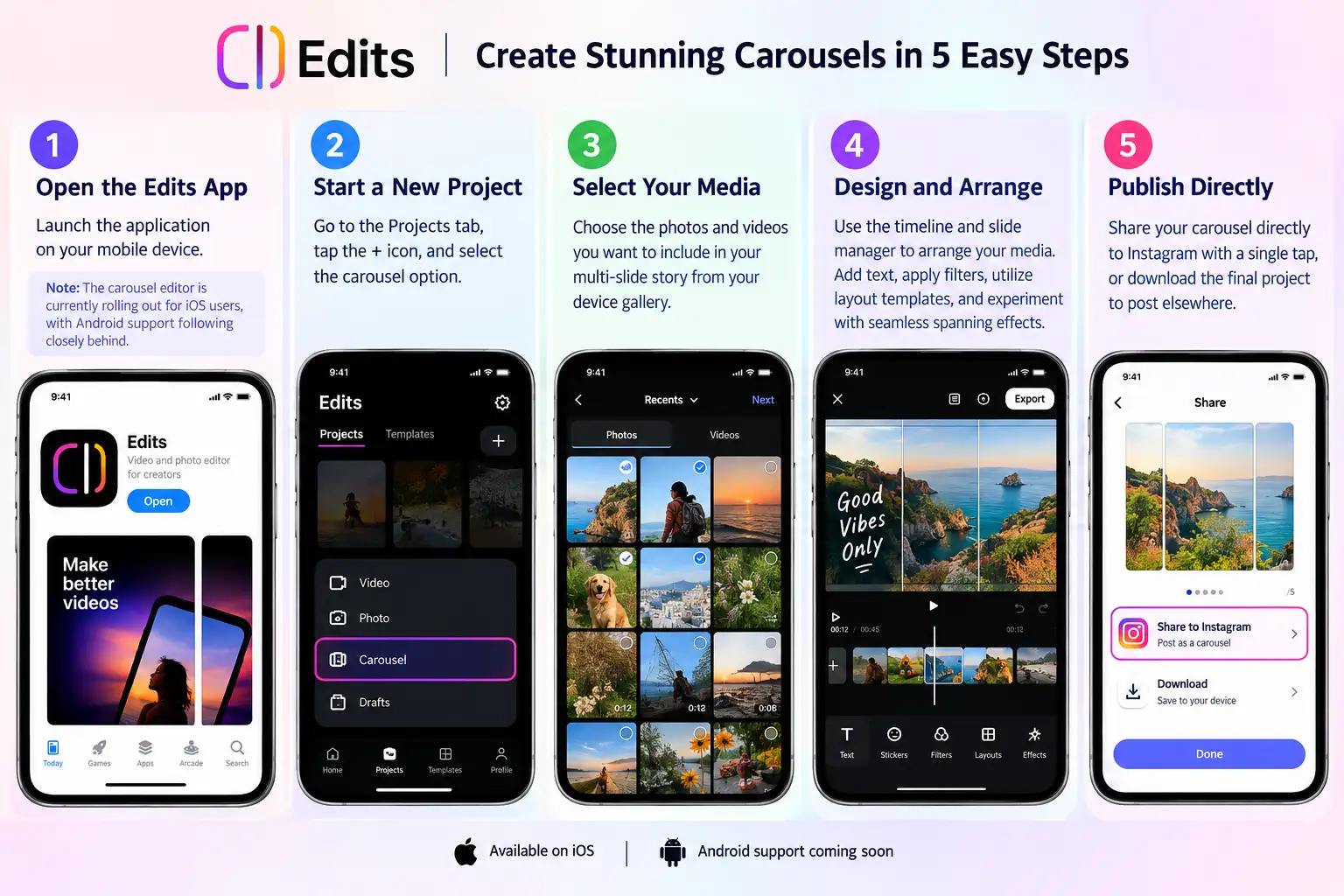
By eliminating the need to export, save, and reupload files across multiple steps, this workflow saves valuable time and keeps your media quality pristine.
FAQs
1. What are custom carousels in the Instagram Edits app?
Custom carousels in Instagram Edits allow creators to design multi-slide swipeable posts featuring a mix of photos and videos within a single project workspace. Unlike standard feed uploads, the app provides advanced layout tools, spanning panoramic effects, and continuous text across multiple slides.
2. Can I combine photos and videos in the same carousel?
Yes. The Edits app lets you seamlessly integrate both high-resolution photos and video clips across individual slides in a single carousel project.
3. How do seamless panoramic carousels work in Edits?
The editor allows images and text elements to span across the boundary of adjacent slides. When viewers swipe through your carousel on Instagram, the content transitions smoothly like a continuous panoramic canvas without visible cutoffs.
4. Is the custom carousel feature available on both iOS and Android?
The feature initially rolls out to iOS users via the Edits app, with full Android support scheduled to follow shortly behind.
5. What is the custom cutout tool, and how is it used in carousels?
The built-in cutout tool automatically isolates the subject from any photo and converts it into an interactive sticker. You can position these custom cutouts across your carousel frames to create layered, 3D-style depth.
6. Will my custom fonts, colors, and presets save across projects?
Yes. The Edits app stores your saved branding styles, including custom color palettes, font pairings, filter presets, and alignment preferences, making it easy to maintain visual consistency across all posts.
7. Do I need third-party apps like Canva or Photoshop to make seamless carousels now?
No. The update brings native tools for multi-slide layout formatting, timeline adjustments, color grading, scaling, and seamless panorama splitting directly into the Edits ecosystem, eliminating the need for third-party design apps.
8. How many steps does it take to publish a carousel from Edits to Instagram?
Creating a carousel follows a simple 5-step workflow: open the Edits app, start a new project, select your media from your device gallery, arrange and design your slides, and tap the direct Share to Instagram button.
9. Does sharing directly from Edits reduce media quality?
No. Exporting or publishing directly through the integrated workflow preserves the original media resolution and aspect ratio, avoiding the compression artifacts often caused by multi-app saving and re-uploading.
10. Why should creators prioritize carousels over single-image posts?
Carousels generate higher engagement rates on Instagram because multi-slide content increases audience dwell time. Interactive, swipeable stories also give creators and brands more room to deliver tutorials, storytelling, and product showcases effectively.
Why This Update Matters for Creators and Brands
In the fast-paced world of social media, audience engagement relies heavily on visual storytelling. Carousels consistently rank as one of the most effective formats for driving high engagement rates on Instagram because they invite users to spend more time interacting with a single post.
By bringing advanced yet accessible custom carousel creation tools into the Edits app, Instagram is leveling the playing field. Creators no longer have to rely on complicated, multi-app workflows to produce high-end, cohesive content. Whether you are sharing a photo collection, a brand campaign, or an educational guide, the new carousel tools ensure your posts look polished, professional, and uniquely yours.
Update your app, fire up a new project, and start experimenting with custom carousels today to elevate your social media presence.

Selva Ganesh is a Computer Science Engineer, Android Developer, and Tech Enthusiast. As the Chief Editor of this blog, he brings over 10 years of experience in Android development and professional blogging. He has completed multiple courses under the Google News Initiative, enhancing his expertise in digital journalism and content accuracy. Selva also manages Android Infotech, a globally recognized platform known for its practical, solution-focused articles that help users resolve Android-related issues.




Leave a Reply