
Samsung devices frequently come with a Consumer Software Customization (CSC) code designed for a particular country or region. Occasionally, users encounter a scenario where they possess a Samsung device intended for a different country than their current residence. For example, a user might have a device tailored for the Italian market while residing in Germany, resulting in the device being assigned the CSC ‘EUX.’ However, users may prefer to switch to the German CSC, ‘GER,’ to access region-specific functionalities, such as integrating their German bank account with Samsung Wallet. This need arises to align the device with the user’s current location and optimize its functionality based on the region they are situated in.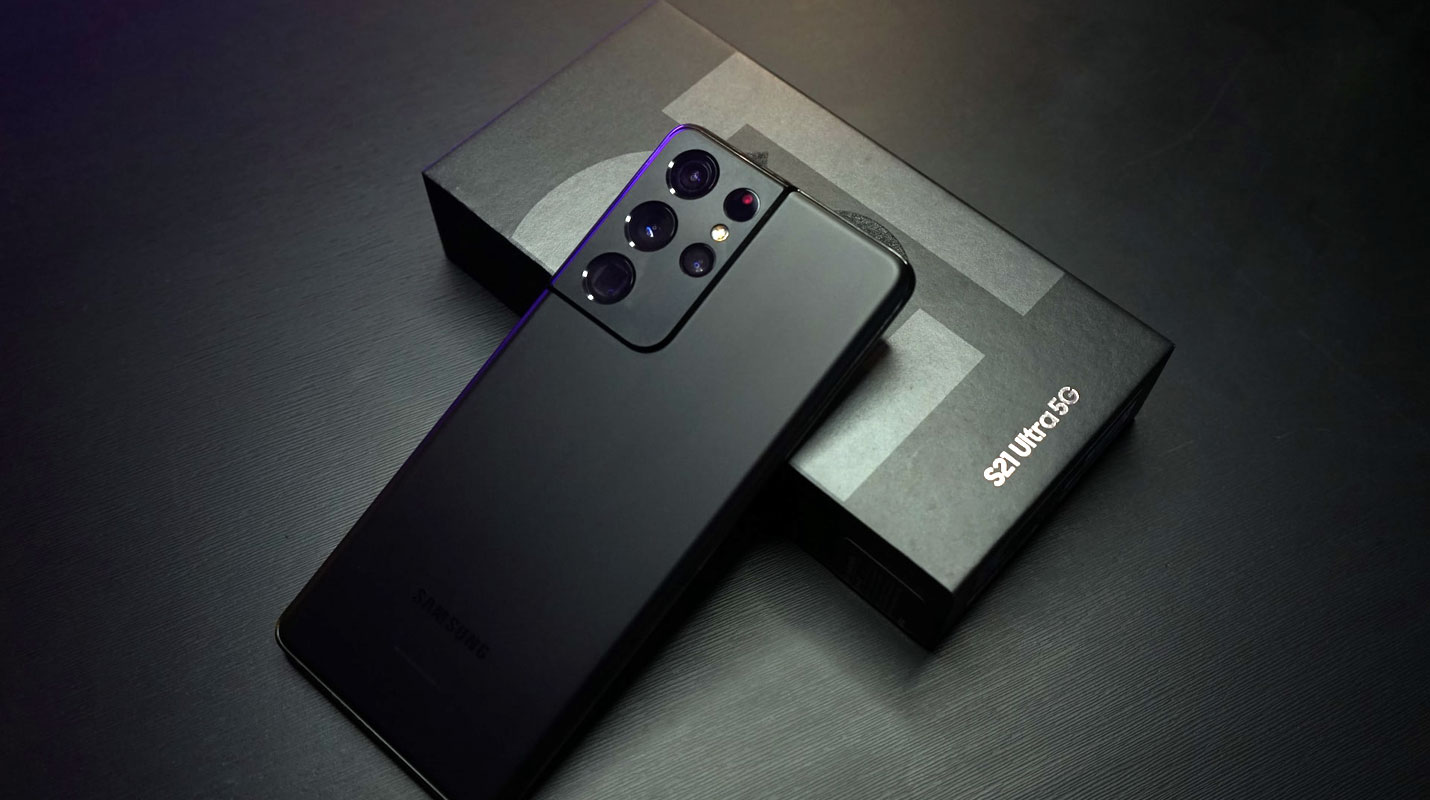
Understanding EUX CSC and Its Significance
The CSC code on a Samsung device is a crucial element that determines various aspects of the device’s functionality based on the country or region. It affects features, apps, and services available to the user.
User Scenarios and Concerns
Many users face this challenge, feeling limited due to their device’s original CSC not aligning with their current location or preference. The inability to use region-specific features can be frustrating.

Previous Attempts and Their Limitations
In attempts to change the CSC, some users have experimented with tools like SamFW, attempting to switch to other CSCs like SEK and back to EUX. Unfortunately, these attempts often proved unsuccessful, leaving users in a dilemma.
Introducing the Alliance Shield App
A practical solution comes in the form of the Alliance Shield app. This app presents a viable workaround to change the country associated with the EUX CSC on your Samsung device.
Step-by-Step Guide to Change EUX CSC
- Download the Alliance Shield app from a trusted source and install it on your Samsung device.
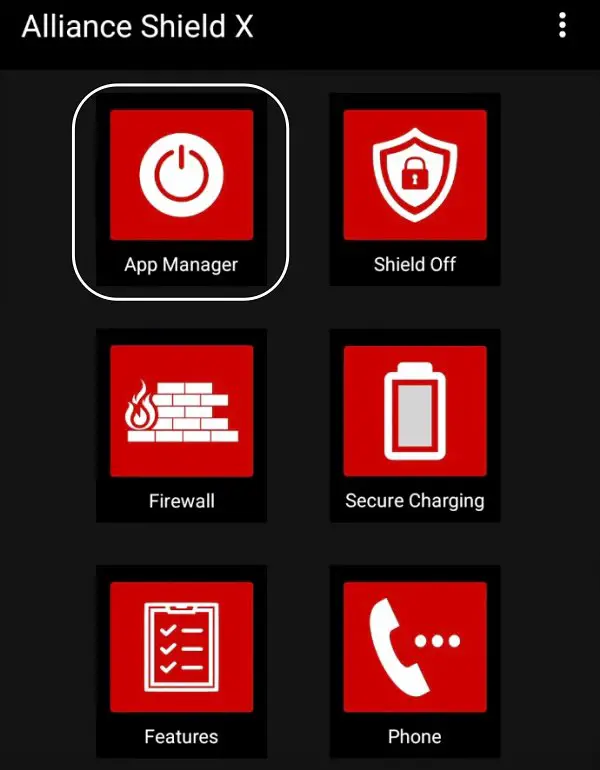
- Open the app and locate the App Manager within the interface.
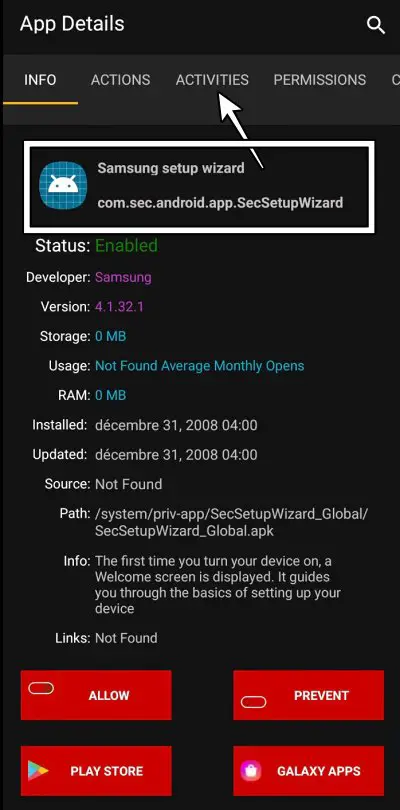
- Use the search feature to find ‘Samsung Setup Wizard’ and go to its Activities section.
- Look for the Activity ending with ‘CountrySelectionActivity’ and select ‘Open.’
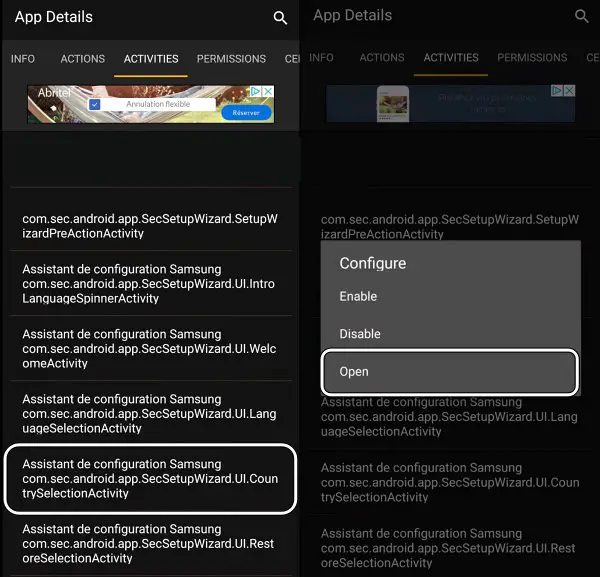
- Proceed with the on-screen steps provided by the app to change the country associated with your CSC.
- After following the steps, verify the changes by checking your device’s CSC.
FAQs
Can I switch my Samsung device’s CSC without using any third-party apps?
Using third-party apps like Alliance Shield is the most effective method to change your Samsung device’s CSC.
Is changing the CSC against Samsung’s terms of service?
No, changing the CSC is not against Samsung’s terms of service. However, following the proper procedures and using reputable apps is essential.
Will changing my device’s CSC affect my warranty?
No, changing the CSC should not affect your device’s warranty. It’s a software customization and does not tamper with the hardware.
Can I revert to the original CSC if needed?
Yes, in most cases, you can revert to the original CSC if needed by following similar steps in the Alliance Shield app.
Are there any risks associated with changing the CSC of my Samsung device?
While changing the CSC is generally safe, there’s always a slight risk involved. It’s essential to meticulously follow the instructions and utilize reputable apps to reduce possible risks.
Wrap Up
Successfully altering the country linked to the EUX CSC on your Samsung device can be achieved with a strategic method. The Alliance Shield app emerges as a dependable solution, allowing users to personalize their device’s CSC to align with their desired country or region. This customization translates into an improved user experience, as users can access region-specific features and services tailored to their preferences. This is significant in optimizing device functionality based on location, enhancing usability and practicality.
By leveraging the capabilities of the Alliance Shield app and following the appropriate steps, users can seamlessly transition their device to a different CSC, aligning it with their specific geographical or regional requirements. This advancement addresses concerns regarding device functionality and underscores the adaptability and versatility of modern smartphone technology.

Selva Ganesh is a Computer Science Engineer, Android Developer, and Tech Enthusiast. As the Chief Editor of this blog, he brings over 10 years of experience in Android development and professional blogging. He has completed multiple courses under the Google News Initiative, enhancing his expertise in digital journalism and content accuracy. Selva also manages Android Infotech, a globally recognized platform known for its practical, solution-focused articles that help users resolve Android-related issues.




Leave a Reply