
Bank apps are different from other apps. They are more sensitive. Even if you use an unsecured Internet connection, it won’t work. It will stop on the login screen. Or it will not load after the Home screen. Primarily, the apps that usually crash or stop working are banking apps. There has been no critical reason why banking apps crash more often than other apps on different Android mobiles. However, some specific standard troubleshooting techniques could fix that in such a situation. In this article, we will show you how to troubleshoot and resolve the constant crashing of your banking apps. Many have proven these troubleshooting suggestions, so you can trust them to fix the issues you’re facing with your banking apps.
When your device memory is almost filled with files and apps, it will affect the device’s general performance; thus, some apps may stop working as they used to. Instead, when you launch them, they will crash and display an error message. Constant crashing of mobile apps can also be linked to some bugs in the affected app. Nevertheless, there are other reasons your mobile apps may stop working. If these apps previously worked and ended abruptly, the issue is with your device. However, if the app never worked right from when you installed it, there is a bug, so you must report the issue to the developer.
Troubleshoot Bank apps not working on smartphones
Is your device compatible?
Compatibility issues may be why your mobile banking app is not working on your mobile device. Some banking apps are designed to be compatible with the latest mobile OS versions, so they may not be able to work on a smartphone running an older version. Therefore, before you start complaining about your banking apps not working on your mobile device, check if your device’s OS version is compatible with running the app.

To see if your device’s OS version is compatible, visit the app page on the Play Store and scroll to the footer area. There, you’ll see the supported OS versions. Unfortunately, the app won’t run on your device if your version is not supported. Maybe you should consider contacting bank support or getting a smartphone running on a higher OS version.
Try the new version of the app.
Sometimes, the sudden crashing of your banking app may be because it is an older version with a bug. Typically, when an app detects a bug, the developer releases an updated version in which the bug has been fixed. Thus, if you often experience such issues, check if there is an updated app version. Then, uninstall the current version on your device and install the most recent version from trusted app stores, or follow the link from the official bank website to download the official release. This method has helped to fix this issue for various people. It also works for other apps, not just for banking apps.
Clear cache
There are different ways to clear your device cache, which can likely be why your banking app is not working. You can install a mobile optimisation app to remove your app caches and improve performance. Also, you can clear the application’s cache from the device settings menu.
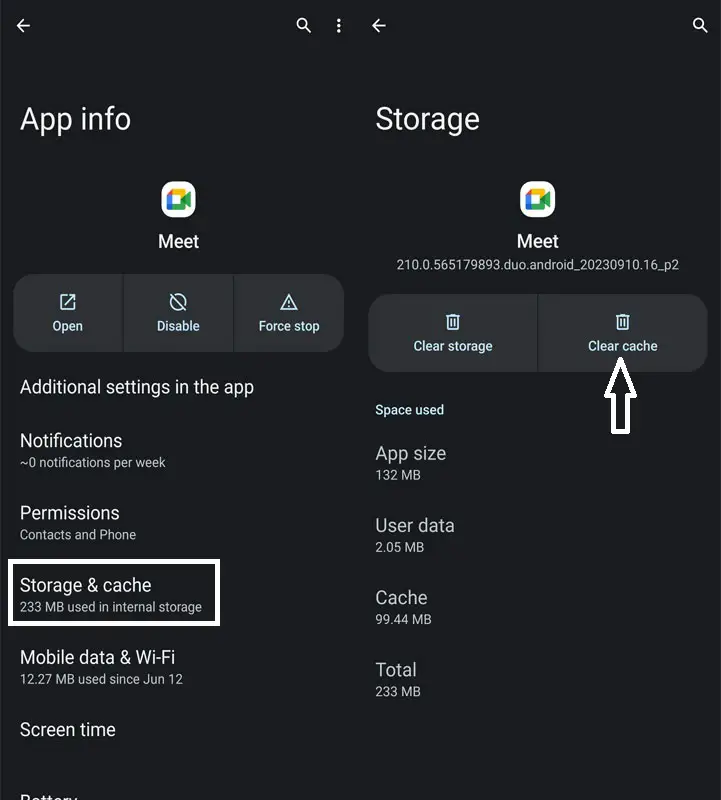
Caches are often among the factors that cause an app to start malfunctioning. To have precise Data, you must set up the app from the first step per your Bank app instructions. Go to your settings menu, locate and click on the “Apps” row, and select the apps you want to clear their caches. After removing the application’s cache, try again to see if it has started working correctly. If the app is still not working, try our other troubleshooting suggestions.
Switch network – use WiFi instead of a mobile network or vice versa.
I faced this issue, and it worked. In some cases, the network connection is also the problem. Maybe your internet service provider has some issues, or the wireless network router is incorrectly configured. Thus, if you have been using your mobile device network and your banking app is not opening, try to use a wireless network to connect to the internet. In the same way, if you’re using WiFi, maybe your home network, try to switch to your local data connection. This may fix the issues you’re facing.
Note: This is not workable if the banking app is crashing. It only works when the app opens, but not when its features are loaded thoroughly.
Maintain one SIM card, preferably the one registered with your bank account.
Also, we have seen why this issue can be caused by the conflict of the SIM cards on your device. If you are using dual SIM cards, you must deactivate the one not connected to the bank account and use the one linked to the bank account. This has helped some people fix this issue; hopefully, it will help you improve it. Disable the Second SIM if you use dual-SIM phones and try.
However, if this doesn’t help, continue trying other solutions discussed in this article.
Enable All Permissions
Sometimes, the app may not work if you accidentally turn off some permissions. Allow all permissions in the app and try. Go to Settings>> Apps >> Your Bank App >> Permissions.
Contact the app developer support team.
This is practically the best solution tip. You can find a way to contact the app developers and explain the issues you’re experiencing with their app. They’ll tell you how to fix the problem, and your app will start working as usual.
Since banking apps help to minimize the time, parties, and processes involved in running business transactions or paying for goods and services, they are essential. Example- Natwest.
Wrap Up
These possible troubleshooting options will help you fix a banking app that is not working correctly. We do not guarantee that these tips listed here will resolve the issue, but most people experiencing similar problems have tried these techniques, and they worked for them; thus, we believe they would work for you, too.
If you have tried all these troubleshooting suggestions but it doesn’t work, contact your bank or the app developers. While this article is meant to solve the problems of unworking banking apps, these possible solutions will also work for other non-banking apps. Never Ever Download Bank apps from third-party sites other than the Play Store and Your Official Bank Website.

Selva Ganesh is a Computer Science Engineer, Android Developer, and Tech Enthusiast. As the Chief Editor of this blog, he brings over 10 years of experience in Android development and professional blogging. He has completed multiple courses under the Google News Initiative, enhancing his expertise in digital journalism and content accuracy. Selva also manages Android Infotech, a globally recognized platform known for its practical, solution-focused articles that help users resolve Android-related issues.





Good to know it’s not a major issue with my phone.
Yes, I have faced this with my bank’s app too.
I hope they fix this soon. It’s quite annoying.
I thought it was only my device causing this problem. Now I know.
It’s frustrating when banking apps freeze right at login.
It’s frustrating when banking apps freeze right at login.
Good to know it’s not a major issue with my phone.
I hope they fix this soon. It’s quite annoying.
This has happened to me several times. Thanks for explaining it.
This has happened to me several times. Thanks for explaining it.
I thought it was only my device causing this problem. Now I know.
This has happened to me several times. Thanks for explaining it.