
Download Magisk.zip and Magisk Manager App All Versions– For seasoned Android enthusiasts, Magisk is a trusted tool known for its systemless rooting approach. Developed by Topjohnwu, Magisk allows users to root Android devices without altering core system files. This method not only simplifies the rooting process but also maintains system integrity. The app includes Magisk Manager, which combines the capabilities of a Superuser Manager and Xposed Installer, offering a streamlined way to manage root access and modules. In this article, we’ve compiled all versions of Magisk and Magisk Manager, providing users with a comprehensive overview of their options. Magisk’s focus on systemless root offers a significant advantage over traditional methods, such as SuperSu, especially for those using custom ROMs or firmware, ensuring seamless Android experiences with maximum control and flexibility.

Interestingly, this app helps Android users hide their device’s root access from specific apps. This rooting app operates in a unique manner that distinguishes it from other rooting apps available. It does not affect your system partition, so you’ll still retain the benefits packed by your device, such as receiving OTA updates from your manufacturer. Even the app skips practically all security checks when rooting Android devices, making the process more accessible and straightforward. When this app is rooting a device, the Android device will still receive OTA updates.
This app offers numerous features, which we have outlined in this article. This is a comprehensive article for Magisk and Manager.

Supporting Android Versions
-
All Android devices running on custom recovery installations
Things to note
-
Check the mobile device number
-
Make sure the mobile Android device is charged above 50% (a fully charged battery will be best)
-
Run a full backup of the device files because performing advanced user actions on Android devices can lead to unrecoverable data loss.
Magisk.zip All Versions
Below are the links to download the available Magisk app versions. If you can’t download the files below, try our AFH Mirror.
- Canary version, Android 17 Canary version(For better patch image files and latest features)
- Magisk Version Latest
Latest V 30.3, 30.2 Update Log:
Magisk v30.7 (Feb 23, 2026)
-
Added support for Android 16 QPR2 (including updated SELinux policy format).
-
Added support for Android XR devices and some Nubia phones in Zygisk.
-
Improved pre-init storage using the klogdump partition.
-
MagiskSU change: Root privileges no longer automatically drop capabilities when switching users. You must use
--drop-capmanually if needed. -
Improved LZMA compression detection in MagiskBoot.
-
Fixed command-line argument parsing bugs in MagiskBoot.
Magisk v30.6 (Dec 1, 2025)
-
Reverted a previous change that caused bootloops on some devices.
How do Flash and root Android devices use Magisk?
It is pretty easy to use this flexible app to root or flash Android mobile devices, unlike other Android rooting apps.
-
You must download Magisk.Zip from any of the links above and copy it to the device’s internal memory.
-
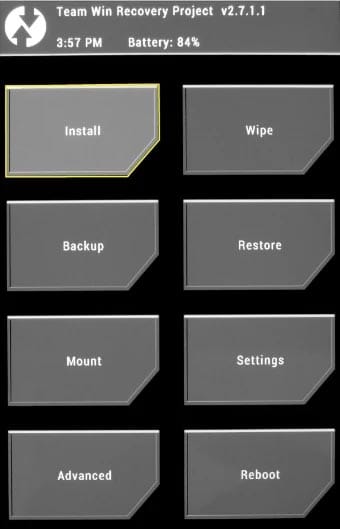
After that, power off the Android mobile device and boot it into recovery mode. To boot an Android device into recovery mode, press the Volume Up, Home, and Power buttons simultaneously for a few seconds. Your device will boot into recovery mode when you press those buttons.
-
In the recovery mode, select Wipe >>> Advanced wipe, >>> select cache data.
-
Return to the main menu in recovery mode and choose the “Install” option. Select Magisk.Zip from the file browser.
Note: Magisk.Zip must be installed on your device’s internal memory so that you can see it when you choose the “install” option in recovery mode.
-
After installing Magisk.Zip, reboot the Android device.
-
You will find the SuperSu app icon in your drawer when the device is booted up.
How to uninstall Unwanted apps?
Typically, Android devices come with many bloatware apps that are unusable to the device owner. Unfortunately, the sad news is that you can’t remove these apps unless you root your device. If you have rooted your device, here is the process for removing unwanted apps from Android devices.
-
To uninstall unwanted apps, use Root Cleaner.
-
Copy the downloaded “Root Cleaner” files to your mobile’s internal memory
-
Run the install file and install Root Cleaner on your device
If you get the “Installation Blocked” message, click on settings and activate “Unknown Sources.”
-
After installing this app, launch it and start removing the bloatware apps on your rooted Android device.
-
Please check very well before uninstalling an app. If you uninstall a system or OS app, your device’s functionality will be severely affected.
-
Also, with this “Root Cleaner” app, you can move apps installed on your phone’s memory to an SD card to free up more space for your device to function seamlessly. However, this may depend on system permissions.
Magisk Manager App All Versions
The Magisk manager works just like the SuperSU manager. Here are the direct links to download the Magisk Manager App for Android devices. If you can’t download the files below, try our AFH Mirror.
- Magisk Manager Version Latest
Installation Method
-
Download the Magisk Manager APK file and copy it to the device’s internal memory.
-
Select and install it on your Mobile.
-
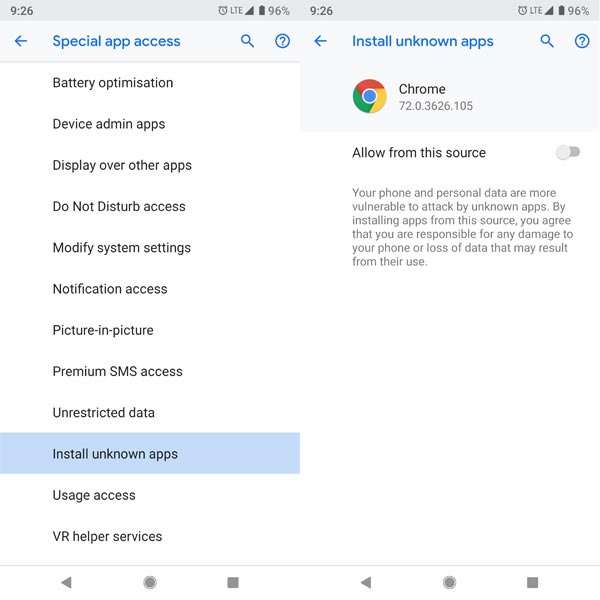
If you get the “Installation Blocked” message, click on settings and activate “Unknown Sources.”
-
Grant the app access to all permissions it requests. This will make the app function as expected.
-
We can even use this app to upgrade the Magisk version on your device. It works exactly like SuperSu but with more intuitive features for more functions.
Features
As said earlier, you’ll find many enticing features on the Magisk Manager App.
-
Systemless rooting
-
Magisk hides
-
Zip file Installation
-
System partition
-
Root your device easily
-
Hide root
-
Custom Recovery Installation
-
Boot Image Installation
-
Xposed framework
-
Magisk modules
-
Safetynet checks
-
System files Installation
Magisk Un-Installation Method
In case you wish to uninstall Magisk from an Android device, follow the steps below;
-
Download the Magisk Uninstaller APK and copy it to your internal memory.
-
Run the installer file to install it on an Android mobile.
-
If you get the “Installation Blocked” message, click on settings and activate “Unknown Sources.”
-
Grant required permission to access the app.
-
Then, select “Uninstall Magisk.”
Wrap Up
This article is for advanced Android users who want to root their mobile devices using the systemless method. Magisk is a tested and trusted app that enables faster rooting of Android devices. We have also included detailed processes for flashing and rooting Android devices using this app, as well as instructions for uninstalling the app if you no longer wish to have it on your device.
Thanks to XDA Developer By topjohnwu
Thanks to AI Developers- Kumar, James, Rain, and others.

Selva Ganesh is a Computer Science Engineer, Android Developer, and Tech Enthusiast. As the Chief Editor of this blog, he brings over 10 years of experience in Android development and professional blogging. He has completed multiple courses under the Google News Initiative, enhancing his expertise in digital journalism and content accuracy. Selva also manages Android Infotech, a globally recognized platform known for its practical, solution-focused articles that help users resolve Android-related issues.




Has anyone tried using the systemless host file feature with the latest canary build?
I found the exact version I needed for my old device. Cheers!
Thanks for the detailed list! Magisk is truly the best rooting method out there.
Magisk Manager has come a long way. So much cleaner now.
I hope they keep supporting older Android versions. This tool is essential.
Just a quick test comment to say thank thank you for the comprehensive list of versions.
The systemless root is what keeps me coming back to Magisk. No more boot loops!
Super helpful guide for anyone dealing with custom ROMs. Topjohnwu’s work is amazing.
Has anyone tried using the systemless host file feature with the latest canary build?
I found the exact version I needed for my old device. Cheers!
Thanks for the detailed list! Magisk is truly the best rooting method out there.
Magisk Manager has come a long way. So much cleaner now.
I hope they keep supporting older Android versions. This tool is essential.
Just a quick test comment to say thank thank you for the comprehensive list of versions.
The systemless root is what keeps me coming back to Magisk. No more boot loops!
Super helpful guide for anyone dealing with custom ROMs. Topjohnwu’s work is amazing.
Has anyone tried using the systemless host file feature with the latest canary build?
I found the exact version I needed for my old device. Cheers!
Thanks for the detailed list! Magisk is truly the best rooting method out there.
Magisk Manager has come a long way. So much cleaner now.