
YouTube Play Something Button Finds the Best Videos for You– Consider the situation where you want to watch videos while eating or when bored but can’t decide which videos to watch. If you’re anything like me, you sometimes struggle to find something to watch when you’re on YouTube. Fortunately, the media giant is adding a new button to the Android app to automatically hunt down and select a video for you to watch.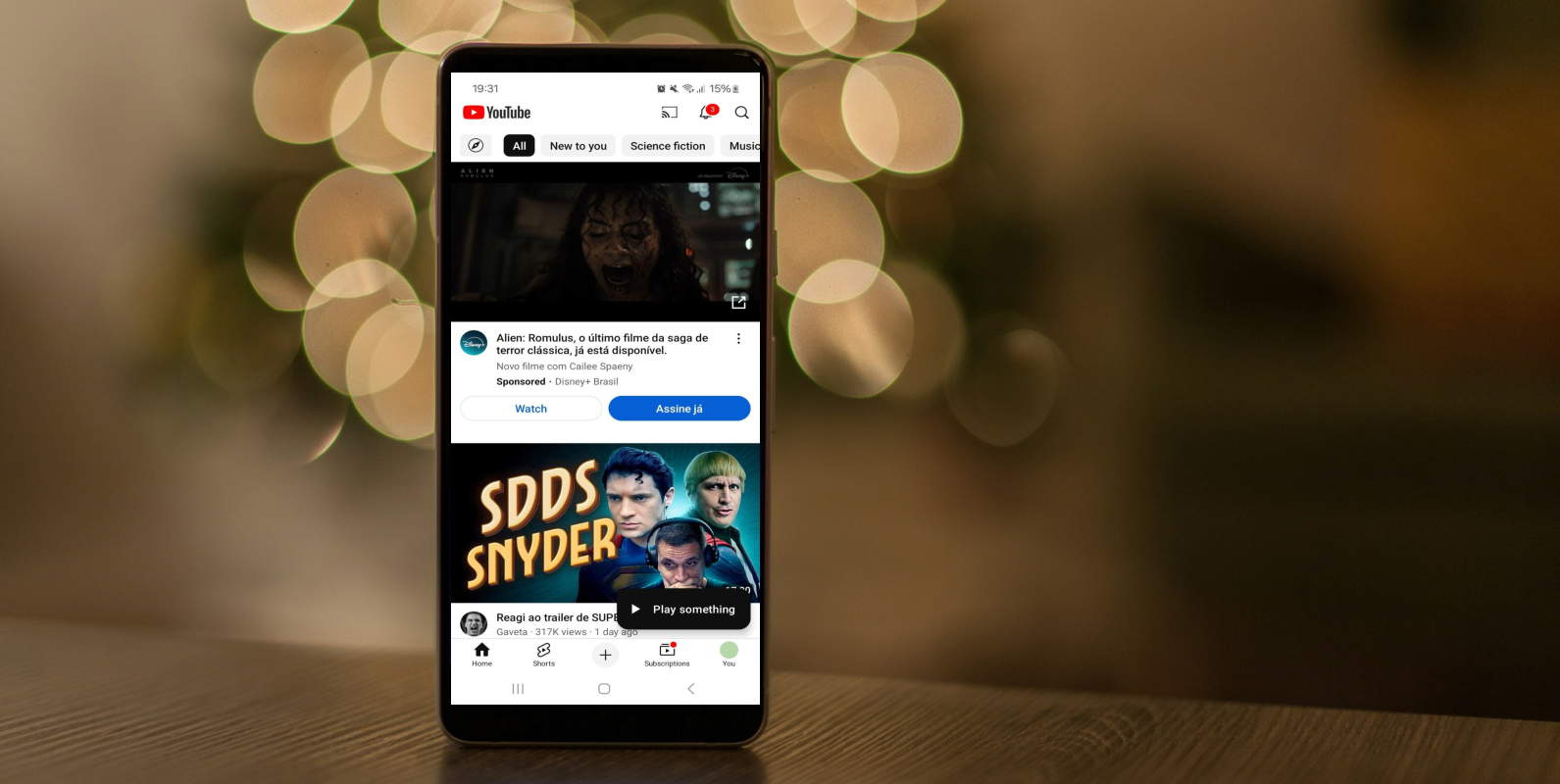
A New Era of Effortless Watching
As reported by 9to5Google, people have spotted a new feature appearing on YouTube for Android. This feature adds a button that reads “Play something” at the bottom right of the homepage. If you tap this, YouTube will automatically fetch something to watch.

How the Feature Works
According to people with the feature, the button will always launch the YouTube Shorts UI to show you its selected video. However, it’s not limited to picking short videos; it can opt to show you a long-form video instead. Given the minimalistic Shorts UI, YouTube likely chose this format to get users to watch a new video without additional distractions.
The Algorithm Behind the Magic
So, how does YouTube decide what video to show you next? Since this feature is new, people haven’t understood how the algorithm works. However, 9to5Google states that it “presumably” takes from your recommended video feed. It might select content based on your viewing history, likes, and subscriptions, ensuring you get something tailored to your interests.
Limited Availability for Now
Right now, Google is giving this feature a test run. As such, not everyone will see it on their device, and even if you get it, there’s no guarantee that it will stick around. However, if you want to try it, users report that the new feature is popping up after updating to version 19.50 or later. As such, update your app and see if YouTube rolls out the button to your device.
The Convenience Factor
The convenience of the “Play Something” button cannot be overstated. In today’s fast-paced world, having an option that eliminates the paradox of choice and allows you to enjoy content without endless scrolling can be a game-changer. Whether you’re looking for entertainment during a meal or something to watch while relaxing, this feature could become your go-to.
Alternative Viewing Options
If you’d rather not trust an algorithm to find your next favourite video, there are still plenty of ways to discover great content on YouTube:
-
- Explore Trending Videos: Check out what’s currently popular on the platform.
- Subscribe to Channels You Love: Keep up with your favourite creators and their latest uploads.
- Use YouTube’s Search Function: Find specific content by typing in keywords.
- Browse Categories: Explore different genres and topics that interest you.
YouTube’s Commitment to Innovation
This new feature is just one example of how YouTube continues to innovate and enhance user experience. By constantly introducing new tools and functionalities, YouTube ensures that its platform remains engaging and user-friendly, catering to the ever-evolving preferences of its audience.
Wrap Up
YouTube’s “Play Something” button represents a leap forward in content discovery, offering a seamless way to enjoy videos without the hassle of decision-making. While it may not be available to everyone, its potential to enhance the viewing experience is undeniable. Whether you embrace this new feature or stick to traditional methods of finding content, YouTube remains a treasure trove of entertainment, ready to cater to all your viewing needs.

Selva Ganesh is the Chief Editor of this Blog. He is a Computer Science Engineer, An experienced Android Developer, Professional Blogger with 8+ years in the field. He completed courses about Google News Initiative. He runs Android Infotech which offers Problem Solving Articles around the globe.



Leave a Reply