
25 Reasons SurveyMonkey is Best Compare with Google Forms – In the modern landscape of data-driven decision-making, the tools we use to gather insights can be the difference between a successful pivot and a costly misstep. While Google Forms has carved out a niche as a convenient, “no-cost” option for basic data collection, SurveyMonkey remains the gold standard for enterprise-grade research, market analysis, and sophisticated feedback loops.

We have conducted an exhaustive analysis of both platforms to understand why serious researchers and growing businesses consistently choose SurveyMonkey over the more rudimentary Google alternative. Below, we detail 25 specific advantages that solidify SurveyMonkey’s position as the market leader in survey technology.
I. Advanced Logic and Architectural Design
The structural integrity of a survey dictates the quality of the data it produces. SurveyMonkey provides a level of architectural control that Google Forms simply cannot match.
1. Eliminating Order Bias with Question Randomization
In professional research, the order in which questions are presented can inadvertently influence a respondent’s answers. SurveyMonkey offers robust Question Randomization and Answer Shuffling features. By rotating the sequence for different users, we ensure that “order bias” is eliminated, leading to more objective and scientifically valid results.
2. Complex If/Then Paths via Advanced Skip Logic
While Google offers basic section jumps, SurveyMonkey’s Advanced Skip Logic allows us to create multi-layered, conditional paths. If a user selects “Dubai,” we can immediately serve them specific sub-options like “Marina” or “Downtown,” effectively creating a personalized experience that respects the respondent’s time.
3. Efficient Navigation with Page Logic
Managing long-form surveys is a challenge in Google Forms, where users often face “form fatigue.” SurveyMonkey’s Page Logic allows us to skip entire sections based on a single response, ensuring that respondents only interact with content that is strictly relevant to them.
4. Dynamic Personalization through Piping
Piping is a high-end feature that allows us to insert an answer from a previous question into the text of a subsequent one. For example, if a respondent identifies “Brand A” as their favorite, the next question can automatically ask, “Why do you prefer Brand A?” This creates a high-touch, conversational feel that significantly boosts engagement.
5. The Power of the Expert-Vetted Question Bank
Starting from scratch is a recipe for biased data. SurveyMonkey provides access to a Question Bank containing thousands of certified, pre-written questions. These questions are professionally formulated to minimize leading language and maximize clarity, ensuring we gather actionable intelligence.
6. Psychological Motivation with Progress Bars
Completion rates are the lifeblood of survey research. SurveyMonkey’s integrated Progress Bars provide a visual cue that reduces abandonment. When respondents know exactly how much of the journey is left, they are far more likely to cross the finish line.
II. Deep Data Analytics and Institutional Intelligence
Data collection is only half the battle; the real value lies in the interpretation.
7. AI-Driven Sentiment Analysis
SurveyMonkey leverages sophisticated Artificial Intelligence to perform Sentiment Analysis on open-ended text responses. Instead of manually reading hundreds of comments, we can automatically categorize feedback as Positive, Negative, or Neutral, instantly identifying the emotional temperature of our audience.
8. Granular Comparisons with Cross-Tabulation
Understanding the “why” behind the data requires looking at segments. Cross-Tabulation allows us to compare how different demographics answered—for instance, identifying how Men vs. Women perceive a new product. Google Forms requires a manual export to Sheets to achieve this; SurveyMonkey does it natively.
9. Built-in Net Promoter Score (NPS) Calculator
The NPS is the industry standard for measuring brand loyalty. SurveyMonkey includes a dedicated NPS Question Type that automatically calculates your score and tracks it over time, providing a clear benchmark for growth.
10. Verifying Integrity with Statistical Significance
Is your data a breakthrough or a fluke? SurveyMonkey provides built-in Statistical Significance calculators. This helps us distinguish between a random variation in responses and a genuine trend, providing the confidence needed for high-stakes business moves.
11. Advanced Native Filtering and Grouping
We can drill down into specific data segments using powerful Filtering and Grouping tools without ever leaving the dashboard. This internal processing is significantly more efficient than the “Export to Excel” workflow required by Google.
12. Competitive Benchmarking
SurveyMonkey allows us to compare our results against industry averages. Knowing that your customer service score is an 8/10 is good; knowing the industry average is 6/10 is a competitive advantage.
III. The “AIO” Edge: AI and Survey Optimization
In the age of AI, SurveyMonkey has integrated machine learning into every step of the survey lifecycle.
13. The SurveyMonkey Genius Coach
Think of SurveyMonkey Genius as a built-in consultant. This AI tool scores your survey draft and provides predictive performance metrics, flagging potential issues before you hit “send.”
14. Predictive Completion Time
Using data from millions of surveys, the AI provides an Estimated Completion Time. We can use this to set expectations for respondents, which is proven to increase the response quality.
15. Presentation-Ready Automatic Charts
In a corporate environment, time is money. SurveyMonkey generates “presentation-ready” visual reports automatically. These charts can be customized and exported directly into PowerPoint, saving hours of manual formatting.
16. Cleansing Data with Response Quality Scores
Not all data is good data. SurveyMonkey’s AI automatically flags “speeders” (respondents who fly through the survey without reading) and junk answers, ensuring your final report is based on high-integrity feedback.
IV. Branding, Professionalism, and White Labeling
A survey is a touchpoint for your brand. Google Forms looks like a Google Form; SurveyMonkey looks like your company.
17. Full White Labeling for Brand Consistency
For professional applications, branding is non-negotiable. SurveyMonkey allows for complete White Labeling, removing all platform branding and replacing it with your own logos, colors, and fonts.
18. Driving Traffic with Custom Redirects
Once a respondent finishes a survey, their attention is a valuable asset. SurveyMonkey allows us to set Custom Redirects, sending users directly to a specific landing page or website immediately after completion.
19. Professionalism with Custom URLs
A link like surveymonkey.com/r/OfficeSurvey inspires far more trust than the long, cryptic strings of characters generated by Google Forms. Custom URLs are essential for social media and print marketing.
20. Multi-Device Preview
We must ensure a seamless experience across all hardware. SurveyMonkey’s Device Preview allows us to see exactly how a survey appears on a MacBook, iPhone, or Tablet before it goes live.
V. Distribution, Reach, and Workflow Integration
The final piece of the puzzle is getting the survey to the right people and making the data work for you.
21. Accessing Global Insights with SurveyMonkey Audience
If you lack a mailing list, SurveyMonkey Audience allows you to purchase responses from specific demographics worldwide. Whether you need “Business owners in Chennai” or “Health enthusiasts in London,” the platform provides the reach.
22. Field Research via Offline Mode
Not all data is collected in an office. The SurveyMonkey App includes an Offline Mode, allowing us to collect data in the field without an internet connection—perfect for trade shows or remote site audits.
23. Optimizing Engagement with A/B Testing
To maximize completion rates, we can use A/B Testing to send two different versions of a survey (e.g., different subject lines or question orders) to see which performs better.
24. Precision Multi-Channel Tracking
SurveyMonkey allows us to generate unique links for different platforms (Email, LinkedIn, QR codes). This Multi-Channel Tracking shows us exactly where our respondents are coming from, allowing us to optimize our marketing spend.
25. Seamless Native Integrations
Finally, SurveyMonkey acts as a core component of your tech stack. With native integrations for Salesforce, HubSpot, and Microsoft Teams, we can trigger automated workflows based on survey responses, turning feedback into immediate action.
Buy SurveyMonkey In Offer Price
Summary: Why Professionals Choose SurveyMonkey
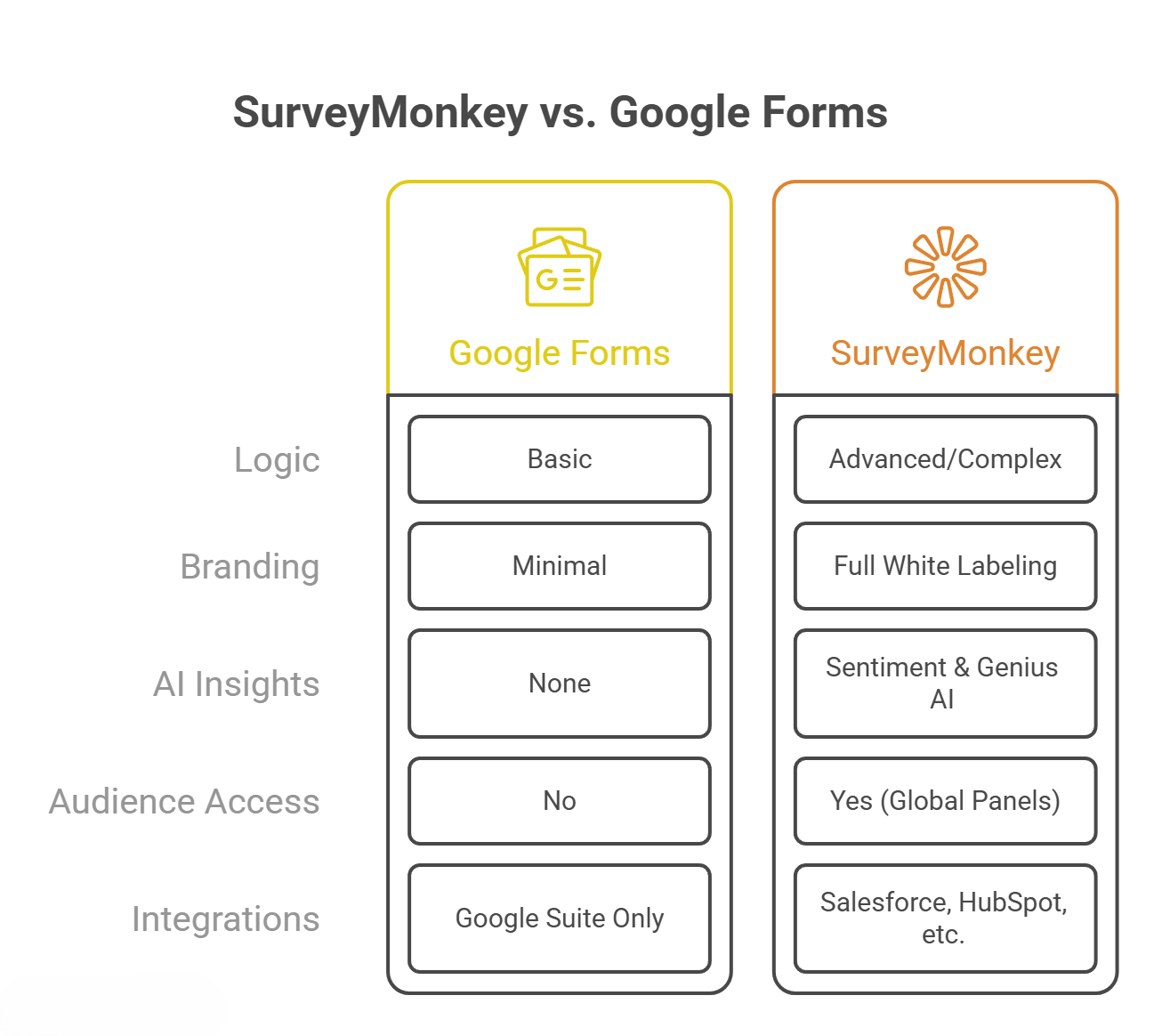
In conclusion, while Google Forms is a commendable tool for quick, internal check-ins, it lacks the depth, security, and analytical power required for serious professional use. For organizations that value data integrity and brand reputation, SurveyMonkey is the clear and logical choice.

Selva Ganesh is a Computer Science Engineer, Android Developer, and Tech Enthusiast. As the Chief Editor of this blog, he brings over 10 years of experience in Android development and professional blogging. He has completed multiple courses under the Google News Initiative, enhancing his expertise in digital journalism and content accuracy. Selva also manages Android Infotech, a globally recognized platform known for its practical, solution-focused articles that help users resolve Android-related issues.




Leave a Reply