
Gemini AI Can Now Use Google Photos – The digital age has gifted us with the ability to capture every precious moment of our lives, yet it has simultaneously burdened us with the overwhelming task of managing thousands of images. We have all experienced the frustration of scrolling through endless folders to find that one specific photo from a summer vacation three years ago. Today, Google Gemini has bridged the gap between artificial intelligence and personal nostalgia. By integrating directly with Google Photos, Gemini is no longer just a chatbot; it is a personal assistant that understands your life through your lens.


In this comprehensive guide, we explore how this integration works, why it matters for everyday users, and how you can leverage this intelligent search capability to reclaim your time and enjoy your memories once again.
Understanding the Power of Personal Intelligence
For years, searching for photos required us to remember specific dates or rely on basic keyword tags. We had to hope the algorithm recognized a “dog” or a “beach.” With the new Gemini integration, the interaction becomes conversational. Instead of using rigid search terms, we can now use natural language to find exactly what we are looking for.
This shift represents a move toward Personal Intelligence. The AI doesn’t just see pixels; it understands context. When we ask Gemini about our lives, it accesses the vast library of Google Photos to provide answers that are uniquely tailored to our experiences. This is not just a technical upgrade; it is a fundamental shift in how we interact with our digital footprints.
Finding Your Best Moments Without the Effort
The primary benefit of this integration is the sheer speed of retrieval. We often take photos of important documents, receipts, or sentimental items, only for them to vanish into the “black hole” of the camera roll. Gemini acts as a sophisticated indexing tool that responds to complex queries.
Imagine asking, “When did we go to that Italian restaurant in Chicago?” Gemini can scan your location metadata and photo content to present you with the exact images from that night. This eliminates the need for manual sorting and allows users—especially those who are not tech-savvy—to navigate their history with ease. We believe that technology should serve the user, and by removing the “search friction,” Gemini makes photo management accessible to everyone.
Simplifying Complex Tasks for Every User
You do not need to be a software engineer to appreciate the utility of AI-driven organization. One of the most impressive features of this integration is its ability to perform multi-step tasks. For example, if you are planning a birthday slideshow, you can simply tell Gemini, “Find the best photos of my daughter from her first three birthdays.”
The AI evaluates factors like image quality, lighting, and facial expressions to curate a selection for you. In the past, this would have taken hours of manual labor. Now, it takes seconds. This automation of creativity allows users to focus on the emotional value of their photos rather than the tedious logistics of finding them.
The Magic of Contextual Recognition
What sets Gemini apart from previous iterations of image search is its deep understanding of context. Standard search engines might find a “cake,” but Gemini understands the concept of a “celebration.” It can distinguish between a casual dinner and a formal wedding based on the attire, the setting, and the people present.
This contextual awareness extends to identifying recurring themes in your life. We can ask Gemini to “show me all the hikes we took last summer,” and it will intelligently group photos taken in nature across different months. It understands that a photo of a trail sign and a photo of a mountain peak are part of the same story.
Enhanced Privacy and Data Security
When discussing AI integration with personal data like photos, privacy is a paramount concern. We understand that your memories are private. Google has designed this integration with robust security protocols. The processing of your personal information is done with the highest level of encryption, ensuring that your data remains yours.
The AI uses your photos to provide you with a better experience, but it does not share those personal images with third parties. For the non-technical user, the most important thing to know is that you remain in control. You can manage your activity settings and decide how much access the assistant has to your library. This balance of utility and privacy is essential for building trust in modern AI tools.
How to Get Started with Gemini AI Can Now Use Google Photos
Setting up this feature is remarkably straightforward. Users simply need the Gemini app and a Google Photos account. By enabling the “Google Workspace” extension within the Gemini settings, the AI gains the ability to “talk” to your photo library.
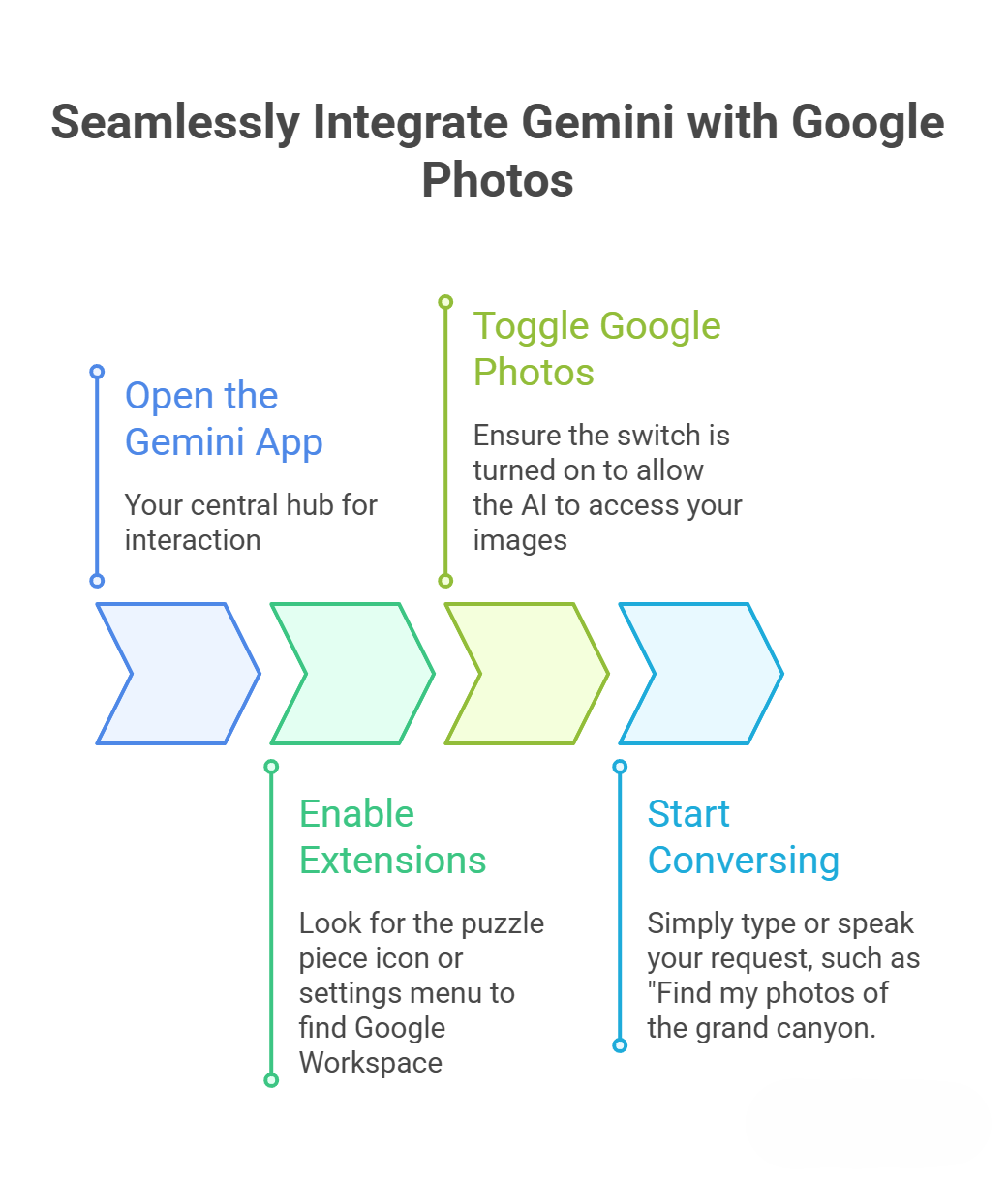
This simple setup process ensures that even those who find technology intimidating can begin using advanced AI features immediately.
Beyond Searching: Summarizing Your Life
Gemini does more than just find photos; it can help you interpret them. For those who keep thousands of photos of receipts or notes, Gemini can extract information from these images. You could ask, “What was the total on my car repair bill from last October?” and the AI will find the photo of the receipt and read the text for you.
This OCR (Optical Character Recognition) capability, combined with Gemini’s reasoning, turns your photo gallery into a searchable database of your life’s logistics. It turns “clutter” into “data” that can be used to make your daily life more organized.
The Future of Personal Artificial Intelligence
We are only at the beginning of what is possible when generative AI meets personal media. In the future, we can expect Gemini to help us edit photos through simple voice commands or even help us write captions for social media based on the content of the image. The goal is to create a seamless ecosystem where the technology fades into the background, leaving only the benefits.
The integration of Gemini and Google Photos is a testament to the power of multimodal AI—AI that can see, hear, and understand text all at once. For the average user, this means less time managing technology and more time reliving the moments that matter most.
Conclusion: A New Era for Digital Memories
In conclusion, the Gemini and Google Photos integration is a landmark development for anyone who uses a smartphone. It transforms a static library of images into a dynamic, interactive history of your life. By using natural language processing and advanced computer vision, Google has made it possible for anyone to find, organize, and enjoy their photos with zero technical expertise.
We encourage you to explore this feature and see how it can simplify your digital life. Whether you are looking for a specific memory or trying to organize years of clutter, Gemini is the personal assistant you have been waiting for. Embrace the future of intelligent photography and let your memories speak back to you.
Frequently Asked Questions
Is my data safe with Gemini? Yes, Google employs industry-leading security to ensure your photos are encrypted and private.
Do I need a paid subscription? While some advanced features may eventually be part of premium tiers, basic Google Photos integration is available to most users with the Gemini app.
Can Gemini delete my photos? Gemini acts as an assistant to find and organize. It will not delete your precious memories without your explicit permission and confirmation.
What if Gemini can’t find a specific photo? Try being more descriptive! Instead of “the dog,” try “the dog at the park last Christmas.” The more context you provide, the better the AI can search.

Selva Ganesh is a Computer Science Engineer, Android Developer, and Tech Enthusiast. As the Chief Editor of this blog, he brings over 10 years of experience in Android development and professional blogging. He has completed multiple courses under the Google News Initiative, enhancing his expertise in digital journalism and content accuracy. Selva also manages Android Infotech, a globally recognized platform known for its practical, solution-focused articles that help users resolve Android-related issues.




A very useful update for daily productivity.
Can’t wait to see what they add to this next month.
The integration feels very native and not forced.
This is exactly what was missing from the initial Gemini launch.
How do I enable this feature in the settings?
Works great on my Pixel device.
The future of photo management is definitely AI-driven.
Does it support searching by text inside the photos?
Finally, no more endless scrolling to find a picture!
Tested it with a complex query and it worked flawlessly.
The UI looks very clean and integrated.