
The paradigm of digital exploration has fundamentally shifted from a reactive model to an autonomous, proactive architecture. Following the landmark announcements at Google I/O 2026, Search has transformed from a static index of blue hyperlinks into a dynamic ecosystem of persistent, reasoning digital entities. At the forefront of this evolution are Google Information Agents, real-time background search engines that eliminate the need for manual, repetitive querying.
We have entered the era of the agentic web, where AI Mode acts as a baseline interface for executing background research tasks 24/7. This comprehensive operational blueprint details the exact steps required to create, customize, and manage your first deployment of automated research protocols.

Architectural Mechanics Of Background Search Agents
To maximize the output of your digital assistants, it is essential to understand the underlying technology that powers the infrastructure. Google Information Agents do not operate on traditional, fixed cron-job set intervals like historical notification systems or standard scheduled actions. Instead, they leverage the deep reasoning matrices of Gemini 3.5 Flash and advanced cross-web retrieval models to continuously monitor data streams.
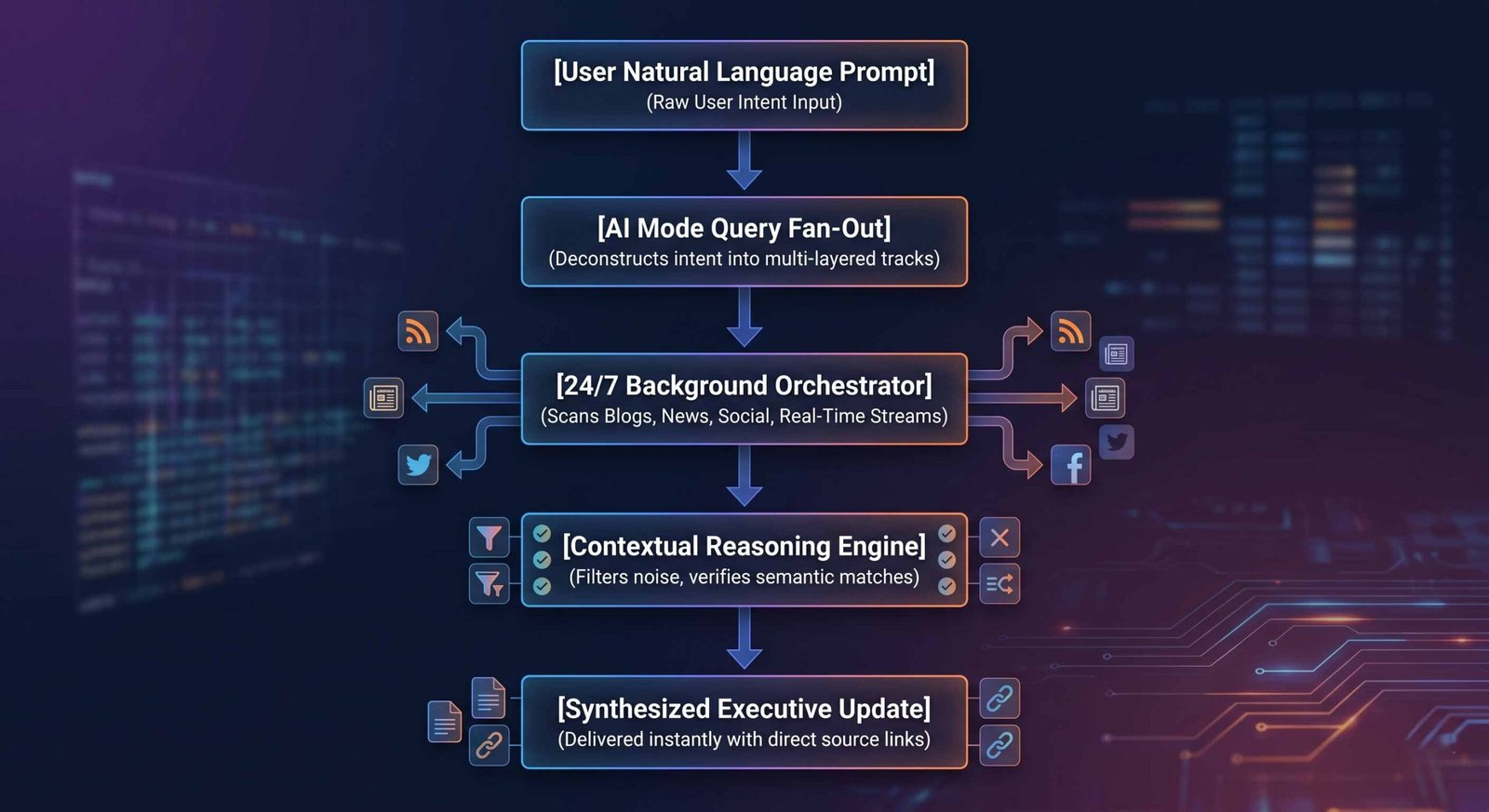
Unlike basic keyword alert scrapers, these agents execute what engineering teams call query fan-out. When a parameter is established, the agent deconstructs the initial prompt into multiple semantic sub-queries. It systematically scans:
- Independent blogs and publication sites
- Mainstream global news syndicates
- Active social media platforms and indexing nodes
- Real-time structured feeds including finance, e-commerce inventories, and sports metrics
The system processes these channels concurrently, applying multi-turn contextual analysis to evaluate whether a data shift is genuinely relevant to your directive before compiling an alert.
Technical Prerequisites For Deployment
Before initializing an autonomous agent inside the search ecosystem, your account profile must meet specific platform thresholds. Currently, Google restricts access to its highest-tier computational infrastructure to ensure stability across global nodes.
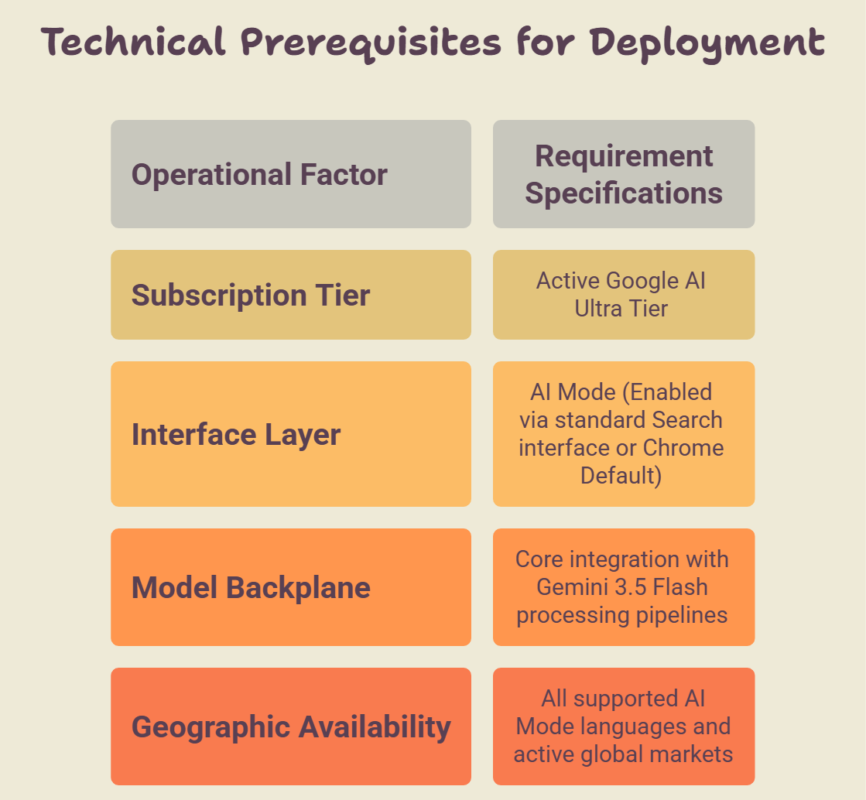
While initial testing environments remain walled within the premium Ultra subscription tier, broader platform expansion targeting Google AI Pro accounts is scheduled to roll out incrementally throughout the summer.
Step-By-Step Installation And Prompt Engineering Protocol
Activating a background tracking entity does not require specialized software patches or API configurations. The entire orchestration is managed through native natural language within the browser interface. Follow this precise sequence to establish an active protocol.
1. Initialize the Advanced Interface
Navigate to your standard Google Search field and toggle the layout to AI Mode. Ensure you are securely authenticated using the specific corporate or personal account associated with your premium infrastructure subscription.
2. Formulate the Agentic Trigger Command
The background tracking system activates exclusively via specific semantic hooks. You must prepend your research topic with imperative linguistic keys such as “keep me updated on” or “alert me when”. These phrases transition the system from a single-session search engine into a persistent background listener.
3. Inject Precise Constraints and Variables
To optimize data parsing and eliminate algorithmic noise, construct highly granular, multi-variable instructions. Avoid vague parameters; state explicit requirements, data types, and conditions.
1. Establish the Scope: Linguistic Hook Selection.
Begin the conversational turn with the strict command structural phrases: Keep me updated on… or Monitor the web and alert me when… to explicitly flag the query for background fan-out processing.
2. Define Material Parameters: Data Target Specification.
Detail the precise object, category, or entity. For instance, do not state “shoes.” Explicitly state: signature sneaker drops or limited colorway collaborations involving my indexed athletes.
3. Set Evaluation Thresholds: Reasoning Filters.
Introduce secondary qualifying criteria. Inform the agent to cross-reference multiple vectors, such as: Only notify me if the item drops via verified retail portals or official brand announcements.
4. Execute and Verify Setup: Agent Confirmation.
Submit the prompt. The AI Mode interface will display a structural visual confirmation with a persistent monitoring badge, indicating the agent is officially operating in the background.
High-Utility Deployment Blueprints For Real-World Tasks
To illustrate the versatile reasoning capabilities of these search entities, we have constructed three explicit prompt blueprints. You can copy, modify, and apply these templates directly to your operational workflow.
E-Commerce And Limited Product Releases
System Command: “Keep me updated on any official announcements, leaked release schedules, or pre-order pages for the upcoming open-source hardware modules from Framework. Alert me the moment any third-party verified tech blogs index a live pre-order link or localized colorway variants.”
Real Estate Procurement And Market Monitoring
System Command: “Monitor regional listing repositories and localized forums 24/7. Alert me when a commercial workspace within the target zone falls below a set leasing threshold, meets the minimum square footage requirements, and includes an off-street loading dock. Synthesize structural updates as changes occur.”
Competitive Business Intelligence
System Command: “Keep me updated on any direct software documentation alterations, feature additions, or API changelog releases from our direct competitors in the enterprise CRM space. Scan public source code repositories, tech newsletters, and press releases, compiling a detailed monthly analysis with complete backlink citations.”
Comparing Information Agents With Historical Automation Tools
It is vital to draw a distinct line between Search Agents and legacy notification mechanisms. Legacy automated routines are typically limited by processing latency and structural rigidity.
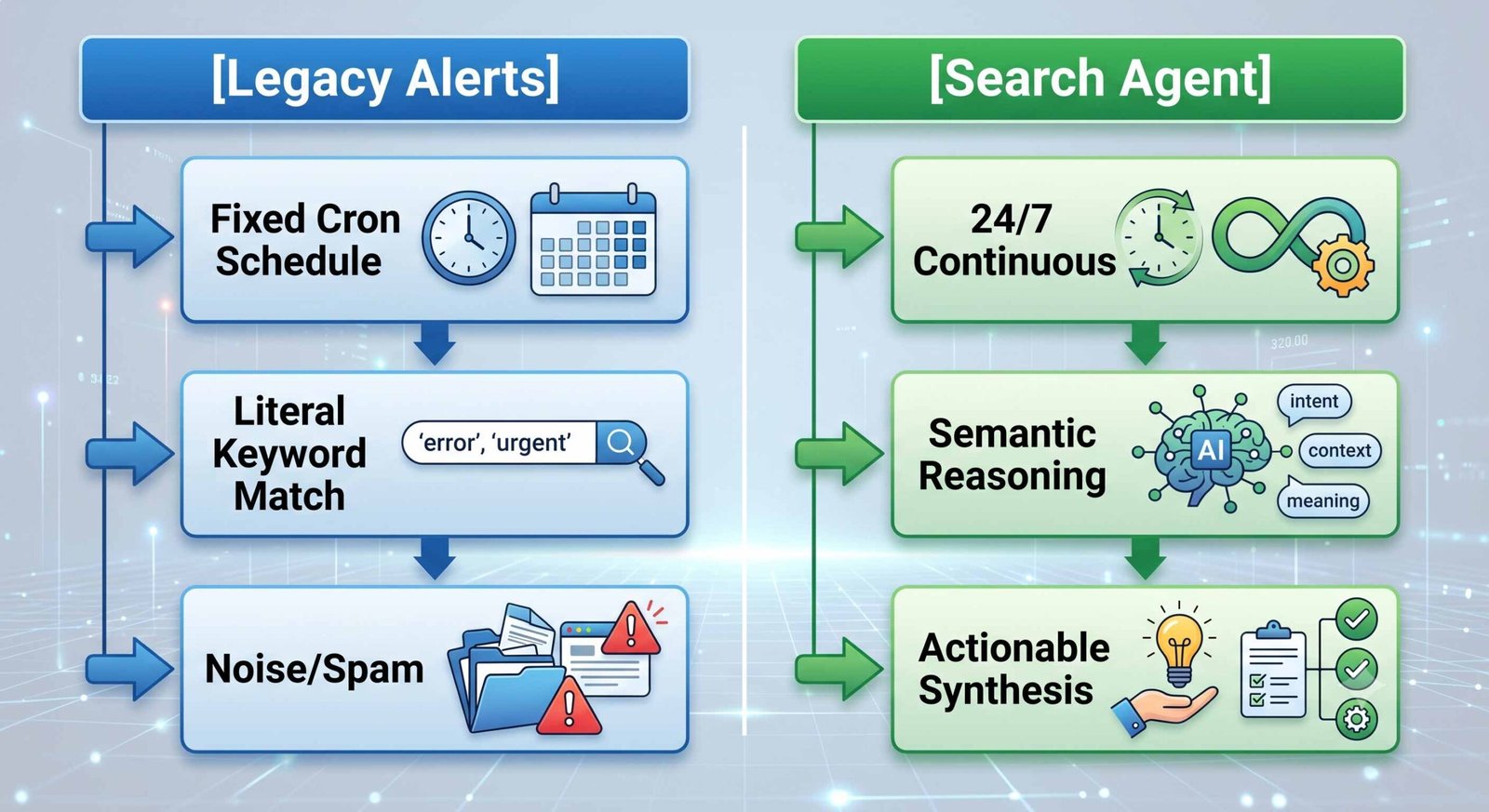
Traditional search alerts depend on indexing loops that populate at wide intervals—often once per day or, at best, every 15 minutes via platform developer actions. This creates a critical data latency gap. Furthermore, legacy systems operate on literal keyword matching, which generates massive volume but yields low relevance, often resulting in inbox bloat filled with unrelated spam.
In contrast, Google Information Agents use continuous streaming data access and cross-reference information using real-time graphs. Because they possess underlying contextual reasoning capabilities, they interpret intent rather than strings. The agent reads the contents of a newly indexed site, determines whether it represents a substantive deviation from past datasets, and presents a synthesized update with direct, actionable entry points, saving hours of manual analysis.
Preparing Assets For The Agentic Web Era
As these continuous background entities become the primary mechanism for users to consume web data, digital platforms must adapt. If your business model depends on search engine visibility, your public architecture must be designed to accommodate agent indexing loops.
To ensure external agents seamlessly extract data from your properties, we must adhere to strict data standardization protocols:
- Implement WebMCP Protocols: Adopt emerging open web standards (WebMCP) to expose clear, structured JavaScript functions and HTML forms directly to incoming search agents.
- Maintain Rigid Data Alignment: Ensure information stays consistent across your platform’s self-hosted pricing catalogs, structured schema markup, and external profiles. Discrepancies drop your site’s algorithmic trust score.
- Prioritize Semantic Cleanliness: Eliminate complex stylistic layout barriers that obscure primary data fields. Agents seek raw, machine-readable facts and accurate, chronological data strings.
Frequently Asked Questions
How do I modify or terminate an active Google Information Agent?
You can manage all active workflows inside the centralized Agent Dashboard located directly within the AI Mode interface. From this control panel, you can pause background routines, adjust internal tracking variables, or delete an entity permanently.
Is there a hard restriction on the number of agents I can deploy?
Under the current infrastructure framework for Google AI Ultra profiles, users can run up to 10 distinct, concurrent background research agents. This resource allocation cap is subject to expansion as server capacity scales locally.
What is the precise delivery mechanism for agent notifications?
When an agent registers an active web change, it delivers a push notification through the Google Search ecosystem, cross-platform Chrome panels, or directly inside your designated workspace communications feed, depending on your integration selections.
Do information agents bypass paywalled websites or private social feeds?
No. Agents operate only on publicly accessible data layers, indexed web content, and Google’s authorized real-time partnership channels. They cannot authenticate into private profiles or bypass subscription-locked firewalls.
Can I share an active research agent with an external team member?
Yes. The dashboard allows users to export specific agent configurations as an operational link. Recipients with an active Google AI Ultra or Pro account can instantly duplicate and run that tracking profile.
How do information agents handle localized currency or geographic variables?
The agent automatically mirrors the primary account location and language settings specified within your AI Mode profile. You can explicitly override this behavior by adding explicit geographical text constraints to your starting prompt.
What sets this feature apart from Gemini’s Scheduled Actions?
Scheduled Actions operate on fixed temporal triggers—such as pulling a report once a day at a specific time. Information Agents run persistently, analyzing incoming data in real time to provide instantaneous updates.
Will these background agents affect my mobile device’s battery life?
No. The extensive background processing, multi-query fan-out, and semantic reasoning loops are executed entirely on Google’s external cloud infrastructure servers, resulting in zero localized processing draw on consumer hardware.
Can an agent handle physical transactions, such as completing a product purchase?
Current iterations of Information Agents are explicitly limited to data gathering, synthesis, and link generation. Autonomous purchasing capabilities via systems like Universal Cart are slated for subsequent platform expansions.
How quickly does an agent detect a change on a monitored web page?
Detection latency depends heavily on how frequently the core search engine crawls the target site. Highly active platforms like mainstream news sites or major e-commerce hubs are analyzed almost instantly as updates stream online.

Selva Ganesh is a Computer Science Engineer, Android Developer, and Tech Enthusiast. As the Chief Editor of this blog, he brings over 10 years of experience in Android development and professional blogging. He has completed multiple courses under the Google News Initiative, enhancing his expertise in digital journalism and content accuracy. Selva also manages Android Infotech, a globally recognized platform known for its practical, solution-focused articles that help users resolve Android-related issues.





Leave a Reply