
Instagram Reels Link Feature Requirements You Must Know – The digital landscape changes rapidly, and businesses must adapt to survive. For years, companies have utilized Instagram Reels and Facebook Reels to capture consumer attention, showcase products, and build communities. However, a major hurdle has always stood in the way of turning video views into actual sales: the inability to add a direct, clickable link to organic video content.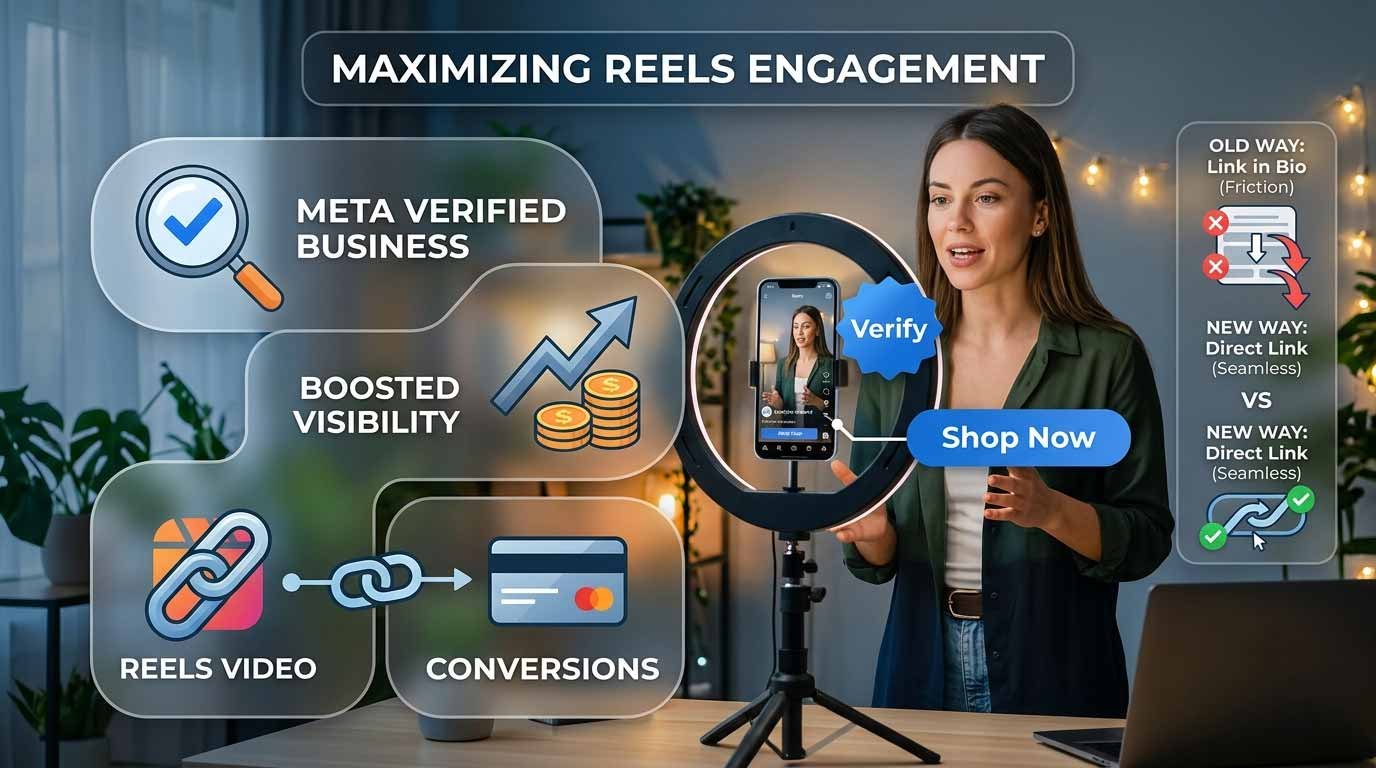
Historically, businesses had to rely on cumbersome workarounds. We have all seen or used the phrases “link in bio,” “drop a comment for the link,” or had to upload a matching Story with a link sticker. These extra steps create friction in the buyer journey, causing potential customers to drop off before making a purchase.

Now, a major update has shifted the balance of power. Through higher tiers of the Meta Verified for Business program, eligible organizations can place clickable links directly within individual Reels. This single feature transforms short-form video from a mere awareness tool into a high-converting sales engine. We will explore how to leverage this feature to maximize engagement and drive measurable business growth.
The Friction Problem in Short-Form Video
To understand why this feature matters, we must analyze how online consumers behave. When a user scrolls through their video feed, they are looking for entertainment or quick answers. If your video highlights a product they want, their buying intent is at its highest during those few seconds.
When a direct link is absent, that momentum is lost. If a viewer has to leave the video, visit your profile page, click a master link, and then search for the product on your website, they often give up. Every extra step reduces your overall sales conversions.
By utilizing Meta Verified Business Links, we remove this friction completely. A viewer can look at your video, tap a button on the screen, and immediately browse your product page without ever leaving the app ecosystem.
What is Meta Verified for Business?
Many business owners recognize the blue checkmark as a symbol of status or authenticity. While standard verification protects your brand from impersonation and offers priority customer support, Meta now offers advanced monthly subscription packages tailored for growth.
The ability to attach direct links to your video content is tied to specific premium tiers, such as the Meta Verified Plus, Premium, or Max packages. Depending on the tier you choose, your business is granted a specific number of “link-enabled” video slots per month.
-
Standard Verification: Provides the blue checkmark, basic account protection, and customer support, but does not include video link privileges.
-
Premium Business Tiers: Grants advanced search placement, enhanced profile customization, and the ability to publish a set number of Reels containing active, clickable website links each month.
This system means businesses must be highly strategic. Because these link slots are valuable and limited, we must plan exactly which videos receive direct links to ensure the highest possible return on investment.
Strategy: Selecting the Right Videos for Premium Links
Since you cannot link every single video you publish, your content calendar must be divided into two main categories: Awareness Content and Conversion Content.
1. Awareness Content (Unlinked)
These videos are designed to cast a wide net. They use popular music, educational tips, humorous industry insights, or broad trends to get the attention of people who do not know your brand yet. The primary goal here is to gain views, saves, and new followers.
2. Conversion Content (Link-Enabled)
These videos are reserved for your premium Meta Verified link slots. They focus heavily on commercial intent. Excellent candidates for your monthly link allocation include:
-
Product Demonstrations: Showing exactly how a physical item works and linking directly to the purchase page.
-
Time-Sensitive Launches: Introducing a new collection, event, or service with a direct link to buy tickets or pre-order.
-
Lead Magnets: Offering a free guide, checklist, or webinar sign-up to build your business email list.
-
Customer Case Studies: Sharing a success story or testimonial, accompanied by a link to book a consultation call.
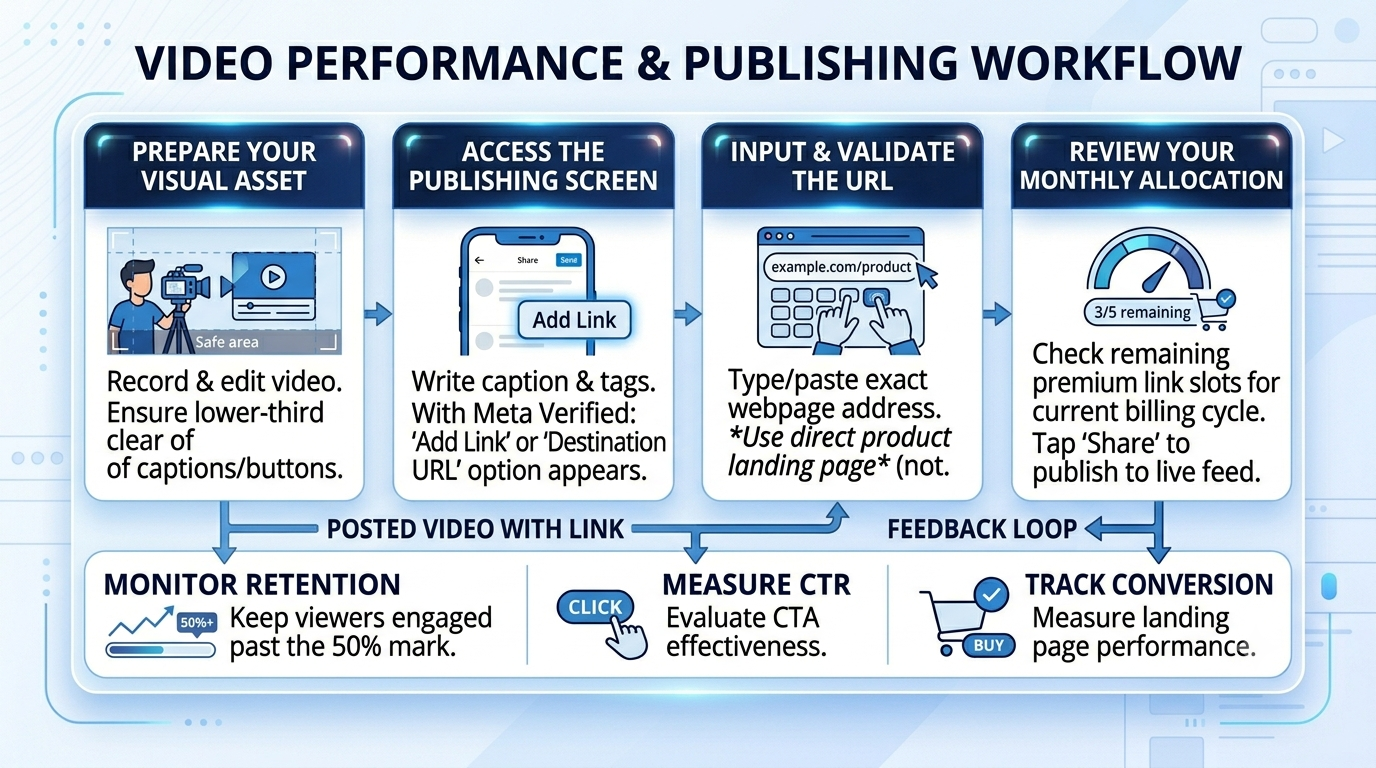
Step-by-Step: Adding Links to Your Video Content
Publishing a link-enabled video is straightforward and does not require advanced technical skills. While the exact visual layout may update slightly across different devices, the core process remains uniform.
Best Practices for Maximizing Video Engagement
Simply adding a link to a video does not guarantee success. The video itself must still capture attention and hold it. To ensure your link-enabled content performs well in the system algorithm, implement these core content creation strategies:
The Critical Three-Second Hook
Online audiences have incredibly short attention spans. The first three seconds of your video must present a clear visual or verbal hook. Avoid slow introductions or long title screens. Start immediately with a bold statement, an interesting question, or a visual demonstration that addresses a specific customer need.
Clear Visual and Verbal Directives
Do not assume your audience will notice the link automatically. You must guide them. Use on-screen text animations or physical gestures pointing toward the lower portion of the screen where the clickable link resides. Explicitly state what they will find by clicking, such as: “Tap the link below to view our sizing chart.”
Optimize for Silent Viewing
A massive percentage of social media users browse feeds with their device audio turned off. If your video relies entirely on someone speaking, you will lose those viewers. Always incorporate large, clear, on-screen text overlays or use auto-generated captions to ensure your marketing message is fully understood in complete silence.
Measuring Success: Tracking Your Analytics
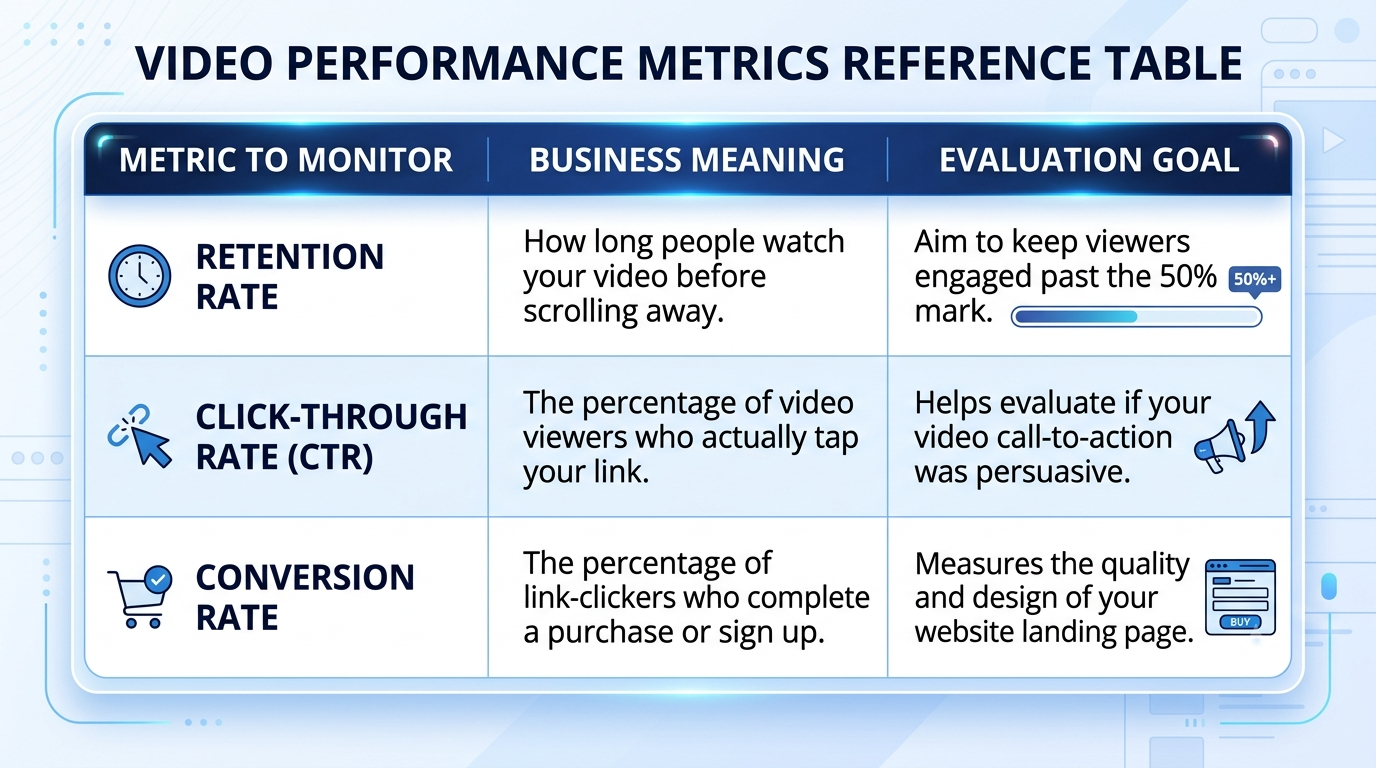
To justify the monthly cost of a premium subscription tier, you must track your performance data accurately. Never guess whether your content is working. Instead, look at specific metrics within your professional dashboard:
Pro Tip: When entering your web address into the video link field, use custom tracking tags (known as UTM parameters). This allows your website’s analytics tool (like Google Analytics) to show you exactly how much revenue was generated specifically by your Meta Verified video links.
Conclusion
The addition of clickable business links within organic video feeds represents a fundamental shift in social media marketing. It bridges the historical gap between creative brand storytelling and direct digital commerce. By upgrading to an eligible tier of Meta Verified for Business, planning your monthly link allocation carefully, and using strong visual hooks, you can turn casual viewers into loyal customers with a single tap.

Selva Ganesh is a Computer Science Engineer, Android Developer, and Tech Enthusiast. As the Chief Editor of this blog, he brings over 10 years of experience in Android development and professional blogging. He has completed multiple courses under the Google News Initiative, enhancing his expertise in digital journalism and content accuracy. Selva also manages Android Infotech, a globally recognized platform known for its practical, solution-focused articles that help users resolve Android-related issues.




