
How to Fix Google Redirecting to Yahoo – A Comprehensive Security Guide – In the modern digital landscape, discovering that your Google searches are redirecting to Yahoo can be more than just a minor inconvenience; it is often a symptomatic indicator of a browser hijacker or malicious adware residing within your system. While Yahoo is a legitimate search engine, being forced to use it against your will is a violation of your digital autonomy and a clear sign that your browser settings have been compromised.


We have engineered this definitive guide to provide you with the exact technical steps required to reclaim your browser. Whether you are operating on Windows, macOS, Android, or iOS, the following protocols will ensure the complete removal of the Yahoo redirect virus and protect your device from future search engine hijacking.
Understanding the Root Cause: Why Does Google Keep Redirecting to Yahoo?
Before diving into the technical fixes, we must address the “why.” This phenomenon rarely occurs by accident. Usually, it is triggered by one of the following security vulnerabilities:
-
Browser Hijackers: Malicious software designed to modify your browser settings without your consent. Their primary goal is to drive traffic to specific sites to generate ad revenue.
-
Malicious Extensions: Often disguised as helpful tools (like “Weather Trackers” or “PDF Converters”), these PUPs (Potentially Unwanted Programs) gain permission to “read and change all your data on the websites you visit.”
-
Bundled Software: When downloading “free” software from third-party sites, the installer often includes hidden adware that switches your default search engine.
-
Malicious Configuration Profiles: Particularly on macOS and iOS, attackers use configuration profiles to lock search settings, making them impossible to change through traditional menus.
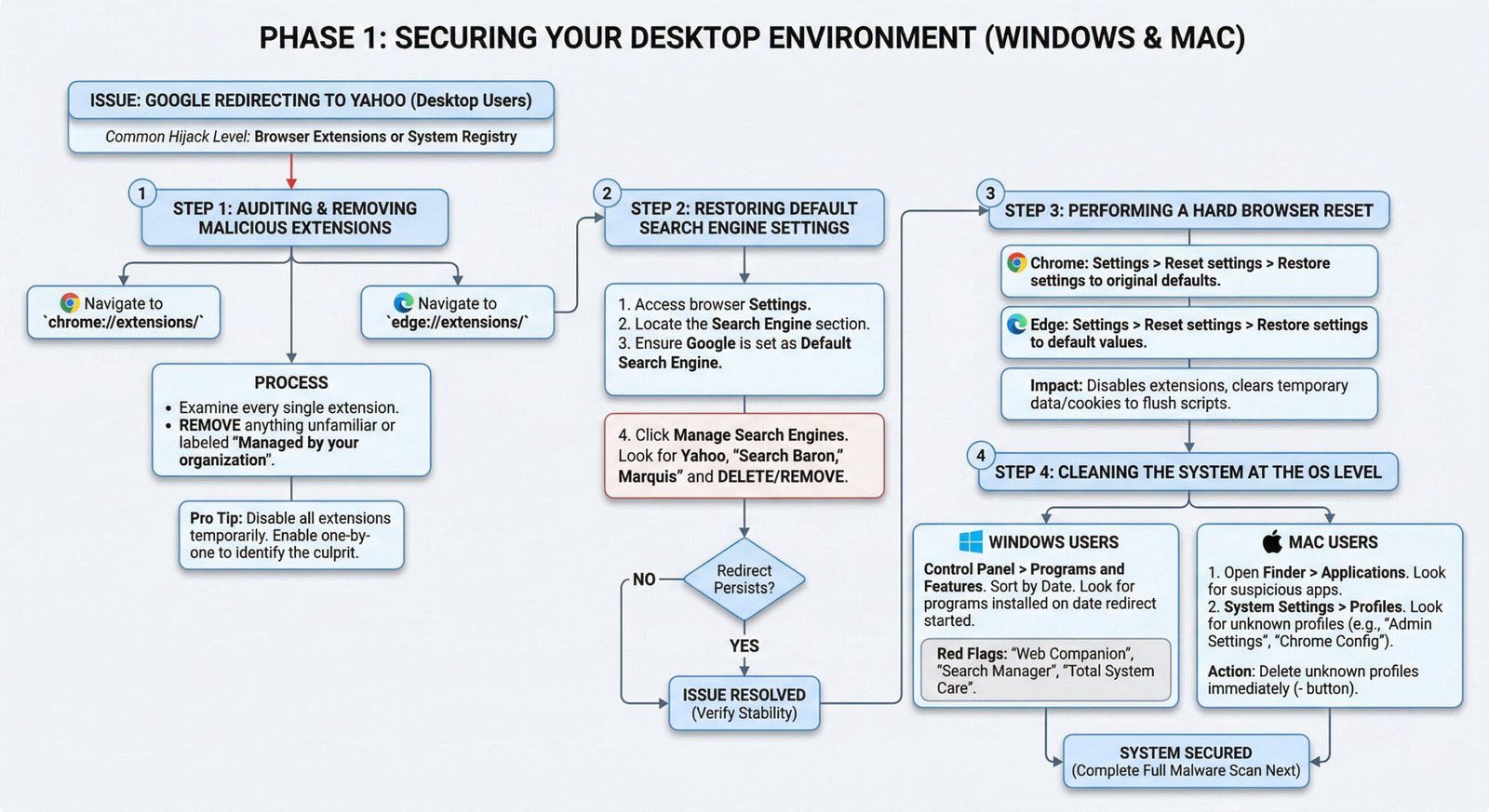
Phase 1: Securing Your Desktop Environment (Windows and Mac)
For desktop users, the hijack usually occurs at the browser level or the system registry level. We recommend following these steps in the exact order presented.
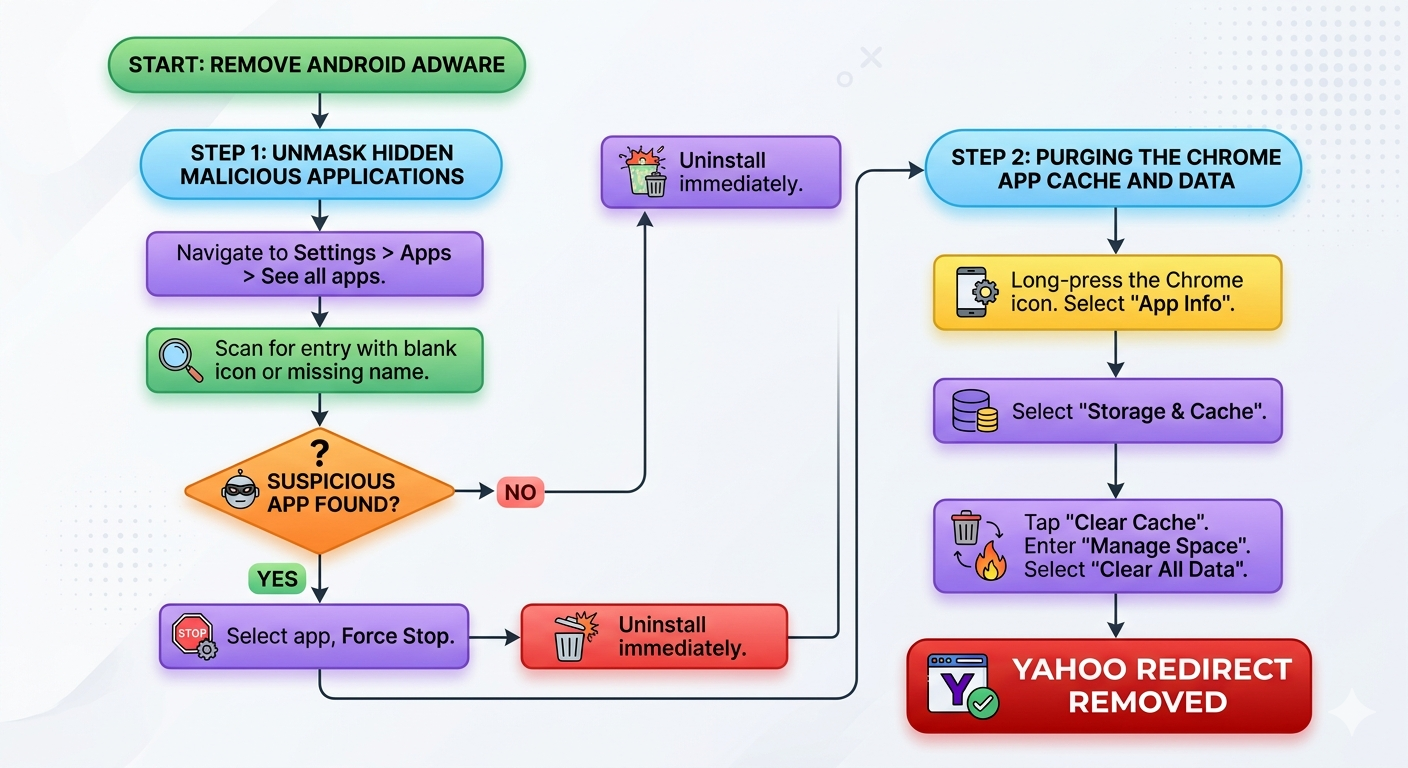
Phase 2: Rectifying the Yahoo Redirect on Android Mobile Devices
Android’s open-source nature makes it susceptible to malicious apps that can manipulate the Chrome for Android ecosystem.
Phase 3: Solving the Issue on iOS (iPhone and iPad)
While iOS is generally more secure, “Configuration Profiles” are a common loophole used by attackers to force Yahoo redirects in Safari.
Step 1: Removing Malicious Profiles
-
Open Settings.
-
Navigate to General > VPN & Device Management.
-
If you see any entry under Configuration Profile that you do not recognize (e.g., from a school or employer), tap it and select Remove Profile.
Step 2: Safari Search Engine Optimization
-
Go to Settings > Safari.
-
Tap Search Engine and verify that Google is selected.
-
Scroll down and tap Clear History and Website Data. This is vital to remove the cached redirect scripts.
Phase 4: Advanced Malware Remediation
If you have completed the steps above and Google still redirects to Yahoo, you are likely dealing with a persistent malware infection that resides in your system’s boot sector or registry.
Recommended Scanning Tools
We advise using a multi-layered scanning approach:
-
Malwarebytes: Excellent for detecting and removing PUPs (Potentially Unwanted Programs) and adware that traditional antivirus software might miss.
-
HitmanPro: A “second-opinion” scanner that identifies malicious files by their behavior rather than just their signature.
-
AdwCleaner: A specialized tool designed specifically to target browser hijackers and toolbar junkware.

Selva Ganesh is a Computer Science Engineer, Android Developer, and Tech Enthusiast. As the Chief Editor of this blog, he brings over 10 years of experience in Android development and professional blogging. He has completed multiple courses under the Google News Initiative, enhancing his expertise in digital journalism and content accuracy. Selva also manages Android Infotech, a globally recognized platform known for its practical, solution-focused articles that help users resolve Android-related issues.




Leave a Reply