
How to Change Gmail Username Without Losing Mails: The Ultimate Guide – We understand that a Gmail username often reflects a specific period in our lives. Whether you created an address years ago that no longer feels professional, or you simply want a fresh start, the question remains: How can you change your Gmail username without losing your precious emails, contacts, and account data?

For years, Google maintained a strict policy that prevented users from changing their primary
@gmail.com
address. However, with recent updates, a new feature is gradually rolling out that allows for a direct transition. In this comprehensive guide, we will explore every method available to change your Google Account email while ensuring your data integrity remains uncompromised.

Understanding Your Google Account Identity
Your Google Account email serves as your primary digital passport. It is the core identifier used to sign into Google services, manage Google Drive storage, and verify your identity on third-party platforms via Sign in with Google.
When we talk about changing this address, we are referring to the primary handle that appears next to your profile photo. It is important to distinguish between changing your Display Name (the name people see when you send an email) and your Username (the actual email address). This guide focuses on the latter—the technical migration of your primary email identifier.
The New “Change Google Account Email” Feature
Google has recently introduced a native way to change a @gmail.com address to another @gmail.com address. This is a significant shift in their infrastructure.
Eligibility and Rolling Updates
We must note that the ability to natively change your Google Account email is currently in a gradual rollout. If you do not see the option immediately, it may not yet be available for your specific account region or type.
What Happens to Your Old Data?
The most critical concern for most users is data loss. We can confirm that when using the official Google migration tool:
-
Emails are preserved: All messages currently in your Inbox, Sent, and Archived folders remain untouched.
-
Drive and Photos: Your Google Drive files and Google Photos library remain linked to the account.
-
Alternate Email Status: Your previous Gmail address automatically becomes an alternate email address. This means you will still receive emails sent to the old address, which are seamlessly forwarded to your new primary inbox.
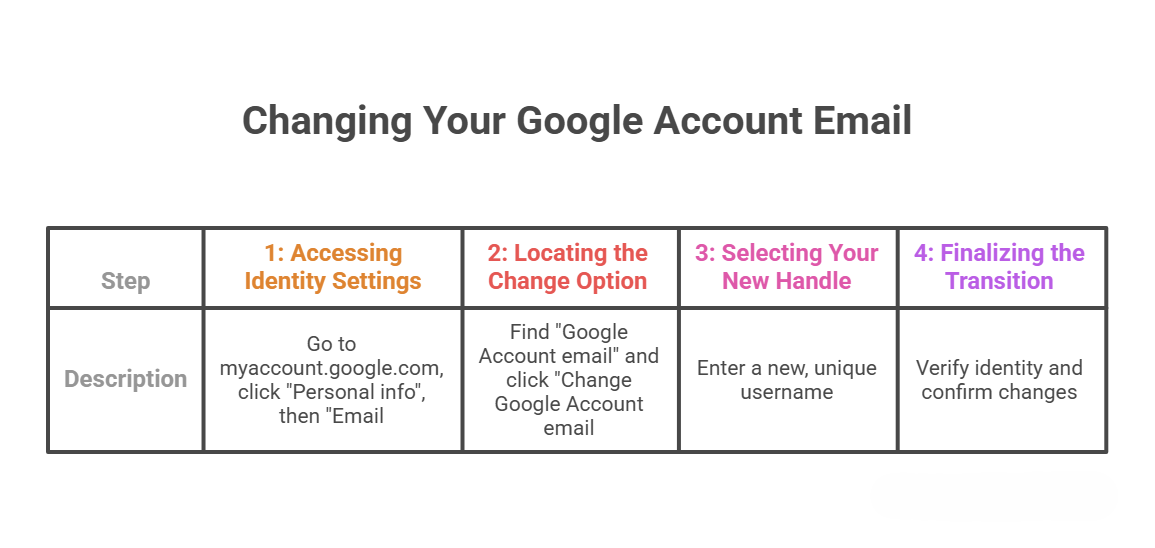
Step-by-Step Guide: Changing Your Gmail Username Natively
If your account has been granted access to this feature, follow these precise steps to execute the change.
Critical Considerations and Potential Issues
Before we proceed with the change, we must highlight several technical dependencies that could be affected by a username migration.
1. Third-Party Integrations
If you use Sign in with Google for external apps (like Spotify, Airbnb, or Canva), those platforms identify you by your email. While most modern systems handle the change via your Google ID, some older platforms might require you to re-link your account.
2. Chrome Remote Desktop and Hardware
If you utilize Chrome Remote Desktop, the connection is tied to your primary email. Changing the address may require you to re-authenticate your remote connections. Similarly, Chromebook users should ensure they have backed up local “Downloads” folders, as the primary owner account change can occasionally trigger a profile refresh.
3. App Settings and Sync
Certain Android app settings or Chrome sync preferences may reset. This mimics the experience of signing into a brand-new device. We recommend performing a full Google Takeout backup before initiating the change as a safety measure.
Alternative Methods: When Native Change is Unavailable
If the native “Change Email” button is missing from your dashboard, we recommend these secondary strategies to achieve the same result without losing your mails.
Method A: Deleting Gmail but Keeping the Google Account
If you wish to move from a
@gmail.com
address to a non-Gmail address (like an Outlook or custom domain email) while keeping your YouTube and Drive data:
-
Go to the “Data & privacy” section of your Google Account.
-
Find “Download or delete your data”.
-
Select “Delete a Google service” and choose Gmail.
-
You will be asked to provide a non-Gmail email address to continue using your other Google services.
Method B: The “Forwarding and Import” Strategy
This is the classic “workaround” that effectively creates a new identity without discarding the old one.
-
Create a New Gmail Account: Set up the username you actually want.
-
Set Up Forwarding: In your old account, go to Settings > Forwarding and POP/IMAP and forward all mail to the new address.
-
Import Existing Mails: In your new account, go to Settings > Accounts and Import > Import mail and contacts. Use the Mail Fetcher tool to pull all historical emails from the old account.
-
Send Mail As: In the new account, add your old address under “Send mail as” so you can reply using your old identity if necessary.
Managing Alternate and Recovery Emails
We strongly suggest utilizing Alternate Emails and Recovery Emails to maintain account security during a transition.
-
Alternate Emails: You can add a secondary email address that allows you to sign in and receive notifications. When you change your primary Gmail, the old one automatically moves here.
-
Recovery Emails: Always ensure your Recovery Email is a service you have access to (like a spouse’s email or a secondary provider). This is your “fail-safe” if the username change leads to a login lockout.
The 12-Month Cooldown Period
One vital detail we must emphasize: Google imposes a 12-month restriction on certain account actions following a username change. While you can revert to your original Gmail address at any time, you cannot create a third new
@gmail.com
address for the same account within a one-year window. Additionally, once the change is finalized, you cannot simply delete the new address without affecting the entire Google Account.
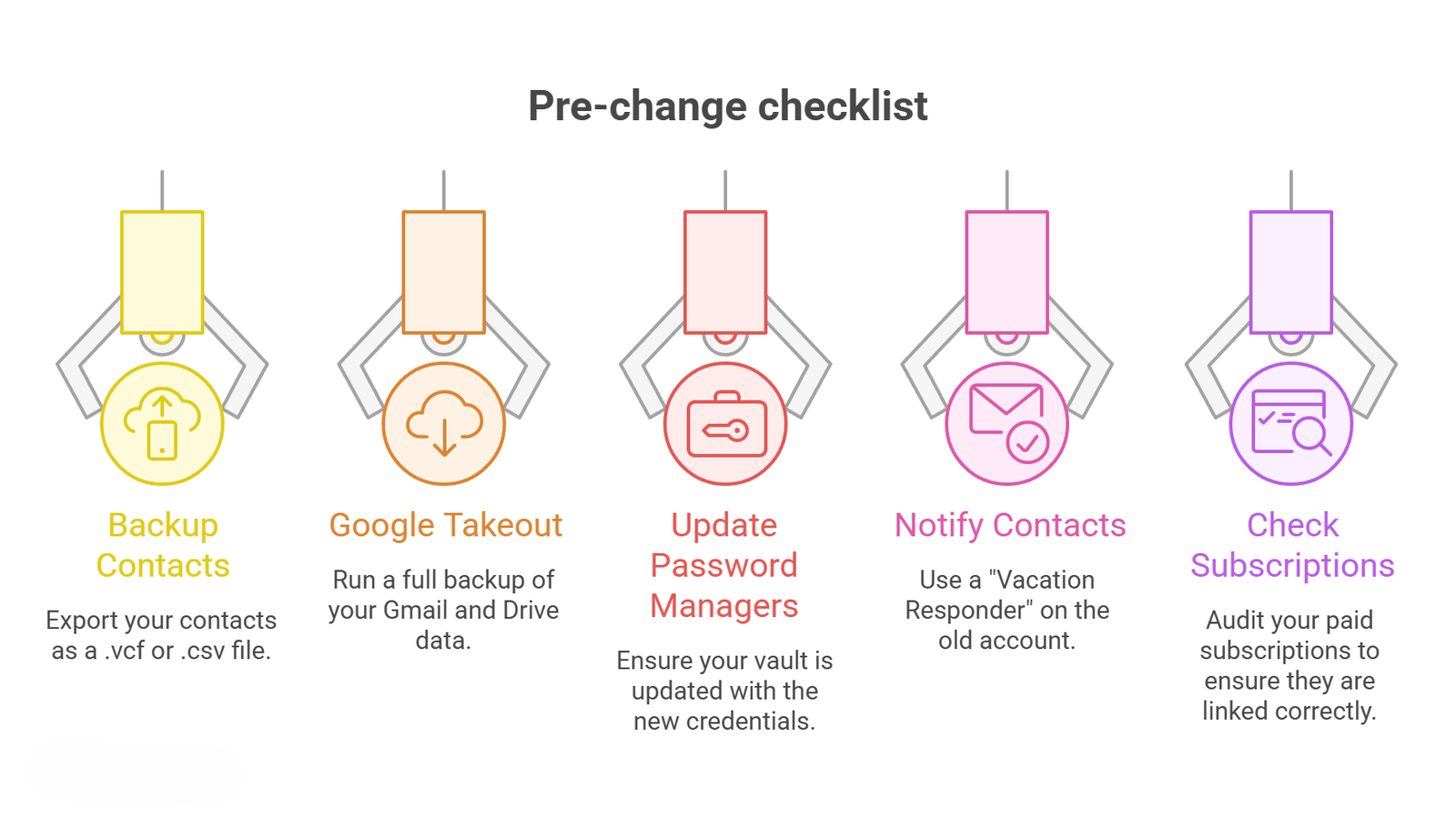
Checklist for a Successful Username Change
To ensure a seamless transition, we have compiled this pre-change checklist:
Frequently Asked Questions: Mastering Your Gmail Username Change
To further assist you in navigating the complexities of account migration, we have compiled the most critical questions regarding the process of updating your Google identity without compromising your data.
1. Will changing my Gmail username delete my old emails?
No. When you use the official Google Account email change tool, all your existing messages, labels, and archived threads are automatically preserved. Your account history remains intact; only the primary address associated with that data is updated.
2. Can I change my @gmail.com address to any name I want?
You can change it to any available username. However, Google does not allow the use of usernames that are already in use, nor does it allow the reuse of deleted usernames from the past. It must be a completely unique and “fresh” string of characters.
3. What happens to people who send emails to my old address?
Once the change is finalized, your previous Gmail address is converted into an alternate email address. Emails sent to the old address will continue to arrive in your new inbox automatically, ensuring you never miss a communication during the transition.
4. Is there a limit to how many times I can change my username?
Yes. Google currently enforces a 12-month cooldown period. While you can revert to your original address relatively quickly, you generally cannot move to a third, new
@gmail.com
address within the same year.
5. Why don’t I see the “Change Google Account email” option?
This feature is part of a gradual rollout. If the option is missing, it is likely not yet available for your specific account. Additionally, users with Google Workspace accounts (work or school) cannot change their own addresses and must contact their IT administrator.
6. Will my Google Drive files still be shared with others?
Yes. Since your underlying Google ID remains the same, all permissions on shared folders and documents stay active. However, collaborators will now see your new email address as the owner or editor of the files.
7. Do I need to update my login on my smartphone?
In most cases, your Android or iOS device will eventually prompt you to re-enter your password to sync with the new primary address. We recommend signing out and signing back in manually if you notice syncing errors in the hours following the change.
8. Will this change affect my YouTube channel or subscriptions?
No. Your YouTube channel, uploaded videos, playlists, and subscriptions are linked to your Google Account ID, not strictly the text of your email. Your channel remains fully functional under the new username.
9. Can I change a @gmail.com address to a @yahoo.com or @outlook.com address?
Yes, but this requires a different process. You must add the third-party email as an alternate address and then, if desired, delete the Gmail service from your account. This keeps the Google Account active (for Drive/Photos) while removing the Gmail inbox.
10. Will my saved passwords in Google Chrome be lost?
Your Chrome Saved Passwords are tied to your account profile. As long as you remain signed into the same Google Account, your passwords will sync to the new username. We do recommend a manual backup of your Password Manager as a general safety precaution.
11. What happens to my “Sign in with Google” accounts on other websites?
Most modern websites use a unique internal token to identify you. However, some older sites might rely on the literal email string. If you find you cannot log into a third-party site, simply use the “Forgot Password” feature or contact their support to update your record to the new address.
12. Does changing my username change my “Display Name”?
Not necessarily. Your Display Name (e.g., “John Doe”) is managed separately under the “Name” section of your Personal Info. You can change your display name without changing your email, and vice versa.
13. Will I lose my Google Play Store purchases?
No. All apps, movies, books, and games purchased through the Google Play Store are tied to your account. The change of email handle does not revoke your digital licenses or purchase history.
14. Can I use a username that I previously deleted?
No. Google has a strict policy against recycling usernames. Even if you were the original owner of a deleted address, once an address is deleted and the grace period for recovery expires, that username is “retired” forever to prevent identity theft.
15. Should I back up my data before changing the username?
Absolutely. While the process is designed to be seamless, technical glitches can occur during database migrations. We strongly advise using Google Takeout to download a copy of your most important data (Contacts, Photos, and Mail) before initiating any major account change.
Conclusion: A New Era for Google Accounts
Changing your Gmail username used to be an impossible task, forcing users to manage multiple fragmented accounts. With the current gradual rollout of the native change feature, Google is finally providing the flexibility users have demanded for over a decade.
By following our guide, you can confidently transition to a new professional identity while keeping your entire digital history intact. Whether you use the official “Change Email” tool or the “Import and Forwarding” method, the goal remains the same: a clean, updated online presence without the headache of data loss.
If you are ready to modernize your digital identity, begin by checking your Personal Info tab today. The power to redefine your Google identity is now at your fingertips.
source- https://blog.google/products-and-platforms/products/workspace/google-account-username-change/

Selva Ganesh is a Computer Science Engineer, Android Developer, and Tech Enthusiast. As the Chief Editor of this blog, he brings over 10 years of experience in Android development and professional blogging. He has completed multiple courses under the Google News Initiative, enhancing his expertise in digital journalism and content accuracy. Selva also manages Android Infotech, a globally recognized platform known for its practical, solution-focused articles that help users resolve Android-related issues.





Leave a Reply