
Instagram is constantly evolving to become more interactive, user-centric, and community-driven. The newest update introduces three powerful features that enhance content sharing and discovery: Instagram Repost, Friends Tab, and Instagram Map. These tools enrich your Instagram experience and open new doors for content creators, marketers, and casual users alike. We’ll explain in detail how to use Instagram Repost, Friends Tab, and Map, and how each can help boost your engagement and visibility on the platform.
Instagram Repost: Share Content Seamlessly
Instagram’s Repost feature is now officially integrated into the app, making it easier than ever to reshare content directly to your profile—without needing third-party apps.

What Is the Instagram Repost Feature?
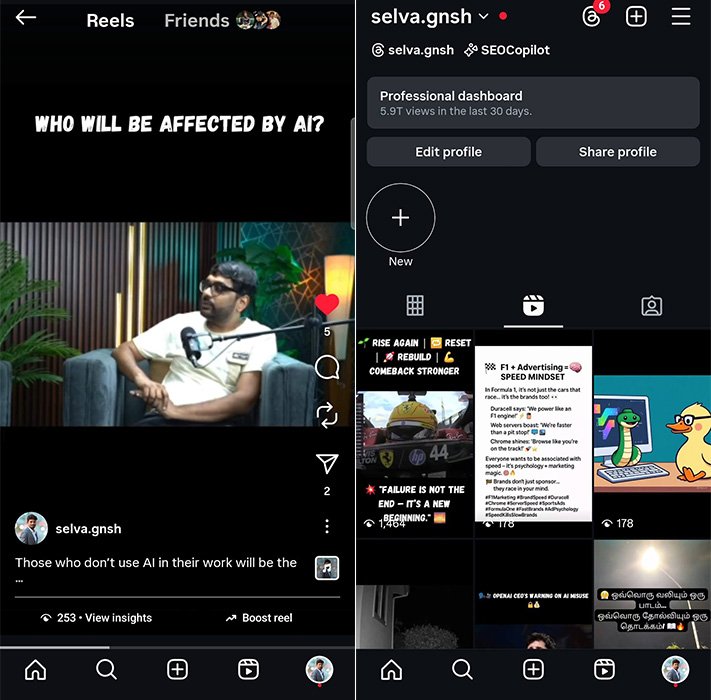
The Instagram Repost function allows users to reshare public Reels and Feed Posts. These posts appear in your profile’s new, dedicated Reposts tab, ensuring followers can distinguish between original and shared content.
This feature supports community growth by giving original creators proper credit while extending their reach through resharing.
How to Repost Reels and Posts
To repost a Reel or Post:
- Open the Reel or Post you want to share.
- Tap the Repost icon (it looks like two arrows in a circle).
- Add a note or comment via the thought bubble (optional).
- Tap “Repost” to confirm.
Your repost will now appear in your Reposts tab and will be visible to your followers in the feed, along with your suggestions.
Repost Etiquette and Best Practices
- Give context in your note when reposting.
- Use the repost feature only on public content to avoid copyright or privacy issues.
- Engage with the original post by liking or commenting—it builds authentic community connections.
️ Instagram Map: Discover Posts by Location
Instagram’s new Map feature brings a visual element to your activity, similar to Snapchat’s Snap Map but focused on content discovery and social location sharing.
What Is the Instagram Map Feature?
The Instagram Map is a location-based visual interface showing where your friends and creators have recently posted. It can display:
- Your friends’ recent activity by location
- Trending content from specific places
- Location-specific Reels, Stories, and Posts
This feature enhances real-world connections and makes discovering local content more dynamic.
How to Use Instagram Map
- Tap the Map icon from the profile or Explore tab.
- Grant Instagram location permissions if prompted.
- Browse the map for content clusters, as indicated by thumbnails.
- Tap on a location to explore the posts from that area.
You can also share your location selectively:
- Go to Settings > Privacy > Location Sharing
- Choose who can view your last active location:
- All Friends
- Close Friends
- Select Individuals
- No One
Privacy and Control
By default, location sharing is OFF, and you have complete control over who can see your location. You can:
- Please turn it on/off anytime
- View and remove shared locations
- See who has access to your location from the settings
Friends Tab in Reels: Discover What Your Friends Love
The new Friends Tab in Reels is a game-changer for personalised content discovery. Instead of relying on the algorithm, you now see Reels your friends have interacted with.
What Is the Friends Tab?
This tab is located within the Reels section and shows a personalised feed of Reels your friends have:
- Liked
- Shared
- Commented on
- Saved
It helps you stay in sync with your circle’s content preferences and discover high-quality Reels you might have missed.
How to Access and Use the Friends Tab
- Go to the Reels tab
- Tap the “Friends” filter at the top
- Browse through Reels your friends have interacted with
- You can like, share, or save these Reels as you scroll
“Blends” enhances this feature, and Reels is recommended based on shared tastes between you and your friends.
Manage Your Visibility in Friends Tab
Instagram also gives you the option to:
- Hide your Reel activity from specific people
- Mute updates from friends you don’t want to follow closely
- Customise suggestions in the Blends section
To manage these settings:
- Go to Settings > Reels > Activity Sharing
- Customise visibility and mute preferences
How These Features Impact Engagement and Discovery
Boost Content Reach with Repost
- Maximise content exposure through reposts, especially from viral accounts
- Reposting timely content (memes, news, trends) increases chances of engagement and visibility
Use Location to Build Local Influence
- Posting with visible locations can attract a local audience
- Businesses can showcase storefront content, customer visits, or events on the map
- Influencers can partner with local brands for geo-targeted campaigns
Strengthen Community Through Friends Tab
- Viewers trust recommendations from friends more than the algorithm
- Brands can create “share-worthy” Reels to enter Friends Tabs organically
- Reels with personal, authentic content tend to get more interaction in this space
️ Privacy and Safety Tips for All Features
- Turn off location when travelling or in unfamiliar places
- Only repost content that is public and aligns with your brand values
- Frequently check account settings to manage data and sharing preferences
Pro Tips to Maximise the New Instagram Features
- Create repostable content: Make your Reels entertaining, informative, or inspirational so others are motivated to share them.
- Use hashtags + location tags: This boosts your visibility in the Map and Explore pages.
- Engage with your community: Comments and interactions from friends increase your Reel’s chance of showing up in the Friends tab.
- Track your content performance using Instagram’s built-in insights—focus on content that performs well when reposted or discovered through maps.
Wrap Up
Instagram’s newest features—Repost, Friends Tab, and Map—are transforming how we interact with content on the platform. These updates allow users to share, discover, and connect meaningfully while giving creators and businesses new ways to boost their visibility and engagement.
Embrace these tools to grow your brand, strengthen your community, and stay at the forefront of digital trends.

Selva Ganesh is a Computer Science Engineer, Android Developer, and Tech Enthusiast. As the Chief Editor of this blog, he brings over 10 years of experience in Android development and professional blogging. He has completed multiple courses under the Google News Initiative, enhancing his expertise in digital journalism and content accuracy. Selva also manages Android Infotech, a globally recognized platform known for its practical, solution-focused articles that help users resolve Android-related issues.




Hunting for hidden gems just got easier with the new map. Ready to explore every corner of the platform.
Everything is organized so neatly in this update! I love how the map feature helps keep track of visited locations.
Keep it gritty and authentic, that is my motto. The Friends Tab helps keep interactions real and grounded.
Such an insightful analysis of community dynamics. I appreciate the detailed breakdown of the repost tool.
Plotting a course across the digital seas is easier with a good map. Navigating these new features will be an adventure.
Reporting on these trends is my passion, and this guide nailed it. Engagement strategies are changing forever.
The map feature feels like the Marauder’s Map for social media. Discovering new places has never been this magical.
The underlying architecture supporting these new features is impressive. User-centric design should always be the primary goal.
Direct and to the point. Let us see if these updates actually improve daily metrics or just add clutter.
A chic and modern update for a modern audience. The Friends Tab is my personal favorite of the bunch.
Time and relative dimensions in social media are shifting rapidly. These updates keep the platform fresh and engaging.
Super excited to test out the repost function today. It will make sharing daily inspiration effortless.
I can see everything happening around the world and locally now. The map feature is truly an all-seeing addition.
Visibility is everything in the digital age. This article explains the new tools clearly and concisely.
Back in my day, we just shared photos without all these cool features. Kids these days have it so good with the new map and tabs!
Empowering casual users and creators simultaneously is brilliant. I am excited to see how youth culture adopts the repost feature.
Gaming creators and influencers will definitely utilize the map for meetups. This is a massive win for community engagement.
It feels like magic to finally have a dedicated friends tab. Our social feeds are about to feel much more personal.
Technically speaking, the integration of these three tools is seamless. Expecting big things from creator metrics this quarter.
The visual appeal of the map feature is stunning. It adds an adventurous element to everyday scrolling.