
Instagram has evolved rapidly over the past few years, shifting from a simple photo-sharing app to one of the world’s most engaging short-form video platforms. The rise of Instagram Reels has changed how users discover, interact with, and share content. With Instagram testing new layouts and navigation styles, many users ask a key question: How can I view the latest Reels on Instagram quickly and easily? We will break down all the ways you can stay updated with the most recent Reels, explore the new features Instagram is rolling out, and highlight practical tips to make the most of your Reels experience.
Why Instagram Reels Dominate the Platform Today
Instagram Reels has become the heartbeat of the platform, overtaking static posts in popularity. According to Meta, Reels are reshared over 4.5 billion times daily across platforms, proving the growing demand for short, entertaining, and informative videos.

Unlike traditional posts, Reels are designed to grab attention instantly and maximize reach through Instagram’s AI-powered recommendation system. Introducing a Reels-first experience in certain regions, including India, signals a future where Reels will take centre stage whenever you open the app.
Accessing the Latest Reels on Instagram
Several methods exist to view the latest Reels without missing out on trending content. Let’s explore the most effective ways: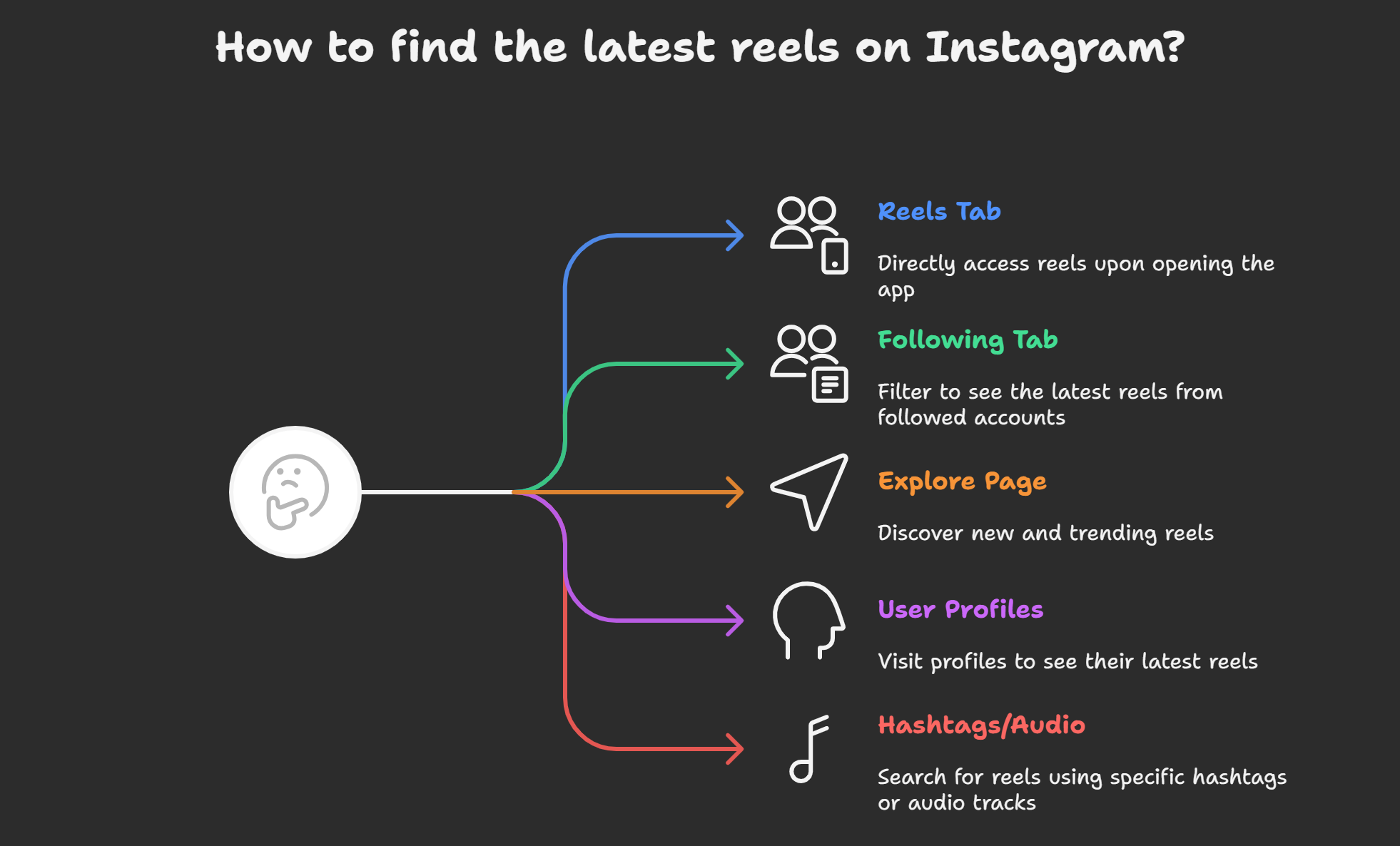
1. Open Instagram with the Reels Tab as the Default
Instagram is testing a design where the app opens directly into the Reels feed. If you are part of this test group, you’ll instantly land on the latest trending videos, making it easier to stay current.
2. Use the “Following” Tab with the “Latest” Filter
The platform has reintroduced a long-awaited feature: a chronological order filter. By switching to the “Following” tab and selecting “Latest”, you can view recent posts, including Reels, from the accounts you follow.
This filter is perfect for users who prefer real-time updates from their network rather than relying solely on the algorithm.
3. Browse the Explore Page
The Explore section continues to be a powerhouse for discovering trending Reels. Instagram curates a feed based on your interests, interactions, and popular content in your region. Explore remains one of the fastest ways for those eager to find fresh and viral Reels.
4. Visit User Profiles Directly
To stay updated with a specific creator’s content, visit their profile and tap the Reels tab (the clapperboard icon). This allows you to see their latest uploads instantly, without depending on the algorithm to show them.
5. Use Hashtags and Audio Searches
Trending hashtags and music tracks are central to Reels. You can explore all recent videos using the same element by tapping on a hashtag or sound in a Reel. This method is excellent for discovering brand-new Reels tied to trends.
New Features Enhancing Reels Viewing
Instagram is rolling out new tools and navigation changes to make Reels easier to access:
- Redesigned Navigation Bar: The DM icon is moving to the centre, with Reels positioned second for quick access.
- Seamless Swiping: Users will soon be able to swipe smoothly between tabs like Reels, DMs, and Home, creating a more fluid browsing experience.
- Dedicated Filters: The introduction of filters such as “All”, “Latest”, and “Friends” provides more control over your feed.
These updates highlight Instagram’s focus on video content and personal communication, aligning with how users consume and share media.
Tips to Never Miss the Latest Instagram Reels
To ensure you always stay ahead of trends and updates, follow these actionable tips:
Turn On Post Notifications
Enable notifications for your favourite creators so you’re instantly alerted whenever they upload a new Reel.
Engage With the Content You Like
Instagram’s algorithm rewards engagement. By liking, commenting, and sharing Reels, you increase the chances of seeing similar fresh content in your feed.
Save and Organize Reels
Use the Save feature to create collections of Reels you want to revisit. This makes tracking the latest uploads from specific niches or creators easier.
Follow Trending Pages
Many creators and aggregator accounts focus solely on curating the latest Reels trends. Following them can help you quickly discover what’s new.
Stay Active on Explore
The more you browse and interact with the Explore page, the more accurately Instagram tailors your feed with the latest viral Reels.
Why Instagram’s Reels-First Approach Matters
The Reels-first redesign is not just about aesthetics—it reflects a global shift in how people consume content. Short-form video is the most engaging format online, and Instagram is doubling down to ensure users spend more time watching and sharing Reels.
This shift means brands, creators, and everyday users must adapt by prioritising video strategies. From influencers growing their following to businesses showcasing products creatively, the latest Reels are central to visibility on Instagram.
The Future of Instagram Reels Experience
Looking ahead, Instagram’s updates will make staying current with the latest content easier than ever. The rollout of global navigation changes ensures every user can access Reels faster, while the new filters provide greater control over what appears in the feed.
As Meta continues to refine Instagram, we can expect AI-driven personalization, improved content discovery, and seamless integration with other Meta platforms like Facebook and WhatsApp. For users, this means never missing out on new Reels trends and enjoying a smoother, more engaging experience.
Wrap Up
Viewing the latest Reels on Instagram is simpler than ever, thanks to the platform’s Reels-first approach, chronological filters, and redesigned navigation. Whether exploring trends, keeping up with friends, or discovering new creators, the latest updates ensure you have complete control over your experience.
By leveraging these tools and staying active, you can always stay ahead of what’s trending on Instagram.

AITeam is the dedicated editorial team of Android Infotech, consisting of experts and enthusiasts specialized in Android-related topics, including app development, software updates, and the latest tech trends. With a passion for technology and years of experience, our team aims to provide accurate, insightful, and up-to-date information to help developers, tech enthusiasts, and readers stay ahead in the Android ecosystem.
For more about our team, visit our About Us page.




Thanks for breaking it down so clearly!
Thanks for breaking it down so clearly!
Super useful info. Bookmarked ✅
Very informative post, I can now find the latest Reels easily.
Very informative post, I can now find the latest Reels easily.
Nice article! Reels are definitely changing Instagram.
Thanks for breaking it down so clearly!
Loved the practical tips here. Thanks a ton!