
Send Images Using T-Mobile Satellite Service– T-Mobile has redefined how we communicate off-grid by rolling out a groundbreaking update to its satellite messaging capabilities. As of July 23, 2025, the T-Mobile T-Satellite Service, powered by SpaceX’s Starlink satellites, now allows users to send and receive images, GIFs, short video clips, and audio messages—a revolutionary step beyond traditional satellite texting.
What is T-Mobile’s Satellite Messaging Service?
T-Mobile’s satellite messaging service, also known as T-Satellite, is a direct-to-device communication platform that enables messaging without relying on traditional cellular towers. Instead, it connects your smartphone directly to low-Earth orbit (LEO) satellites to deliver messages even in remote locations with zero cellular coverage.

Limited initially to text-only messaging, the service now supports Multimedia Messaging Service (MMS) on selected devices.
New Feature: MMS Support Over Satellite
T-Mobile satellite MMS is now live for select Samsung and Motorola smartphones. This newly launched feature enables the sharing of:
- Images (JPEG, PNG, HEIC)
- Short GIFs
- Audio messages
- Brief video clips (up to ~5 seconds)
This feature is handy for:
- Emergency responders need to send field visuals
- Hikers or campers sharing locations or incidents
- Remote workers are sending field updates
- Families staying in touch while off-grid
✅ Supported Devices for T-Satellite MMS
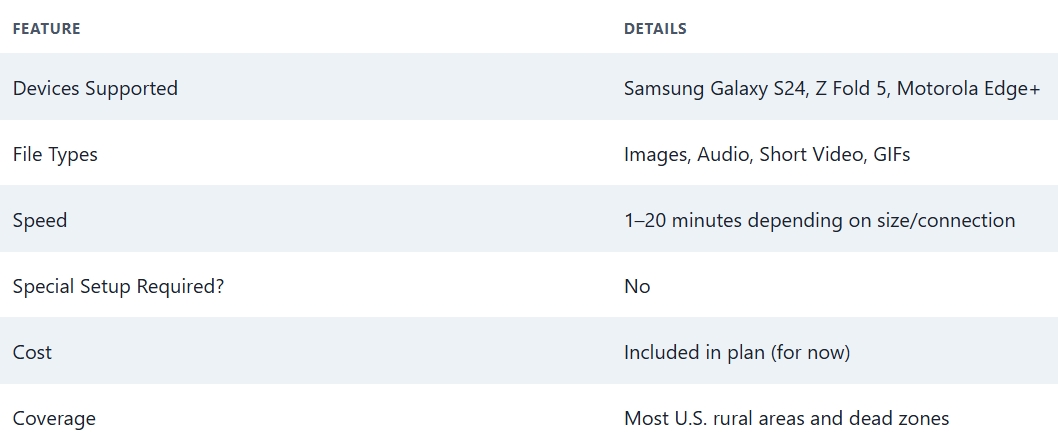
T-Mobile has rolled out this feature to a limited number of Samsung and Motorola devices, with more to be added soon. Devices confirmed to support MMS over satellite include:
- Samsung Galaxy S24 series
- Samsung Galaxy Z Flip 5
- Samsung Galaxy Z Fold 5
- Motorola Edge+ (2024)
- Motorola Razr 2024
These models have been optimised to seamlessly switch to satellite mode when no cellular signal is detected.
How It Works: Seamless Switching Between Networks
When you exit a coverage zone, your phone will automatically detect the satellite network. You’ll see a notification such as “Connected via Satellite” in the status bar.
There’s no need to open a separate app or aim your phone toward the sky. Unlike older satellite phones, this service:
- Works inside vehicles in many cases
- Does not require clear skies, though performance is better with less obstruction
- Activates without user input once you’re out of cellular range
⏱️ MMS Transmission Speed Over Satellite
While the technology is impressive, it’s essential to understand that MMS transmission over satellite isn’t instantaneous:
-
Still Image: 1 to 2 minutes
-
Audio Clip: 2 to 4 minutes
-
Short Video (5 seconds): 10 to 20+ minutes
The delay depends on factors like:
- File size
- Your environment (trees, clouds, buildings)
- Your device’s position
Due to these limitations, it’s recommended for occasional use, especially for safety, location sharing, or updates in emergencies.
️ No Extra Setup or App Required
T-Mobile made this system frictionless. Once your device is supported and you’re within T-Mobile’s coverage (or T-Satellite fallback zones), there’s:
- No app to install
- No special settings to enable
- No extra fee (for most plans during the initial rollout)
Send an image or voice clip through your standard messaging app, and T-Satellite takes over when needed.
Coverage: Where Satellite Messaging Works
T-Satellite messaging is designed to work nationwide in the U.S., especially in:
- Rural areas
- Mountains
- National parks
- Deserts
- Offshore waters near the continental U.S.
The Starlink satellite constellation is expanding rapidly, with near-global coverage expected in the coming years. This service could be viable worldwide, depending on regulations and partnerships.
Use Cases for Satellite MMS
1. Emergency Situations:
When out of network, send photos of injuries, weather conditions, or surroundings to first responders.
2. Travel & Adventure:
Let friends or family know you’re safe by sharing a quick selfie or update from a no-coverage zone.
3. Off-grid Worksites:
Send field photos or location pings to teams even in areas without a signal.
4. Remote Check-ins:
Perfect for rural deliveries, ranchers, or lone workers needing visual proof or status reports.
Future of T-Mobile T-Satellite Services
T-Mobile is not stopping with just image and audio support. Here’s what’s in development:
- Voice messaging
- Two-way video messaging
- Basic data sync support
- App integrations for maps and tracking
- Expanded support to Apple, Google Pixel, and OnePlus devices
As the Starlink Direct-to-Cell technology matures, T-Mobile is expected to roll out satellite voice calls and limited internet access, making the vision of a truly connected planet much closer to reality.
⚠️ Things to Keep in Mind
While this service is promising, there are a few caveats:
- Slower delivery compared to cellular MMS
- Only specific file formats are supported
- Not available internationally (yet)
- Battery consumption may be slightly higher in satellite mode
However, the peace of mind of being able to send an image or audio clip during emergencies or when travelling far off-grid is a significant benefit.
Quick Summary: Sending MMS via T-Mobile Satellite
What’s Next for Users?
If you own a compatible phone and are on T-Mobile’s latest plans, MMS via satellite will activate automatically when you lose signal. There’s nothing extra you need to do—keep your messaging app open and use your phone normally.
As more devices and features roll out, T-Mobile subscribers will benefit from enhanced emergency communication and richer off-grid connectivity, all without carrying bulky satellite gadgets.

Selva Ganesh is a Computer Science Engineer, Android Developer, and Tech Enthusiast. As the Chief Editor of this blog, he brings over 10 years of experience in Android development and professional blogging. He has completed multiple courses under the Google News Initiative, enhancing his expertise in digital journalism and content accuracy. Selva also manages Android Infotech, a globally recognized platform known for its practical, solution-focused articles that help users resolve Android-related issues.




This service sets a new standard for remote communication.
Can’t believe we can now send GIFs over satellite!
Works even in deep forest terrain.
Excited to try it during my African safari trip.
The best update T-Mobile has released in years.
How will this handle high-traffic events like festivals?
Just tried audio messages — great quality!
This makes adventure travel more connected.
Needs slightly faster upload speeds for larger videos.
Looking forward to using this for remote work.