
The Android ecosystem is set to undergo a significant update with the introduction of native support for the third-party password manager’s auto-fill functionality. This feature will enhance user experience and improve security by seamlessly integrating third-party services for password management, passkeys, and other critical data input. As of Chrome version 131, Android users will no longer rely on compatibility modes for their autofill needs. This major update brings forward a smoother, more intuitive experience for Chrome on Android users.
Understanding Chrome’s Autofill Service Evolution
For years, Google Chrome has offered autofill services as a core functionality, allowing users to easily store and retrieve data such as passwords, addresses, and payment information. Google’s autofill service has been the default on Chrome for Android, offering users a familiar, built-in solution for managing sensitive data. However, third-party services have struggled to integrate seamlessly into Chrome’s autofill system.

Until now, third-party password managers could only function on Chrome for Android using a workaround called “compatibility mode.” While this allowed autofill services to operate, it often led to glitches. These issues included stuttering page scrolling, duplicate Google and third-party managers’ suggestions, and a less-than-optimal user experience.
The upcoming update to Chrome 131 will eliminate the need for compatibility mode, allowing third-party password managers to autofill forms natively. This change marks a significant milestone in providing Android users with a more streamlined and reliable autofill experience.
How Native Third-Party Autofill Enhances User Experience
With this upcoming update, third-party password managers can now autofill passwords, passkeys, and other personal data as effortlessly as Google’s default autofill service. This change resolves the issues caused by compatibility mode and ensures a smoother, faster experience for users who prefer external password managers.
By enabling native Autofill, Chrome will handle third-party autofill requests with the same fluidity as it does with Google’s Autofill. This includes eliminating screen glitches, improving scrolling smoothness, and preventing the display of redundant autofill suggestions. In short, users will have a cleaner, more efficient autofill experience when interacting with websites and apps on Chrome for Android.
Step-by-Step: Enabling Third-Party Password Managers on Android
If you’re eager to test this feature before the full rollout, here’s a step-by-step guide to setting up a third-party password manager for Autofill on Chrome 131 and Android 14. These steps apply to a Google Pixel device running Android 15 but may vary slightly for other manufacturers.
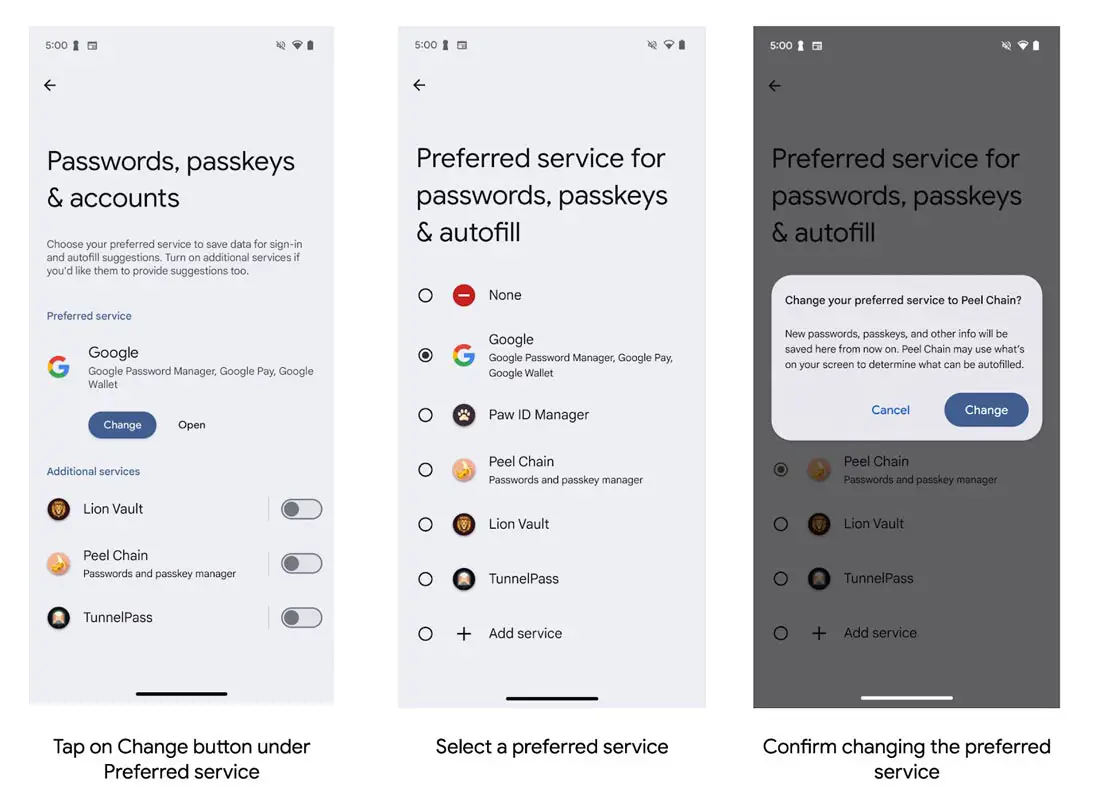
- Set a Third-Party Password Manager as Your Preferred Autofill Service:
- Open Android System Settings.
- Navigate to Passwords, passkeys & accounts.
- Tap the Change button under the Preferred Service section.
- Select your third-party password manager from the list.
- Confirm the change to make it your preferred autofill service.
Enable Third-Party Autofill in Chrome:
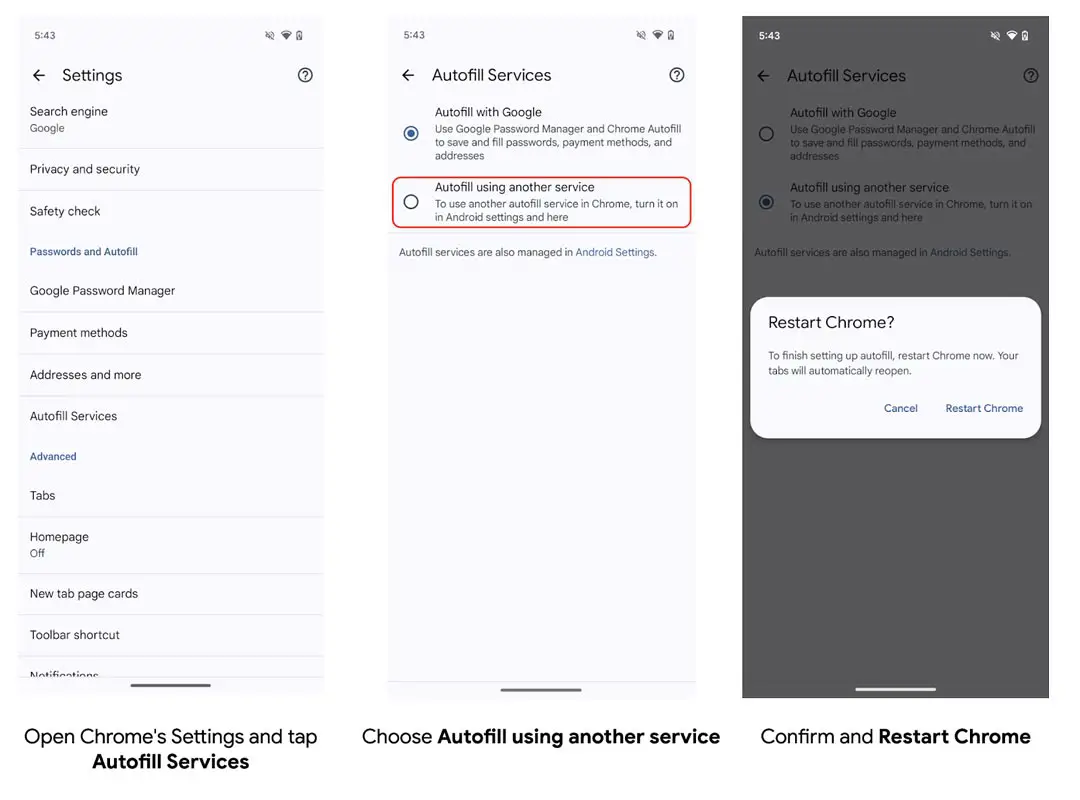
- Open Chrome on your Android device.
- In the address bar, enter: chrome://flags#enable-autofill-virtual-view-structure.
- Set the flag to Enabled and restart Chrome.
- Open Chrome Settings and navigate to Autofill Services.
- Select Autofill using another service.
- Confirm the changes and restart Chrome again.
After Chrome 131’s stable release on November 12th, 2024, these steps will no longer be required, as the native autofill functionality will be available by default. However, until then, this manual setup allows users to experience the enhanced autofill functionality.
Chrome’s Shift Away From Compatibility Mode
Google Chrome has officially announced that compatibility mode support will end in early 2025. This shift marks the final stage of integration for third-party autofill services, which means that users who rely on password managers like LastPass, Dashlane, and others should switch to using the new native autofill setting to avoid any service disruption.
Removing compatibility mode is critical to providing a seamless and reliable experience on Android devices. Users will no longer encounter the common issues caused by the outdated compatibility approach, such as duplicate suggestions or inconsistent autofill behaviour.
Third-party autofill service providers need not implement anything additional if their current systems are integrated with Android’s native autofill API. Chrome will handle all interactions smoothly, making the transition effortless for developers and users.
Critical Dates for the Rollout of Chrome Autofill Changes
The timeline for this critical update is as follows:
- October 16th, 2024: Chrome 131 beta becomes available, allowing users to test the new functionality.
- November 12th, 2024: Chrome 131 stable release introduces native third-party autofill functionality to all users.
- Early 2025: Compatibility mode for Autofill will be phased out, requiring users to switch to the new native Autofill settings.
Benefits of Using Third-Party Password Managers with Native Autofill
While Google’s built-in autofill service offers strong integration across its ecosystem, many users prefer third-party password managers due to their additional features, such as enhanced security, cross-platform syncing, and advanced password generation tools. With Chrome now supporting native Autofill for these services, users no longer have to compromise between smooth functionality and their preferred password management tool.
Third-party password managers often provide:
- Cross-device syncing: Seamless password access across mobile, desktop, and other devices.
- Secure encryption: Enhanced encryption options that go beyond the default Google autofill.
- Password health checks: Alerts for weak, reused, or compromised passwords.
- Secure sharing options: Share passwords securely with trusted contacts.
With the integration of native Autofill, these features can now be enjoyed without technical hiccups caused by compatibility mode. This ensures a holistic and secure user experience on Android devices.
Wrap Up
The upcoming native support for third-party autofill services on Chrome for Android is a game-changer for users who rely on password managers to keep their credentials secure. This update will provide a smoother, faster, and more reliable autofill experience by eliminating compatibility mode and integrating directly into Chrome. As Chrome phases out of compatibility mode by early 2025, users and developers should prepare for the transition by enabling the new autofill settings in Chrome 131.

Selva Ganesh is a Computer Science Engineer, Android Developer, and Tech Enthusiast. As the Chief Editor of this blog, he brings over 10 years of experience in Android development and professional blogging. He has completed multiple courses under the Google News Initiative, enhancing his expertise in digital journalism and content accuracy. Selva also manages Android Infotech, a globally recognized platform known for its practical, solution-focused articles that help users resolve Android-related issues.





Leave a Reply