
We are witnessing a monumental shift in how artificial intelligence integrates into our daily lives. This summer, Google Photos AI wardrobe feature that fundamentally changes how we interact with our clothing collections. For years, we have struggled with the “closet full of clothes and nothing to wear” dilemma. By leveraging advanced machine learning and image recognition, Google is finally bringing the iconic digital closet from science fiction into our reality.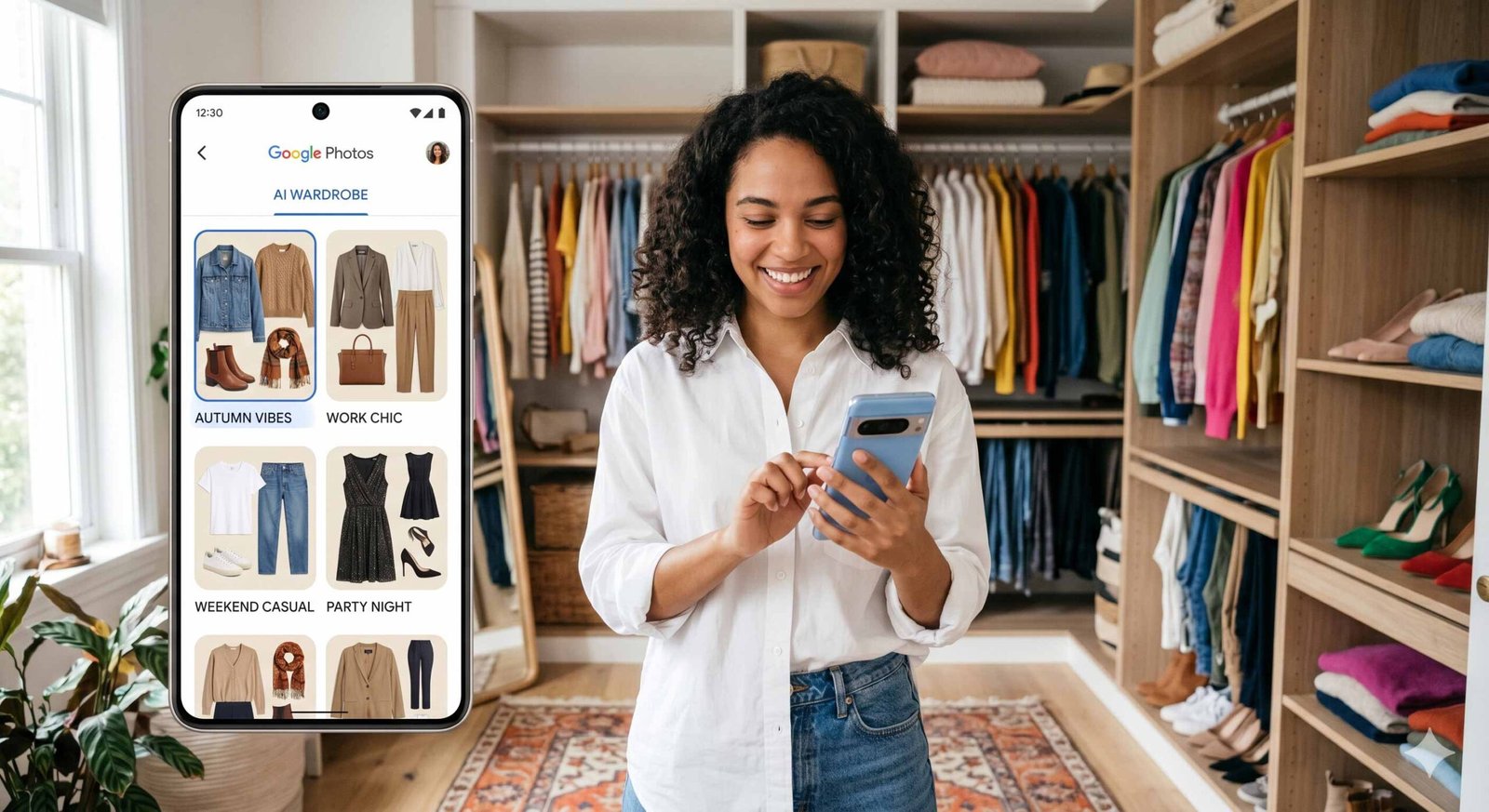
How the Google Photos Digital Wardrobe Works
The brilliance of this update lies in its automation. Unlike previous fashion apps that required users to photograph and upload every single garment manually, the Google Photos AI scans your existing photo library to identify clothing items you have already worn.

We have found that the system utilizes computer vision to detect textures, patterns, and silhouettes from your past selfies, portraits, and candid shots. It then isolates these garments to create a high-definition digital inventory. This means your digital wardrobe is built effortlessly as you continue to take photos, making it a living, breathing catalog of your personal style.
Revolutionary Features of the AI Wardrobe Update
This isn’t just a simple gallery of clothes; it is a sophisticated styling assistant. We are particularly impressed by the depth of functionality Google has integrated into this summer 2026 update:
- Automatic Categorization: The AI intelligently sorts your items into categories such as tops, bottoms, outerwear, footwear, and accessories.
- Virtual Try-On Technology: Utilizing a digital avatar or a base photo of yourself, you can virtually preview how different items look together. This uses the same generative AI technology seen in Google Search’s virtual try-on, but applied to your own clothes.
- Mix and Match Outfits: The “Outfits” tab allows you to drag and drop different pieces to see how a vintage blazer pairs with modern denim.
- Digital Moodboards: We can now create curated moodboards for specific occasions, such as summer weddings, work conferences, or weekend getaways.
- Social Sharing: You can instantly share a virtual outfit with friends to get a second opinion before you even step foot in your physical closet.
The Rollout Plan: Android First, iOS to Follow
Following Google’s traditional release pattern, the AI wardrobe feature will debut on Android devices first. We expect the initial rollout to coincide with the launch of the Motorola Razr 2026 series and the latest Google Pixel updates. iOS users won’t have to wait long, as the feature is scheduled to hit the Apple App Store shortly after the initial summer launch.
Step-by-Step Guide: Setting Up Your Digital Closet
To ensure you are ready the moment the update hits your device, we recommend following these optimization steps:
- Update Google Photos: Ensure you are running the latest version of the app from the Play Store or App Store.
- Enable AI Features: Navigate to the Collections tab and look for the new Wardrobe section. You may need to opt in to allow the AI to scan your library for clothing.
- Refine Your Catalog: While the AI is highly accurate, we suggest reviewing the identified items. You can manually remove items you no longer own (sold or donated) to keep your digital closet accurate.
- Create Your First Outfit: Tap the Create button (the floating action button) to begin pairing items and saving them to your Outfits gallery.
The Sustainability Impact of Digital Wardrobes
Beyond convenience, we believe this feature promotes sustainable fashion. By having a searchable, organized view of every item in your possession, you are less likely to purchase “duplicates” of things you already own. We can use the AI to rediscover forgotten pieces at the back of the drawer, encouraging a “shop your own closet” mentality that reduces fast fashion consumption.
Privacy and Data Security
As with all AI-driven features involving personal photos, privacy is a top priority. Google has stated that the wardrobe analysis occurs with the same high-level encryption used for all Google Photos data. The AI models identify clothing patterns without compromising the identity or privacy of individuals in the background of your photos.
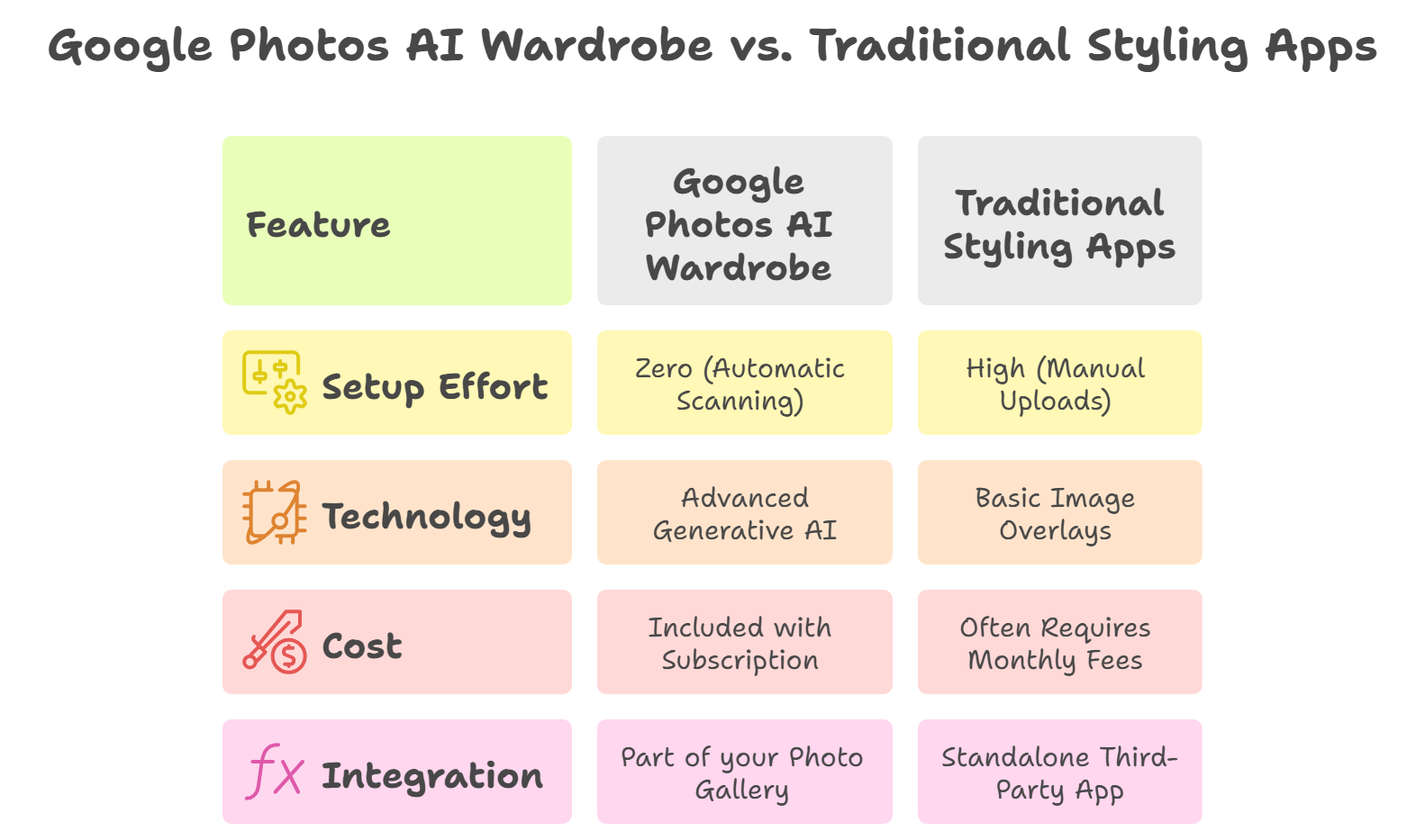
Comparison: Google Photos vs. Traditional Style Apps
Frequently Asked Questions (FAQs)
1. When will the Google Photos AI wardrobe feature be available?
The feature is set to launch in Summer 2026, starting with Android users, followed by a rollout for iOS.
2. Do I need a Google One subscription to use it?
While basic organization may be free, we anticipate that advanced Virtual Try-On and AI Outfit Generation may require a Google AI Pro or Ultra subscription.
3. Will it recognize clothes in old photos?
Yes, the AI scans your entire photo history to identify garments you’ve worn over the years.
4. Can I add clothes I haven’t worn yet?
Currently, the feature focuses on items detected in your photos. However, you can take a quick photo of a new item and upload it to have the AI catalog it.
5. How accurate is the virtual try-on?
It uses Google’s Nano Banana 2 model to ensure realistic fabric draping and fit visualization.
6. Does it work for men’s and women’s clothing?
Yes, the AI is trained to recognize a diverse range of fashion styles, gender-neutral clothing, and accessories.
7. Can I share my digital wardrobe with a stylist?
You can share individual outfits or moodboards via a direct link or through Google Photos sharing features.
8. What if the AI identifies an item incorrectly?
Users have the ability to manually edit categories or delete items that were misidentified.
9. Will this feature work offline?
Initial processing requires an internet connection for the AI models, but browsing your cataloged wardrobe should be available offline.
10. How does it help with packing for trips?
You can use the Moodboard feature to plan specific travel outfits, ensuring you only pack what you actually intend to wear.

Selva Ganesh is a Computer Science Engineer, Android Developer, and Tech Enthusiast. As the Chief Editor of this blog, he brings over 10 years of experience in Android development and professional blogging. He has completed multiple courses under the Google News Initiative, enhancing his expertise in digital journalism and content accuracy. Selva also manages Android Infotech, a globally recognized platform known for its practical, solution-focused articles that help users resolve Android-related issues.





Leave a Reply