
If we look at All of the Google Platforms, We can find that some apps compete against each other. Yes, Google Meet, Chat, and Google Duo’s purpose is message conversation. But Each of the platforms has its unique features. When you focus on all platforms, You may not give a better user experience. Even if each messaging platform has its unique features, they always miss something that makes users move to another third-party platform. So, Google begins to utilize the already existing platform integration process. They already integrated Meet into Gmail. Now Google added the Chat tab into the Gmail Android app. Since Google Chat is attracted to a group of users, you can enable it if you want.

Google’s Gmail app is becoming more than just an app to access your email messages, it is now integrating more functions that are really necessary, and you’d love to try them all out. You must have noticed the “Meet” tab on the Gmail app, and now this post will explain how you can activate the Chat and Room tabs on the Gmail tab.
Before now, Google Chat is only available to Workspace users; you need to be a Workspace user before you can use the service. But now, you can get the service on your Gmail app. However, you have to activate the service before it would appear on your Gmail.
How to Enable Google Chat in Gmail in Android?
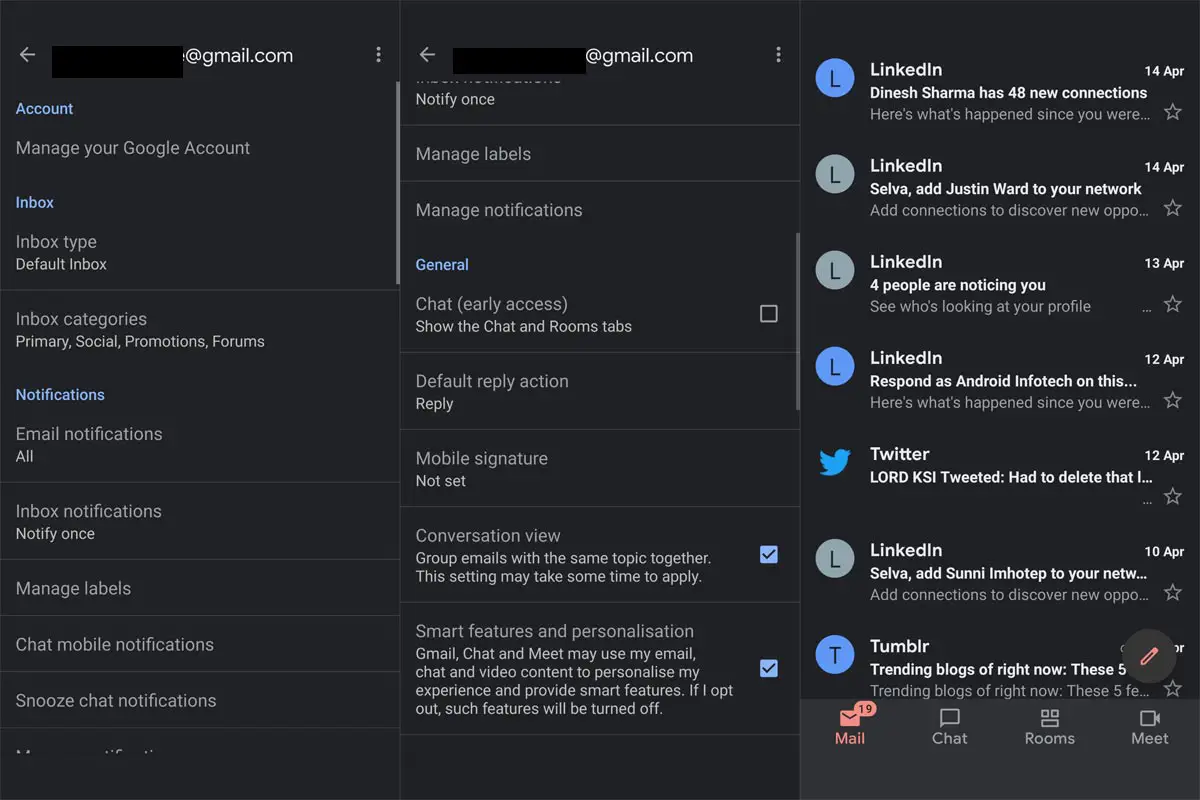
- Afterward, open the app and launch the side menu by click on the three vertical dashes at the top-left side.
- Scroll down and click on “Settings” – it is the last option on the side menu.
- On the next screen, tap on your personal Gmail account.
- Again, scroll down to “General,” you should see “Chat (Early Access),” click on it, and a pop-up box will come on, click on “Try it.”
- Once you click on “Try it,” your Gmail app will restart. But if it doesn’t reopen on its own, you can open it yourself from the app drawer.
- Upon opening the app, you will notice a new tab on the bottom area. You will be locked on the default “Mail” tab, while you can access Google Chat by tapping on the “Chat.” Also, you will see another tab named “Rooms;” this tab opens an ongoing conversation view. The “Rooms” tab isn’t that useful, and you can quickly switch between the three tabs at any time.
How is Chat in Gmail different from Regular Chat App?
All features of Google Chat are available on the “Chat” tab on your Gmail version. Goggle aims at improving collaboration by integrating Chat with its Gmail app. When you use the official Chat app, you will only get the Google Chat service, but you can multitask and switch between Google services easily with the Gmail app.
Wrap Up
Google already implementing new features and integration in Google Meet. They consider Meet as a direct Zoom competitor. Chat is also available on Gmail for Web and Gmail for iOS. It is a new update, and not everyone knows about it yet. You can choose to turn off the Chat and Room tabs anytime you think you don’t need them anymore. So, let’s hear from you; how do you see these new tabs? Are they really going to make things easy for you? What’s your experience so far using Gmail.

Selva Ganesh is a Computer Science Engineer, Android Developer, and Tech Enthusiast. As the Chief Editor of this blog, he brings over 10 years of experience in Android development and professional blogging. He has completed multiple courses under the Google News Initiative, enhancing his expertise in digital journalism and content accuracy. Selva also manages Android Infotech, a globally recognized platform known for its practical, solution-focused articles that help users resolve Android-related issues.




Leave a Reply