
Since WhatsApp is a messaging service platform, they have to bring features that help to increase the comfort of sharing messages. They already provided a lot of additional measures to share Media files. In the text messages alone, They have to Delete everyone and other different options. Now, Vanishing/Disappearing Message Timers on WhatsApp are coming soon. Course, They can screenshot it or download the media files. But, It will be helpful when sharing temporary links or OTPs with people. Compared with regular users, This feature will help to disappear sensitive information that sends to users by Business companies.
WhatsApp Vanishing/Disappearing Timers of Message
This year, WhatsApp launched new options to help with disappearing messages, and a default timer for messages is now available to all users. This feature lets you create new chat threads with disappearing messages already set to the specified duration from WhatsApp privacy Settings. When you turn on the default message timer feature, it only applies to new individual chats. However, WhatsApp is developing an alternative option for existing conversations.
WhatsApp v2.22.16.8 beta allows setting multiple chats already in use to be deleted using the default settings. Before this update setting page, it only contained radio buttons that let you choose the period for messages to be deleted for new chats. However, with this update, users can add the timer settings to existing conversations they prefer. The Timer varies from 24 hours to 90 Days.
How do they work?
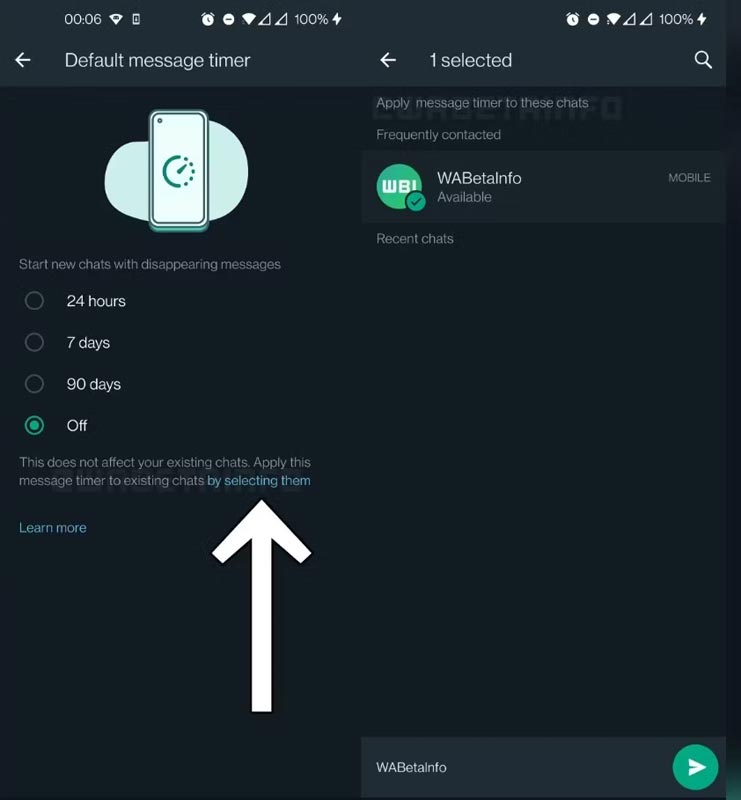
WhatsApp is working on a new feature that allows us to convert existing conversations into disappearing chats within a forthcoming update. If the user clicks “by selecting them,” an additional section opens where you can choose several discussions and transform them into disappearing chats in one go. This feature is handy when turning on disappearing messages in multiple chats. You don’t have to turn off the feature in each chat’s details manually. Once you have converted them into vanishing chats, It will delete any new messages from the talks.
WhatsApp Message Timers Expectation
It would be nice to have a menu for doing this that They didn’t hide behind tiny shortcut links prominent button would be a dream; however, to be honest, WhatsApp is probably suitable in thinking that this isn’t an option you’ll have to interact with often. Some beta testers on this release see this option as it’s being rolled out via a server-side switch, but a more significant launch will follow when WhatsApp can test it enough that it’s hoped for.
Availability
Unfortunately, the feature is still being developed, so there are no details on when it will roll for beta testing. However, once the part becomes available, we will update the changelog on our website.
Wrap Up
In reality, The Disappearing message is helpful in some scenarios for regular users. But, The purpose will be utilized by the Banks that often send OTPs to the users. Still, now, Banks and other institutions use traditional SMS-based verifications. Compared with WhatsApp, the security is less on those platforms. With the new Vanishing Timer Message, Finance institutions can utilize this feature; WhatsApp is end-to-end encrypted. What are your thoughts about WhatsApp Disappear Message Timers? Share it below.

Selva Ganesh is a Computer Science Engineer, Android Developer, and Tech Enthusiast. As the Chief Editor of this blog, he brings over 10 years of experience in Android development and professional blogging. He has completed multiple courses under the Google News Initiative, enhancing his expertise in digital journalism and content accuracy. Selva also manages Android Infotech, a globally recognized platform known for its practical, solution-focused articles that help users resolve Android-related issues.




Leave a Reply